การแนะนำ
About Your Nikon COOLPIX P950
The Nikon COOLPIX P950 is a versatile compact digital camera designed for capturing both still images and video. It features an expansive 83x optical zoom lens, a 16MP 1/2.3" CMOS sensor, and built-in connectivity options. This manual provides essential information for setting up, operating, and maintaining your camera.
มีอะไรอยู่ในกล่อง
Verify that all items are present in your package. The standard camera kit includes:
- กล้องดิจิตอล Nikon COOLPIX P950
- EL20a Battery Pack
- เครื่องชาร์จแบตเตอรี่
- สายไมโคร USB
- สายคล้องคอ
- 67mm Lens Cap
- ฮูดเลนส์
Depending on your purchase, additional accessories may be included:
- 64GB Transcend SD Memory Card
- Premium Camera Bag
- ขาตั้งกล้อง 50 "
- USB Memory Card Reader
- โบลเวอร์เลนส์
- ปากกาทำความสะอาดเลนส์

Image: The Nikon COOLPIX P950 camera shown with various accessories including a tripod, camera bag, memory card, battery, charger, and cleaning tools.
การตั้งค่า
1. การชาร์จแบตเตอรี่
Insert the EL20a Battery Pack into the provided charger. Connect the charger to a power outlet. The charging indicator light will show the charging status. Ensure the battery is fully charged before first use.

Image: Individual components of the Nikon accessory kit, including the battery, charger, USB cable, lens cap, lens hood, and camera strap.
2. การใส่การ์ดหน่วยความจำ
Open the memory card slot cover on the camera body. Insert the 64GB Transcend SD Memory Card with the label facing the correct direction until it clicks into place. Close the cover securely.

Image: Additional bundle accessories, including a Transcend 64GB SD card, camera bag, tripod, USB card reader, lens blower, and lens cleaning pen.
3. Attaching the Lens Cap and Hood
Attach the 67mm lens cap to protect the lens when not in use. For glare reduction and additional protection, align the lens hood with the markings on the lens and twist to secure it.
4. การติดสายคล้องกล้อง
Thread the camera strap through the strap lugs on both sides of the camera body and secure it as instructed in the strap's packaging. This helps prevent accidental drops.
5. เปิดเครื่องครั้งแรก
กดปุ่มเปิด/ปิดเพื่อเปิดกล้อง ทำตามคำแนะนำบนหน้าจอเพื่อตั้งค่าวันที่ เวลา และภาษา
การใช้งานกล้อง
โหมดถ่ายภาพพื้นฐาน
The COOLPIX P950 offers various shooting modes accessible via the mode dial:
- โหมดอัตโนมัติ: The camera automatically optimizes settings for most shooting conditions.
- โปรแกรมอัตโนมัติ (P): Allows manual control over some settings while the camera sets exposure.
- โหมดปรับความเร็วชัตเตอร์อัตโนมัติ (S): You set the shutter speed, and the camera adjusts aperture.
- โหมดปรับรูรับแสงอัตโนมัติ (A): You set the aperture, and the camera adjusts shutter speed.
- คู่มือ (ม): Full manual control over both shutter speed and aperture.
- โหมดฉาก: Pre-set modes for specific scenarios like Landscape, Portrait, Sports, etc.
- โหมดภาพยนตร์: สำหรับการบันทึกวิดีโอ
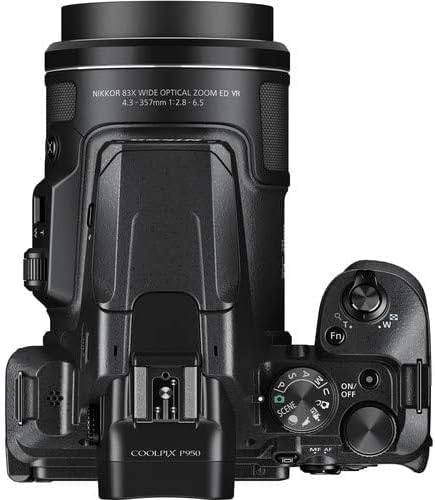
ภาพ: ด้านบน view of the Nikon COOLPIX P950, highlighting the mode dial, power button, and zoom control around the shutter button.
ฟังก์ชั่นซูม
Utilize the 83x optical zoom lens by moving the zoom lever around the shutter button. The camera covers a focal length range equivalent to 24-2000mm. Dual Detect Vibration Reduction helps stabilize images at long zoom settings.
การโฟกัส
The camera uses Contrast Detection Autofocus with 99 autofocus points. Half-press the shutter button to focus on your subject before fully pressing to capture the image.
การเชื่อมต่อ
The P950 features built-in Wi-Fi and Bluetooth. Use Nikon's SnapBridge app on a mobile device for wireless file transfer and remote camera control.
แสดงผลและ Viewตัวค้นหา
The camera features a 3.2-inch LCD display and an electronic viewfinder. The LCD display can be articulated for flexible shooting angles.

Image: The Nikon COOLPIX P950 camera demonstrating its vari-angle LCD screen, which can be rotated and extended for various viewตำแหน่งการจัดงาน

ภาพ: ด้านหลัง view of the Nikon COOLPIX P950, displaying the main LCD screen, directional pad, menu button, and other control buttons.
การซ่อมบำรุง
การทำความสะอาดกล้อง
Use a soft, lint-free cloth to clean the camera body. For the lens, use a lens cleaning pen or blower to remove dust, then gently wipe with a specialized lens cloth if necessary. Avoid using harsh chemicals.
การดูแลแบตเตอรี่
Store batteries in a cool, dry place. Do not expose them to extreme temperatures. Recharge batteries regularly, even if not in frequent use, to maintain their lifespan.
พื้นที่จัดเก็บ
When not in use, store the camera in a dry, dust-free environment, preferably in a camera bag. Remove the battery if storing for extended periods.
การแก้ไขปัญหา
This section addresses common issues you might encounter with your Nikon COOLPIX P950.
- กล้องไม่สามารถเปิดได้: ตรวจสอบให้แน่ใจว่าแบตเตอรี่ชาร์จเต็มและใส่เข้าไปอย่างถูกต้อง
- ภาพเบลอ: Check if Dual Detect Vibration Reduction is enabled. Ensure sufficient light for the scene. Use a tripod for very long zoom shots or low-light conditions.
- ข้อผิดพลาดการ์ดหน่วยความจำ: ตรวจสอบให้แน่ใจว่าเสียบการ์ดหน่วยความจำถูกต้องและไม่เต็ม ลองฟอร์แมตการ์ด (ซึ่งจะลบข้อมูลทั้งหมด)
- Cannot connect to smartphone via SnapBridge: Ensure Wi-Fi and Bluetooth are enabled on both the camera and your smartphone. Restart both devices and try pairing again.
- แฟลชไม่ทำงาน: Check flash mode settings. Ensure the flash is popped up if set to auto or fill-flash.
If problems persist, consult the official Nikon support resources or contact customer service.
ข้อมูลจำเพาะ
| คุณสมบัติ | รายละเอียด |
|---|---|
| ยี่ห้อ | นิคอน |
| ชื่อรุ่น | คูลพิกซ์ P950 |
| ความละเอียดของเซนเซอร์ภาพ | 16 MP |
| ขนาดเซนเซอร์ภาพ | CMOS 1 / 2.3 นิ้ว |
| ซูมออปติคอล | 83 เท่า |
| Focal Length (Equivalent) | 24-2000มม. |
| ระบบป้องกันภาพสั่นไหว | Dual Detect Vibration Reduction (Optical) |
| แสดง | 3.2-inch Vari-angle LCD (921,600 dots) |
| Viewตัวค้นหา | อิเล็กทรอนิกส์ |
| การเชื่อมต่อ | Wi-Fi, Bluetooth, USB, HDMI |
| รองรับ File รูปแบบ | JPEG, RAW (NRW) |
| ความละเอียดวิดีโอ | Up to 2160p (4K UHD) |
| ประเภทการ์ดหน่วยความจำ | เอสดี, เอสดีเอชซี, เอสดีเอ็กซ์ซี |
| แบตเตอรี่ | EN-EL20a แบตเตอรี่ลิเธียมไอออนแบบรีชาร์จ |
| ยูพีซี | 657768067259 |
การรับประกันและการสนับสนุน
ข้อมูลการรับประกัน
This product typically comes with a 90-day limited warranty. Please refer to your purchase documentation for specific warranty terms and conditions, as these may vary for renewed products.
การสนับสนุนลูกค้า
For technical assistance, troubleshooting beyond this manual, or warranty claims, please contact Nikon customer support or the seller from whom the product was purchased.


