1. บทนำ
Thank you for choosing the KSIX Phoenix Smart Sunglasses. These innovative sunglasses combine stylish eye protection with integrated wireless audio technology, designed for active lifestyles. Please read this manual carefully to ensure proper use and maintenance of your device.

Image: KSIX Phoenix Smart Sunglasses with interchangeable dark and clear lenses.
คุณสมบัติหลัก:
- Dual Microphone System: Enhanced audio quality for calls and music with ambient noise cancellation.
- ระบบควบคุมแบบสัมผัสที่ใช้งานง่าย: Easy management of calls, music playback, and voice assistant activation.
- Sport-Optimized Design: Durable and comfortable for various sports, featuring Category 3 lenses.
- ความต้านทานน้ำ IPX5: Protected against sweat and light rain, ideal for outdoor activities.
- เลนส์ที่สามารถถอดเปลี่ยนได้: Includes UV400 (grey) and UV320 (transparent) lenses for different light conditions.
- ปรับพอดี: Three sizes of nose pads for personalized comfort.
- อายุการใช้งานแบตเตอรี่ที่ยาวนานขึ้น: เล่นเสียงได้นานถึง 6.5 ชั่วโมงต่อการชาร์จเพียงครั้งเดียว
2. เนื้อหาบรรจุภัณฑ์
โปรดตรวจสอบว่าสินค้าทั้งหมดมีอยู่ในแพ็คเกจของคุณ:
- KSIX Phoenix Smart Sunglasses
- Grey UV400 Lens (pre-installed or separate)
- Transparent UV320 Lens
- สายชาร์จแม่เหล็ก
- 3 Pairs of Nose Pads (Small, Medium, Large)
- คู่มือการใช้งาน (เอกสารนี้)
3. การตั้งค่าและการใช้งานครั้งแรก
3.1 การชาร์จแว่นกันแดด
Before first use, fully charge your KSIX Phoenix Smart Sunglasses.
- Connect the magnetic charging cable to the charging port located on the right temple of the sunglasses.
- เชื่อมต่อปลายสายอีกด้านหนึ่งเข้ากับแหล่งพลังงาน USB (เช่น พอร์ต USB ของคอมพิวเตอร์ อะแดปเตอร์ติดผนัง USB)
- ไฟแสดงสถานะการชาร์จจะสว่างขึ้น การชาร์จเต็มใช้เวลาประมาณ 1.5 ชั่วโมง
- เมื่อชาร์จเต็มแล้ว ให้ถอดสายเคเบิลออก

Image: Illustration of the magnetic charging port and battery specifications (6.5h playback, 1.5h charge time, 100mAh battery).
3.2 การเปิด/ปิดเครื่อง
The KSIX Phoenix Smart Sunglasses feature an automatic power on/off function.
- การเปิดเครื่อง: Gently open the right temple of the sunglasses. You will hear an audible confirmation.
- วิธีปิดเครื่อง: Gently close the right temple of the sunglasses. You will hear an audible confirmation.

Image: Visual guide for automatic power on/off by adjusting the right temple.
3.3 การจับคู่บลูทูธ
วิธีเชื่อมต่อแว่นกันแดดกับสมาร์ทโฟนหรืออุปกรณ์ที่รองรับบลูทูธ:
- Ensure the sunglasses are powered on.
- บนสมาร์ทโฟนของคุณ เปิดใช้งาน Bluetooth และค้นหาอุปกรณ์ที่มีอยู่
- Select "KSIX Phoenix" from the list of devices.
- เมื่อจับคู่เสร็จแล้ว คุณจะได้ยินเสียงยืนยัน
3.4 Adjusting Nose Pads
For optimal comfort and fit, select the appropriate nose pad size.
- The package includes three sizes: Small, Medium, and Large.
- Gently remove the pre-installed nose pads and replace them with the size that best fits your nose bridge.
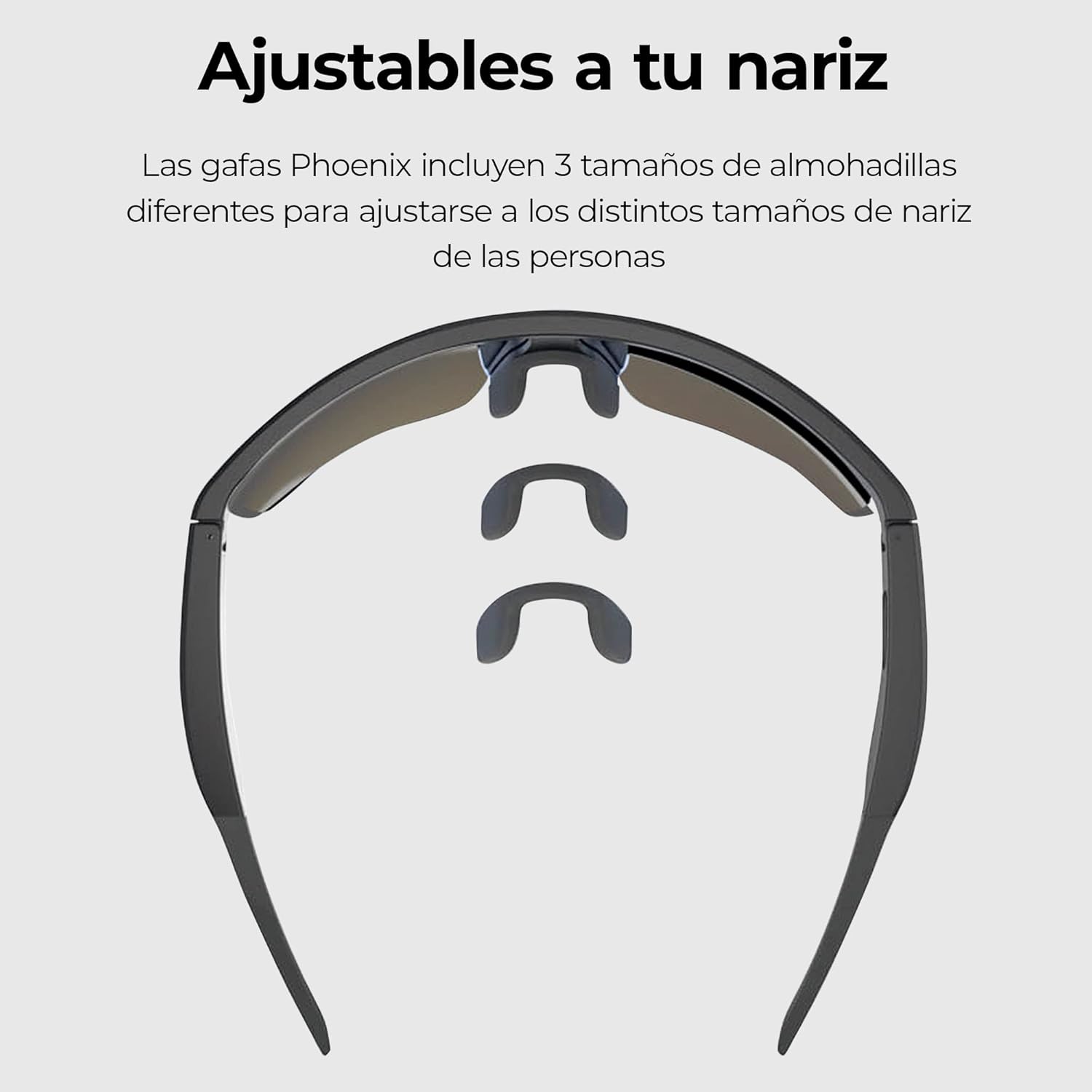
Image: Three interchangeable nose pad sizes (S, M, L) for customized fit.
4. คู่มือการใช้งาน
4.1 ระบบควบคุมแบบสัมผัส
The KSIX Phoenix Smart Sunglasses feature intuitive touch controls on the temples for various functions. The high sensitivity allows use even with sports gloves.

Image: Visual guide to touch control gestures on the sunglasses temple.
| การกระทำ | การทำงาน |
|---|---|
| คลิกเดียว | Answer / End Call, Play / Pause Music |
| กดค้างไว้ (2 วินาที) | ปฏิเสธสาย เปิดใช้งานผู้ช่วยเสียง |
| ดับเบิ้ลคลิก | เพลงต่อไป |
| ทริปเปิ้ลคลิก | เพลงก่อนหน้า |
4.2 การโทรออกและรับสาย
The integrated dual microphones ensure clear communication.
- รับสาย: When a call comes in, single-click the touch sensor on either temple.
- การวางสาย: During a call, single-click the touch sensor on either temple.
- การปฏิเสธสาย: When a call comes in, press and hold the touch sensor for 2 seconds.
- ผู้ช่วยเสียง: Press and hold the touch sensor for 2 seconds to activate your device's voice assistant (e.g., Siri, Google Assistant).

Image: Depiction of the ambient noise-cancelling microphone and the hands-free call microphone.
4.3 การเล่นเพลง
Control your music directly from your sunglasses.
- เล่น/หยุดชั่วคราว: Single-click the touch sensor.
- เพลงถัดไป: Double-click the touch sensor.
- แทร็กก่อนหน้า: Triple-click the touch sensor.
4.4 Changing Lenses
The KSIX Phoenix Smart Sunglasses come with interchangeable lenses to adapt to different lighting conditions.
- Grey UV400 Lens: Ideal for bright conditions, offering Category 3 sun protection.
- Transparent UV320 Lens: Suitable for low-light conditions or indoor use, providing basic UV protection.
- To change lenses, carefully detach the current lens from the frame and snap the desired lens into place. Ensure it is securely fastened.

Image: Comparison of the dark and clear interchangeable lenses.
5. การบำรุงรักษาและการดูแล
To ensure the longevity and optimal performance of your KSIX Phoenix Smart Sunglasses, follow these care instructions:
- การทำความสะอาดเลนส์: Use a soft, clean microfiber cloth to wipe the lenses. For stubborn smudges, use a lens cleaning spray specifically designed for eyewear. Avoid abrasive materials or harsh chemicals.
- กรอบทำความสะอาด: เช็ดกรอบด้วยผ้านุ่มๆamp ผ้า.
- การกันน้ำ (IPX5): The sunglasses are rated IPX5, meaning they are protected against low-pressure water jets from any direction. This makes them resistant to sweat and light rain. Do not submerge the sunglasses in water or expose them to high-pressure water.
- พื้นที่จัดเก็บ: When not in use, store the sunglasses in their protective case to prevent scratches and damage.
- อุณหภูมิ: Avoid exposing the sunglasses to extreme temperatures (hot or cold) for extended periods, as this can affect battery life and electronic components.

Image: KSIX Phoenix Smart Sunglasses demonstrating IPX5 water resistance against splashes.
6 การแก้ไขปัญหา
If you encounter any issues with your KSIX Phoenix Smart Sunglasses, please refer to the following common problems and solutions:
| ปัญหา | สาเหตุที่เป็นไปได้ | สารละลาย |
|---|---|---|
| แว่นกันแดดไม่เปิดใช้งาน | Low battery. Right temple not fully opened. | Charge the sunglasses fully. Ensure the right temple is fully opened to activate. |
| ไม่สามารถจับคู่ผ่านบลูทูธได้ | Sunglasses not in pairing mode. Bluetooth off on device. Interference. | Ensure sunglasses are powered on. Turn Bluetooth off and on again on your device. Move closer to the device. |
| ไม่มีเสียงหรือคุณภาพเสียงไม่ดี | Volume too low. Not properly paired. Obstruction. | Increase volume on both sunglasses and connected device. Re-pair the device. Ensure nothing is blocking the speakers. |
| การควบคุมแบบสัมผัสไม่ตอบสนอง | Dirty sensor. Software glitch. | Clean the touch sensor area. Power off and on the sunglasses. |
| แบตเตอรี่หมดเร็วมาก | High volume usage. Old battery. | Reduce volume. Ensure sunglasses are powered off when not in use. |
7. ข้อมูลจำเพาะ
| คุณสมบัติ | รายละเอียด |
|---|---|
| หมายเลขรุ่น | BXBGS01 |
| ยี่ห้อ | KSIX สมาร์ทเทคโนโลยีของคุณ |
| แบตเตอรี่ | ลิเธียมโพลีเมอร์ 100 mAh |
| อายุการใช้งานแบตเตอรี่ | สูงสุด 6.5 ชั่วโมง (ที่ระดับเสียง 50%) |
| เวลาในการชาร์จ | ประมาณ 1.5 ชั่วโมง |
| ความต้านทานต่อน้ำ | IPX5 (ทนต่อเหงื่อและฝนเล็กน้อย) |
| Lens Protection (Grey) | UV400, Category 3 |
| Lens Protection (Transparent) | ยูวี320 |
| ไมโครโฟน | Dual (Ambient Noise Cancellation, Call Microphone) |
| การเชื่อมต่อ | ไร้สาย (Bluetooth) |
| ประเทศต้นกำเนิด | จีน |
8. ข้อมูลการรับประกัน
KSIX products are designed and manufactured to the highest quality standards. This product is covered by a limited warranty from the date of purchase. Please retain your proof of purchase for warranty claims. The warranty covers manufacturing defects but does not cover damage caused by misuse, accidents, unauthorized modifications, or normal wear and tear. For specific warranty terms and conditions, please refer to the warranty card included with your product or visit the official KSIX webเว็บไซต์.
9. การสนับสนุนและการติดต่อ
If you require further assistance or have questions not covered in this manual, please contact KSIX customer support:
- Webเว็บไซต์: Visit the official KSIX webไซต์สำหรับคำถามที่พบบ่อย การลงทะเบียนผลิตภัณฑ์ และทรัพยากรสนับสนุน
- อีเมล: Refer to your product packaging or the KSIX webเว็บไซต์สำหรับที่อยู่อีเมลฝ่ายบริการลูกค้า
- โทรศัพท์: Contact details for regional support may be available on the KSIX webเว็บไซต์.
Please have your product model number (BXBGS01) and proof of purchase ready when contacting support.


