1. บทนำ
The Tapo P105 Smart Plug Mini is a Wi-Fi enabled device designed for controlling home electronic appliances such as lamps, fans, and humidifiers. It offers remote control capabilities and is compatible with Amazon Alexa and Google Assistant for voice control. The Tapo app facilitates setup and provides comprehensive control features, including scheduling and an away mode.
2. คุณสมบัติหลัก
- Super Easy Setup: Features Bluetooth Onboarding for a smooth and fast configuration experience.
- การควบคุมด้วยเสียงแบบแฮนด์ฟรี: Fully compatible with Amazon Alexa and Google Assistant for voice-activated control of electronic appliances.
- การออกแบบประหยัดพื้นที่: Mini size prevents blocking adjacent sockets.
- Advanced Scheduling & Timer: Automate turning appliances on and off according to daily routines or countdown timers.
- Trusted and Reliable: UL94-V0 Flame-Retardant PC material for safety, UL certified.
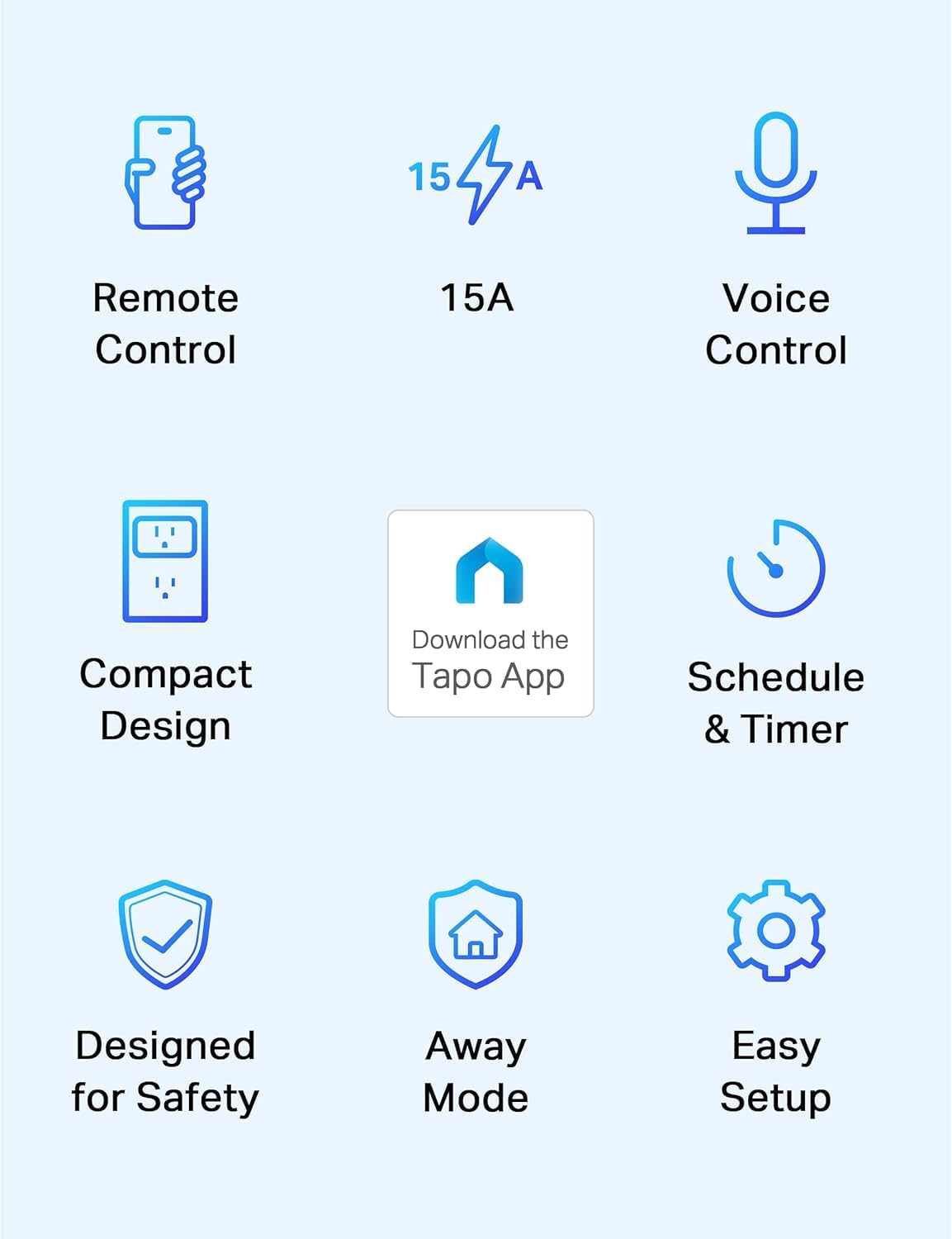
รูปที่ 2.1: เกินview of Tapo P105 Smart Plug Mini key features.
2.1 การควบคุมระยะไกล
Control your connected devices instantly from anywhere using the Tapo App on your smartphone or tablet.
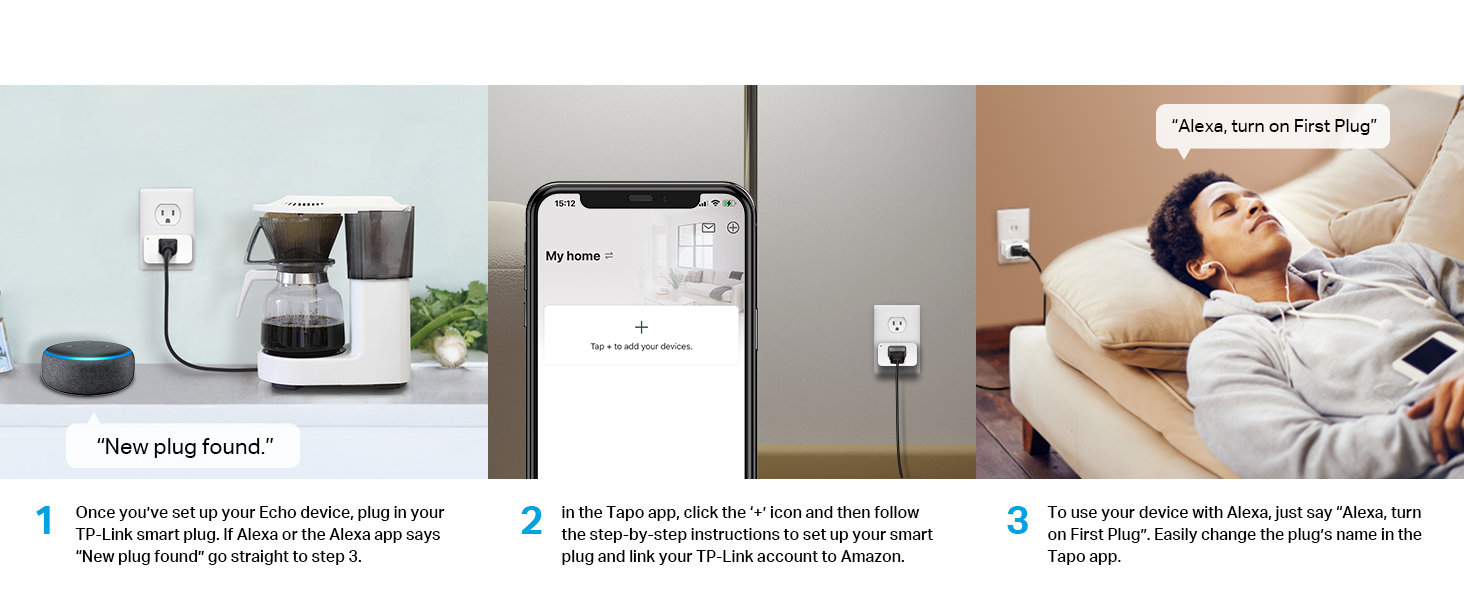
Figure 2.2: Remote control functionality via the Tapo app.
2.2 การควบคุมด้วยเสียง
Integrate with Amazon Alexa or Google Assistant to manage your devices using voice commands, providing hands-free convenience.
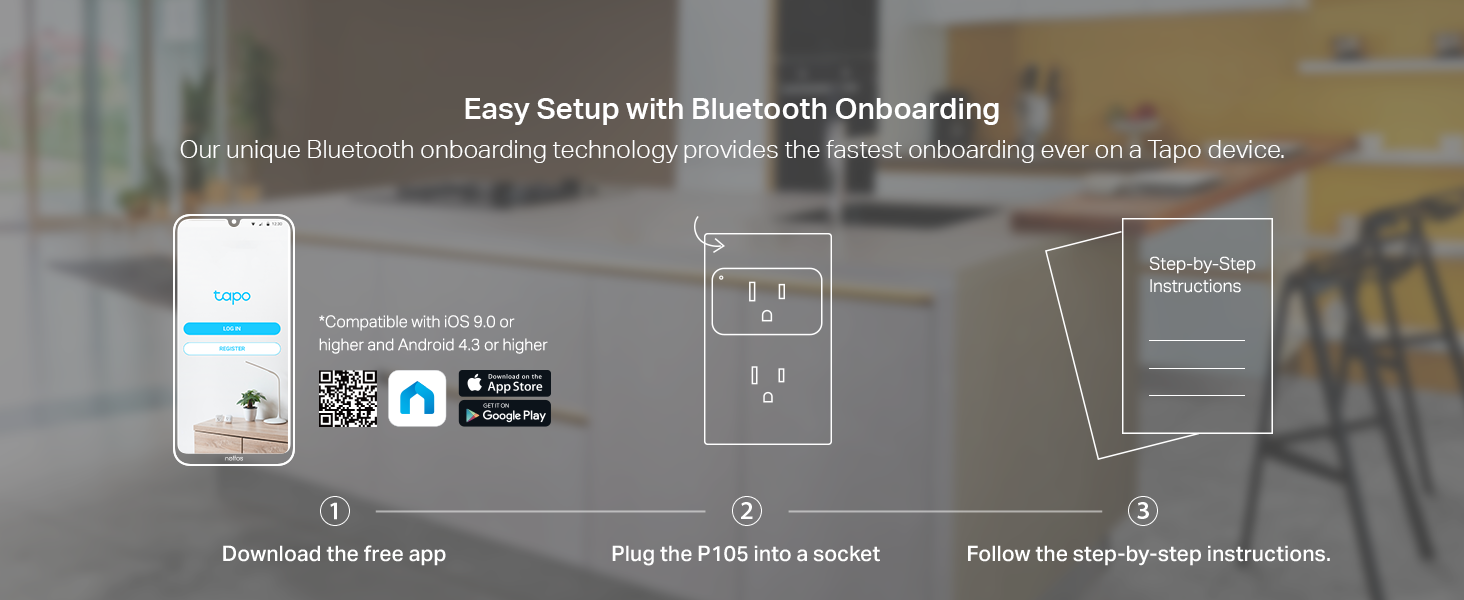
Figure 2.3: Voice control in action with a smart assistant.
2.3 Compact Design and Power
The Tapo P105 features a compact design that allows for the use of both outlets in a standard wall receptacle. Each plug supports devices up to 15A or 1800W.

Figure 2.4: Compact design allowing full outlet access.
2.4 คุณลักษณะด้านความปลอดภัย
The Tapo P105 is UL Certified and constructed with UL94-V0 flame-retardant PC material. Nickel-plated phosphor bronze pins contribute to durable and stable connections, minimizing burn hazards.

Figure 2.5: Safety certifications and features.
3. เนื้อหาบรรจุภัณฑ์
The Tapo P105 Smart Plug Mini package includes the following items:
- 4 x Mini Smart Wi-Fi Plug P105
- คู่มือเริ่มต้นอย่างรวดเร็ว 1 ชุด

Figure 3.1: Contents of the Tapo P105 Smart Plug Mini 4-Pack.
4. คำแนะนำในการตั้งค่า
4.1 Initial Setup with Tapo App
The Tapo P105 features Bluetooth Onboarding for a quick and easy setup process. Follow these steps to get started:
- ดาวน์โหลดแอป Tapo: ค้นหา 'Tapo' in the App Store (iOS 9.0 or higher) or Google Play (Android 4.3 or higher), or visit tapo.com/app/download-app/.
- Plug in the P105: Insert the Tapo P105 smart plug into a standard wall socket.
- ทำตามคำแนะนำในแอป: Open the Tapo app and follow the step-by-step guide to connect your smart plug to your Wi-Fi network.

Figure 4.1: Easy setup process with Bluetooth Onboarding.
4.2 การเชื่อมต่อกับ Amazon Alexa
After setting up your Tapo P105 with the Tapo app, you can integrate it with Amazon Alexa:
- Ensure your Echo device is set up. Plug in your Tapo P105. If the Alexa app indicates "New plug found," proceed to step 3.
- In the Tapo app, tap the '+' icon and follow the instructions to set up your smart plug. Link your TP-Link account to Amazon.
- To use your device with Alexa, simply say, for example, "Alexa, turn on First Plug." You can rename the plug in the Tapo app for easier voice commands.

Figure 4.2: Steps for integrating with Amazon Alexa.
5. คู่มือการใช้งาน
5.1 Remote Control via Tapo App
Once configured, use the Tapo app to turn your connected devices on or off from any location with an internet connection. The app provides a clear interface to manage all your smart plugs.
5.2 การกำหนดตารางเวลาและตัวจับเวลา
Set custom schedules for your devices to automatically power on or off at specific times. You can also use countdown timers for temporary control. This feature is ideal for managing lights, fans, or other appliances to align with your daily routine.

รูปที่ 5.1: อดีตample of scheduling and timer functions.
5.3 โหมดเดินทางออกนอกบ้าน
Activate 'Away Mode' to randomly turn connected lights on and off, creating the impression that someone is home. This feature can enhance security when you are away.

Figure 5.2: Away Mode simulating occupancy.
6. การบำรุงรักษา
To ensure optimal performance and longevity of your Tapo P105 Smart Plug Mini, follow these maintenance guidelines:
- การทำความสะอาด: Disconnect the smart plug from the power outlet before cleaning. Use a soft, dry cloth to wipe the exterior. Do not use liquid cleaners or aerosols.
- สิ่งแวดล้อม: Avoid exposing the device to excessive moisture, heat, or direct sunlight. Ensure it is used within the specified operating temperature range (32°F to 104°F).
- อัพเดตเฟิร์มแวร์: Regularly check the Tapo app for available firmware updates to ensure your device has the latest features and security enhancements.
7 การแก้ไขปัญหา
7.1 ปัญหาการเชื่อมต่อ
- การเชื่อมต่อ Wi-Fi: Ensure your smart plug is within range of your 2.4GHz Wi-Fi network. The Tapo P105 does not support 5GHz Wi-Fi.
- ตรวจสอบเราเตอร์: Verify that your router is functioning correctly and that other devices can connect to the internet.
- รีสตาร์ทอุปกรณ์: Unplug the smart plug from the outlet, wait a few seconds, and plug it back in.
- รีเซ็ต: If issues persist, perform a factory reset (refer to the Quick Start Guide for specific instructions) and re-add the device through the Tapo app.
7.2 App Control Problems
- เวอร์ชันแอป: Ensure your Tapo app is updated to the latest version.
- การเชื่อมต่ออินเตอร์เน็ต: ยืนยันว่าสมาร์ทโฟนของคุณมีการเชื่อมต่ออินเทอร์เน็ตที่ใช้งานได้
- ลงชื่อเข้าใช้: Verify you are logged into the correct Tapo account.
7.3 การควบคุมด้วยเสียงไม่ตอบสนอง
- เชื่อมโยงบัญชี: Confirm your Tapo account is correctly linked to your Amazon Alexa or Google Home account.
- ชื่ออุปกรณ์: Ensure you are using the correct device name as configured in the Tapo app and recognized by your voice assistant.
- Assistant Status: Check if your voice assistant device (e.g., Echo, Google Home speaker) is online and responsive.
8. ข้อมูลจำเพาะ
| ข้อมูลจำเพาะ | รายละเอียด |
|---|---|
| แบบอย่าง | ตะโป พี105 |
| โหมดการทำงาน | เปิดปิด |
| คะแนนปัจจุบัน | 15 Amps |
| ปฏิบัติการฉบับที่tage | 120 โวลต์ (AC) |
| ประเภทการติดต่อ | ปิดปกติ |
| ประเภทขั้วต่อ | เสียบปลั๊ก |
| ยี่ห้อ | ตะโปะ |
| เทอร์มินัล | รูทะลุ |
| ขนาดสินค้า กว้าง x ยาว x สูง | 1.5 x 1.5 x 2.11 นิ้ว |
| ประเภทวงจร | 1 ทาง |
| วัสดุติดต่อ | โลหะ |
| การให้คะแนนการคุ้มครองระหว่างประเทศ | IP00 |
| จำนวนตำแหน่ง | 1 |
| คะแนนอุณหภูมิต่ำกว่า | 32 องศาฟาเรนไฮต์ |
| คะแนนอุณหภูมิบน | 104 องศาฟาเรนไฮต์ |
| ประเภทตัวควบคุม | Amazon Alexa, Android, iOS |
| วิธีการควบคุม | แอพ, เสียง |
| โปรโตคอลการเชื่อมต่อ | บลูทู ธ Wi-Fi |
| สี | สีขาว |
| ผู้ผลิต | ทีพี ลิงค์ |
| น้ำหนักสินค้า | 9.9 ออนซ์ |
| รูปแบบปลั๊ก | ประเภท บี |
9. ข้อมูลการรับประกัน
The Tapo P105 Smart Plug Mini comes with a 2-year manufacturer's warranty. Please retain your proof of purchase for warranty claims.
10. การสนับสนุน
For technical assistance or further inquiries, please contact TP-Link support:
- โทรศัพท์: (866) 225-8139
- Webเว็บไซต์: myproducts.tp-link.com/us
- อีเมล: support.USA@tp-link.com


