1. บทนำ
This manual provides essential instructions for the safe and efficient use of your Alcatel 3085 mobile phone. Please read this guide thoroughly before operating the device to ensure proper functionality and to prevent damage. Keep this manual for future reference.
2. เนื้อหาบรรจุภัณฑ์
ตรวจสอบว่าแพ็คเกจของคุณมีรายการต่อไปนี้:
- โทรศัพท์มือถือ Alcatel 3085
- แบตเตอรี่
- เครื่องชาร์จ
- คู่มือเริ่มต้นอย่างรวดเร็ว
- (Optional) Charging Cradle
หากมีสินค้าใดขาดหายหรือเสียหาย โปรดติดต่อผู้ค้าปลีกของคุณ
3. การตั้งค่า
3.1. การใส่ซิมการ์ดและแบตเตอรี่
- ถอดฝาครอบด้านหลังออก: Gently pry open the back cover of the phone using the notch provided.
- ใส่ซิมการ์ด: Locate the SIM card slot(s). Align your SIM card with the cut corner and slide it into the slot until it clicks into place. Ensure the gold contacts face downwards.
- ใส่แบตเตอรี่: Place the battery into the battery compartment, ensuring the gold contacts on the battery align with the contacts in the phone.
- เปลี่ยนฝาหลัง: Carefully align the back cover and press it firmly until it snaps into place.
3.2. การชาร์จแบตเตอรี่
ก่อนใช้งานครั้งแรก ควรชาร์จแบตเตอรี่โทรศัพท์ให้เต็ม
- Connect the charger to the charging port on the phone or place the phone in the charging cradle (if included).
- เสียบที่ชาร์จเข้ากับเต้ารับไฟฟ้า
- The charging indicator will appear on the screen. Disconnect the charger once the battery is fully charged.
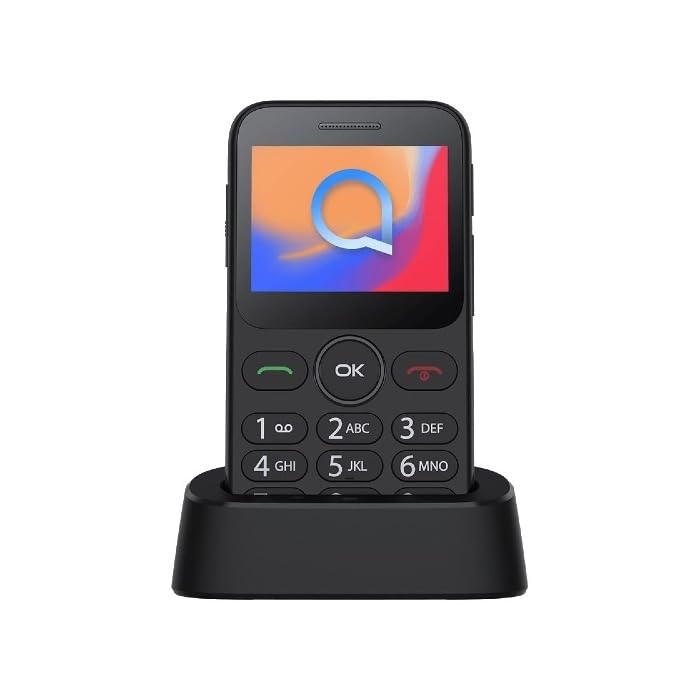
Image 1: Alcatel 3085 mobile phone placed in its charging cradle. The phone features a small color screen and a physical keypad with large, clearly labeled buttons.
4. คู่มือการใช้งาน
4.1. การเปิด/ปิดเครื่อง
- การเปิดเครื่อง: กดปุ่มค้างไว้ เปิด/ปิดการโทร ปุ่ม(ปุ่มสีแดง) จนกว่าหน้าจอจะสว่างขึ้น
- วิธีปิดเครื่อง: กดปุ่มค้างไว้ เปิด/ปิดการโทร กดปุ่มค้างไว้จนกว่าตัวเลือกการปิดเครื่องจะปรากฏขึ้น จากนั้นเลือก "ปิดเครื่อง"
4.2. การโทรออกและรับสาย
- การโทร: กรอกหมายเลขโทรศัพท์โดยใช้แป้นกดและกดปุ่ม เรียก ปุ่ม(ปุ่มสีเขียว)
- รับสาย: เมื่อโทรศัพท์ดัง ให้กดปุ่ม เรียก ปุ่มที่จะตอบ
- การวางสาย: กดปุ่ม วางสาย ปุ่ม.
4.3. การส่งและรับข้อความ
- นำทางไปที่ ข้อความ เมนูจากหน้าจอหลัก
- Select "Create new message" or "New SMS".
- Enter the recipient's number and type your message using the keypad.
- กด "ส่ง"
4.4. การนำทางพื้นฐาน
- ใช้ ปุ่มนำทาง (up, down, left, right) to scroll through menus.
- กดปุ่ม ตกลง/เลือก button (center button) to confirm a selection.
- กดปุ่ม กลับ/ล้าง button (often the right soft key) to go back to the previous screen or delete characters.
5. การบำรุงรักษาและการดูแล
- การทำความสะอาด: ใช้ผ้าแห้งนุ่มๆ เช็ดทำความสะอาดหน้าจอและตัวเครื่องโทรศัพท์ หลีกเลี่ยงการใช้น้ำยาทำความสะอาด
- พื้นที่จัดเก็บ: เก็บโทรศัพท์ไว้ในที่แห้งและเย็น หลีกเลี่ยงแสงแดดโดยตรงและอุณหภูมิที่สูงหรือต่ำเกินไป
- การดูแลแบตเตอรี่ Do not expose the battery to high temperatures or dispose of it in fire. Use only approved chargers.
- ความต้านทานน้ำ: โทรศัพท์รุ่นนี้ไม่กันน้ำ โปรดหลีกเลี่ยงการสัมผัสกับของเหลว
6 การแก้ไขปัญหา
| ปัญหา | วิธีแก้ปัญหาที่เป็นไปได้ |
|---|---|
| โทรศัพท์ไม่เปิดเครื่อง | Ensure the battery is correctly inserted and charged. Try charging the phone for at least 30 minutes. |
| ไม่สามารถโทรออกหรือรับสายได้ | Check if the SIM card is properly inserted. Verify that you have network coverage. Contact your service provider if the issue persists. |
| แบตเตอรี่หมดเร็ว | Reduce screen brightness. Close unused applications. Ensure the phone is not in an area with poor network signal, which can increase battery consumption. |
| แป้นพิมพ์ไม่ตอบสนอง | Restart the phone. Ensure no physical obstruction is affecting the keys. |
7. ข้อมูลจำเพาะ
| คุณสมบัติ | รายละเอียด |
|---|---|
| ยี่ห้อ | อัลคาเทล |
| หมายเลขรุ่น | 3085 (HP02945) |
| สี | สีดำเมทัลลิก |
| ASIN | B0B8X482MH |
| ผู้ผลิต | อัลคาเทล |
| รับประกันการอัปเดตซอฟต์แวร์จนถึง | ไม่มีข้อมูล |
| ความพร้อมของอะไหล่ | ไม่มีข้อมูล |
8. การรับประกันและการสนับสนุน
For warranty information, please refer to the warranty card included in your product packaging or visit the official Alcatel website. For technical support, please contact Alcatel customer service through their official channels.
You can find more information and support resources on the official Alcatel webเว็บไซต์: www.alcatelmobile.com
9. ข้อมูลด้านความปลอดภัย
- อย่าพยายามถอดประกอบหรือปรับเปลี่ยนโทรศัพท์
- Use only original or approved accessories.
- ควรหลีกเลี่ยงการวางโทรศัพท์ไว้ในที่ที่มีอุณหภูมิสูงหรือต่ำเกินไป แสงแดดโดยตรง หรือความชื้น
- ควรเก็บโทรศัพท์ให้ห่างจากอุปกรณ์ทางการแพทย์ เนื่องจากอาจรบกวนการทำงานของอุปกรณ์เหล่านั้นได้
- ทิ้งโทรศัพท์และแบตเตอรี่อย่างถูกวิธีตามระเบียบข้อบังคับของท้องถิ่น


