1. บทนำ
The AIYIMA A08 PRO is a high-fidelity Class D stereo digital audio amplifier designed for passive speakers in home audio systems. It features a TPA3255 amplifier chip, Bluetooth 5.1 connectivity, and a classic VU meter for visual feedback. This manual provides detailed instructions for setting up, operating, and maintaining your A08 PRO amplifier เพื่อให้มั่นใจถึงประสิทธิภาพสูงสุด
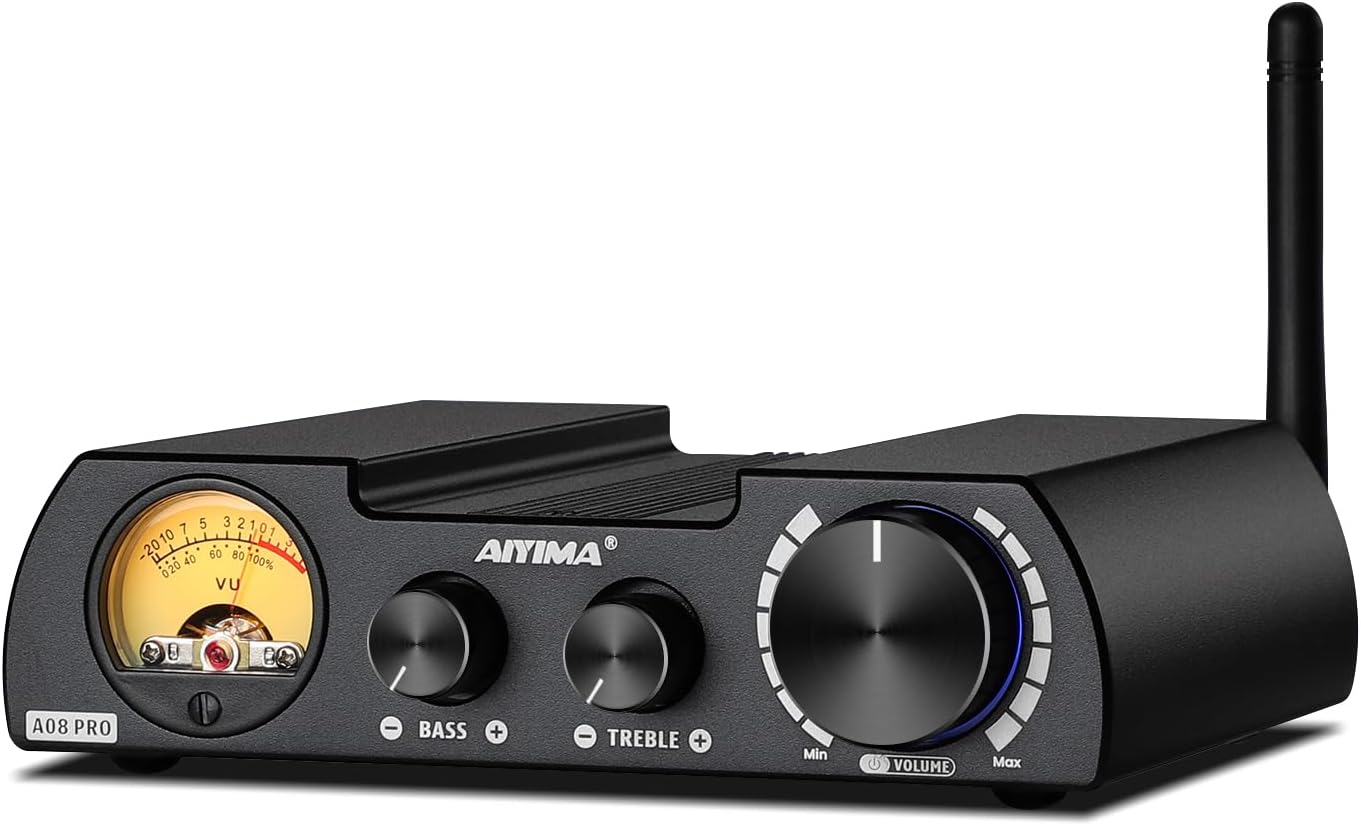
Figure 1: AIYIMA A08 PRO TPA3255 Power Ampชีวิต
2. อะไรอยู่ในกล่อง
- 1x AIYIMA A08 PRO Ampชีวิต
- 1x อะแดปเตอร์ไฟฟ้า DC 36V 6A
- เสาอากาศบลูทูธ 1 ชิ้น
- 1x คู่มือผู้ใช้

รูปที่ 2: สิ่งของในบรรจุภัณฑ์
3. สินค้าหมดview
3.1 แผงด้านหน้า
- วียูมิเตอร์: Displays audio signal level, providing a vintage visual experience.
- การควบคุมเสียงเบส: ปรับเอาท์พุตความถี่ต่ำ
- การควบคุมเสียงแหลม: ปรับเอาท์พุตความถี่สูง
- ปุ่มปรับระดับเสียง/เปิดปิด: Controls overall volume and acts as the power switch (press to turn on/off).
3.2 แผงด้านหลัง
- ขั้วต่อเสาอากาศบลูทูธ: สำหรับติดตั้งเสาอากาศบลูทูธที่ให้มาในชุด
- ช่องต่อสัญญาณเสียง RCA: สำหรับเชื่อมต่อแหล่งสัญญาณเสียงภายนอกผ่านสาย RCA
- เอาต์พุต AUX 3.5 มม.: For connecting to active speakers, active amplifiers, or active subwoofers.
- ขั้วต่อเอาต์พุตลำโพง: For connecting passive speakers (left and right channels).
- DC Power Input (24V-48V): สำหรับการเชื่อมต่ออะแดปเตอร์ไฟฟ้า

รูปที่ 3: โครงร่างแผงด้านหน้าและด้านหลัง
3.3 มิติ
The A08 PRO has compact dimensions, making it suitable for various setups.
- ขนาดสินค้า : 5.98 x 4.8 x 1.57 นิ้ว (152 มม. x 122 มม. x 40 มม.)
- น้ำหนักสินค้า: 2.31 ปอนด์ (692.5 กรัม)

รูปที่ 4: ขนาดผลิตภัณฑ์
4. การตั้งค่า
4.1 การเชื่อมต่อลำโพง
- Ensure the A08 PRO is powered off.
- Connect your passive speakers to the Speaker Output Terminals on the rear panel. Match the positive (+) and negative (-) terminals correctly for each speaker.
4.2 การเชื่อมต่อแหล่งเสียง
อินพุต RCA
- Connect your audio source (e.g., CD player, DAC, TV) to the RCA Audio Input terminals on the rear panel using RCA cables.
อินพุตบลูทูธ
- Screw the included Bluetooth antenna onto the RF connector on the rear panel.
- Ensure Bluetooth is enabled on your source device (smartphone, tablet, PC).
- ค้นหา "AIYIMA" in your device's Bluetooth settings and pair.
4.3 Connecting a Subwoofer or External Amplifier (AUX OUT)
- Connect the 3.5mm AUX Output on the rear panel to the input of an active subwoofer or another active amplifier. This allows for building a 2.1 channel system or expanding your audio setup.
4.4 การเชื่อมต่อสายไฟ
- Connect the included DC 36V 6A power adapter to the DC Power Input (24V-48V) on the rear panel.
- เสียบอะแดปเตอร์ไฟฟ้าเข้ากับเต้ารับไฟฟ้าที่เหมาะสม

Figure 5: Various Connection Scenarios
Video 1: Connecting AIYIMA A08 PRO Power Amplifier to an A07 Amplifier. This video demonstrates how to connect the A08 PRO to another ampเครื่องแสดงasing ความอเนกประสงค์ของมันในระบบเสียงแบบหลายองค์ประกอบ
Video 2: AIYIMA T8 Tube Preamplifier matching the A08 PRO Power Amp. This video illustrates how to integrate the A08 PRO with a T8 tube preamplifier for enhanced audio performance, demonstrating the connection process and resulting sound.
5. คู่มือการใช้งาน
5.1 เปิด/ปิดเครื่อง
Press the Volume/Power knob on the front panel to turn the amplifier เปิดหรือปิด
5.2 การควบคุมระดับเสียง
Rotate the Volume/Power knob clockwise to increase volume and counter-clockwise to decrease volume.
5.3 การควบคุมโทนเสียง
Use the Bass and Treble knobs on the front panel to adjust the low and high frequencies according to your preference.
5.4 การเลือกอินพุต
The A08 PRO automatically prioritizes Bluetooth input if a paired device is connected. If Bluetooth is disconnected, it will automatically switch to the RCA input. The color of the light around the Volume/Power knob indicates the active input:
- ไฟสีแดง: RCA Input active
- แสงสีฟ้า: Bluetooth Input active
6. Power Supply Considerations
The A08 PRO comes with a DC 36V 6A power adapter. To achieve the maximum rated power output of 300W per channel (into 4Ω), an upgraded linear power supply with DC 48V and current above 10A is required. Ensure any upgraded power supply is a linear type and not an industrial power supply.

Figure 6: Power Output vs. Supply Power and Impedance
7. ข้อมูลจำเพาะ
| คุณสมบัติ | ข้อมูลจำเพาะ |
|---|---|
| หมายเลขรุ่น | เอ08โปร |
| Ampชิปลิฟายเออร์ | TPA3255 |
| กำลังขับ (สูงสุด) | 300W + 300W (into 4Ω with 48V/12.5A power supply) |
| ความต้านทานของลำโพง | 3-8Ω |
| เวอร์ชันบลูทูธ | 5.1 (Qualcomm QCC5125 Chip) |
| ตัวแปลงสัญญาณบลูทูธที่รองรับ | SBC, AAC, APTX, APTX-LL, APTX-HD, LDAC |
| อินพุตเสียง | บลูทูธ, RCA |
| เอาต์พุตเสียง | ช่องต่อลำโพง, ช่องต่อ AUX 3.5 มม. |
| ขนาดสินค้า | 5.98 x 4.8 x 1.57 นิ้ว |
| น้ำหนักสินค้า | 2.31 ปอนด์ |
| ผู้ผลิต | ยี่หม่า เทค |
8 การแก้ไขปัญหา
8.1 No Sound from RCA Input
If you are not getting sound from the RCA input, check the following:
- The A08 PRO prioritizes Bluetooth input. If a previously paired Bluetooth device is within range and has its Bluetooth enabled, the amplifier may automatically connect to it, overriding the RCA input.
- To switch to RCA input, ensure no Bluetooth device is actively paired with the A08 PRO. You may need to manually disconnect or turn off Bluetooth on your source device (e.g., smartphone) to force the amplifier to switch to RCA.
- Verify that the RCA cables are securely connected to both the ampเครื่องขยายเสียงและแหล่งกำเนิดเสียง
- Check the volume levels on both the ampเครื่องขยายเสียงและแหล่งกำเนิดเสียงของคุณ
Video 3: Bluetooth Auto-Connect Behavior. This video highlights the amplifier's tendency to auto-connect to Bluetooth devices and how it affects RCA input selection, providing a visual guide for troubleshooting.
9. การบำรุงรักษา
- เก็บรักษาไว้ amplifier in a dry, well-ventilated area away from direct sunlight, heat sources, and moisture.
- เช็ดทำความสะอาดภายนอกด้วยผ้าแห้งเนื้อนุ่ม ห้ามใช้น้ำยาทำความสะอาดหรือสารละลายใดๆ
- ตรวจสอบให้แน่ใจว่ามีการระบายอากาศที่เหมาะสมรอบๆ ตัวเครื่องเพื่อป้องกันความร้อนสูงเกินไป
10. การรับประกันและการสนับสนุน
AIYIMA provides a worry-free warranty and technical services for its products. For any questions or support needs, please refer to the contact information provided with your purchase or visit the official AIYIMA webเว็บไซต์.
Video 4: About AIYIMA Audio Company. This video provides an overview of AIYIMA, its history, and its commitment to HiFi audio equipment, offering insight into the brand's background and values.