1. บทนำ
This manual provides comprehensive instructions for the OMAIC Universal Replacement Remote Control, designed for a wide range of LG Smart TVs. It covers essential information regarding setup, operation, maintenance, and troubleshooting to ensure optimal use of your remote control.
2. สินค้าหมดview
The OMAIC Universal Replacement Remote Control is an infrared remote designed to replace various LG Smart TV remote models. It features dedicated hotkeys for popular streaming services and a full set of control buttons for seamless navigation.

รูปที่ 1: ด้านหน้าและด้านหลัง view of the OMAIC Universal Replacement LG Smart TV Remote Control, showcasing its design and battery compartment.
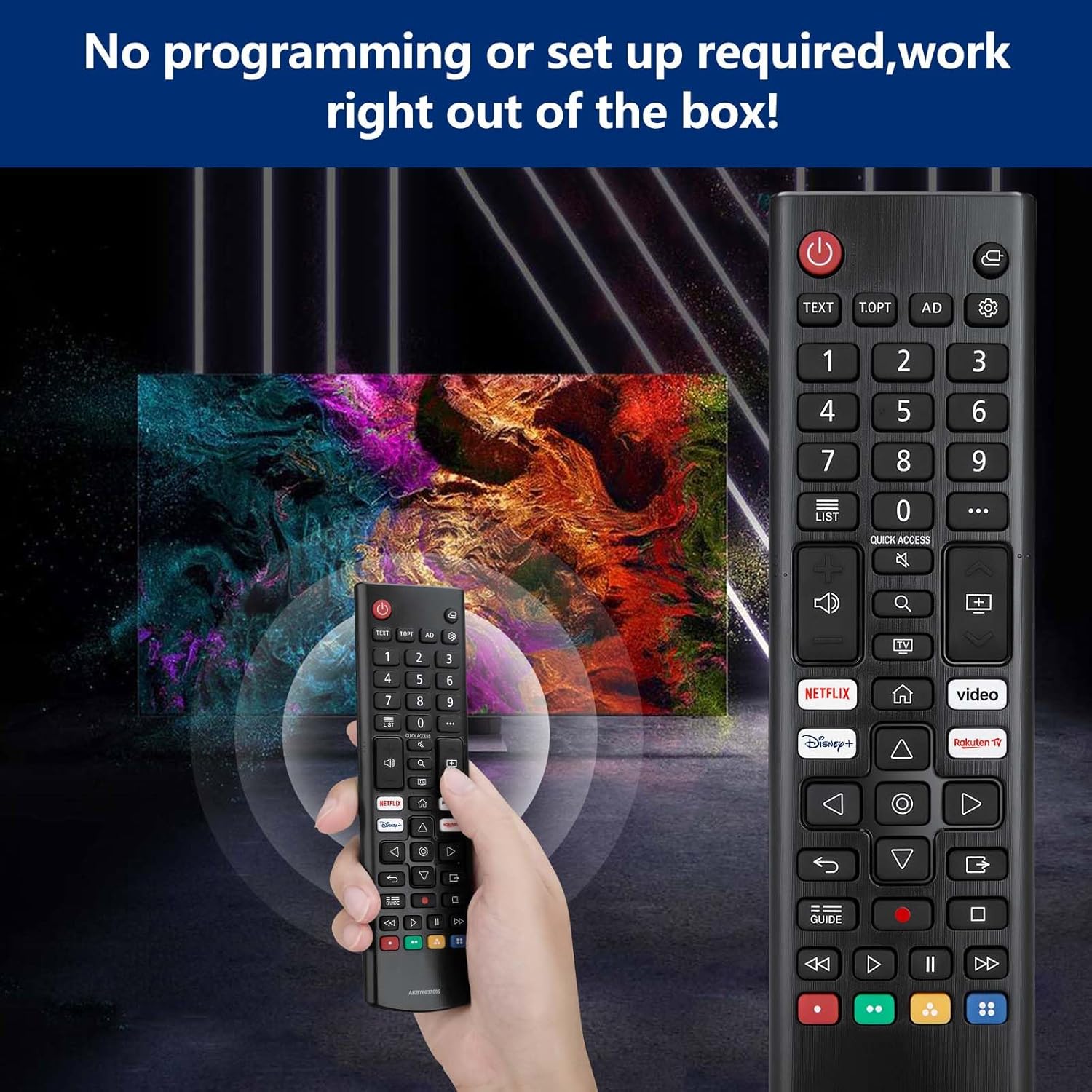
รูปที่ 2: Detailed diagram illustrating the function of each button on the OMAIC remote control.
3. การตั้งค่า
This remote control requires no programming or complex setup. Simply insert two AAA batteries, and it will be ready for use.
3.1 การติดตั้งแบตเตอรี่
- ค้นหาช่องใส่แบตเตอรี่ที่ด้านหลังของรีโมทคอนโทรล
- เลื่อนเปิดฝาครอบช่องใส่แบตเตอรี่
- Insert two AAA batteries, ensuring correct polarity (+ and - terminals).
- ปิดฝาช่องใส่แบตเตอรี่ให้แน่น

รูปที่ 3: Visual guide for inserting two AAA batteries into the remote control's battery compartment.
4. คู่มือการใช้งาน
The remote control provides intuitive access to various LG Smart TV functions. Refer to Figure 2 for a visual guide to button layout.
4.1 ฟังก์ชั่นพื้นฐาน
- ปุ่มเพาเวอร์ (⏻): เปิดหรือปิดทีวี
- ปุ่มตัวเลข (0-9): Directly select channels or input numbers.
- ปุ่มปรับระดับเสียง (▲/▼): ปรับระดับเสียง.
- Programme Buttons (▲/▼): Scroll through saved programs/channels.
- ปุ่มนำทาง (ขึ้น/ลง/ซ้าย/ขวา): นำทางผ่านเมนูและตัวเลือก
- ปุ่มตกลง: Selects menu items or confirms options.
- ปุ่มย้อนกลับ: Returns to the previous level in menus.
- ปุ่มโฮม (⌂): Accesses the TV's Home menu.
- ปุ่มป้อนข้อมูล: เปลี่ยนแหล่งสัญญาณเข้า (HDMI, AV เป็นต้น)
- การเข้าถึงด่วน: Edits Quick Access settings (functionality may vary by TV model).
4.2 Streaming Service Hotkeys
Dedicated buttons provide direct access to popular streaming applications:
- ปุ่ม Netflix: เปิดแอปพลิเคชัน Netflix
- ปุ่ม Prime Video: เปิดแอปพลิเคชัน Prime Video
- ปุ่ม Disney+: เปิดใช้งานแอปพลิเคชัน Disney+
- Rakuten TV Button: Launches the Rakuten TV application.

รูปที่ 4: Illustration of the dedicated hotkeys for quick access to streaming services.
5. ความเข้ากันได้
This OMAIC Universal Replacement Remote Control is compatible with a wide range of LG Smart TV models and can replace several original LG remote control models.
5.1 Compatible LG TV Models
The remote is designed for use with various LG 4K, 8K, NanoCell, QNED, OLED, LED, and UHD Smart TVs, including but not limited to:
- LED TV Models: LM5, LM6, LQ6, UM7 Series
- NanoCell TV Models: NANO70, NANO75, NANO76, NANO77, NANO78, NANO79, NANO80, NANO81, NANO85, NANO86, NANO88, NANO90, NANO91, NANO95, NANO96, NANO99 Series
- OLED 4K/8K TV Models: A1, A2, A8, B1, B2, B7, B8, B9, C1, C2, C7, C8, C9, E7, E8, E9, G1, G2, G7, G8, W7, W8, W9, Z1, Z2, ZX, WX, GX, CX, BX, CS Series
- QNED MiniLED TV Models: QNED81, QNED82, QNED86, QNED87, QNED91, NANO95, QNED96, QNED99 Series
- UHD 4K TV Models: 7 series, 8 series, 9 series, UN71, UN73, UN74, UN80, UN81, UN85, UP75, UP76, UP77, UP78, UP80, UP81, UQ70, UQ75, UQ76, UQ80, UQ81, UQ90, UQ91 Series
- Also compatible with UK6, UK7, UK8, UK9, UJ6, UJ7, UJ8, UJ9, SJ7, SJ8, SJ9, SM8, SM9, SK7, SK8, SK9, LK5, LK6, LJ5, LJ6 Series.

รูปที่ 5: The OMAIC remote control demonstrating compatibility with various LG 4K and 8K Smart TV technologies.
5.2 Compatible Original Remote Control Models
This remote acts as a universal replacement for many LG TV remote models, including:
- AN-MR650A, AN-MR18BA, AN-MR19BA, AN-MR20GA, AN-MR21GA, AN-MR22GN
- PM20GA, PM21GA, PM22GN
- AGF76631064, AKB75095308, AKB75095307, AKB76037605, AKB75055701, AKB73715608, AKB73715601

รูปที่ 6: The OMAIC remote control shown with various original LG remote models it is designed to replace.
6. การบำรุงรักษา
การดูแลรักษาอย่างถูกวิธีจะช่วยยืดอายุการใช้งานของรีโมทคอนโทรลของคุณได้
- การทำความสะอาด: ใช้ผ้านุ่มและแห้งเช็ดทำความสะอาดรีโมทคอนโทรล หลีกเลี่ยงการใช้น้ำยาทำความสะอาดหรือวัสดุที่มีฤทธิ์กัดกร่อน
- การเปลี่ยนแบตเตอรี่: เปลี่ยนแบตเตอรี่เมื่อรีโมทตอบสนองช้าลงหรือหยุดทำงาน ควรเปลี่ยนแบตเตอรี่ทั้งสองก้อนพร้อมกันด้วยแบตเตอรี่ใหม่เสมอ
- พื้นที่จัดเก็บ: หากจะไม่ใช้รีโมทคอนโทรลเป็นเวลานาน ควรถอดแบตเตอรี่ออกเพื่อป้องกันการรั่วไหลและความเสียหายที่อาจเกิดขึ้น
- สิ่งแวดล้อม: Avoid exposing the remote to extreme temperatures, direct sunlight, or high humidity.
7 การแก้ไขปัญหา
If you encounter issues with your remote control, refer to the following troubleshooting steps:
- รีโมตไม่ตอบสนอง:
- ตรวจสอบให้แน่ใจว่าใส่แบตเตอรี่อย่างถูกต้องและมีขั้วที่ถูกต้อง
- เปลี่ยนแบตเตอรี่ด้วยแบตเตอรี่ AAA ใหม่
- Check for any obstructions between the remote control and the TV's infrared (IR) receiver. Ensure a clear line of sight.
- ตรวจสอบว่าทีวีเปิดอยู่
- ปุ่มไม่ทำงาน:
- Clean the remote control surface and buttons to remove any dirt or debris that might be interfering with button presses.
- If only specific buttons are not working, and battery replacement does not resolve the issue, the remote may require replacement.
8. ข้อมูลจำเพาะ
| คุณสมบัติ | ข้อมูลจำเพาะ |
|---|---|
| หมายเลขรุ่น | AKB76037605 |
| ยี่ห้อ | โอเอ็มเอไอซี |
| เทคโนโลยีการเชื่อมต่อ | อินฟราเรด |
| อุปกรณ์ที่รองรับ | Television (LG Smart TVs) |
| จำนวนปุ่ม | 50 |
| ประเภทตัวควบคุม | ปุ่มควบคุม |
| แบตเตอรี่ที่จำเป็น | ถ่าน AAA จำนวน 2 ก้อน |
| ขนาดสินค้า | 17 x 4.7 x 2.5 ซม. |
| น้ำหนักผลิตภัณฑ์ | 65 กรัม |
| ระยะสูงสุด | 12 เมตร |
| คุณสมบัติพิเศษ | สากล |
9. การสนับสนุน
OMAIC is committed to maintaining a high standard of excellence and customer satisfaction. If you have any questions, concerns, or require assistance with your OMAIC Universal Replacement LG Smart TV Remote Control, please contact our customer support team. We aim to respond to all inquiries within 12 business hours.
โปรดดูเอกสารการซื้อหรือข้อมูลจากผู้ค้าปลีก webไซต์สำหรับข้อมูลการติดต่อที่เฉพาะเจาะจง