1. บทนำ
Thank you for choosing the Smartwares FSM-12601 Wi-Fi Smoke Detector. This device is designed to provide early warning of smoke and fire, enhancing the safety of your home. Featuring a photoelectric sensor, it offers high sensitivity to detect slow-smoldering fires while minimizing false alarms. With Wi-Fi connectivity, you can receive real-time alerts on your smartphone via the Connected at Home or Smartlife app.

Image: The Smartwares FSM-12601 Wi-Fi Smoke Detector in a home setting.
2. ข้อมูลด้านความปลอดภัยที่สำคัญ
- อ่านคำแนะนำทั้งหมดอย่างละเอียดก่อนการติดตั้งและใช้งาน
- This smoke detector is designed for residential use.
- ห้ามทาสีเครื่องตรวจจับควัน สีอาจอุดตันช่องตรวจจับและทำให้สัญญาณเตือนทำงานผิดปกติได้
- Do not install in areas with high humidity, excessive dust, or near cooking fumes.
- Regularly test the smoke detector as described in this manual.
- In case of an alarm, evacuate the premises immediately and call emergency services.
3. เนื้อหาบรรจุภัณฑ์
ตรวจสอบให้แน่ใจว่ามีรายการทั้งหมดอยู่ในบรรจุภัณฑ์:
- Smartwares FSM-12601 Wi-Fi Smoke Detector
- ตัวยึด
- แบตเตอรี่ CR123A
- สกรูยึดและปลั๊กผนัง
- คู่มือการใช้งาน
4. สินค้าหมดview
The Smartwares FSM-12601 features a compact design with a central test/mute button and an integrated LED indicator.

ภาพ: ด้านหน้า view of the smoke detector highlighting the Test/Mute button.
- ปุ่มทดสอบ/ปิดเสียง: Press to test the alarm or silence a false alarm.
- ไฟแสดงสถานะ LED: Provides visual status of the device (e.g., normal operation, alarm, low battery, pairing mode).
- ผู้บรรยาย: Emits the 85 dB alarm sound.

Image: Dimensions and key features of the smoke detector.
5. การตั้งค่าและการติดตั้ง
5.1 การติดตั้งแบตเตอรี่
- Gently twist the back cover of the smoke detector counter-clockwise to open it.
- Insert the provided CR123A battery, ensuring correct polarity (+/-).
- Close the back cover by twisting it clockwise until it clicks into place.
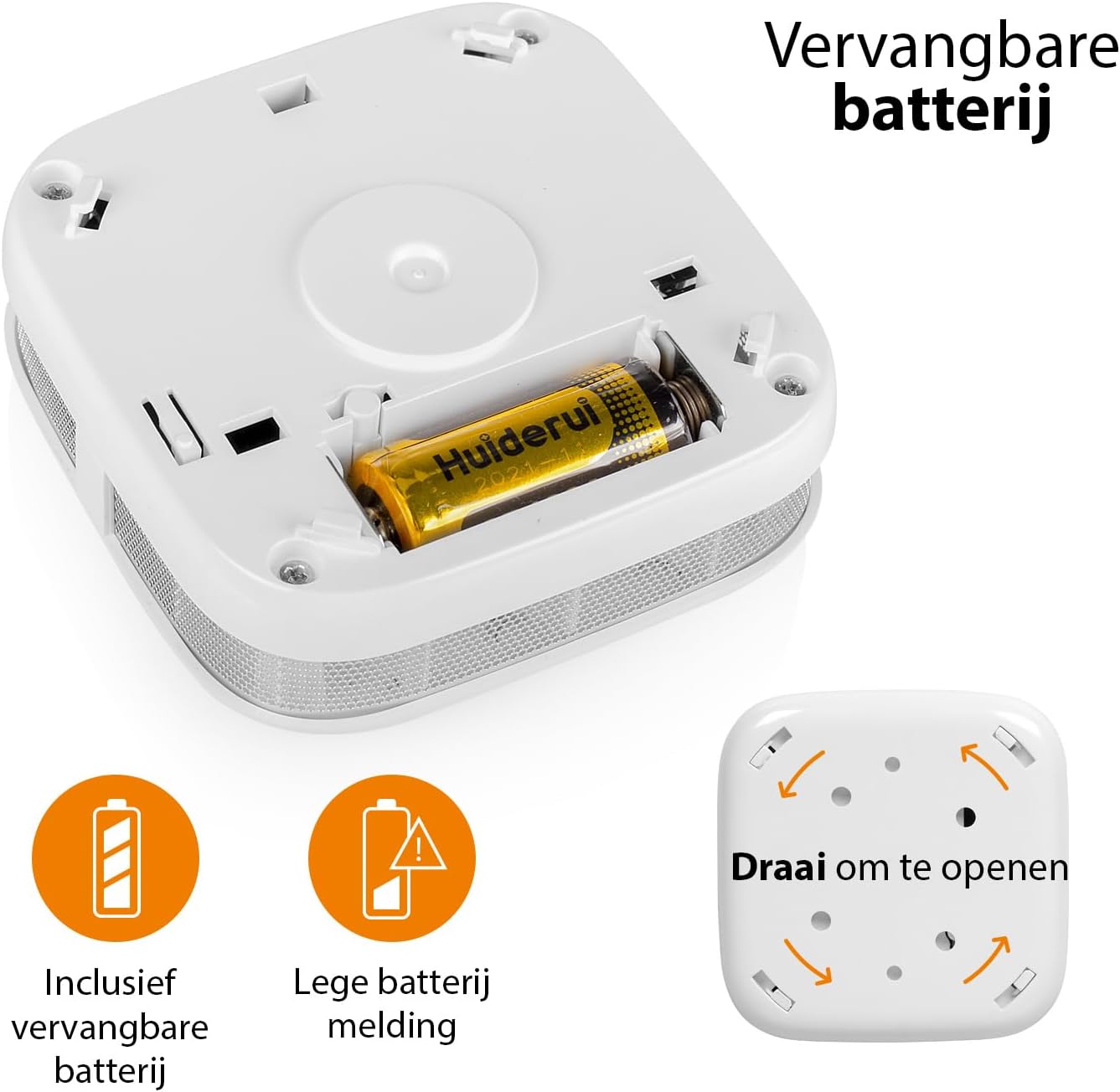
Image: Battery compartment and instructions to open the device.
5.2 ตำแหน่งการติดตั้ง
For optimal performance, install the smoke detector on the ceiling in the center of a room or hallway. If ceiling mounting is not possible, install it on a wall, at least 10-30 cm (4-12 inches) from the ceiling. Avoid corners. Install at least one smoke detector on each floor of your home, including basements and attics.
- Avoid installing near windows, doors, or ventilation openings where drafts might interfere with smoke detection.
- Keep away from cooking appliances, fireplaces, and areas with high humidity like bathrooms.
5.3 การติดตั้งทางกายภาพ
- เลือกสถานที่ติดตั้งที่เหมาะสม
- ใช้ขายึดเป็นแบบในการทำเครื่องหมายตำแหน่งรูเจาะบนเพดานหรือผนัง
- เจาะรูและเสียบปลั๊กผนัง
- ติดขายึดโดยใช้สกรูที่ให้มา
- Align the smoke detector with the mounting bracket and twist it clockwise until it locks securely into place.
5.4 App Connection (Wi-Fi Pairing)
To enable Wi-Fi features and receive smartphone notifications, connect your smoke detector to the Smartwares "Connected at Home" or "Smartlife" app.
- Download the "Connected at Home" or "Smartlife" app from your smartphone's app store (available for iOS and Android).
- ลงทะเบียนหรือเข้าสู่ระบบบัญชีของคุณ
- Long press the Test/Mute button on the smoke detector until the red LED indicator starts flashing. This indicates pairing mode.
- Follow the on-screen instructions within the app to add the smoke detector to your Wi-Fi network.
- Once successfully paired, the LED indicator will stop flashing and remain off, or indicate normal operation as per app instructions.

Image: Steps for connecting the smoke detector to the app.

Image: Benefits of connecting the smoke detector to the app.
6. คู่มือการใช้งาน
6.1 การทำงานปกติ
Once installed and connected, the smoke detector is in normal operating mode. The LED indicator will flash briefly every 40-60 seconds to confirm it is functioning correctly.
6.2 Testing the Smoke Detector
แนะนำให้ทดสอบเครื่องตรวจจับควันไฟทุกสัปดาห์เพื่อให้แน่ใจว่าทำงานได้อย่างถูกต้อง
- Press and hold the Test/Mute button for a few seconds.
- The alarm will sound loudly (85 dB), and the LED indicator will flash rapidly.
- ปล่อยปุ่ม สัญญาณเตือนควรจะหยุดลง
- หากสัญญาณเตือนไม่ดัง โปรดดูส่วนการแก้ไขปัญหา
6.3 Mute Function (Hush Mode)
In case of a non-emergency alarm (e.g., cooking fumes), you can temporarily silence the alarm.
- Press the Test/Mute button briefly during an alarm.
- The alarm will silence for approximately 10 minutes. The LED will continue to flash every few seconds to indicate it is in hush mode.
- หลังจาก 10 นาที หากยังมีควันอยู่ สัญญาณเตือนจะดังขึ้นอีกครั้ง
- If the smoke has cleared, the detector will return to normal operation.
6.4 ไฟ LED แสดงสถานะ
- Flashes every 40-60 seconds: การดำเนินงานปกติ.
- Flashes rapidly with alarm sound: ตรวจพบควัน
- Flashes every few seconds (no alarm): Hush mode active.
- Flashes every 32 seconds (with chirp): Low battery warning. Replace battery immediately.
- Flashes rapidly (during setup): โหมดจับคู่
7. การบำรุงรักษา
7.1 การเปลี่ยนแบตเตอรี่
The smoke detector operates on a CR123A battery with an approximate lifespan of one year. When the battery is low, the device will chirp every 32 seconds, and the LED will flash.
- Twist the smoke detector counter-clockwise to remove it from its mounting bracket.
- Open the back cover by twisting it counter-clockwise.
- Remove the old CR123A battery and dispose of it according to local regulations.
- ใส่แบตเตอรี่ CR123A ใหม่ โดยสังเกตขั้วให้ถูกต้อง
- Close the back cover and reattach the detector to its mounting bracket.
- Test the smoke detector immediately after replacing the battery.
7.2 Cleaning the Smoke Detector
Dust and debris can affect the performance of your smoke detector. Clean it at least once a month.
- Remove the smoke detector from its mounting bracket.
- Use a soft brush or a vacuum cleaner with a soft brush attachment to gently clean the exterior casing and the openings around the sensor.
- Do not use water, cleaning solvents, or harsh chemicals.
- Reattach the detector and test it.
8 การแก้ไขปัญหา
| ปัญหา | สาเหตุที่เป็นไปได้ | สารละลาย |
|---|---|---|
| ไม่มีเสียงสัญญาณเตือนดังระหว่างการทดสอบ | Dead or low battery; incorrect battery installation; faulty unit. | Replace battery; check battery polarity; if problem persists, contact support. |
| สัญญาณเตือนภัยเท็จที่เกิดขึ้นบ่อยครั้ง | Detector is too close to cooking fumes, steam, or high humidity; excessive dust. | Relocate detector further from sources of false alarms; clean the detector. |
| Chirping sound every 32 seconds. | เตือนแบตเตอรี่ต่ำ | เปลี่ยนแบตเตอรี่ CR123A ทันที |
| Cannot connect to Wi-Fi app. | Incorrect Wi-Fi password; detector too far from router; incorrect pairing procedure; app issues. | Ensure correct Wi-Fi password; move detector closer to router; repeat pairing steps carefully; check app for updates or known issues. |
| ไม่มีการแจ้งเตือนใดๆ บนสมาร์ทโฟน | App notifications disabled; detector disconnected from Wi-Fi; app not running in background. | Check app notification settings; verify detector's Wi-Fi connection; ensure app is allowed to run in background. |
9. ข้อมูลจำเพาะทางเทคนิค
| หมายเลขรุ่น | เอฟเอสเอ็ม-12601 |
| ประเภทเซนเซอร์ | อิเล็กทริค |
| ระดับเสียงปลุก | 85 เดซิเบล ที่ระยะ 3 เมตร |
| แหล่งพลังงาน | 1x CR123A Lithium battery (included) |
| อายุการใช้งานแบตเตอรี่ | ประมาณ 1 ปี |
| การเชื่อมต่อ | Wi-Fi (2.4 GHz) |
| ความชื้นในการทำงาน | ป้องกันการควบแน่นได้สูงสุดถึง 95% |
| ขนาด (กว้าง x ยาว x สูง) | 7.6 x 7.6 x 2.8 ซม. |
| น้ำหนัก | 84 กรัม |
| วัสดุ | พลาสติก ABS |
10. ข้อมูลการกำจัด
Do not dispose of the device or batteries with household waste. Electronic waste and batteries should be collected separately for environmentally sound disposal. Use the return and collection systems available in your country.
11. การรับประกันและการสนับสนุน
Smartwares products come with a standard manufacturer's warranty. For detailed warranty terms, technical support, or service inquiries, please refer to the contact information provided on the Smartwares website or the original purchase documentation.


