Baseus Bowie WM02 TWS Bluetooth Earbuds
คู่มือการใช้งาน
การแนะนำ
Thank you for choosing the Baseus Bowie WM02 TWS Bluetooth Earbuds. These ultra-compact and lightweight earbuds are designed for comfortable, long-term wear, offering a seamless audio experience with advanced Bluetooth 5.3 technology and an impressive 25-hour battery life (with charging case). This manual will guide you through the setup, operation, and maintenance of your new earbuds.

Image: Baseus Bowie WM02 TWS Bluetooth Earbuds in white, with their charging case.
การตั้งค่า
1. การแกะกล่องและส่วนประกอบ
Before first use, please ensure all components are present in the package:
- Baseus Bowie WM02 TWS Earbuds
- เคสชาร์จไฟ
- สายชาร์จ USB-C
- จุกหูฟังหลายขนาด (S, M, L)
- คู่มือการใช้งาน
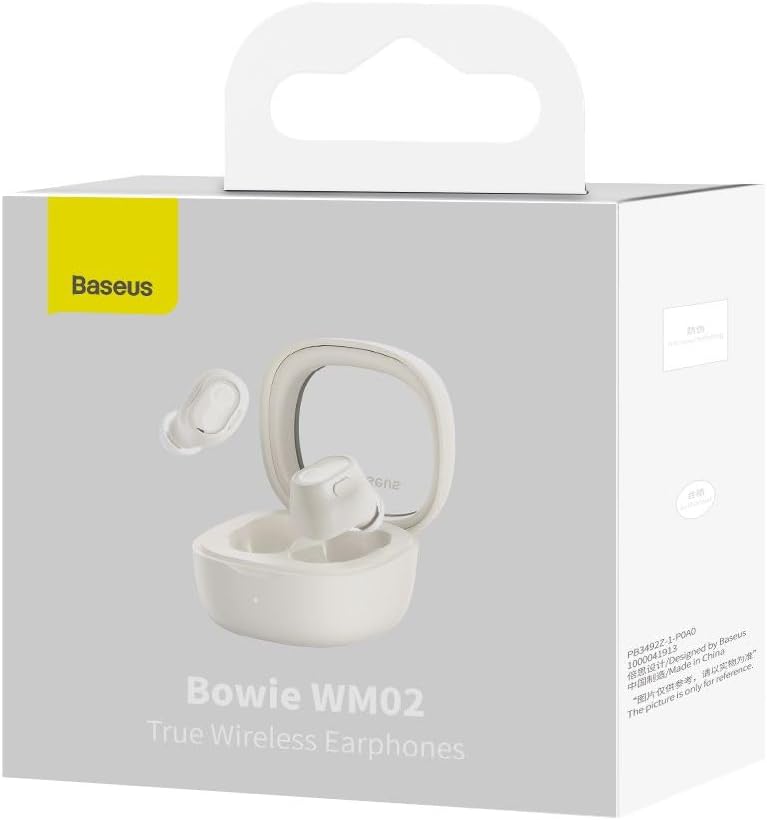
Image: The Baseus Bowie WM02 earbuds, charging case, USB-C cable, and ear tips laid out with the product packaging.
2. การชาร์จหูฟังและเคส
เพื่อประสิทธิภาพสูงสุด โปรดชาร์จหูฟังและเคสชาร์จให้เต็มก่อนใช้งานครั้งแรก
- ใส่หูฟังลงในกล่องชาร์จ ตรวจสอบให้แน่ใจว่าหูฟังอยู่ในช่องที่ถูกต้อง
- เสียบสายชาร์จ USB-C เข้ากับพอร์ตชาร์จบนเคส และเสียบปลายอีกด้านหนึ่งเข้ากับแหล่งจ่ายไฟ USB (เช่น คอมพิวเตอร์ อะแดปเตอร์ติดผนัง)
- The indicator light on the charging case will show the charging status. Once fully charged, the light will typically turn solid or turn off.
A 10-minute quick charge provides approximately 2 hours of listening time, and a full charge offers up to 5 hours of continuous use, extending to 25 hours with the charging case.

Image: Graphic illustrating the 25-hour battery life of the Baseus Bowie WM02 earbuds and charging case.
3. การจับคู่บลูทู ธ
ทำตามขั้นตอนเหล่านี้เพื่อจับคู่เอียร์บัดของคุณกับอุปกรณ์ที่รองรับบลูทูธ:
- เปิดกล่องชาร์จ หูฟังจะเข้าสู่โหมดจับคู่โดยอัตโนมัติ (ไฟแสดงสถานะจะกะพริบ)
- บนอุปกรณ์ของคุณ (สมาร์ทโฟน แท็บเล็ต แล็ปท็อป) ไปที่การตั้งค่าบลูทูธ และเปิดใช้งานบลูทูธ
- ค้นหา available devices and select "Baseus Bowie WM02" from the list.
- Once connected, the earbud indicator lights will typically turn off or show a steady light.
The earbuds feature Bluetooth 5.3 for stable and efficient connection.

Image: A visual representation of the Wireless 5.3 chip, highlighting fast and smooth connection.
4. Baseus App Integration
Enhance your experience by downloading the official Baseus app. The app allows you to:
- ค้นหาตำแหน่งหูฟังของคุณ
- Check real-time battery levels.
- ปรับแต่งการควบคุมแบบสัมผัส
- เข้าถึงคุณลักษณะและการอัปเดตเพิ่มเติม

Image: Screenshot of the Baseus app interface, demonstrating features like earbud location and battery status.
คำแนะนำการใช้งาน
1. การสวมหูฟัง
The Baseus Bowie WM02 earbuds are designed for a comfortable and secure fit, even for smaller ears. They weigh only 3.8g per earbud and have a 108-degree elevation angle for ergonomic wear.
- Select the ear tips that provide the best seal and comfort for your ears.
- ค่อยๆ ใส่หูฟังแต่ละข้างเข้าไปในช่องหูของคุณแล้วบิดเล็กน้อยเพื่อยึดให้แน่น

Image: A woman demonstrating the comfortable and seamless fit of the Baseus Bowie WM02 earbuds.
2. การควบคุมแบบสัมผัส
The earbuds feature intuitive touch controls. You can customize these controls via the Baseus app.
| การกระทำ | ควบคุม |
|---|---|
| เล่น/หยุดชั่วคราว | แตะครั้งเดียวที่หูฟังเอียร์บัดข้างใดข้างหนึ่ง |
| เพลงถัดไป | แตะสองครั้งที่หูฟังด้านขวา |
| เพลงก่อนหน้า | แตะสองครั้งที่เอียร์บัดซ้าย |
| รับสาย/วางสาย | แตะครั้งเดียวที่หูฟังเอียร์บัดข้างใดข้างหนึ่ง |
| ปฏิเสธการรับสาย | กดหูฟังเอียร์บัดข้างใดข้างหนึ่งค้างไว้ |
| เปิดใช้งานผู้ช่วยเสียง | แตะสามครั้งที่หูฟังข้างใดข้างหนึ่ง |
| เปิดใช้งานโหมดความหน่วงต่ำ (โหมดเล่นเกม) | Long press on either earbud (check app for specific gesture) |
3. เปิด/ปิดเครื่อง
- เปิดเครื่อง: เปิดกล่องชาร์จแล้วหูฟังจะเปิดเครื่องโดยอัตโนมัติและเชื่อมต่อกับอุปกรณ์ที่จับคู่ไว้ครั้งล่าสุด
- หมดแรง: ใส่หูฟังกลับเข้าไปในกล่องชาร์จและปิดฝา หูฟังจะตัดการเชื่อมต่อและปิดเครื่องโดยอัตโนมัติ
4. โหมดเล่นเกม (ความหน่วงต่ำ)
The Bowie WM02 features a 60ms low-latency mode, ideal for gaming, ensuring instant response and synchronized audio. Activate this mode via the touch controls or the Baseus app for an immersive gaming experience.
การซ่อมบำรุง
1. การทำความสะอาด
การทำความสะอาดเป็นประจำช่วยรักษาคุณภาพเสียงและสุขอนามัย
- ใช้ผ้าแห้งนุ่มและไม่ขุยเช็ดหูฟังและกล่องชาร์จ
- For ear tips, remove them and clean with mild soap and water, then dry thoroughly before reattaching.
- ค่อยๆ เช็ดทำความสะอาดขั้วชาร์จทั้งบนหูฟังและเคสด้วยสำลีแห้ง
- หลีกเลี่ยงการใช้สารทำความสะอาดที่มีฤทธิ์กัดกร่อน แอลกอฮอล์ หรือตัวทำละลาย
2. การจัดเก็บ
เมื่อไม่ได้ใช้งาน ให้เก็บหูฟังไว้ในกล่องชาร์จเพื่อป้องกันฝุ่นและความเสียหาย
3. การดูแลแบตเตอรี่
- หลีกเลี่ยงการให้หูฟังและกล่องสัมผัสกับอุณหภูมิที่สูงหรือต่ำเกินไป (ร้อนหรือเย็น)
- Do not leave the battery completely drained for extended periods. Charge them regularly.
การแก้ไขปัญหา
If you encounter any issues with your Baseus Bowie WM02 earbuds, please refer to the following common solutions:
| ปัญหา | วิธีแก้ปัญหาที่เป็นไปได้ |
|---|---|
| หูฟังเอียร์บัดไม่จับคู่ | ตรวจสอบให้แน่ใจว่าหูฟังชาร์จแบตเตอรี่เต็มแล้ว ปิดและเปิดบลูทูธบนอุปกรณ์ของคุณ ลบอุปกรณ์ออกจากบลูทูธในตั้งค่า แล้วจับคู่ใหม่อีกครั้ง |
| ไม่มีเสียงจากเอียร์บัดข้างเดียว | Check battery level of both earbuds. Place both earbuds back in the case, close the lid, then open again. Re-pair if necessary. |
| ปัญหาการชาร์จ | Ensure charging cable is securely connected. Try a different USB port or charger. Clean charging contacts on earbuds and case. |
| ระดับเสียงต่ำหรือคุณภาพเสียงไม่ดี | Adjust volume on your device. Ensure ear tips provide a good seal. Clean earbud mesh to remove debris. |
| ระบบควบคุมแบบสัมผัสไม่ตอบสนอง | Ensure your fingers are clean and dry. Try resetting the earbuds (refer to Baseus app or online support for specific reset instructions). |
หากปัญหายังคงอยู่ โปรดติดต่อฝ่ายบริการลูกค้าของ Baseus
ข้อมูลจำเพาะ
| คุณสมบัติ | รายละเอียด |
|---|---|
| ชื่อรุ่น | โบวี่ WM02 |
| หมายเลขรุ่นของผู้ผลิต | NGTW180002 |
| เทคโนโลยีการเชื่อมต่อ | ไร้สาย (Bluetooth) |
| เทคโนโลยีการสื่อสารไร้สาย | บลูทูธ 5.3 |
| Earbud Form Factor | อินเอียร์ |
| การควบคุมเสียงรบกวน | ไม่มี |
| น้ำหนักผลิตภัณฑ์ | 60 กรัม |
| ช่วงความถี่ | 20 เฮิรตซ์ - 20,000 เฮิรตซ์ |
| อิมพีแดนซ์ | 140 โอห์ม |
| อายุการใช้งานแบตเตอรี่โดยเฉลี่ย (หูฟัง) | 5 ชั่วโมง |
| อายุการใช้งานแบตเตอรี่ทั้งหมด (รวมเคส) | นานถึง 25 ชั่วโมง |
| เวลาในการชาร์จ | Approx. 1.5 hours (for full charge) |
| พอร์ตชาร์จ | ยูเอสบี ไทป์ ซี |
| คุณสมบัติพิเศษ | Fast Charging, Low Latency Mode (60ms) |
| อุปกรณ์ที่รองรับ | Bluetooth-enabled devices such as smartphones, tablets, laptops, and desktop computers. |
การรับประกันและการสนับสนุน
ข้อมูลการรับประกัน
The Baseus Bowie WM02 TWS Bluetooth Earbuds come with a 12-month manufacturer's warranty from the official Baseus Brazil store. Please retain your proof of purchase for warranty claims.
การสนับสนุนลูกค้า
For further assistance, technical support, or warranty inquiries, please contact Baseus customer support through the official Baseus website or the Baseus app. You can also visit the ร้าน Baseus บน Amazon สำหรับข้อมูลเพิ่มเติม


