1. บทนำ
Thank you for choosing the WORKPRO Pink Cordless Drill Driver Set. This 12V electric power drill is designed for household tasks, offering versatility and ease of use for various DIY projects. Its lightweight design and adjustable settings make it suitable for tasks such as hanging pictures, assembling furniture, and tightening screws.

Image: The WORKPRO Pink Cordless Drill Driver Set, showcasing the drill, various drill bits, and the Type-C charging cable.
2. ข้อมูลด้านความปลอดภัย
ควรปฏิบัติตามข้อควรระวังด้านความปลอดภัยขั้นพื้นฐานเสมอเมื่อใช้เครื่องมือไฟฟ้า เพื่อลดความเสี่ยงจากไฟไหม้ ไฟฟ้าช็อต และการบาดเจ็บส่วนบุคคล
- Wear appropriate personal protective equipment, including eye protection (safety glasses or goggles) and hearing protection.
- รักษาพื้นที่ทำงานของคุณให้สะอาดและมีแสงสว่างเพียงพอ พื้นที่รกหรือมืดชวนให้เกิดอุบัติเหตุ
- ห้ามใช้เครื่องมือไฟฟ้าในสภาพแวดล้อมที่อาจเกิดการระเบิด เช่น ในบริเวณที่มีของเหลวไวไฟ แก๊ส หรือฝุ่น
- ระวังเด็กและผู้คนรอบข้างไม่ให้ใช้เครื่องมือไฟฟ้า เพราะสิ่งรบกวนอาจทำให้คุณควบคุมเครื่องไม่ได้
- หลีกเลี่ยงการสตาร์ทโดยไม่ได้ตั้งใจ ตรวจสอบให้แน่ใจว่าสวิตช์อยู่ในตำแหน่งปิดก่อนต่อเข้ากับชุดแบตเตอรี่ หยิบหรือพกพาเครื่องมือ
- ใช้เครื่องมือให้เหมาะสมกับการใช้งานของคุณ อย่าฝืนใช้เครื่องมือ
- ดูแลรักษาเครื่องมือด้วยความระมัดระวัง รักษาเครื่องมือตัดให้คมและสะอาด
- ถอดแบตเตอรี่ออกจากเครื่องมือไฟฟ้าก่อนทำการปรับแต่ง เปลี่ยนอุปกรณ์เสริม หรือจัดเก็บเครื่องมือไฟฟ้า
- เก็บเครื่องมือไฟฟ้าที่ไม่ได้ใช้งานให้พ้นจากมือเด็ก และอย่าให้บุคคลที่ไม่คุ้นเคยกับเครื่องมือไฟฟ้าหรือคำแนะนำเหล่านี้ใช้งานเครื่องมือไฟฟ้า
3. ส่วนประกอบและเนื้อหาแพ็คเกจ
Your WORKPRO Pink Cordless Drill Driver Set includes the following items:
- 1 x WORKPRO 12V Cordless Drill Driver
- ดอกสว่าน 6 ดอก (ขนาดต่างๆ)
- สายชาร์จ Type-C 1 เส้น

Image: A detailed diagram of the WORKPRO Pink Cordless Drill, highlighting its key components such as the keyless chuck, torque adjustment collar, variable speed switch, LED light, and Type-C charging port. The included drill bits and screwdriver bits are also shown.
4. การตั้งค่า
4.1 Attaching Drill Bits / Screwdriver Bits
The drill features a 3/8-inch keyless chuck for quick and easy bit changes. To attach a bit:
- Ensure the drill is off and the forward/reverse switch is in the neutral (locked) position.
- หมุนหัวจับทวนเข็มนาฬิกาเพื่อเปิดขากรรไกร
- Insert the desired drill bit or screwdriver bit into the chuck, ensuring it is seated firmly.
- Twist the chuck clockwise to tighten the jaws securely around the bit. The automatic spindle lock assists in one-handed tightening.
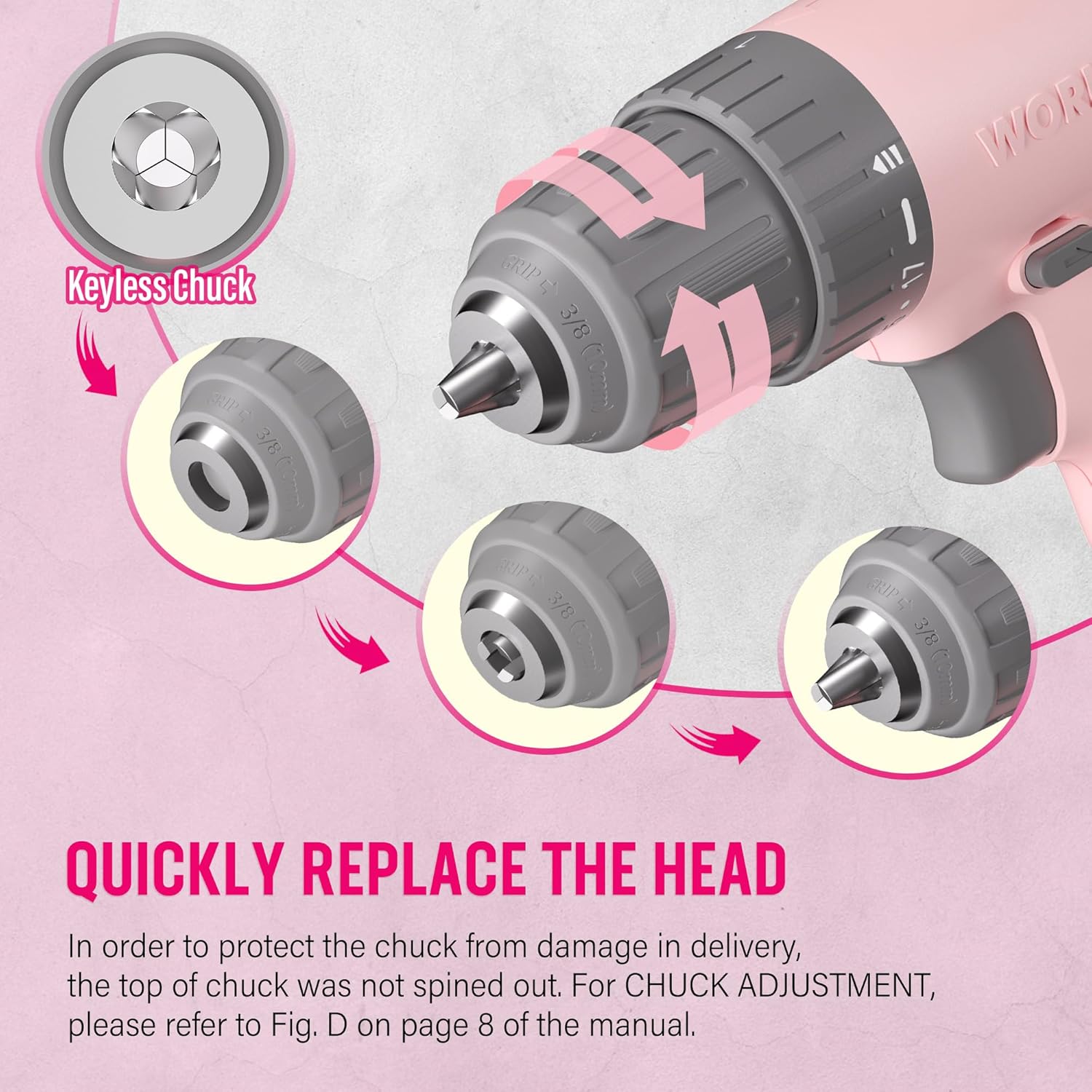
Image: A close-up illustration demonstrating the operation of the keyless chuck, showing how to open and close it to quickly replace drill or screwdriver bits.
4.2 การชาร์จแบตเตอรี่
The drill is equipped with an integrated 12V Lithium-Ion battery and charges via a Type-C USB cable. Use a 5V/1A charger for optimal charging.
- Connect the Type-C end of the charging cable to the drill's charging port.
- Connect the USB-A end of the cable to any compatible USB power source (e.g., computer, power bank, USB wall adapter, car charger).
- Monitor the battery capacity indicator lights on the drill to check the charging status.
- A blinking light indicates the battery needs recharging. Multiple solid lights indicate charge level.

Image: The WORKPRO Pink Cordless Drill connected to a laptop via its Type-C charging cable, illustrating its USB rechargeable feature.
5. คู่มือการใช้งาน
5.1 การควบคุมความเร็วแบบแปรผัน
The drill features a variable speed trigger, allowing you to control the rotational speed from 0 to 750 RPM based on the pressure applied.
- แรงดันไฟ: For slower speeds, ideal for starting holes or driving screws precisely.
- ความกดดันหนัก: For faster speeds, suitable for drilling into materials.
- เรเลasing the trigger will automatically stop the drill.

Image: A hand holding the WORKPRO Pink Cordless Drill, illustrating how the variable speed switch operates based on trigger pressure (0-750 RPM).
5.2 การตั้งค่าแรงบิด (17+1)
The 17+1 torque adjustable design allows you to select the appropriate torque for different tasks and materials, preventing over-driving screws or damaging surfaces. The maximum torque can reach 19 Newton Meters (168 IN-LBS).
- Rotate the torque adjustment collar located behind the chuck to select the desired setting.
- Lower settings are for driving small screws or working with soft materials.
- Higher settings are for driving larger screws or drilling into harder materials like wood, PVC, or metal.
- The "+1" setting is for drill mode, providing maximum torque for drilling applications.
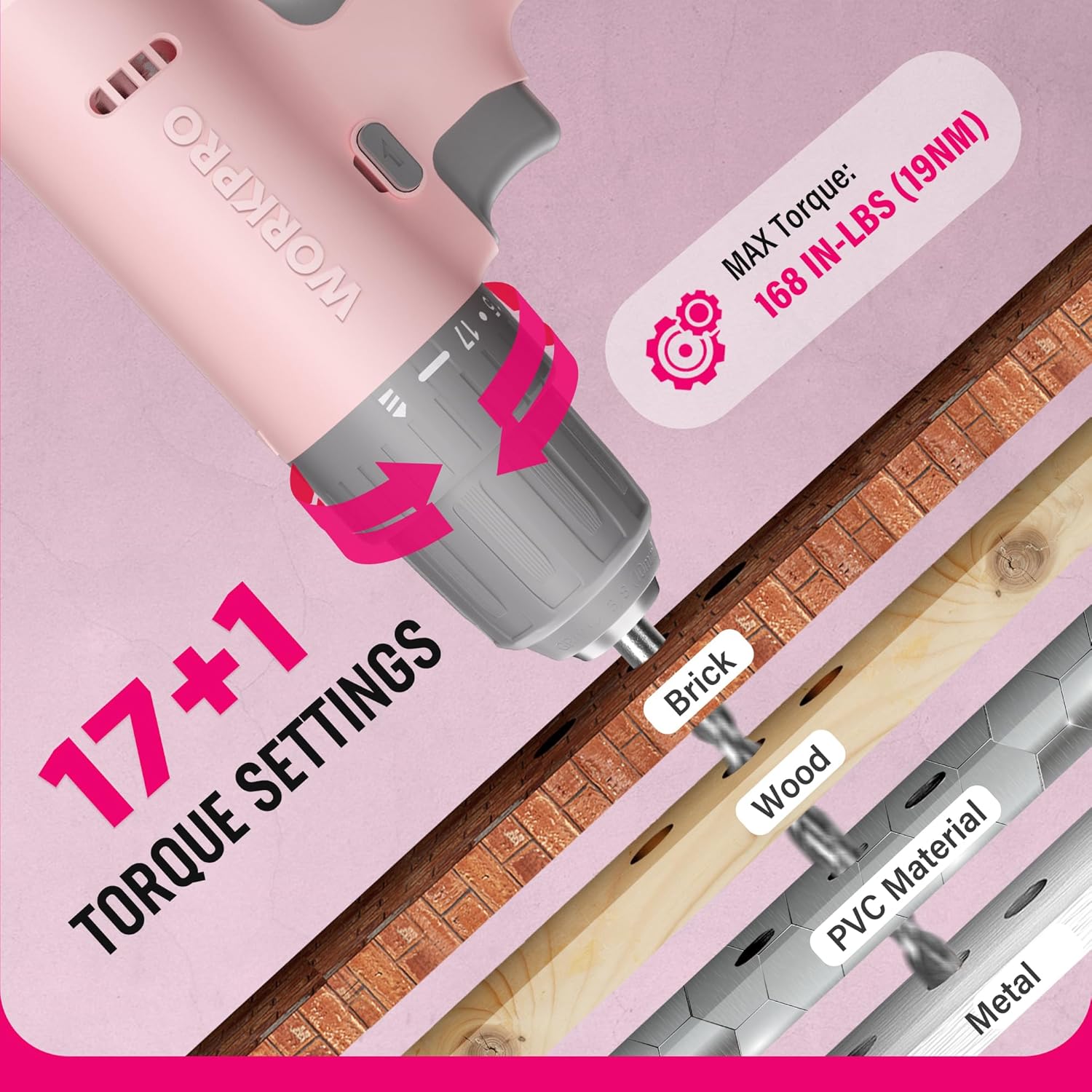
ภาพ: ภาพระยะใกล้ view of the WORKPRO Pink Cordless Drill's 17+1 torque settings, indicating suitable materials like brick, wood, PVC, and metal for different torque levels.
5.3 สวิตช์เดินหน้า/ถอยหลัง
The forward/reverse switch allows you to change the direction of rotation for driving or removing screws and bits.
- Push the switch to the left for forward rotation (driving screws/drilling).
- กดสวิตช์ไปทางขวาเพื่อหมุนกลับทิศทาง (สำหรับถอดสกรู/ดอกสว่าน)
- Center the switch to lock the trigger and prevent accidental operation.
ไฟ LED ทำงาน 5.4 ดวง
The integrated LED light activates when the trigger is pressed, illuminating the work area for improved visibility in dark or confined spaces.

Image: The WORKPRO Pink Cordless Drill in use, with its LED work light brightly illuminating the area, making it easier to work in dark environments.
6. การบำรุงรักษา
Proper maintenance ensures the longevity and optimal performance of your drill.
- การทำความสะอาด: Regularly wipe down the drill with a soft, damp ผ้า ห้ามใช้สารเคมีรุนแรงหรือน้ำยาทำความสะอาดที่มีฤทธิ์กัดกร่อน ควรทำความสะอาดช่องระบายอากาศให้ปราศจากฝุ่นและเศษขยะ
- พื้นที่จัดเก็บ: Store the drill in a dry place, away from direct sunlight and extreme temperatures. Ensure the battery is partially charged before long-term storage.
- การดูแลแบตเตอรี่ Avoid fully discharging the battery frequently. Recharge the battery before it is completely depleted to prolong its lifespan.
- การบำรุงรักษาชัค: ทำความสะอาดขากรรไกรของหัวจับเป็นระยะเพื่อให้แน่ใจว่าจับดอกสว่านได้อย่างเหมาะสม
7 การแก้ไขปัญหา
| ปัญหา | สาเหตุที่เป็นไปได้ | สารละลาย |
|---|---|---|
| สว่านไม่เปิด | แบตเตอรี่หมด Forward/reverse switch is in the locked (center) position. | Charge the battery using the provided Type-C cable. เลื่อนสวิตช์เดินหน้า/ถอยหลังไปที่ตำแหน่งเดินหน้าหรือถอยหลัง |
| กำลังหรือความเร็วลดลง | ชาร์จแบตเตอรี่ต่ำ Incorrect torque setting for the task. | ชาร์จแบตเตอรี่ Adjust the torque collar to a higher setting or switch to drill mode. |
| บิตลื่นในหัวจับ | ขันหัวจับไม่แน่นพอ ก้านดอกสว่านสกปรกหรือชำรุด | ขันหัวจับให้แน่นอีกครั้ง ทำความสะอาดหรือเปลี่ยนดอกสว่านใหม่ |
8. ข้อมูลจำเพาะ
| คุณสมบัติ | รายละเอียด |
|---|---|
| ยี่ห้อ | เวิร์คโปร |
| หมายเลขรุ่น | W122061 |
| แหล่งพลังงาน | ใช้พลังงานจากแบตเตอรี่ |
| เล่มที่tage | 12 โวลต์ |
| ความเร็วการหมุนสูงสุด | 750 รอบต่อนาที |
| แรงบิดสูงสุด | 19 Newton Meters (168 IN-LBS) |
| การตั้งค่าแรงบิด | 17 + 1 (โหมดเจาะ) |
| ขนาดเชย | 3/8 นิ้ว (แบบไม่มีกุญแจ) |
| ประเภทแบตเตอรี่ | ลิเธียมไอออน (รวมอยู่ด้วย) |
| พอร์ตชาร์จ | Type-C USB (5V-9V input) |
| คุณสมบัติพิเศษ | ไฟทำงาน LED ปรับความเร็วได้ |
| วัสดุ | ABS Plastic + TPE |
| น้ำหนักสินค้า | 1.37 กิโลกรัม (ประมาณ 3.01 ปอนด์) |
| ขนาดสินค้า | 9.37 x 2.87 x 9.92 นิ้ว |
9. การรับประกันและการสนับสนุน
For warranty information or technical support, please refer to the contact details provided with your product packaging or visit the official WORKPRO webไซต์ โปรดเก็บใบเสร็จรับเงินไว้เป็นหลักฐานการซื้อ
WORKPRO Tools is committed to quality and customer satisfaction. Additionally, a portion of this product's purchase supports the NATIONAL BREAST CANCER FOUNDATION, INC., aiding in early detection, education, and support services.


