การแนะนำ
This manual provides comprehensive instructions for the operation and maintenance of your AbergBest Mini Digital Camera. Designed for ease of use, this compact camera is ideal for capturing everyday moments with its 21-megapixel sensor and HD 720P video recording capabilities. Please read this manual thoroughly to ensure proper usage and to maximize your camera's potential.
มีอะไรอยู่ในกล่อง
Upon unboxing your AbergBest Mini Digital Camera, please verify that all the following components are included:
- AbergBest Mini Digital Camera (Model: New2022ABDC5100)
- 2 x Lithium Batteries
- Charging Brick (USB Wall Adapter)
- สาย USB (สำหรับชาร์จและถ่ายโอนข้อมูล)
- สายรัดข้อมือ
- Driver Disk (CD)
- คู่มือการใช้งาน
- Carrying Satchel

Image: All components included in the AbergBest Mini Digital Camera package.
การตั้งค่า
1. การติดตั้งแบตเตอรี่
The camera comes with two rechargeable lithium batteries. To install a battery:
- หาฝาปิดช่องใส่แบตเตอรี่ที่ด้านล่างของกล้อง
- เลื่อนสลักเพื่อเปิดช่องเก็บของ
- ใส่แบตเตอรี่ ตรวจสอบให้แน่ใจว่าขั้วแบตเตอรี่ตรงกันอย่างถูกต้อง
- ปิดฝาช่องใส่แบตเตอรี่ให้สนิทจนได้ยินเสียงคลิก

Image: Visual guide for inserting the battery into the camera.
2. SD Card Installation (Not Included)
An SD memory card is required to store photos and videos. The camera supports up to a 64GB SD memory card. For optimal performance, use a certified brand SD card with a Class 4 speed or above.
- ค้นหาช่องเสียบการ์ด SD ซึ่งโดยทั่วไปจะอยู่ใกล้ช่องใส่แบตเตอรี่หรือด้านข้างของกล้อง
- ใส่การ์ด SD โดยให้ด้านที่เป็นโลหะหันลง จนกระทั่งได้ยินเสียงคลิกเข้าที่
- ในการถอด ให้ดันการ์ดเข้าไปเบาๆ จนกระทั่งการ์ดเด้งออกมา

Image: Recommended SD card types and capacity for the camera.
3. การชาร์จกล้อง
Use the provided USB cable and charging brick to charge the camera. A fully charged battery can support the camera for over 60 minutes of use.
- เสียบปลายสาย USB ด้านเล็กเข้ากับพอร์ต USB ของกล้อง
- Connect the large end of the USB cable to the charging brick.
- Plug the charging brick into a wall outlet.
- ไฟแสดงสถานะการชาร์จจะสว่างขึ้นขณะชาร์จและจะดับลงเมื่อชาร์จเสร็จสมบูรณ์
คำแนะนำการใช้งาน
1. การเปิด/ปิดเครื่อง
Press and hold the Power button (usually located on the top or side of the camera) to turn the camera on or off.
2. การใช้งานหน้าจอ LCD
The camera features a 2.7-inch TFT LCD screen for framing shots, reviewการดูรูปภาพ และการใช้งานเมนูต่างๆ
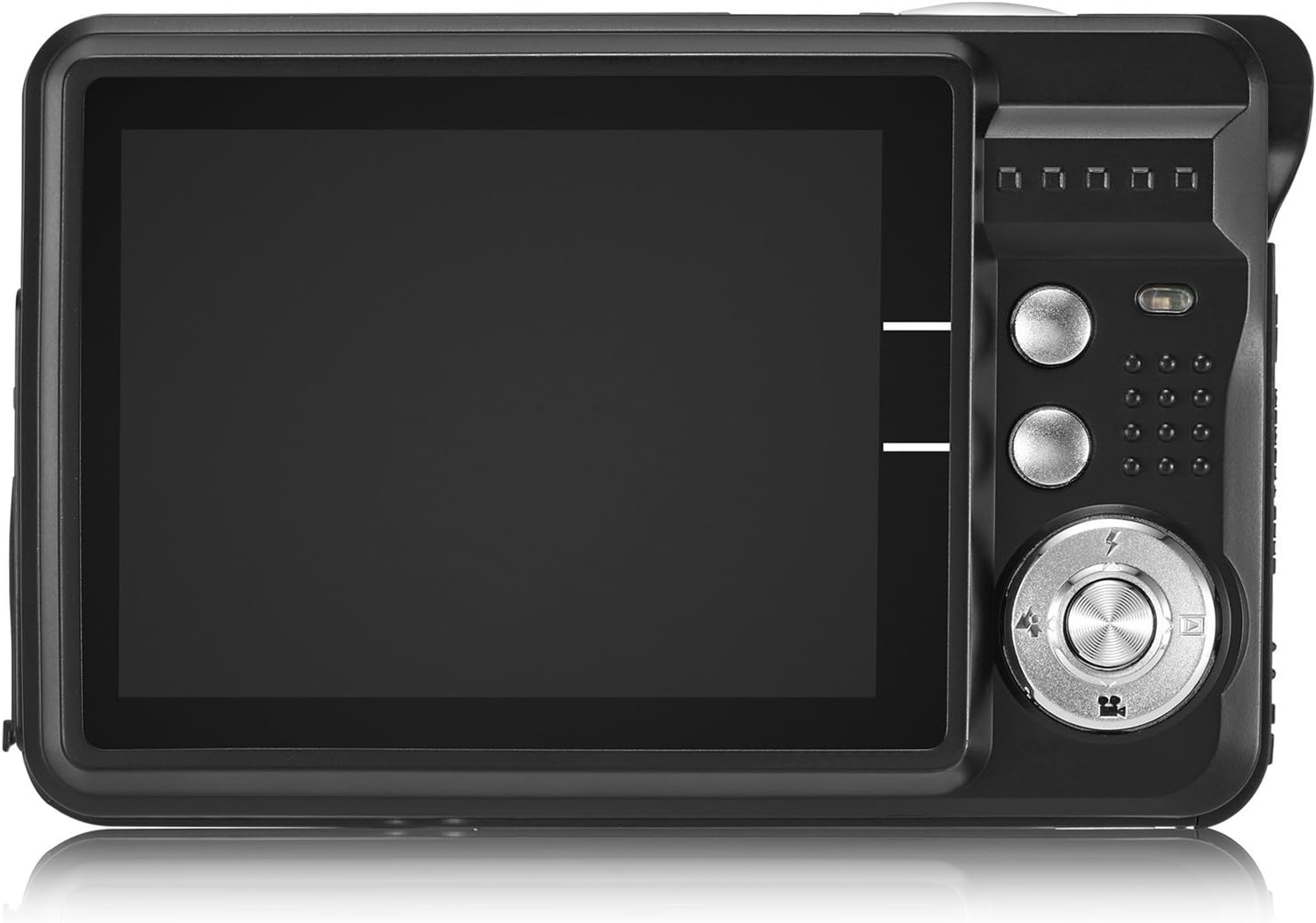
Image: The camera's 2.7-inch LCD screen and rear controls.
3.การถ่ายภาพ
วิธีถ่ายภาพนิ่ง:
- จัดองค์ประกอบภาพโดยใช้หน้าจอ LCD
- กดปุ่มชัตเตอร์ลงครึ่งหนึ่งเพื่อปรับโฟกัส
- Press the Shutter button fully to take the picture.
The camera captures images at 21 megapixels in JPEG format.
4. บันทึกวิดีโอ
ในการบันทึกวิดีโอ:
- Switch the camera to video mode (refer to the on-screen icons or user manual for specific button).
- กดปุ่มชัตเตอร์เพื่อเริ่มการบันทึก
- กดปุ่มชัตเตอร์อีกครั้งเพื่อหยุดการบันทึก
Videos are recorded in HD 720P resolution in AVI format.

Image: The camera displaying video recording functionality.
5. ฟังก์ชั่นซูม
The camera features 8X digital zoom. Use the zoom buttons (often labeled with a magnifying glass icon or 'W' for Wide and 'T' for Telephoto) to adjust the zoom level.

Image: Demonstrating the camera's 8X digital zoom capability.
6. Scene Modes and Settings
Access the camera's menu to select various scene modes and adjust settings for different shooting conditions. Available modes include:
- ภาพบุคคลตอนกลางคืน: For clear portraits in low light.
- Night Scenery: Optimizes for landscapes at night.
- กีฬา: Reduces blur for fast-moving subjects.
- Scenery: Enhances outdoor landscape shots.
- งานสังสรรค์: Ideal for indoor events with mixed lighting.
- ชายหาด: Adjusts for bright, reflective environments.
- ความไวสูง: Improves performance in very low light.
Other adjustable settings include ISO (Auto, 100, 200, 400), Anti-Shake for stable images, and Flash options (Auto, On, Off, Red-eye Reduction). The camera also features Face Detection, Smile Capture, and a 2-second Self-Timer.

Image: The camera's 2.7-inch screen highlighting the face detection feature.

Image: Illustrating the effect of the built-in flash in low-light conditions.
การเชื่อมต่อกับคอมพิวเตอร์
วิธีโอนรูปภาพและวิดีโอไปยังคอมพิวเตอร์ของคุณ:
- ตรวจสอบให้แน่ใจว่ากล้องปิดอยู่
- เชื่อมต่อกล้องเข้ากับคอมพิวเตอร์ของคุณโดยใช้สาย USB ที่ให้มา
- เปิดกล้อง กล้องควรจะปรากฏเป็นไดรฟ์แบบถอดได้บนคอมพิวเตอร์ของคุณ
- Alternatively, you can remove the SD card and insert it into a compatible card reader connected to your computer.
The camera is compatible with Windows XP/VISTA/7/8/10 and Mac operating systems. A driver disk is included for older systems or specific software needs, though most modern operating systems will recognize the camera automatically.

Image: Connecting the camera to a personal computer for data transfer.
การซ่อมบำรุง
Proper care will extend the life of your camera:
- การทำความสะอาด: Use a soft, lint-free cloth to clean the camera body and screen. For the lens, use a specialized lens cleaning cloth and solution. Avoid harsh chemicals.
- พื้นที่จัดเก็บ: เก็บกล้องไว้ในที่แห้งและเย็น หลีกเลี่ยงแสงแดดโดยตรงและอุณหภูมิที่สูงหรือต่ำเกินไป ถอดแบตเตอรี่ออกหากเก็บเป็นเวลานาน
- การดูแลแบตเตอรี่ Fully charge batteries before first use. Avoid overcharging or completely draining the battery frequently to prolong its lifespan.
การแก้ไขปัญหา
หากคุณพบปัญหาเกี่ยวกับกล้อง โปรดลองทำตามขั้นตอนการแก้ไขปัญหาทั่วไปต่อไปนี้:
- กล้องไม่เปิด: Ensure the battery is correctly installed and fully charged. Try using the second provided battery.
- คุณภาพของภาพไม่ดี: Check lighting conditions. Ensure the lens is clean. Adjust scene modes or ISO settings as needed.
- ข้อผิดพลาดการ์ดหน่วยความจำ: Ensure the SD card is properly inserted and not full. Try formatting the card (this will erase all data, so back up first). Use a compatible SD card (Class 4 or above, up to 64GB).
- กล้องหยุดนิ่ง: ถอดและใส่แบตเตอรี่กลับเข้าไปใหม่เพื่อรีเซ็ตกล้อง
If problems persist, please refer to the detailed user manual or contact customer support.
ข้อมูลจำเพาะ
| คุณสมบัติ | รายละเอียด |
|---|---|
| ยี่ห้อ | อาเบิร์กเบิร์ก |
| ชื่อรุ่น | ABCAM218UPDATED |
| หมายเลขรุ่น | New2022ABDC5100 |
| สูงสุด Webความละเอียดของภาพลูกเบี้ยว | 21 MP |
| เทคโนโลยีโฟโต้เซนเซอร์ | ซีมอส |
| ความละเอียดวิดีโอ | 720p |
| รองรับ File รูปแบบ | AVI (Video), JPEG (Photo) |
| ระบบป้องกันภาพสั่นไหว | ดิจิตอล |
| ขนาดหน้าจอ | จอ TFT ขนาด 2.7 นิ้ว |
| ซูมดิจิตอล | 8x |
| ประเภทหน่วยความจำแฟลช | SD (up to 64GB, Class 4+) |
| ประเภทแบตเตอรี่ | ลิเธียมโพลีเมอร์ (รวม 2 ชิ้น) |
| เทคโนโลยีการเชื่อมต่อ | ยูเอสบี |
| อุปกรณ์ที่รองรับ | Windows XP/VISTA/7/8/10/MAC |
| คุณสมบัติพิเศษ | Face Detection, Smile Capture, Anti-Shake, Self-Timer |
| น้ำหนักสินค้า | 309 กรัม |
| ขนาดสินค้า (ลึก x กว้าง x สูง) | ลึก 3.74 นิ้ว x กว้าง 2.4 นิ้ว x สูง 0.94 นิ้ว |
การรับประกันและการสนับสนุน
Your AbergBest Mini Digital Camera comes with a รับประกันจากผู้ผลิต 1 ปี. For warranty claims, technical support, or any questions regarding your product, please refer to the contact information provided in the included user manual or visit the official AbergBest webเว็บไซต์.
โปรดเก็บหลักฐานการซื้อไว้เพื่อวัตถุประสงค์การรับประกัน