1. บทนำ
This manual provides essential information for the safe and efficient use of your TechniSat DIGITRADIO 143 (V3) HiFi Internet Radio Tuner. Please read these instructions thoroughly before operating the device and retain them for future reference. The DIGITRADIO 143 (V3) is designed to enhance your existing stereo system with a wide range of modern audio reception and streaming capabilities.

Image 1.1: The TechniSat DIGITRADIO 143 (V3) integrated into a home audio setup.
The DIGITRADIO 143 (V3) is a versatile tuner without integrated speakers, allowing you to upgrade your stereo system with DAB+/DAB, FM, Internet radio, and various streaming options, including MP3 file playback. Its standard Hi-Fi component width of 43.5 cm ensures seamless integration with most existing audio systems.

Image 1.2: Highlighting the diverse radio reception capabilities of the device.
2. ข้อมูลด้านความปลอดภัย
โปรดปฏิบัติตามข้อควรระวังด้านความปลอดภัยต่อไปนี้เสมอ เพื่อป้องกันความเสียหายต่ออุปกรณ์หรือการบาดเจ็บต่อตัวคุณเอง:
- อย่าให้อุปกรณ์โดนฝนหรือความชื้น
- อย่าเปิดอุปกรณ์casinง. ส่งต่อการบริการทั้งหมดให้กับบุคลากรที่มีคุณสมบัติ
- ตรวจสอบให้แน่ใจว่ามีการระบายอากาศที่เหมาะสมเพื่อป้องกันภาวะความร้อนมากเกินไป
- ใช้เฉพาะอะแดปเตอร์แปลงไฟที่ให้มากับเครื่องเท่านั้น
- เก็บอุปกรณ์ให้ห่างจากแหล่งความร้อนและแสงแดดโดยตรง
- ทำความสะอาดอุปกรณ์ด้วยผ้าแห้งและนุ่มเท่านั้น
3. เนื้อหาบรรจุภัณฑ์
ตรวจสอบว่ามีรายการทั้งหมดอยู่ในแพ็คเกจ:
- TechniSat DIGITRADIO 143 (V3) HiFi Internet Radio Tuner (Black)
- เสาอากาศลวด
- รีโมทคอนโทรล
- คู่มือการใช้งาน
4. สินค้าหมดview
4.1 แผงด้านหน้า

ภาพที่ 4.1: ด้านหน้า view of the DIGITRADIO 143 (V3), showing the display, controls, and USB port.
The front panel features a 3.2-inch color TFT display for clear information display, navigation buttons, a USB port for media playback and charging, and rotary controls for tuning and volume.

ภาพที่ 4.2: รายละเอียด view of the 3.2-inch color display and front USB port.
4.2 การเชื่อมต่อแผงด้านหลัง
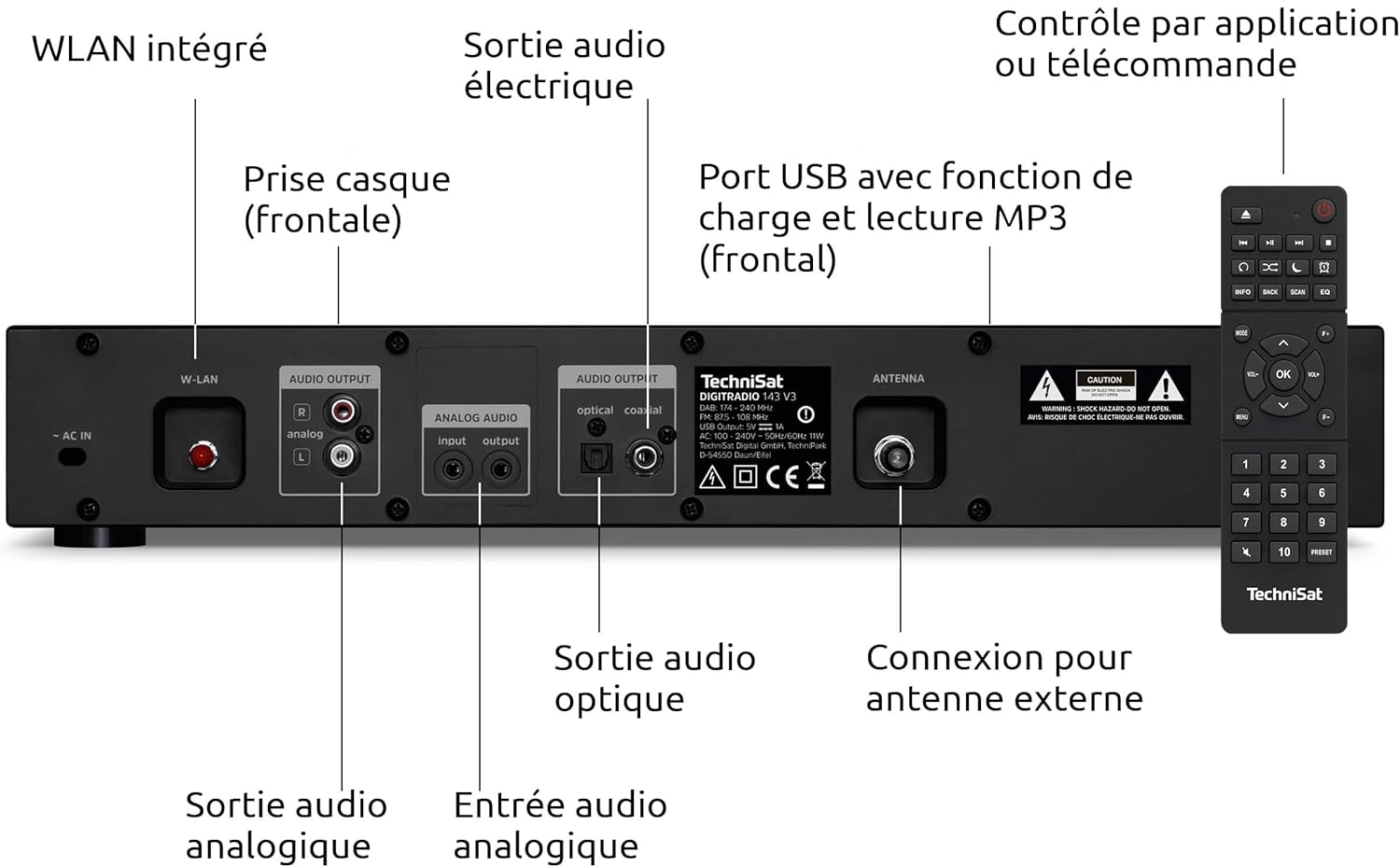
Image 4.3: Rear panel connections including Wi-Fi antenna, audio outputs, and antenna input.
- AC ใน: การเชื่อมต่อสายไฟ
- เครือข่ายไร้สาย: Integrated Wi-Fi antenna connection.
- AUDIO OUTPUT (Analog L/R): RCA connectors for analog audio output to an ampเครื่องขยายเสียงหรือตัวรับสัญญาณ
- AUDIO INPUT (Analog L/R): RCA connectors for analog audio input from an external source.
- OPTICAL AUDIO OUTPUT: เอาต์พุตเสียงดิจิตอลแบบออปติคอล
- COAXIAL AUDIO OUTPUT: เอาต์พุตเสียงดิจิตอลแบบโคแอกเซียล
- เสาอากาศ: F-type connector for external DAB+/FM antenna.
- หูฟัง: 3.5mm jack for headphone connection (front panel).

Image 4.4: Numbered diagram of the rear panel connections for easy identification.
5. การตั้งค่า
5.1 Placement and Integration
Place the DIGITRADIO 143 (V3) on a stable, flat surface, ensuring adequate ventilation around the unit. Its 43.5 cm width is designed to fit seamlessly into standard Hi-Fi racks alongside other components.

Image 5.1: The DIGITRADIO 143 (V3) fitting perfectly within a Hi-Fi system stack.
5.2 Connecting to Power and Audio System
- การเชื่อมต่อเสาอากาศ: Connect the supplied wire antenna to the ANTENNA port on the rear panel. For improved reception, consider connecting an external DAB+/FM antenna.
- เอาต์พุตเสียง: Connect the DIGITRADIO 143 (V3) to your ampใช้เครื่องขยายเสียงหรือเครื่องรับสัญญาณโดยใช้วิธีใดวิธีหนึ่งต่อไปนี้:
- อนาล็อก: Use RCA cables to connect the AUDIO OUTPUT (Analog L/R) ports to an available analog input on your ampชีวิต.
- ดิจิตอล: Use an optical or coaxial cable to connect the corresponding digital output on the DIGITRADIO 143 (V3) to a digital input on your amplifier/เครื่องรับ.
- การเชื่อมต่อไฟฟ้า: Plug the power cable into the AC IN port on the rear panel, then connect it to a wall outlet.
5.3 ตัวช่วยการตั้งค่าเริ่มต้น
Upon first power-on, the device will guide you through an initial setup wizard. Follow the on-screen prompts to configure language, time, date, and network settings (Wi-Fi). Ensure your Wi-Fi network name (SSID) and password are available.
6. การดำเนินการ
6.1 โหมดวิทยุ (DAB+, FM, วิทยุอินเทอร์เน็ต)
Use the MODE button on the front panel or remote control to switch between DAB+, FM, and Internet Radio modes. In each mode, use the TUNING/OK knob or navigation buttons to scan for stations and select your preferred broadcasts.

Image 6.1: The display showing details of an Internet Radio station.
6.2 การสตรีมเสียงบลูทูธ
To stream audio from a Bluetooth-enabled device (e.g., smartphone, tablet):
- Select Bluetooth mode on the DIGITRADIO 143 (V3).
- Enable Bluetooth on your external device and search for available devices.
- Select "DIGITRADIO 143" from the list to pair.
- Once paired, you can play audio from your device through the tuner.

Image 6.2: Wireless music enjoyment via Bluetooth or Spotify Connect.
6.3 การเชื่อมต่อ Spotify
The DIGITRADIO 143 (V3) supports Spotify Connect for both Free and Premium accounts. To use Spotify Connect:
- Ensure your DIGITRADIO 143 (V3) is connected to the internet.
- เปิดแอป Spotify บนสมาร์ทโฟน แท็บเล็ต หรือคอมพิวเตอร์ของคุณ
- เปิดเพลงแล้วแตะไอคอน "อุปกรณ์ที่ใช้งานได้"
- Select "DIGITRADIO 143" from the list of devices.
6.4 การเล่น USB
เสียบอุปกรณ์จัดเก็บข้อมูล USB ที่มีไฟล์ MP3 files into the front USB port. The device will automatically detect the media and allow you to navigate and play your music files.
การควบคุมแอพ 6.5 ตัว
Control your DIGITRADIO 143 (V3) using a compatible smartphone application such as UNDOK or OKTIV. Download the app from your device's app store and follow the in-app instructions to connect to your tuner.

Image 6.3: The device can be conveniently controlled via a smartphone app.
7. การบำรุงรักษา
To ensure the longevity and optimal performance of your DIGITRADIO 143 (V3):
- การทำความสะอาด: Disconnect the power before cleaning. Use a soft, dry, lint-free cloth to wipe the exterior. Do not use liquid cleaners or abrasive materials.
- การระบายอากาศ : ตรวจสอบให้แน่ใจว่าช่องระบายอากาศไม่ได้ถูกปิดกั้น
- พื้นที่จัดเก็บ: หากต้องเก็บรักษาอุปกรณ์เป็นเวลานาน ควรตัดการเชื่อมต่อจากแหล่งจ่ายไฟและเก็บไว้ในที่แห้งและเย็น
8 การแก้ไขปัญหา
| ปัญหา | สาเหตุที่เป็นไปได้ | สารละลาย |
|---|---|---|
| ไม่มีไฟฟ้า | สายไฟไม่ได้เชื่อมต่อ เต้าเสียบไฟฟ้าชำรุด | ตรวจสอบการเชื่อมต่อสายไฟ ลองใช้เต้ารับอื่น |
| No radio reception (DAB+/FM) | Antenna not connected or poorly positioned; weak signal. | Ensure antenna is securely connected and properly positioned. Consider an external antenna. |
| No Internet Radio/Streaming | No Wi-Fi connection; incorrect Wi-Fi password; router issue. | Check Wi-Fi settings and password. Restart your Wi-Fi router. Ensure strong Wi-Fi signal. |
| ปัญหาการจับคู่บลูทูธ | Device not in pairing mode; external device Bluetooth off. | Ensure DIGITRADIO 143 (V3) is in Bluetooth mode. Enable Bluetooth on your external device and search again. |
| รีโมตคอนโทรลไม่ทำงาน | แบตเตอรี่หมด มีสิ่งกีดขวางระหว่างรีโมทและตัวเครื่อง | Replace remote control batteries (2x AAA). Ensure clear line of sight to the unit's IR receiver. |
9. ข้อมูลจำเพาะ
- ยี่ห้อ: เทคนิแซท
- แบบอย่าง: DIGITRADIO 143 (V3)
- สี: สีดำ
- การเชื่อมต่อ: ไวไฟ, บลูทูธ
- เทคโนโลยีการปรับแต่ง: วิทยุ DAB+, FM, วิทยุอินเทอร์เน็ต
- คุณสมบัติพิเศษ: DAB+ radio, FM radio (with RDS and PLL), Internet radio, 3.2" color TFT display, Spotify Connect, Bluetooth audio streaming, app control, USB charge/playback function
- อินพุต/เอาต์พุต: USB (Type A, 1 port), Analog Audio L/R Input (RCA), Analog Audio L/R Output (RCA), Optical Digital Output, Coaxial Digital Output, 3.5mm Headphone Jack, External Antenna Connection (F-type)
- ขนาดสินค้า (กว้าง x สูง x ลึก): 43.5 x 7.5 x 29 ซม.
- แหล่งพลังงาน: สายไฟ
- ส่วนประกอบที่รวมอยู่: DIGITRADIO 143, wire antenna, remote control, instruction manual
10. การรับประกันและการสนับสนุน
This TechniSat DIGITRADIO 143 (V3) comes with a standard 2-year warranty from the date of purchase. This warranty covers manufacturing defects and material faults under normal use. It does not cover damage caused by misuse, accidents, unauthorized modifications, or normal wear and tear.
For technical support, warranty claims, or further assistance, please contact TechniSat customer service through their official website or the retailer where the product was purchased. Please have your proof of purchase and product model number (0000/2947) available when contacting support.