1. บทนำ
This manual provides essential information for the safe and efficient operation of your Powertech MB3904 8 Step Intelligent Lead Acid and Lithium Battery Charger. Please read this manual thoroughly before use and retain it for future reference.
2. ข้อมูลด้านความปลอดภัย
ปฏิบัติตามข้อควรระวังเพื่อความปลอดภัยต่อไปนี้เสมอ:
- Ensure the charger is disconnected from the power supply before making or breaking connections to the battery.
- ใช้เครื่องชาร์จเฉพาะในบริเวณที่มีการระบายอากาศที่ดีเท่านั้น
- หลีกเลี่ยงการชาร์จแบตเตอรี่ที่ถูกแช่แข็ง
- อย่าให้เครื่องชาร์จโดนฝนหรือความชื้นมากเกินไป
- เก็บให้พ้นจากมือเด็ก
- This charger is designed for 6V or 12V Lead Acid or LiFePO4 batteries only. Do not use with other battery types.
3. เนื้อหาบรรจุภัณฑ์
ตรวจสอบว่ามีรายการทั้งหมดอยู่ในแพ็คเกจ:
- Powertech MB3904 8 Step Intelligent Battery Charger Unit
- แบตเตอรี่Clamp Connectors (Red and Black)
- Ring Terminal Connectors
- สายไฟ AC
- คู่มือการใช้งาน (เอกสารนี้)
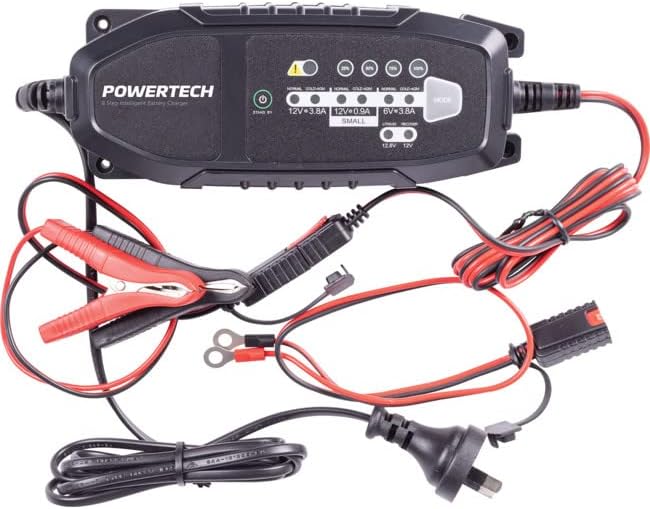
Image: The Powertech MB3904 battery charger unit shown with its various included accessories, including battery clamps, ring terminals, and the AC power cord.
4. คุณสมบัติของผลิตภัณฑ์
The Powertech MB3904 charger offers advanced features for optimal battery maintenance:
- 8-Step Charging Process: Ensures thorough and efficient charging for various battery types.
- หลายเล่มtagความเข้ากันได้: Suitable for both 6V and 12V lead acid and LiFePO4 batteries.
- การป้องกันที่ครอบคลุม: Includes overload, short circuit, reverse polarity, safety timer, and wrong battery protection.
- ไฟ LED แสดงสถานะที่ใช้งานง่าย: Clearly display charge status and selected mode.
- ปุ่มเลือกโหมด: Allows easy switching between charging modes.
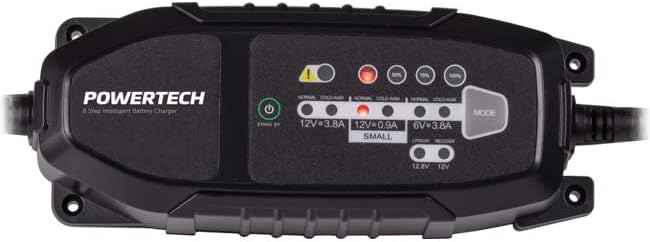
ภาพ: จากบนลงล่าง view of the Powertech MB3904 charger, highlighting the LED indicators for charge status and the 'MODE' button for selecting charging programs.
5. การตั้งค่า
- การจัดวาง: Place the charger on a stable, flat surface in a well-ventilated area, away from direct sunlight or heat sources.
- การเชื่อมต่อแบตเตอรี่: Ensure the battery terminals are clean. Connect the red (+) clamp/ring terminal to the positive (+) battery terminal and the black (-) clamp/ring terminal to the negative (-) battery terminal. Ensure a secure connection.
- การเชื่อมต่อไฟฟ้า: Plug the AC power cord into a suitable wall outlet. The charger will enter standby mode.
6. คู่มือการใช้งาน
6.1 การเลือกโหมดการชาร์จ
After connecting the battery and power, press the โหมด button to cycle through the available charging programs. The corresponding LED will illuminate to indicate the selected mode:
- 12V 3.8A (Normal): Standard charging for 12V lead acid batteries.
- 12V 3.8A (Cold/AGM): For charging 12V lead acid batteries in cold conditions or AGM batteries.
- 12V 0.9A (Small): For charging smaller 12V lead acid batteries.
- 6V 3.8A: For charging 6V lead acid batteries.
- Lithium (12.8V/12V): For charging 12V LiFePO4 batteries.
- ซ่อมแซม: A special mode for desulfation of deeply discharged lead acid batteries.
6.2. กระบวนการชาร์จ
Once a mode is selected, the charger will automatically begin the 8-step charging process. The progress LEDs (25%, 50%, 75%, 100%) will illuminate sequentially to indicate the battery's charge level. When the 100% LED is solid, the battery is fully charged.
6.3. การถอดปลั๊กเครื่องชาร์จ
- ถอดสายไฟ AC ออกจากเต้ารับที่ผนัง
- ปลดสีดำ (-) clamp/ring terminal from the negative (-) battery terminal.
- ตัดการเชื่อมต่อสีแดง (+) clamp/ring terminal from the positive (+) battery terminal.
7. การบำรุงรักษา
- การทำความสะอาด: ทำความสะอาดที่ชาร์จasinเช็ดด้วยผ้านุ่มและแห้ง ห้ามใช้น้ำยาทำความสะอาดที่มีฤทธิ์กัดกร่อนหรือตัวทำละลาย
- พื้นที่จัดเก็บ: เก็บที่ชาร์จไว้ในที่เย็นและแห้งเมื่อไม่ได้ใช้งาน
- การตรวจสอบสายเคเบิล: Periodically inspect the power cord and battery cables for any signs of damage. Do not use the charger if cables are damaged.
8 การแก้ไขปัญหา
| ปัญหา | สาเหตุที่เป็นไปได้ | สารละลาย |
|---|---|---|
| เครื่องชาร์จไม่เปิด | ไม่มีไฟจากเต้าเสียบ; การเชื่อมต่อหลวม | ตรวจสอบเต้ารับไฟฟ้า ตรวจสอบให้แน่ใจว่าเสียบสายไฟอย่างแน่นหนา |
| ไฟ LED แสดงข้อผิดพลาดสว่างขึ้น | Reverse polarity; short circuit; wrong battery type. | Check battery connections for correct polarity; inspect cables for shorts; ensure battery type matches selected mode. |
| แบตเตอรี่ไม่ชาร์จ | Battery deeply discharged/damaged; incorrect mode selected. | Try "Repair" mode for lead acid batteries; test battery with a multimeter; ensure correct charging mode is selected. |
9. ข้อมูลจำเพาะ
- แบบอย่าง: เอ็มบี3904
- อินพุต Voltage: แรงดันไฟฟ้า 220-240 โวลต์ 50/60 เฮิรตซ์
- ปริมาณการส่งออกtage: DC 6 โวลต์ / 12 โวลต์
- กระแสไฟชาร์จ: 0.9ก/3.8ก
- ประเภทแบตเตอรี่: Lead Acid (WET, MF, CA, EFB, GEL, AGM), LiFePO4
- การป้องกัน: Overload, Short Circuit, Reverse Polarity, Safety Timer, Wrong Battery
- ขนาด : ขนาดประมาณ 20.4 x 7.4 x 4.8 ซม
- น้ำหนัก: ประมาณ 534 กรัม
- การปฏิบัติตาม: CE
10. การรับประกันและการสนับสนุน
This Powertech product is covered by a standard manufacturer's warranty. For specific warranty terms and conditions, please refer to the warranty card included with your purchase or contact your retailer.
For technical support or service inquiries, please contact Jaycar Electronics customer service or visit their official webไซต์นี้ โปรดเก็บหลักฐานการซื้อไว้เพื่อใช้ยืนยันการรับประกัน
เจย์คาร์ อิเล็กทรอนิกส์ Webเว็บไซต์: www.jaycar.com.au


