1. สินค้าหมดview
The ezcap234 TapeDigi 1 is a multi-functional device designed to bring your analog audio into the digital age. It combines a cassette player, AM/FM radio, and a digital audio recorder/converter into one portable unit. You can enjoy your old cassette tapes, tune into your favorite radio stations, and even record audio directly to a Micro SD card.
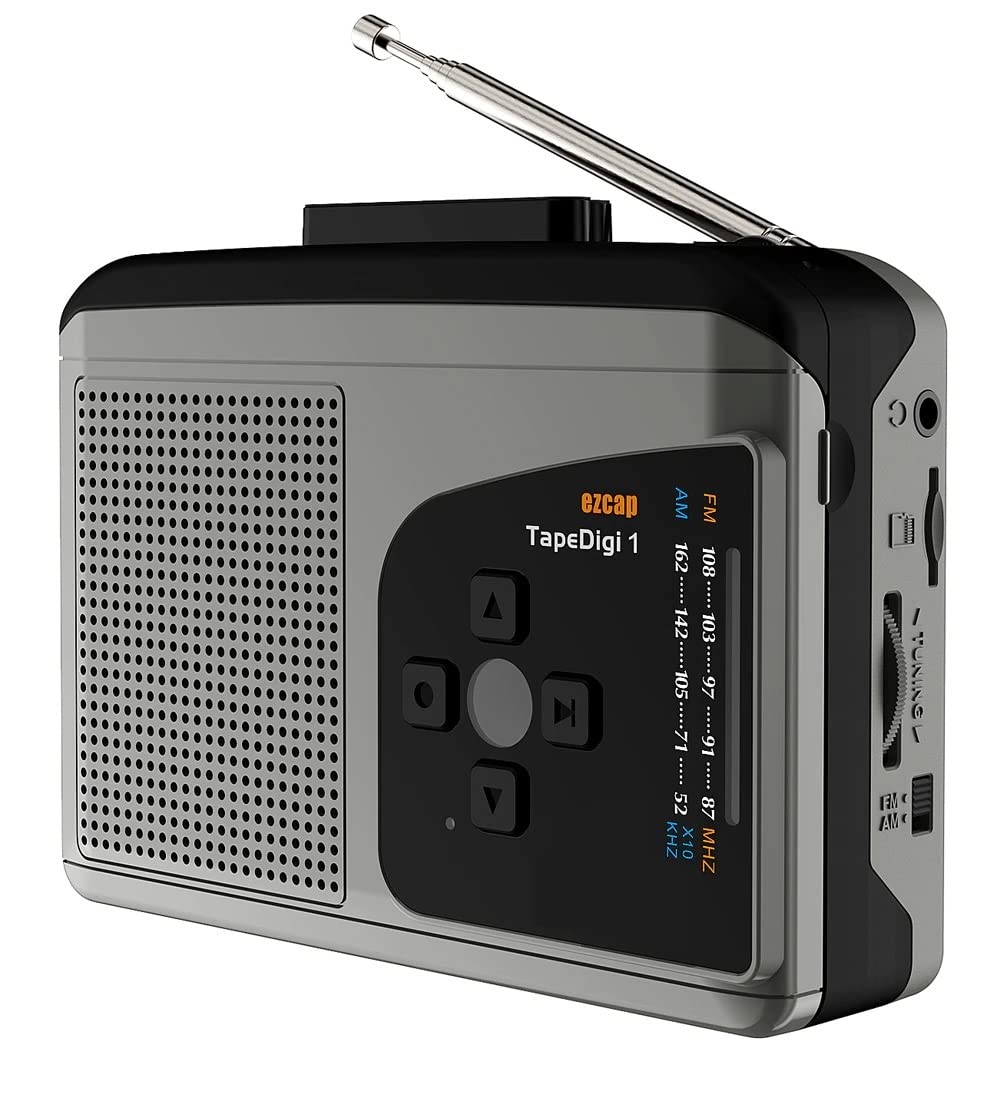
ภาพ: ด้านหน้า view of the ezcap234 TapeDigi 1, showcasing its speaker grille, control buttons, and extended antenna.
2. คุณสมบัติหลัก
- เครื่องเล่นเทปคาสเซ็ท: Playback your classic cassette tape collection.
- วิทยุ AM/FM: เปิดฟังสถานีวิทยุท้องถิ่นที่มีสัญญาณชัดเจน
- การแปลงไฟล์ MP3: Convert cassette tapes and radio broadcasts directly to MP3 files on a Micro SD card (up to 32GB).
- เครื่องบันทึกเสียง: Built-in microphone allows for direct voice recording to Micro SD card.
- ลำโพงในตัว: Enjoy audio playback directly from the device.
- แจ็คหูฟัง: สำหรับการฟังส่วนตัว
- ตัวเลือกพลังงานคู่: Operates via USB power or 2x AA batteries (not included).

Image: Visual representation of the device's core functionalities, including tape playback, radio, recording, and audio output options.
3. การระบุส่วนประกอบ
Familiarize yourself with the various parts of your ezcap234 TapeDigi 1:

Image: Detailed diagram labeling the antenna, volume adjustment, earphone jack, Micro SD card slot, radio tuning knob, FM/AM switch, Tape/Radio switch, Record/Stop recording button, Indicator LED, UP/DOWN/Play/Stop playing buttons, Speaker, Tape fast forward/rewind, Stop playing tape, Play tape, Microphone inside, and 5V DC jack.
- เสาอากาศ: Extendable for FM/AM radio reception.
- การปรับระดับเสียง: Rotary knob to control audio output level.
- แจ็คหูฟัง: 3.5mm port for connecting headphones.
- ช่องเสียบการ์ด Micro SD: Insert Micro SD card for recording and playback.
- ปุ่มปรับวิทยุ: ปรับความถี่วิทยุ
- FM/AM Switch: เลือกคลื่นวิทยุระหว่าง FM และ AM
- Tape/Radio Switch: Toggles between cassette player and radio modes.
- Record/Stop Recording Button: Initiates and ends audio recording.
- ไฟแสดงสถานะ LED: Shows device status (e.g., recording, power).
- Control Buttons (UP/DOWN/Play/Stop): For navigation and playback control.
- ผู้บรรยาย: ลำโพงในตัวสำหรับเอาต์พุตเสียง
- Tape Controls (Fast Forward/Rewind/Stop/Play): Standard cassette player controls.
- ไมโครโฟน: Internal microphone for voice recording.
- แจ็ค DC 5V: พอร์ตอินพุตไฟ
4. การเปิดเครื่อง
The ezcap234 TapeDigi 1 can be powered in two ways:
- พลังงาน USB: Connect a 5V DC power adapter (not included) to the 5V DC jack using a USB cable.
- แบตเตอรี่ AA: Insert 2x AA batteries (not included) into the battery compartment located on the back of the device. Ensure correct polarity.

Image: The device demonstrating its power options, showing both USB cable connection and the open battery compartment for AA batteries.
5. การเล่นเทปคาสเซ็ต
การเล่นเทปคาสเซ็ท:
- เปิดช่องใส่ตลับเทป
- Insert a cassette tape, ensuring it is properly seated.
- ปิดช่องใส่กลักกระดาษ
- เลื่อน Tape/Radio Switch to the 'Tape' position.
- กดปุ่ม เล่น ปุ่มบนแผงควบคุมของเครื่องเล่นเทปคาสเซ็ต
- ปรับแต่ง การปรับระดับเสียง ปรับระดับเสียงตามต้องการ
- ใช้ ส่งต่ออย่างรวดเร็ว และ ย้อนกลับ ปุ่มสำหรับนำทางเทป
- กดปุ่ม หยุด ปุ่มเพื่อหยุดเล่น

Image: The ezcap234 TapeDigi 1 positioned on a wooden surface, surrounded by various cassette tapes, illustrating its primary function as a cassette player.
6. การใช้งานวิทยุ AM/FM
หากต้องการฟังวิทยุ:
- เลื่อน Tape/Radio Switch to the 'Radio' position.
- ขยายเวลา เสาอากาศ เพื่อการรับสัญญาณที่ดีที่สุด
- เลื่อน FM/AM Switch to select your desired band (FM: 87-108MHz, AM: 520-1610 KHz).
- หมุน ปุ่มปรับวิทยุ to find a station.
- ปรับแต่ง การปรับระดับเสียง ปรับระดับเสียงตามที่คุณต้องการ

Image: The device with its telescopic antenna fully extended, highlighting its capability as a portable FM/AM radio receiver.

Image: A conceptual image showing the device broadcasting radio waves, with text bubbles indicating various types of content such as music, news, and talk shows, emphasizing its AM/FM radio function.
7. การบันทึกเสียง
The device supports recording from cassette tapes, AM/FM radio, and the built-in microphone directly to a Micro SD card.
7.1. Preparing for Recording
- Ensure a Micro SD card (up to 32GB, formatted to FAT32) is inserted into the ช่องเสียบการ์ด Micro SD.
- Select the desired audio source (Tape or Radio) using the Tape/Radio Switch, or prepare to use the built-in microphone.

ภาพ: ภาพระยะใกล้ view of the side of the device, clearly showing the Micro SD card slot, indicating where to insert the storage for recordings.
7.2. Recording from Tape or Radio
- Start playback of the cassette tape or tune to the desired radio station.
- กดปุ่ม Record/Stop Recording Button. The Indicator LED will illuminate, indicating recording is in progress.
- กดปุ่ม Record/Stop Recording Button again to stop recording. The LED will turn off.
7.3. Recording Voice (Built-in Microphone)
- Ensure the device is in 'Radio' mode (even if not listening to radio) or 'Tape' mode without a tape playing.
- กดปุ่ม Record/Stop Recording Button. The Indicator LED will illuminate.
- Speak clearly towards the built-in ไมโครโฟน.
- กดปุ่ม Record/Stop Recording Button อีกครั้งเพื่อหยุดการบันทึก

Image: The device next to a microphone icon and text, illustrating its capability to record voice using its built-in microphone and save to a Micro SD card.

Image: A person speaking near the device, with visual cues of sound waves, demonstrating the microphone recording function to a TF card.
7.4. Recording Modes (Auto/Manual)
The device supports both automatic and manual recording modes. In auto mode, the device can detect pauses in audio and automatically partition recordings into separate MP3 files, which is useful for digitizing albums or long broadcasts.

Image: A graphic illustrating audio waveforms, explaining the Auto or Manual Recording Mode feature, where auto mode can partition songs into separate MP3 files.
8. Converting Tapes to MP3
The ezcap234 TapeDigi 1 simplifies the process of converting your analog cassette tapes into digital MP3 files, saving them directly to a Micro SD card.
- Insert your Micro SD card into the slot.
- ใส่เทปคาสเซ็ตที่คุณต้องการแปลงลงในช่องใส่เทป
- ให้แน่ใจว่า Tape/Radio Switch is in the 'Tape' position.
- กดปุ่ม เล่น ปุ่มบนแผงควบคุมของเครื่องเล่นเทปคาสเซ็ต
- กดทันที Record/Stop Recording Button to begin conversion. The audio from the tape will be recorded as an MP3 file ลงในการ์ด Micro SD
- กดปุ่ม Record/Stop Recording Button again to stop the conversion.
The converted MP3 files can then be transferred to a computer or other devices for playback.

Image: A visual representation of the conversion process, showing a cassette tape transforming into MP3 format and being stored on a 32GB Micro SD card.

Image: An overhead shot of a workspace featuring the ezcap234 TapeDigi 1 alongside a laptop and other audio gear, demonstrating its role in converting old cassettes to MP3s for digital use.
9. การเล่นซ้ำของการบันทึก Files
To listen to MP3 files stored on the Micro SD card:
- ตรวจสอบให้แน่ใจว่าได้ใส่การ์ด Micro SD ที่มีไฟล์ MP3 แล้ว fileมีการแทรกตัวอักษร s เข้าไป
- เลื่อน Tape/Radio Switch to the 'Radio' position.
- กดปุ่ม Play/Stop playing button (often the center button in the control cluster).
- ใช้ ขึ้น/ลง buttons to navigate between recorded tracks.
- ปรับแต่ง การปรับระดับเสียง ปรับระดับได้ตามต้องการ

Image: The device surrounded by icons for music, news, and talk shows, illustrating its dual function of playing FM/AM radio and recording that content to MP3 format.
10 การแก้ไขปัญหา
| ปัญหา | สาเหตุที่เป็นไปได้ | สารละลาย |
|---|---|---|
| ไม่มีไฟ / อุปกรณ์ไม่เปิด | Batteries are dead or incorrectly inserted; USB cable not connected properly or power source is faulty. | Replace batteries, ensuring correct polarity. Check USB cable connection and try a different power source. |
| ไม่มีเสียงออกจากลำโพง/หูฟัง | Volume is too low; Earphones not fully plugged in; Device in wrong mode. | Increase volume. Ensure earphones are fully inserted. Check Tape/Radio switch position. |
| การรับสัญญาณวิทยุไม่ดี | เสาอากาศไม่ได้ยืดออก; บริเวณที่มีสัญญาณอ่อน; มีสัญญาณรบกวน | Fully extend the antenna. Try repositioning the device. Avoid areas with strong electromagnetic interference. |
| Cannot record to Micro SD card | Micro SD card is full, corrupted, or not formatted correctly (FAT32); Card not inserted properly. | Check Micro SD card capacity. Reformat the card to FAT32 on a computer. Reinsert the card firmly. Try a different Micro SD card. |
| Cassette tape not playing correctly | Tape is tangled or damaged; Tape compartment not closed properly. | Inspect the tape for damage. Ensure the tape compartment is securely closed. |
11. ข้อมูลจำเพาะ
| คุณสมบัติ | รายละเอียด |
|---|---|
| ยี่ห้อ | ไมโครเวฟ |
| แบบอย่าง | EZCAP-234-TapeDigi1 |
| ขนาดสินค้า | 10 x 3 x 8 ซม. |
| น้ำหนักสินค้า | 290 กรัม |
| แหล่งจ่ายไฟ | 5V DC (USB) or 2x AA Batteries |
| ความถี่วิทยุ | FM: 87-108MHz, AM: 520-1610 KHz |
| รูปแบบการบันทึก | เอ็มพี 3 |
| สื่อเก็บข้อมูล | Micro SD Card (up to 32GB, FAT32 format) |
| เอาท์พุตเสียง | Built-in Speaker, 3.5mm Earphone Jack |
| ป้อนข้อมูล | Cassette Tape, AM/FM Radio, Built-in Microphone |
12. การดูแลรักษา
- ควรเก็บอุปกรณ์ให้แห้ง อย่าให้โดนความชื้นหรืออุณหภูมิที่สูงเกินไป
- เช็ดทำความสะอาดภายนอกด้วยผ้าแห้งเนื้อนุ่ม ห้ามใช้สารทำความสะอาดที่มีฤทธิ์กัดกร่อนหรือตัวทำละลาย
- For cassette playback, periodically clean the tape head and pinch roller with a cotton swab lightly dampเคลือบด้วยไอโซโพรพิลแอลกอฮอล์เพื่อให้ได้คุณภาพเสียงที่ดีที่สุดและป้องกันเทปเสียหาย
- เมื่อไม่ได้ใช้งานเป็นเวลานาน ควรถอดแบตเตอรี่ออกเพื่อป้องกันการรั่วไหล
- หลีกเลี่ยงการทำอุปกรณ์หล่นหรือกระแทกอย่างรุนแรง
13. การรับประกันและการสนับสนุน
For warranty information and customer support, please refer to the documentation included with your purchase or visit the official MICROWARE webไซต์ โปรดเก็บใบเสร็จรับเงินไว้เป็นหลักฐานการซื้อสำหรับการเรียกร้องการรับประกัน
ผู้ผลิต: Microware Multimedia Private Limited
ประเทศต้นกำเนิด: จีน


