1. บทนำ
Welcome to the user manual for your new HXSJ V600 96-Key Wired Gaming Keyboard. This manual provides essential information on setting up, operating, maintaining, and troubleshooting your device. Please read this manual thoroughly to ensure optimal performance and longevity of your keyboard.
2. ข้อมูลด้านความปลอดภัย
เพื่อให้มั่นใจถึงความปลอดภัยในการใช้งานและป้องกันความเสียหาย โปรดปฏิบัติตามแนวทางด้านความปลอดภัยต่อไปนี้:
- เก็บแป้นพิมพ์ให้ห่างจากของเหลวและความชื้นที่มากเกินไป
- หลีกเลี่ยงการให้คีย์บอร์ดสัมผัสกับอุณหภูมิที่สูงเกินไป
- Do not attempt to disassemble or modify the keyboard. This may void the warranty and cause damage.
- ใช้เฉพาะสาย USB ที่ให้มาเพื่อเชื่อมต่อ
- ทำความสะอาดแป้นพิมพ์ด้วยผ้านุ่มและแห้ง หลีกเลี่ยงสารเคมีรุนแรง
3. สินค้าหมดview
The HXSJ V600 is a high-performance 96-key wired gaming keyboard designed for an enhanced typing and gaming experience. It features a compact layout, vibrant RGB backlighting, and durable two-color injection keycaps.

รูปที่ 3.1: ด้านบน view of the HXSJ V600 96-key wired gaming keyboard, showcasinด้วยรูปแบบที่กะทัดรัดและการออกแบบปุ่มกด
4. คุณสมบัติหลัก
The HXSJ V600 keyboard offers a range of features designed for gamers and everyday users:
- รูปแบบ 96 คีย์: A compact design that retains most essential keys, optimizing desk space.
- การเชื่อมต่อแบบมีสาย: Reliable USB connection for stable and responsive performance.
- ไฟแบ็คไลท์ RGB: Enjoy a wonderful RGB rainbow backlight via pudding keycaps, enhancing your gaming setup.
- คีย์แคปฉีดสองสี: Durable keycaps with legends that won't fade, providing a comfortable typing experience.
- Adjustable Tripod: Allows for ergonomic positioning to suit your preference.
- Water-like ABS Curved Keycap Design: Designed for comfortable and precise key presses.
- ปลั๊กแอนด์เพลย์: ไม่จำเป็นต้องมีซอฟต์แวร์หรือไดรเวอร์เพิ่มเติมสำหรับฟังก์ชันพื้นฐาน
- ความเข้ากันได้กว้าง: Supports operating systems including Win XP, Win7, Win8, Win10, Android, and Mac OS.
- WIN Key Lock Function: กด WIN+L to lock the WIN and APP keys simultaneously, preventing accidental interruptions during gaming. Press again to unlock.
- 26-Key Conflict-Free Design: Ensures that multiple simultaneous key presses are registered accurately, crucial for gaming performance.

Figure 4.1: The HXSJ V600 keyboard highlighting its RGB lighting and 96-key layout.
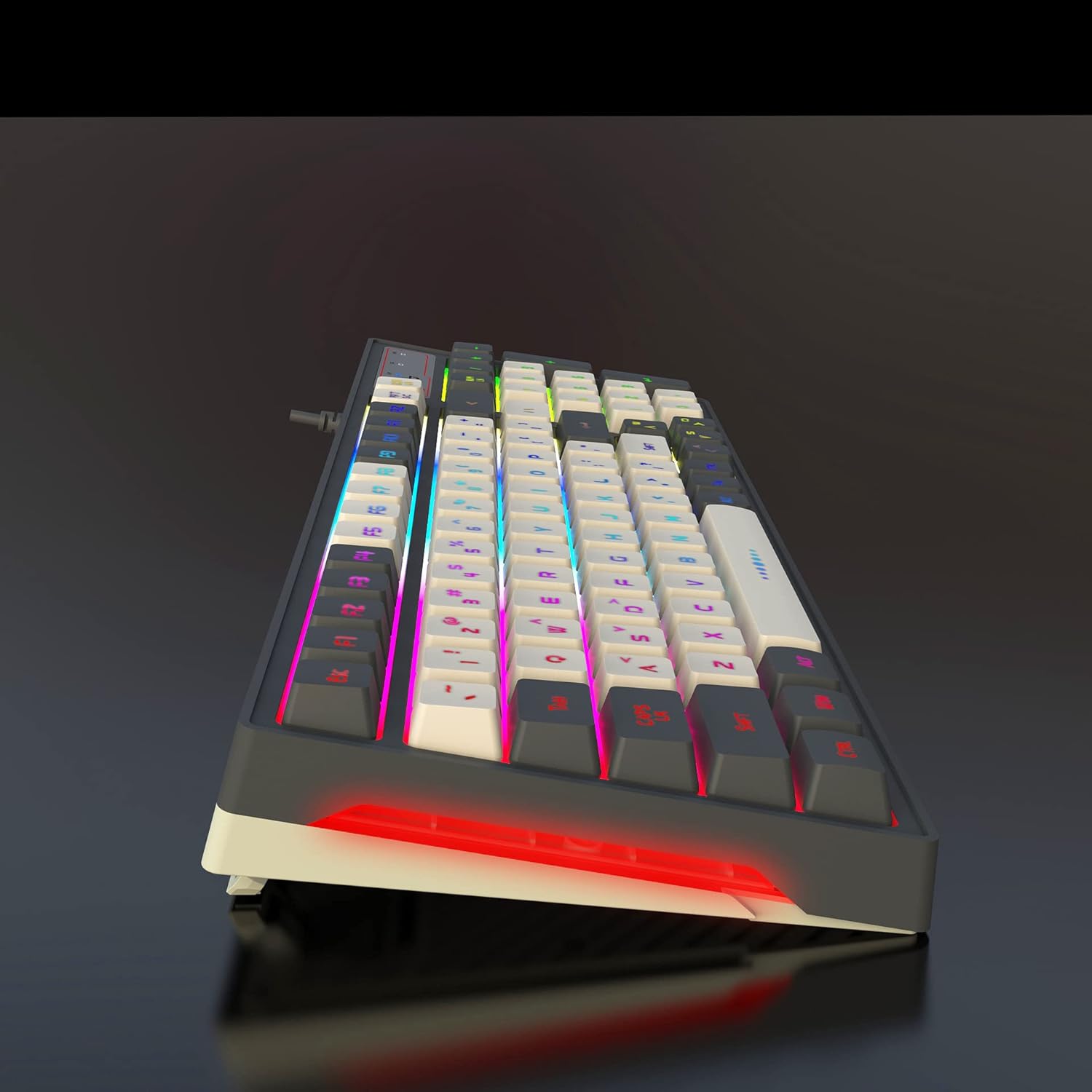
Figure 4.2: Illustration demonstrating the 26-key conflict-free design, ensuring accurate input during intense gaming sessions.
5. เนื้อหาบรรจุภัณฑ์
กรุณาทำเครื่องหมายในช่องสำหรับรายการต่อไปนี้:
- 1 x HXSJ V600 96-Key Wired Gaming Keyboard
- สาย USB 1 เส้น

Figure 5.1: The HXSJ V600 keyboard and its packaging, illustrating the contents included in the box.
6. คำแนะนำในการตั้งค่า
Follow these steps to set up your HXSJ V600 keyboard:
- แกะ: Carefully remove the keyboard and USB cable from the packaging.
- เชื่อมต่อ: Insert the USB connector of the keyboard cable into an available USB port on your computer.
- การจดจำระบบ: Your operating system (Windows, Mac OS, Android) should automatically detect and install the necessary drivers. No additional software installation is required for basic functionality.
- ปรับ: Adjust the keyboard's tripod feet for your preferred typing angle.
7. คู่มือการใช้งาน
The HXSJ V600 keyboard operates as a standard QWERTY keyboard. Below are specific functions:
การควบคุมแบ็คไลท์ 7.1
The keyboard features dynamic RGB backlighting. Specific key combinations for changing lighting modes or brightness are typically indicated on the keycaps themselves or in a quick start guide not provided in this manual. Experiment with the function keys (F1-F12) in combination with the 'Fn' key if present, or dedicated lighting keys, to cycle through effects.
7.2 ฟังก์ชั่นพิเศษ
- WIN Key Lock: เพื่อป้องกันการกดปุ่ม Windows โดยไม่ได้ตั้งใจขณะเล่นเกม ให้กด WIN+L. This will lock both the WIN key and the APP key. Press WIN+L again to unlock them.
8. การบำรุงรักษาและการดูแล
Proper care will extend the life of your keyboard:
- การทำความสะอาด: Use a soft, lint-free cloth to wipe the surface of the keyboard. For dust between keys, use compressed air. Do not use liquid cleaners directly on the keyboard.
- พื้นที่จัดเก็บ: When not in use, store the keyboard in a dry, cool place away from direct sunlight.
- การดูแลสายเคเบิล: หลีกเลี่ยงการงอหรือบิดสาย USB มากเกินไปเพื่อป้องกันความเสียหายภายใน
9 การแก้ไขปัญหา
If you encounter issues with your HXSJ V600 keyboard, refer to the table below for common problems and solutions:
| ปัญหา | สาเหตุที่เป็นไปได้ | สารละลาย |
|---|---|---|
| แป้นพิมพ์ไม่ตอบสนอง | การเชื่อมต่อ USB หลวม; พอร์ต USB มีปัญหา; ปัญหาไดรเวอร์ | ตรวจสอบให้แน่ใจว่าเสียบสาย USB แน่นดีแล้ว ลองเปลี่ยนพอร์ต USB รีสตาร์ทคอมพิวเตอร์ |
| ไฟแบ็คไลท์ไม่ทำงานหรือกระพริบ | Lighting mode off; Software glitch; Hardware issue. | Check keyboard lighting controls (Fn + specific keys). Restart computer. |
| คีย์ไม่ลงทะเบียนหรือเกิดภาพซ้อน | Dust/debris under keycap; Software conflict. | Clean under keycaps with compressed air. Ensure no conflicting software is running. The 26-key conflict-free design minimizes this issue. |
| WIN key is locked | WIN key lock function activated. | กด WIN+L again to unlock the WIN and APP keys. |
หากปัญหายังคงมีอยู่หลังจากลองวิธีแก้ไขเหล่านี้แล้ว โปรดติดต่อฝ่ายสนับสนุนลูกค้า
10. ข้อมูลจำเพาะทางเทคนิค
| คุณสมบัติ | ข้อมูลจำเพาะ |
|---|---|
| ยี่ห้อ | HXSJ |
| แบบอย่าง | วี600 |
| จำนวนคีย์ | 96 |
| เทคโนโลยีการเชื่อมต่อ | สาย (USB) |
| คุณสมบัติพิเศษ | Backlit (RGB), 26-Key Conflict-Free |
| วัสดุปุ่มกด | Acrylonitrile Butadiene Styrene (ABS) - Two-color injection |
| ความยาวสายเคเบิล | 1.8 เมตร (โดยประมาณ) |
| อุปกรณ์ที่รองรับ | PC |
| การรองรับระบบปฏิบัติการ | Win XP/Win7/Win8/Win10/Android/Mac OS |
| น้ำหนักสินค้า | 770 กรัม |
| ขนาดแพ็คเกจ | 40.79 x 16.9 x 4.7 ซม. |
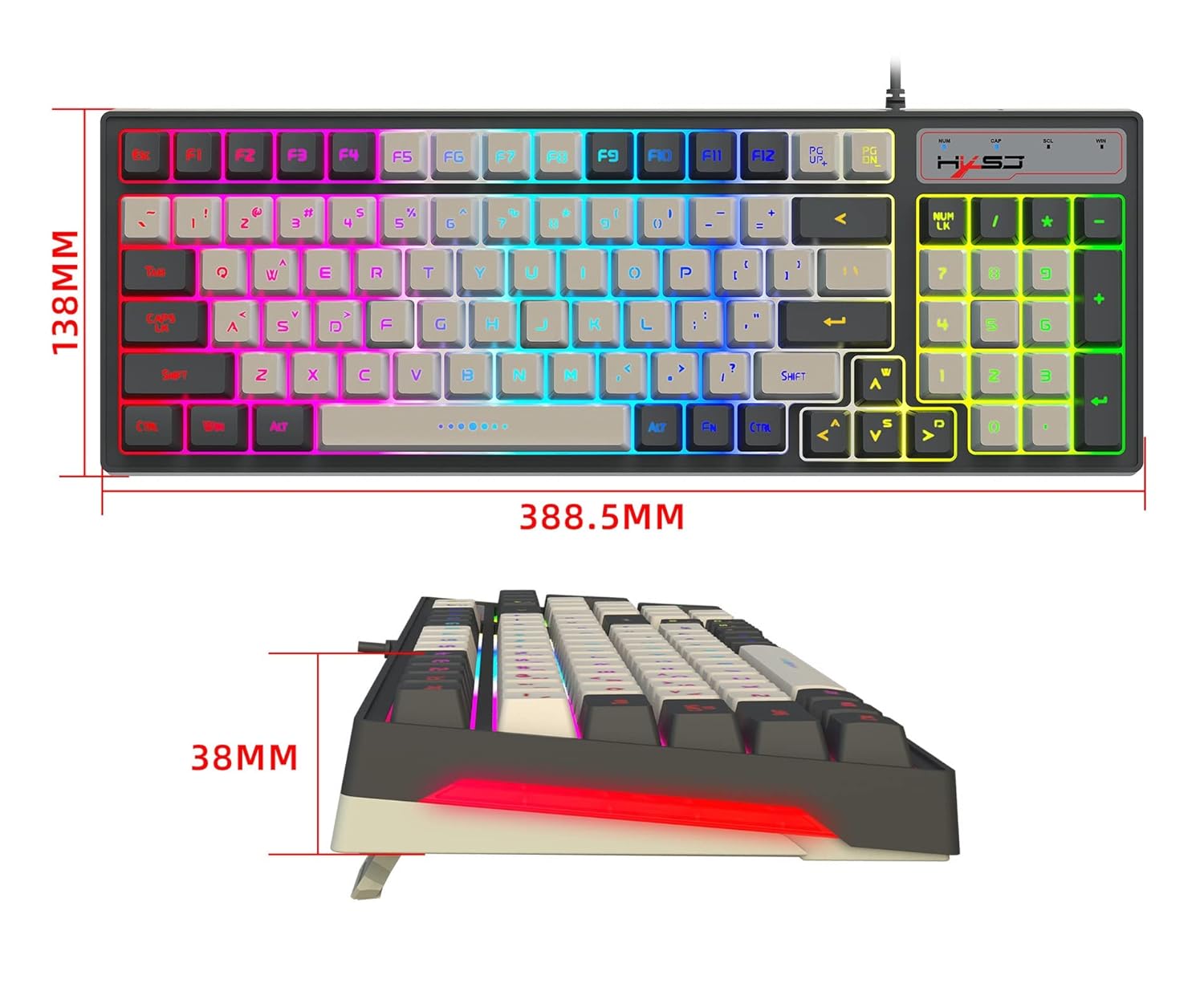
Figure 10.1: Diagram illustrating the dimensions of the HXSJ V600 keyboard.
11. การรับประกันและการสนับสนุน
การรับประกัน: This product typically comes with a 10-day replacement policy from the date of purchase, subject to the terms and conditions of the retailer. Please retain your proof of purchase for any warranty claims.
สนับสนุน: For further assistance, technical support, or warranty inquiries, please contact the retailer or manufacturer directly. Refer to your purchase documentation for specific contact details.


