1. บทนำ
This manual provides essential information for the safe and efficient assembly, operation, and maintenance of your Tempur-Pedic TP7000 Mesh Back Fabric Task Chair. Please read all instructions carefully before use and retain this manual for future reference.
2. ข้อมูลด้านความปลอดภัย
- ความจุน้ำหนักสูงสุด: เก้าอี้ตัวนี้ออกแบบมาเพื่อรับน้ำหนักสูงสุด 250 ปอนด์ (113 กิโลกรัม) การใช้งานเกินขีดจำกัดนี้อาจทำให้เก้าอี้เสียหายหรือก่อให้เกิดอันตรายได้
- วัตถุประสงค์การใช้: This chair is intended for office and task use. Do not use it for purposes other than its intended design.
- การประกอบ: Ensure all components are securely fastened before using the chair. Periodically check all bolts and screws for tightness.
- ความเสถียร: Avoid standing on the chair or using it as a step stool. Do not lean excessively to one side or the back, as this may cause the chair to tip over.
- เด็ก: Keep children away from the chair during assembly. Do not allow children to play on or around the chair.
3. เนื้อหาบรรจุภัณฑ์
Before beginning assembly, verify that all parts are present and undamaged. If any parts are missing or damaged, do not proceed with assembly. Contact customer support for assistance.
- Chair Back (Mesh)
- Chair Seat (Fabric with Tempur Material)
- ที่วางแขน (2)
- Chair Base (5-star with casters)
- กระบอกยกแก๊ส
- แผ่นกลไก
- ชุดอุปกรณ์ฮาร์ดแวร์ (สกรู แหวนรอง ประแจหกเหลี่ยม)
4. การติดตั้งและการประกอบ
Follow these steps to assemble your Tempur-Pedic TP7000 Task Chair. It is recommended to assemble the chair on a soft, non-abrasive surface to prevent damage.
- ติดล้อเข้ากับฐาน: ใส่ล้อเลื่อนทั้งห้าล้อลงในรูที่ปลายขาแต่ละข้างของฐานเก้าอี้ ดันให้แน่นจนกระทั่งได้ยินเสียงคลิกเข้าที่
- ใส่แก๊สยก: วางกระบอกไฮดรอลิกสำหรับยกเก้าอี้ลงในรูตรงกลางของฐานเก้าอี้ที่ประกอบเสร็จแล้ว
- ติดแผ่นกลไกเข้ากับที่นั่ง: Align the mechanism plate with the pre-drilled holes on the underside of the chair seat. Secure it using the provided screws and Allen wrench. Ensure the front of the mechanism faces the front of the seat.
- ติดตั้งที่วางแขนเข้ากับที่นั่ง: Attach the armrests to the sides of the chair seat using the designated screws. Do not fully tighten yet.
- Attach Backrest to Seat/Mechanism: Align the backrest with the mounting points on the mechanism plate or seat. Secure with screws. Once the backrest is attached, fully tighten all armrest screws.
- เชื่อมต่อชุดเบาะนั่งเข้ากับระบบแก๊สลิฟท์: วางเบาะและพนักพิงที่ประกอบเสร็จแล้วลงบนกระบอกไฮดรอลิกอย่างระมัดระวัง ตรวจสอบให้แน่ใจว่าปลายเรียวของกระบอกไฮดรอลิกเข้ากับแผ่นกลไกอย่างแน่นหนา


5. คำแนะนำการใช้งาน (การปรับแต่ง)
Your Tempur-Pedic TP7000 chair offers several adjustments to customize your seating experience for optimal comfort and support.
- การปรับความสูงของที่นั่ง: To raise the seat, lift the lever located under the right side of the seat while taking your weight off the chair. To lower the seat, lift the lever while seated. Release the lever at the desired height.
- การปรับความสูงของที่วางแขน: Press the button on the side of each armrest and move the armrest up or down to your preferred height. Release the button to lock it in place.
- การล็อก/ปลดล็อกการเอียง: The chair features a single reclining position. To allow the chair to recline, pull the lever (usually the same as the height adjustment lever, or a separate one) outwards. To lock the chair in an upright position, push the lever inwards.
- การปรับความตึงเอียง: Rotate the round knob located under the front of the seat to adjust the tension of the recline. Turn clockwise to increase tension (making it harder to recline) and counter-clockwise to decrease tension (making it easier to recline).
6. การบำรุงรักษา
การดูแลรักษาอย่างถูกวิธีจะช่วยยืดอายุการใช้งานและรักษาสภาพของเก้าอี้ของคุณให้ดูดีอยู่เสมอ
- การทำความสะอาด: The fabric seat and mesh back should be spot cleaned only. Use a mild detergent and a damp cloth. Do not saturate the fabric. Test any cleaning solution on an inconspicuous area first.
- การตรวจสอบ: ตรวจสอบน็อต สกรู และจุดเชื่อมต่อทั้งหมดเป็นระยะ เพื่อให้แน่ใจว่าแน่นสนิท ขันให้แน่นอีกครั้งหากจำเป็น
- ล้อ: ควรทำความสะอาดล้อเลื่อนให้ปราศจากเส้นผมและเศษสิ่งสกปรก เพื่อให้การเคลื่อนที่ราบรื่น
- หลีกเลี่ยงสารเคมีที่รุนแรง: Do not use abrasive cleaners, solvents, or strong detergents, as these can damage the chair's materials.
7 การแก้ไขปัญหา
หากคุณประสบปัญหาเกี่ยวกับเก้าอี้ โปรดดูปัญหาทั่วไปและวิธีแก้ไขต่อไปนี้:
- เก้าอี้จมหรือไม่สามารถลอยขึ้นได้:
สารละลาย: The gas lift cylinder may be faulty. Contact customer support for a replacement. - เสียงเก้าอี้ดังเอี๊ยดอ๊าด:
สารละลาย: Check all screws and bolts and tighten them. A small amount of silicone lubricant can be applied to moving parts if the squeaking persists. - Casters Do Not Roll Smoothly:
สารละลาย: กำจัดเส้นผมหรือเศษสิ่งสกปรกที่พันอยู่รอบล้อเลื่อนออก ทำความสะอาดล้อด้วยน้ำยาทำความสะอาดamp ผ้า. - Chair Does Not Recline:
สารละลาย: Ensure the tilt lock lever is disengaged (pulled outwards). Adjust the tilt tension knob counter-clockwise to reduce tension.
8. ข้อมูลจำเพาะ
| คุณสมบัติ | รายละเอียด |
|---|---|
| ยี่ห้อ | เทมเพอร์-พีดิก |
| แบบอย่าง | TP7000 |
| สี | Cobalt (Seat), Black (Mesh Back) |
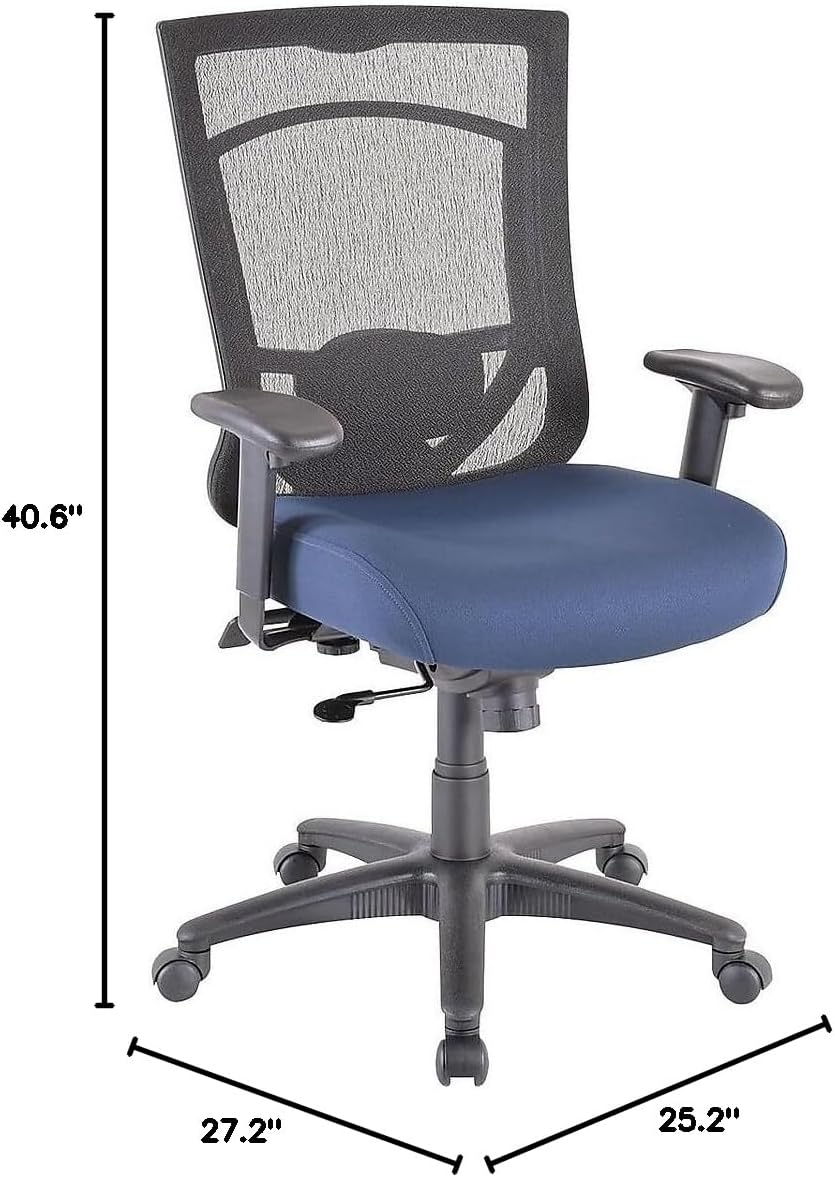
| ขนาดโดยรวม (สูง x กว้าง x ลึก) | 40.6-44.1" x 27.2" x 25.2" |
| ขนาดที่นั่ง (กว้าง x ลึก) | 20.9" x 20.1" |
| Back Dimensions (W x H) | 20.9" x 22.4" |
| คำแนะนำน้ำหนักสูงสุด | 250 ปอนด์ (113 กก.) |
| วัสดุ | Mesh Back, Fabric Seat with Authentic Tempur Material |
| คุณสมบัติพิเศษ | Adjustable Height, Adjustable Armrests, Tilt Lock, Tilt Tension |
| คำแนะนำการดูแลผลิตภัณฑ์ | จุดที่สะอาด |
| ปริมาณการใช้ที่แนะนำต่อวัน | 8-10 ชั่วโมง |
9. การรับประกันและการสนับสนุน
Your Tempur-Pedic TP7000 Mesh Back Fabric Task Chair is backed by a รับประกันตลอดอายุการใช้งาน. This warranty covers defects in materials and workmanship under normal use. Specific terms and conditions apply.
For warranty claims, technical support, or to order replacement parts, please contact Tempur-Pedic customer service. Refer to your purchase documentation or the official Tempur-Pedic webเว็บไซต์สำหรับข้อมูลการติดต่อล่าสุด
When contacting support, please have your model number (TP7000) and proof of purchase readily available.


