1. บทนำ
This manual provides detailed instructions for the installation, operation, and maintenance of the QIACHIP Mini Wireless Remote Control Switch. This device is designed to provide wireless control for various DC applications, including LED lights, car batteries, and door locks, operating within a voltagมีช่วงแรงดันไฟ DC 6V ถึง 60V

Figure 1: QIACHIP Mini Wireless Remote Control Switch (1 Receiver + 1 Transmitter)
2. สินค้าหมดview
คุณสมบัติหลัก:
- ฉบับกว้างtagอี ช่วง: ปริมาณอินพุตtage DC 5V-60V, supporting various DC applications.
- ความจุกระแสไฟฟ้าสูง: Maximum relay contact current of 20 Amps.
- ความถี่ RF: Operates on 433 MHz for reliable wireless communication.
- ระยะการส่งสัญญาณที่ไกลขึ้น: Approximately 50-100m in open spaces. The antenna can be extended for improved reception.
- โหมดการทำงานหลายโหมด: Supports Momentary, Toggle, Latched, and Delay modes.
- ความเข้ากันได้ของรีโมทคอนโทรล: Supports EV1527 learning code remote controllers, allowing pairing with up to 20 remotes.
- การออกแบบที่กะทัดรัด: PCB size of 47 x 26 x 18 mm (L, W, H).
- การใช้งานที่หลากหลาย: Suitable for car battery power control, garage doors, electronic doors, appliances, motorcycle alarms, car sunroofs, and heating systems.

Figure 2: Product application examples for lighting control.

Figure 3: Enhanced features of the remote switch, including an exposed antenna for better reception and a wider voltagช่วงอี
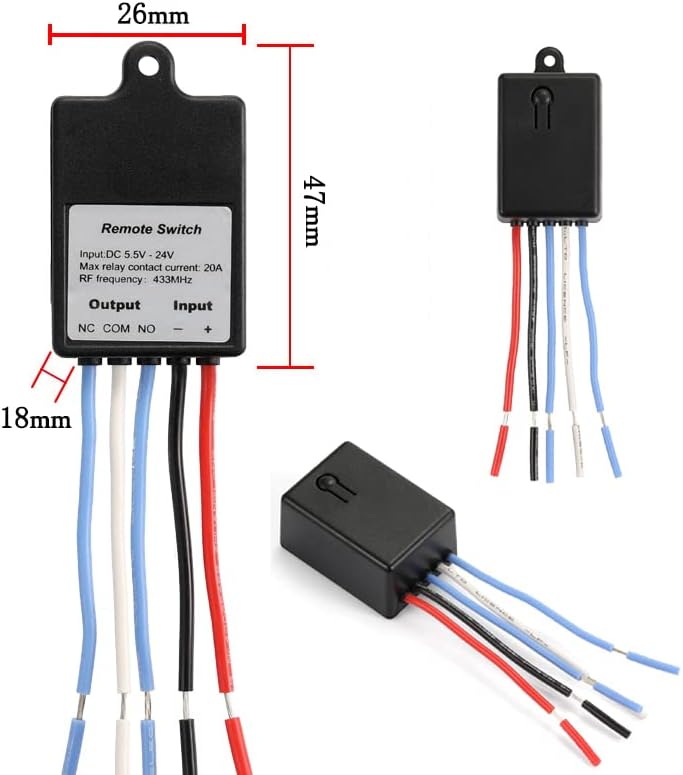
Figure 4: Physical dimensions of the remote control switch.

Figure 5: Internal components and terminal labels of the remote switch.
3. ข้อมูลจำเพาะ
| ข้อมูลจำเพาะ | ค่า |
|---|---|
| โหมดการทำงาน | เปิดปิด |
| คะแนนปัจจุบัน | 20 Amps |
| ปฏิบัติการฉบับที่tage | กระแสตรง 5V-60V |
| ประเภทการติดต่อ | Normally Open (NO), Normally Closed (NC), Common (COM) |
| ประเภทขั้วต่อ | ไร้สาย |
| เทอร์มินัล | ประสาน |
| ขนาดรายการ (ยาว x กว้าง x สูง) | 1.85 x 1.02 x 0.71 นิ้ว (47 x 26 x 18 มม.) |
| ประเภทวงจร | 1 ทาง |
| วัสดุติดต่อ | พลาสติก |
| การให้คะแนนการคุ้มครองระหว่างประเทศ | IP54 |
| จำนวนตำแหน่ง | 2 |
| วิธีการควบคุม | ระยะไกล |
| โปรโตคอลการเชื่อมต่อ | 433 เมกะเฮิรตซ์ |
| วัดtage | 480 วัตต์ |
| น้ำหนักสินค้า | 1.76 ออนซ์ |
| แบตเตอรี่ (เครื่องส่งสัญญาณ) | ต้องใช้แบตเตอรี่ CR1 2032 ก้อน (รวมอยู่ด้วย) |
4. การติดตั้งและเดินสายไฟ
The QIACHIP remote control switch features three output terminals: NC (ปกติปิด), COM (ทั่วไป), และ NO (ปกติเปิด). These terminals function like a Single-Pole Double-Throw (SPDT) switch. The input terminals are labeled + และ - for DC power connection.
Wiring Principles:
- คอม: This is the common terminal where the power source or load is typically connected.
- เอ็นซี: Normally Closed. This terminal is connected to COM by default when the relay is inactive.
- เลขที่: Normally Open. This terminal is disconnected from COM by default when the relay is inactive. It connects to COM when the relay is activated.
- Input Power (+ and -): Connect your DC power supply (5V-60V) to these terminals to power the receiver module.
แผนภาพการเดินสายไฟทั่วไป:

Figure 6: Wiring for a DC load (e.g., LED light). The load is connected to NO and COM, and the receiver is powered by the DC source.

Figure 7: Wiring for an access control or door lock system. The lock is connected to NO and COM, and the receiver is powered by the DC source.

Figure 8: Wiring for an external power supply load. The remote switch controls the load's circuit via NO and COM, while the load has its own power source.
สำคัญ: ตรวจสอบให้แน่ใจเสมอว่าแรงดันไฟฟ้าของแหล่งจ่ายไฟถูกต้องtage matches the requirements of your load and the remote switch. Incorrect wiring can damage the device or connected components.
5. Operating Modes and Pairing Instructions
The QIACHIP remote control switch supports four operating modes: Momentary, Toggle, Latched, and Delay. Each mode offers different control behaviors. To change modes, you must first perform a reset. After the reset, all previously paired remote controls are temporarily deactivated.
Video: Wiring and Pairing Demonstration
Video 1: This video demonstrates the wiring process and how to pair the remote control switch in different operating modes (Momentary, Toggle, Latched, and Delay Off).
5.1. Momentary Mode
In Momentary mode, the output is active only while the remote button is pressed. Releasing the button deactivates the output.
- การจับคู่: กดปุ่มเรียนรู้บนตัวรับสัญญาณ ครั้งหนึ่ง. The indicator light will turn on. Then, press any button on your remote control. The indicator light will flash and turn off, indicating successful pairing.

Figure 9: Momentary Mode operation.
5.2. สลับโหมด
In Toggle mode, pressing the remote button once activates the output, and pressing it again deactivates the output.
- การจับคู่: กดปุ่มเรียนรู้บนตัวรับสัญญาณ สองครั้ง. The indicator light will turn on. Then, press any button on your remote control. The indicator light will flash and turn off, indicating successful pairing.

Figure 10: Toggle Mode operation.
5.3. Latched Mode
In Latched mode, one remote button activates the output, and another remote button deactivates it. This mode requires a multi-button remote.
- การจับคู่: กดปุ่มเรียนรู้บนตัวรับสัญญาณ สามครั้ง. The indicator light will turn on. Then, press the first button (e.g., 'A') on your remote, followed by the second button (e.g., 'B'). The indicator light will flash and turn off, indicating successful pairing.

Figure 11: Latched Mode operation.
5.4. Delay Off Mode
In Delay Off mode, the output activates when the remote button is pressed and remains active for a set duration (e.g., 5, 10, 15, or 20 seconds) before automatically deactivating.
- Pairing for 5-second delay: กดปุ่มเรียนรู้บนตัวรับสัญญาณ สี่ครั้ง. The indicator light will turn on. Then, press any button on your remote control. The indicator light will flash and turn off, indicating successful pairing.
- Pairing for 10-second delay: กดปุ่มเรียนรู้บนตัวรับสัญญาณ ห้าครั้ง.
- Pairing for 15-second delay: กดปุ่มเรียนรู้บนตัวรับสัญญาณ หกครั้ง.
- Pairing for 20-second delay: กดปุ่มเรียนรู้บนตัวรับสัญญาณ เจ็ดครั้ง.

Figure 12: Delay Off Mode operation.
5.5. Resetting All Paired Remotes
To clear all previously paired remote controls and reset the receiver to its default state, follow these steps:
- กดปุ่มเรียนรู้บนตัวรับสัญญาณ eight times. The indicator light will flash rapidly and then turn off. This indicates that all stored remote control data has been erased.
6. การบำรุงรักษา
The QIACHIP Mini Wireless Remote Control Switch is designed for durability and requires minimal maintenance. Keep the device clean and free from dust and moisture. Ensure all wiring connections are secure to prevent intermittent operation. Replace the CR2032 battery in the transmitter when its range decreases or it stops responding.
7 การแก้ไขปัญหา
- อุปกรณ์ไม่ตอบสนองต่อรีโมท:
- Check if the remote control battery is depleted. Replace if necessary.
- ตรวจสอบให้แน่ใจว่าตัวรับสัญญาณได้รับพลังงานอย่างถูกต้อง (DC 5V-60V)
- Verify that the remote is paired correctly to the receiver in the desired mode. If unsure, perform a reset and re-pair.
- Check for strong RF interference in the environment.
- ระยะการควบคุมระยะไกลลดลง:
- เปลี่ยนแบตเตอรี่รีโมทคอนโทรล
- Ensure the receiver's antenna is not obstructed and is extended if possible.
- Minimize physical obstructions (walls, metal objects) between the remote and receiver.
- Output not activating/deactivating correctly:
- Verify wiring connections to NC, COM, and NO terminals are correct for your application.
- Ensure the load's power requirements do not exceed the relay's maximum contact current (20A) or wattagอี(480วัตต์)
- Confirm the operating mode is set as intended (Momentary, Toggle, Latched, Delay).
- Indicator light not functioning:
- Check the power supply to the receiver.
- If the device is otherwise functional, the indicator light may be faulty, but this does not affect core operation.
8. การรับประกันและการสนับสนุน
For warranty information or technical support, please refer to the product packaging or contact QIACHIP customer service through the retailer where the product was purchased. Keep your purchase receipt for warranty claims.


