1. บทนำ
This manual provides detailed instructions for the safe and efficient operation of your Pyle PWMA1299A 12-inch Portable Wireless Bluetooth Speaker System. Please read this manual thoroughly before using the device and retain it for future reference. This system is designed for versatile audio playback and amplification, featuring Bluetooth connectivity, USB/Micro SD card readers, FM radio, and microphone inputs.
2. คำแนะนำด้านความปลอดภัย
- อย่าให้เครื่องนี้โดนฝนหรือความชื้น เพื่อป้องกันอันตรายจากไฟไหม้หรือไฟฟ้าช็อต
- Do not open the cabinet. There are no user-serviceable parts inside. Refer all servicing to qualified personnel.
- ตรวจสอบให้แน่ใจว่ามีการระบายอากาศที่เหมาะสม อย่าปิดกั้นช่องระบายอากาศ
- ควรหลีกเลี่ยงการวางเครื่องไว้ใกล้แหล่งความร้อน เช่น เครื่องทำความร้อน ช่องระบายความร้อน เตา หรืออุปกรณ์อื่นๆ ที่สร้างความร้อน
- ปกป้องสายไฟไม่ให้ถูกเหยียบหรือถูกหนีบ โดยเฉพาะที่ปลั๊ก เต้ารับไฟฟ้า และจุดที่สายไฟออกจากเครื่อง
- ถอดปลั๊กเครื่องในระหว่างที่มีพายุฝนฟ้าคะนองหรือเมื่อไม่ได้ใช้งานเป็นเวลานาน
- ใช้เฉพาะอุปกรณ์เสริม/สิ่งที่แนบที่ผู้ผลิตกำหนดเท่านั้น
- Dispose of batteries properly. Do not expose batteries to excessive heat.
3. เนื้อหาบรรจุภัณฑ์
ตรวจสอบว่ามีรายการทั้งหมดอยู่ในแพ็คเกจ:
- Pyle PWMA1299A Portable PA Speaker System
- (2) ไมโครโฟนมือถือไร้สาย
- สายไฟ
- รีโมทคอนโทรล

Image: The Pyle PWMA1299A speaker system, shown with its included two wireless handheld microphones and remote control. The speaker features a retractable handle and wheels for portability.
4. คุณสมบัติของผลิตภัณฑ์
- การออกแบบกะทัดรัดและพกพาสะดวก: Features a convenient carry handle and rolling wheels for easy transport.
- การสตรีมบลูทูธไร้สาย: Connects to smartphones, tablets, laptops, and other Bluetooth-enabled devices.
- แบตเตอรี่แบบชาร์จไฟได้ในตัว: Provides up to 3+ hours of operation on a single charge.
- วิทยุ FM: Integrated FM tuner with a digital LED display.
- USB Flash & Micro SD Memory Card Readers: Supports MP3 digital audio file การเล่นซ้ำ
- Audio Recording Function: Allows recording audio directly to USB/Micro SD.
- อินพุตไมโครโฟน: Includes 1/4'' microphone input and support for two wireless microphones.
- Aux (3.5mm) Input Jack: สำหรับเชื่อมต่ออุปกรณ์เสียงภายนอก
- Full Range Stereo Sound: Equipped with a 12'' mid-range speaker and a 3'' tweeter for clear audio.
- การควบคุมเสียงที่ปรับได้: Features Echo, Bass, and Volume adjustments.
- Karaoke Microphone Talk-Over Mode: Automatically lowers background music when microphone is in use.

ภาพ: ระเบิด view of the speaker's internal components, highlighting the 12-inch mid-range speaker and the 3-inch tweeter, which contribute to the system's sound reproduction.
5. การตั้งค่า
5.1 การชาร์จเริ่มต้น
Before first use, fully charge the speaker's built-in rechargeable battery. Connect the power cable to the AC input on the rear panel of the speaker and plug it into a standard wall outlet (120/240V). The charging indicator light will illuminate. Charging typically takes several hours. Once fully charged, the indicator may change color or turn off, depending on the model. A full charge provides approximately 3+ hours of battery life.

Image: The rear control panel of the Pyle speaker, showing various inputs and controls, including the power input for charging the internal battery.
5.2 การเปิด/ปิดเครื่อง
Locate the power switch on the rear panel of the speaker. Flip the switch to the "ON" position to power on the unit. The digital LED display will light up. To power off, flip the switch to the "OFF" position. It is recommended to turn off the power with the ON/OFF switch when not in use to prevent battery damage from standby mode.
6. คู่มือการใช้งาน
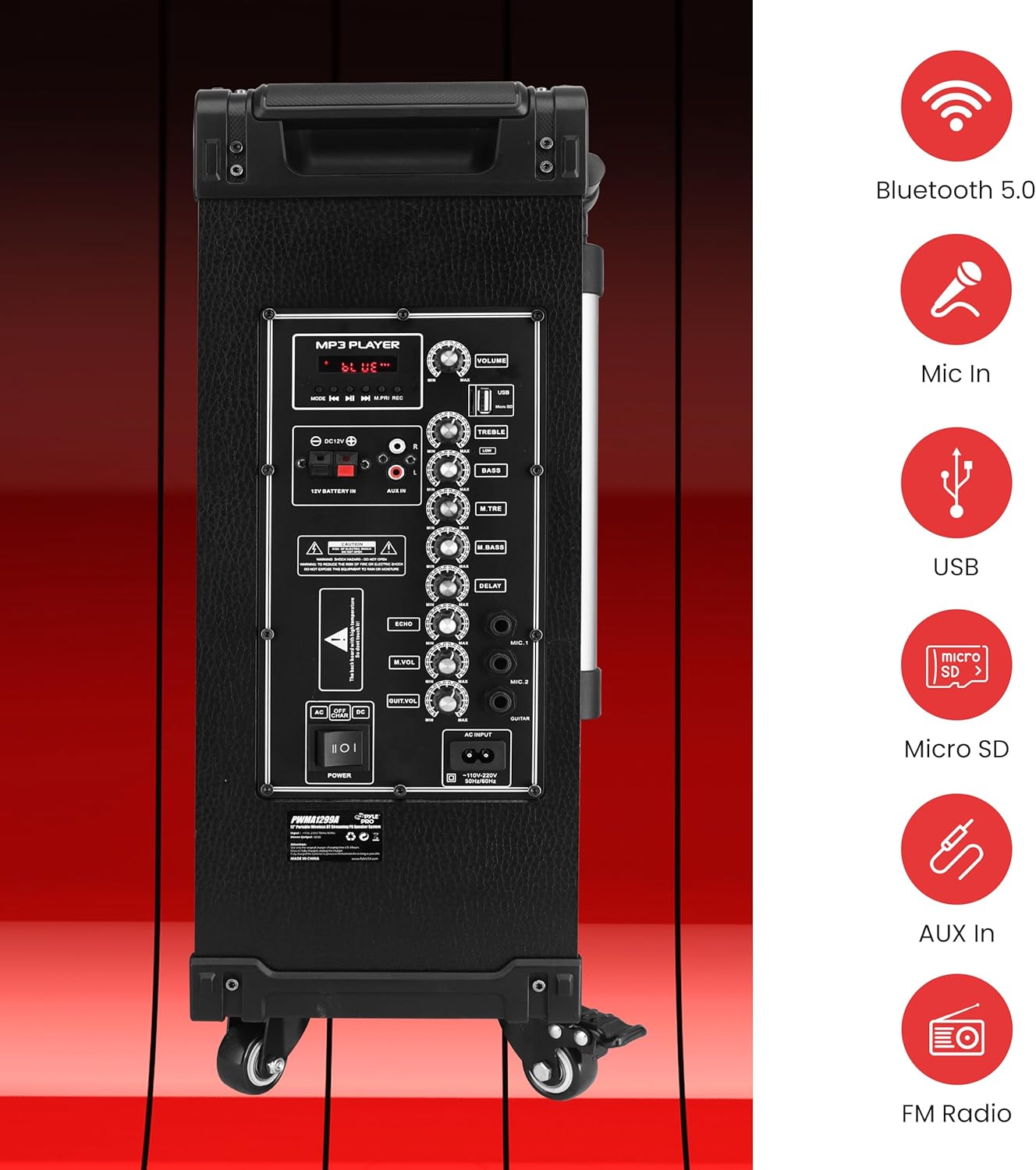
ภาพ: รายละเอียด view of the speaker's rear control panel, illustrating the layout of the MP3 player section, volume and tone controls, microphone inputs, and auxiliary connections.
6.1 การจับคู่บลูทูธ
- เปิดลำโพง
- Press the "MODE" button on the control panel or remote control until "BLUE" appears on the digital LED display, indicating Bluetooth mode.
- บนอุปกรณ์ที่รองรับ Bluetooth ของคุณ (สมาร์ทโฟน แท็บเล็ต ฯลฯ) ให้เปิดใช้งาน Bluetooth และค้นหาอุปกรณ์ที่มีอยู่
- Select "PYLE" from the list of devices.
- Once paired, the speaker will emit a confirmation tone, and you can begin streaming audio wirelessly. The Bluetooth wireless range is approximately 33+ feet.
The Pyle speaker supports Bluetooth version 5.0 for stable wireless connections.
6.2 การเล่นไฟล์ผ่าน USB/Micro SD
- ใส่แฟลชไดรฟ์ USB หรือการ์ด Micro SD ลงในช่องที่ตรงกันบนแผงควบคุม
- ลำโพงจะเปลี่ยนไปใช้โหมด USB/SD โดยอัตโนมัติและเริ่มเล่นไฟล์ MP3 files. If it does not switch automatically, press the "MODE" button to select USB/SD mode.
- Use the playback controls (Play/Pause, Next, Previous) on the control panel or remote control to manage your music.
6.3 วิทยุ FM
- กดปุ่ม "MODE" จนกระทั่ง "FM" ปรากฏบนจอแสดงผล LED ดิจิทัล
- กดปุ่มเล่น/หยุดชั่วคราวค้างไว้เพื่อเริ่มการค้นหาสถานีวิทยุ FM โดยอัตโนมัติ ลำโพงจะบันทึกสถานีที่พบทั้งหมด
- Use the Next/Previous buttons to navigate through the saved FM stations.
6.4 การใช้งานไมโครโฟน
The system includes two wireless handheld microphones and a 1/4'' wired microphone input.
- ไมโครโฟนไร้สาย: Ensure the wireless microphones have fresh 'AA' batteries (2 per microphone). Power on the microphones. They should automatically connect to the speaker.
- ไมโครโฟนแบบมีสาย: Plug a 1/4'' microphone into the "MIC IN" jack on the control panel.
- Adjust the "MIC VOL" knob to control the microphone volume.
- Use the "ECHO", "M.BASS" (Mic Bass), and "M.TRE" (Mic Treble) knobs to fine-tune the microphone's sound.
- The Karaoke Microphone Talk-Over Mode automatically lowers background music when you speak into the microphone.
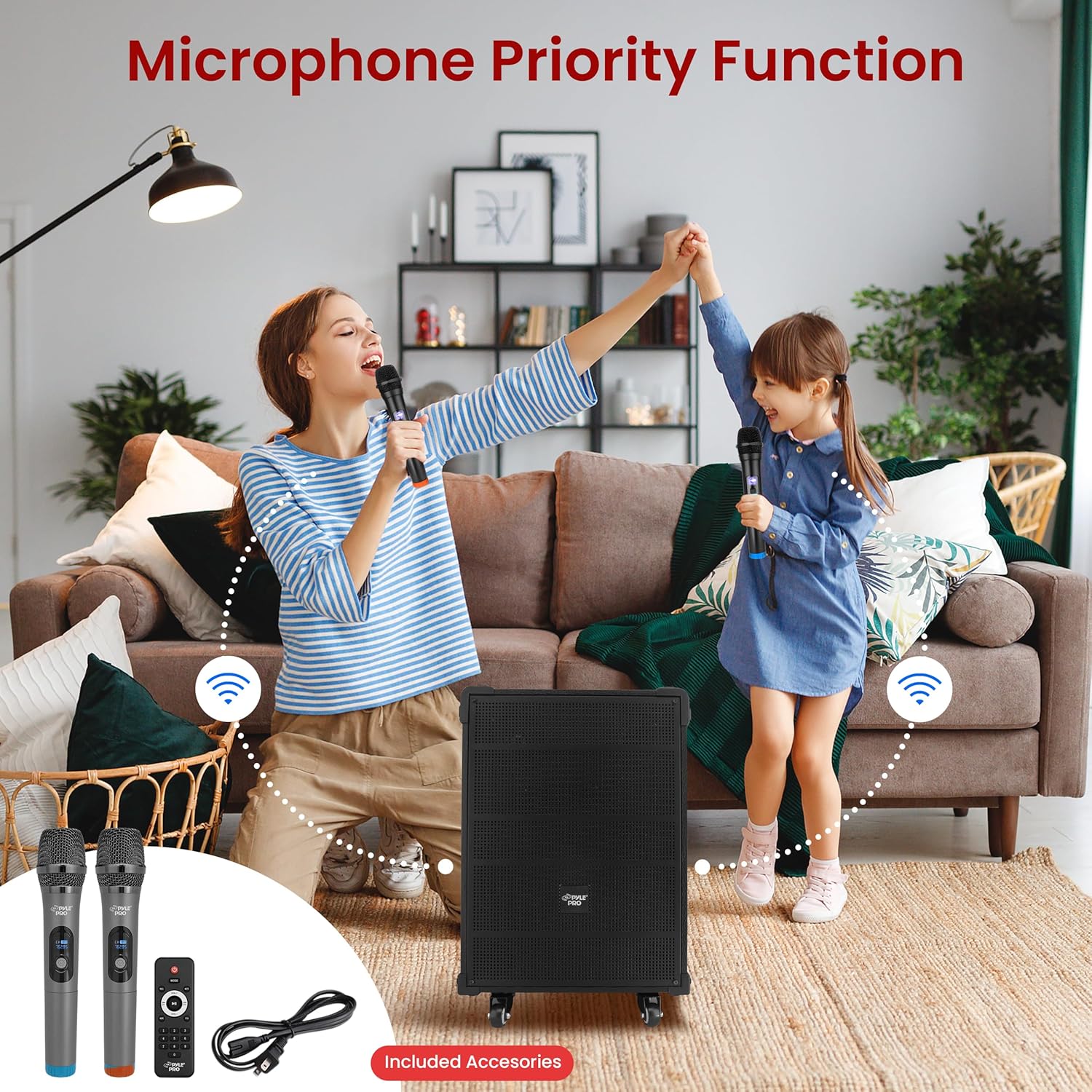
Image: Two individuals using the wireless microphones with the Pyle speaker system, demonstrating its use for vocal performances or public speaking.
6.5 ฟังก์ชันบันทึกเสียง
To record audio from the microphone or auxiliary input directly to a USB drive or Micro SD card:
- Ensure a USB drive or Micro SD card is inserted into the speaker.
- Connect your microphone or auxiliary device.
- Press the "REC" button on the control panel or remote control to start recording.
- กดปุ่ม "REC" อีกครั้งเพื่อหยุดการบันทึก การบันทึกจะเสร็จสิ้น file will be saved to the USB drive or Micro SD card.
6.6 ช่องเสียบ Aux (3.5 มม.)
Connect external audio devices (e.g., MP3 players, CD players) using a 3.5mm audio cable to the "AUX IN" jack on the control panel. Press the "MODE" button to select AUX input mode.
6.7 แผงควบคุมโอเวอร์view
The rear control panel features various knobs and buttons for adjusting audio settings:
- ปริมาณ: Master volume control for overall sound output.
- เสียงแหลม: ปรับการตอบสนองความถี่สูง
- เบส: ปรับการตอบสนองความถี่ต่ำ
- เสียงสะท้อน: ควบคุมเอฟเฟกต์เสียงสะท้อนสำหรับไมโครโฟน
- MIC ฉบับ: ปรับระดับเสียงของไมโครโฟนที่เชื่อมต่อ
- เอ็ม.เบส: Adjusts the bass for microphones.
- M.TRE: Adjusts the treble for microphones.
- ล่าช้า: Controls the delay effect for microphones.
7. การบำรุงรักษา
- การทำความสะอาด: ใช้ผ้านุ่มและแห้งเช็ดทำความสะอาดภายนอกลำโพง ห้ามใช้น้ำยาทำความสะอาดหรือสารละลายที่มีฤทธิ์กัดกร่อน
- การดูแลแบตเตอรี่ To prolong battery life, fully charge the unit before storing it for extended periods. Avoid completely draining the battery frequently.
- พื้นที่จัดเก็บ: เก็บลำโพงไว้ในที่แห้งและเย็น หลีกเลี่ยงแสงแดดโดยตรงและอุณหภูมิที่สูงหรือต่ำเกินไป
8 การแก้ไขปัญหา
| ปัญหา | สาเหตุที่เป็นไปได้ | สารละลาย |
|---|---|---|
| ไม่มีไฟฟ้า | แบตเตอรี่หมด; ไม่ได้เสียบสายไฟ; สวิตช์ไฟปิดอยู่ | Charge the battery; Ensure power cable is securely connected and plugged into a live outlet; Turn the power switch to "ON". |
| ไม่มีเสียงออก | Volume is too low; Incorrect input mode selected; Audio cable not connected properly. | Increase the master volume; Press "MODE" to select the correct input (Bluetooth, USB, SD, FM, AUX); Check audio cable connections. |
| บลูทูธไม่เชื่อมต่อ | ลำโพงไม่ได้อยู่ในโหมดบลูทูธ อุปกรณ์อยู่ไกลเกินไป อุปกรณ์เชื่อมต่อกับลำโพงอื่นแล้ว | Ensure speaker is in Bluetooth mode ("BLUE" on display); Move device closer to speaker; Disconnect from other Bluetooth devices. |
| ไมโครโฟนไม่ทำงาน | Microphone volume too low; Wireless microphone batteries depleted; Wired microphone not connected. | Increase "MIC VOL" knob; Replace 'AA' batteries in wireless microphones; Ensure wired microphone is securely plugged into "MIC IN". |
If you experience issues with charging, ensure the power cable is firmly connected to both the speaker and a working power outlet. If the issue persists, consult the support section.
Video: This video demonstrates the Pyle 12'' Portable Wireless Bluetooth Speaker system, showcasing its features and portability. It provides a visual overview of the product's design and functionality.
9. ข้อมูลจำเพาะ
| คุณสมบัติ | รายละเอียด |
|---|---|
| หมายเลขรุ่น | PWMA1299A |
| กำลังขับสูงสุด | 800 วัตต์ |
| ระบบเสียง | 12'' Mid-Range Speaker + 3'' Tweeter |
| อิมพีแดนซ์ | 4 โอห์ม |
| อัตราส่วน S/N | 60เดซิเบล |
| เวอร์ชันบลูทูธ | 5.0 |
| ช่วงไร้สาย Bluetooth | 33 ฟุตขึ้นไป |
| แบตเตอรี่แบบชาร์จไฟได้ในตัว | 12V/7AH Lead-Acid Battery |
| อายุการใช้งานแบตเตอรี่ | มากถึง 3+ ชั่วโมง |
| แหล่งจ่ายไฟ | 120/240โวลต์ |
| Mic Nominal Current Drain | <100 mAh |
| Microphone Battery Requirement | แบตเตอรี่ขนาด 'AA' จำนวน 2 ก้อน (แต่ละก้อน) |
| ขนาดสินค้า (กว้าง x ยาว x สูง) | 18.50 นิ้ว x 11.22 นิ้ว x 25.59 นิ้ว |
| น้ำหนักสินค้า | 28.3 ปอนด์ |
| ยูพีซี | 842893147017 |
10. การรับประกันและการสนับสนุน
Pyle products are designed for reliability and performance. For warranty information, technical support, or service inquiries, please refer to the official Pyle webหรือติดต่อฝ่ายบริการลูกค้า เก็บใบเสร็จรับเงินไว้เป็นหลักฐานการซื้อสำหรับการเคลมประกัน
สำหรับทรัพยากรเพิ่มเติมและข้อมูลผลิตภัณฑ์ โปรดไปที่ ร้าน Pyle บน Amazon.


