1. บทนำ
Thank you for choosing the KAIDI KD-771 TWS Smart Touch V5.1 Wireless Earbuds. This manual provides essential information for the proper use, setup, and maintenance of your new earbuds. Please read it carefully before use and retain it for future reference.
เนื้อหาแพ็คเกจ:
- 1 Pair of KAIDI KD-771 Wireless Earbuds
- 1 กล่องชาร์จ
- 1 USB Charging Cable (Type-C)
- 1 คู่มือผู้ใช้

Image 1.1: KAIDI KD-771 Wireless Earbuds with their retail packaging.
2. ข้อมูลด้านความปลอดภัย
- Do not disassemble, repair, or modify the product. This may cause fire, electronic breakdown, or complete product damage.
- เก็บอุปกรณ์ให้ห่างจากอุณหภูมิที่สูง แสงแดดโดยตรง และความชื้นสูง
- Avoid exposing the earbuds to water or other liquids. While rated IPX4 for splash resistance, they are not waterproof and should not be submerged.
- ใช้เฉพาะสายชาร์จที่ให้มาหรือที่เทียบเท่าที่ได้รับการรับรองเท่านั้น
- อย่าใช้หูฟังในระดับเสียงที่ดังเกินไปเป็นเวลานาน เพื่อป้องกันความเสียหายต่อการได้ยิน
- เก็บให้พ้นจากมือเด็ก
3. สินค้าหมดview
The KAIDI KD-771 earbuds feature a compact design with intuitive touch controls and a portable charging case.

Image 3.1: The KAIDI KD-771 Wireless Earbuds alongside their closed charging case.

ภาพที่ 3.2: รายละเอียด view of the earbuds and charging case, highlighting the USB Type-C charging port and earbud design.
ส่วนประกอบ:
- หูฟัง: Left and Right earbuds with Smart Touch sensors.
- เคสชาร์จ: Stores and charges the earbuds. Features a battery indicator LED and a USB Type-C charging port.
- ไมโครโฟน: Integrated into each earbud for calls.
4. การตั้งค่า
4.1 การชาร์จหูฟังและเคส
ก่อนใช้งานครั้งแรก ควรชาร์จหูฟังและเคสชาร์จให้เต็ม
- ใส่หูฟังลงในกล่องชาร์จ ตรวจสอบให้แน่ใจว่าใส่หูฟังเข้าที่อย่างถูกต้อง
- Connect the USB Type-C charging cable to the charging port on the case and the other end to a USB power source (e.g., wall adapter, computer).
- ไฟ LED บนเคสชาร์จจะสว่างขึ้นเพื่อแสดงสถานะการชาร์จ เมื่อชาร์จเต็มแล้ว ไฟแสดงสถานะอาจเปลี่ยนสีหรือดับลง
- A full charge provides approximately 4 hours of earbud usage, with additional charges available from the case.
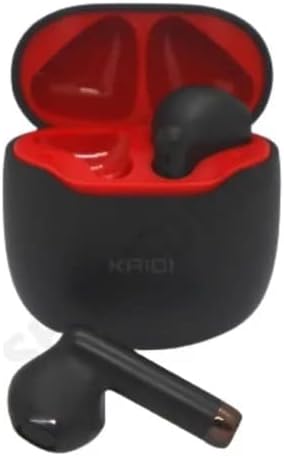
Image 4.1: Earbuds placed inside the charging case, ready for charging.
4.2 การจับคู่กับอุปกรณ์
The earbuds use Bluetooth V5.1 for a stable and low-latency connection.
- เปิดเครื่อง: เปิดกล่องชาร์จ หูฟังจะเปิดใช้งานโดยอัตโนมัติและเข้าสู่โหมดจับคู่ คุณอาจได้ยินเสียงแจ้งเตือน
- เปิดใช้งานบลูทูธ: On your smartphone or other Bluetooth-enabled device, go to the Bluetooth settings and ensure Bluetooth is enabled.
- เลือกอุปกรณ์: In the list of available Bluetooth devices, locate and select "KD-771".
- ยืนยันการเชื่อมต่อ: เมื่อเชื่อมต่อเสร็จแล้ว คุณจะได้ยินเสียงยืนยัน และหูฟังจะพร้อมใช้งาน
- การเชื่อมต่อใหม่อัตโนมัติ: After initial pairing, the earbuds will automatically connect to the last paired device when removed from the case, provided Bluetooth is active on the device.
5. คู่มือการใช้งาน
The KAIDI KD-771 earbuds feature Smart Touch controls for easy management of audio and calls.
5.1 การควบคุมแบบสัมผัสอัจฉริยะ
- เล่น/หยุดชั่วคราว: แตะที่หูฟังข้างใดข้างหนึ่งเพียงครั้งเดียว
- เพลงถัดไป: แตะสองครั้งที่หูฟังด้านขวา
- แทร็กก่อนหน้า: แตะสองครั้งที่หูฟังด้านซ้าย
- รับ/วางสาย: แตะเพียงครั้งเดียวที่หูฟังข้างใดข้างหนึ่งในระหว่างที่มีสายเรียกเข้าหรือสายสนทนาที่ใช้งานอยู่
- ปฏิเสธสาย: กดปุ่มหูฟังข้างใดข้างหนึ่งค้างไว้ 2 วินาทีในระหว่างที่มีสายเรียกเข้า
- เปิดใช้งาน Voice Assistant: แตะสามครั้งที่หูฟังข้างใดข้างหนึ่ง (เช่น Siri หรือ Google Assistant)
- การควบคุมระดับเสียง: Volume adjustments must be made directly on the connected device (smartphone, tablet, etc.). The earbuds do not have integrated volume controls.
5.2 เปิด/ปิดเครื่อง
- เปิดเครื่อง: Open the charging case, or press and hold the touch area on both earbuds for 3 seconds if they are outside the case and off.
- หมดแรง: วางหูฟังกลับเข้าไปในกล่องชาร์จและปิดฝา หรืออีกวิธีหนึ่งคือ กดค้างที่บริเวณสัมผัสบนหูฟังทั้งสองข้างเป็นเวลา 5 วินาที
6. การบำรุงรักษา
6.1 การทำความสะอาด
- เช็ดหูฟังและกล่องชาร์จด้วยผ้าแห้งนุ่มที่ไม่เป็นขุย
- ห้ามใช้สารทำความสะอาดที่มีฤทธิ์กัดกร่อน แอลกอฮอล์ หรือตัวทำละลายเคมี
- ตรวจสอบให้แน่ใจว่าหน้าสัมผัสการชาร์จบนหูฟังทั้งสองข้างและเคสสะอาดและไม่มีสิ่งสกปรก
6.2 พื้นที่จัดเก็บ
- เมื่อไม่ได้ใช้งาน ให้เก็บหูฟังไว้ในกล่องชาร์จเพื่อปกป้องหูฟังและชาร์จไฟให้หูฟังอยู่เสมอ
- เก็บในที่เย็นและแห้ง ห่างจากแสงแดดโดยตรงและอุณหภูมิที่สูงเกินไป
6.3 ความต้านทานต่อน้ำ
The KAIDI KD-771 earbuds are rated IPX4, meaning they are resistant to splashes of water from any direction. This makes them suitable for workouts or light rain. However, they are not designed for submersion in water, showering, or swimming. Avoid exposing them to heavy rain or direct streams of water.
7 การแก้ไขปัญหา
| ปัญหา | สาเหตุที่เป็นไปได้ | สารละลาย |
|---|---|---|
| หูฟังไม่เปิดใช้งาน | แบตเตอรี่อ่อน | ชาร์จหูฟังและเคสชาร์จให้เต็ม |
| หูฟังไม่สามารถเชื่อมต่อกับอุปกรณ์ได้ | Bluetooth is off on device; earbuds not in pairing mode; device list cluttered. | Ensure Bluetooth is on. Place earbuds in case, close, then open to re-enter pairing mode. Forget "KD-771" on your device and try pairing again. |
| ไม่มีเสียงจากหูฟัง | ระดับเสียงต่ำเกินไป ไม่ได้เชื่อมต่อหูฟัง สื่อหยุดชั่วคราว | Increase volume on your device. Check Bluetooth connection. Ensure media is playing. |
| หูฟังข้างหนึ่งไม่มีเสียง | หูฟังไม่ซิงค์อย่างถูกต้อง แบตเตอรี่ของหูฟังข้างหนึ่งอ่อน | Place both earbuds back in the case, close the lid, then open again. Ensure both earbuds are charged. |
| เคสชาร์จไม่ชาร์จ | สายไฟหรือแหล่งจ่ายไฟชำรุด | Try a different USB Type-C cable and/or power adapter. Ensure connections are secure. |
8. ข้อมูลจำเพาะ
- ชื่อรุ่น : เคดี-771
- เทคโนโลยีการเชื่อมต่อ: ไร้สาย (บลูทูธ V5.1)
- เทคโนโลยีการสื่อสารไร้สาย: บลูทูธ
- วิธีการควบคุม: สัมผัส
- คุณสมบัติพิเศษ: Volume control (via device), Lightweight, Microphone included, IPX4 Splash Resistant
- ตำแหน่งหู: อินเอียร์
- วัสดุ: พลาสติก
- การตอบสนองความถี่: 20 Hz - 20 kHz (implied from 20000 Hz spec)
- Sound Responsiveness: 115 เดซิเบล
- อิมพีแดนซ์: 32 โอห์ม
- ช่วงความถี่: 2.400 - 2.485 GHz
- แหล่งพลังงาน: แบตเตอรี่
- Average Battery Life (Earbuds): 4 ชั่วโมง
- ส่วนประกอบแบตเตอรี่: ลิเธียมไอออน
- พอร์ตชาร์จ: ยูเอสบี ไทป์ ซี
- น้ำหนักผลิตภัณฑ์: 100 กรัม
- ใบรับรองจาก ANATEL: 18583-21-14467
9. การรับประกันและการสนับสนุน
9.1 การรับประกันของผู้ผลิต
ผลิตภัณฑ์นี้มาพร้อมกับการรับประกันจากผู้ผลิต 3 เดือน นับจากวันที่ซื้อสินค้า การรับประกันนี้ครอบคลุมข้อบกพร่องจากการผลิตภายใต้การใช้งานปกติ ไม่ครอบคลุมความเสียหายที่เกิดจากการใช้งานผิดวิธี อุบัติเหตุ การดัดแปลงโดยไม่ได้รับอนุญาต หรือการสึกหรอตามปกติ
9.2 การสนับสนุนลูกค้า
For technical assistance, warranty claims, or further inquiries, please contact your retailer or the KAIDI customer support channel provided at the point of purchase. Please have your proof of purchase and product model number (KD-771) ready when contacting support.


