การแนะนำ
Thank you for choosing the Minoston MT10W WiFi Timer Switch. This smart countdown timer switch allows you to control lights, fans, and heaters with preset countdown times and remote access via a smartphone application. It integrates seamlessly with Amazon Alexa and Google Assistant for voice control. This manual provides detailed instructions for installation, operation, and maintenance to ensure optimal performance and safety.

ภาพ: ด้านหน้า view of the Minoston MT10W WiFi Timer Switch and its retail packaging, highlighting key features and certifications.
ข้อมูลด้านความปลอดภัยที่สำคัญ
- ความเสี่ยงจากไฟไหม้ ไฟฟ้าช็อต หรือการบาดเจ็บ
- อุปกรณ์นี้มีไว้สำหรับการติดตั้งตามรหัสไฟฟ้าแห่งชาติและข้อบังคับท้องถิ่น
- หากไม่แน่ใจเกี่ยวกับส่วนใดส่วนหนึ่งของคำแนะนำเหล่านี้ โปรดปรึกษาช่างไฟฟ้าที่มีคุณสมบัติเหมาะสม
- ควรปิดสวิตช์ไฟที่เบรกเกอร์หรือกล่องฟิวส์ทุกครั้งก่อนทำการติดตั้งหรือซ่อมบำรุง
- NEUTRAL WIRE REQUIRED. Ensure your electrical box has a neutral wire.
- Do not use with dimmable fixtures or 3-way switches.
- อุณหภูมิในการทำงาน: 32°F ถึง 104°F (0°C ถึง 40°C)
- สำหรับใช้ภายในอาคารเท่านั้น
เนื้อหาแพ็คเกจ
- Minoston MT10W WiFi Timer Switch
- คู่มือการใช้งาน
- สกรูยึด
- ลวดถั่ว
ข้อมูลจำเพาะ
| หมายเลขรุ่น | MT10 ว |
| พลัง | 120VAC, 60Hz |
| Incandescent Load | 960W (1200W Tungsten) |
| โหลดมอเตอร์ | 1 / 2 เอชพี |
| โหลดตัวต้านทาน | 1800วัตต์ |
| ความถี่ไวไฟ | 2.4กิกะเฮิรตซ์ |
| อุณหภูมิในการทำงาน | 32°F ~ 104°F (0 °C ~ 40 °C) |
| ความชื้น | 95% RH ไม่ควบแน่น |
| การรับรอง | อีทีแอล,เอฟซีซี |
| ขนาด | 4.5 x 3 x 10.49 ซม. (1.77 x 1.18 x 4.13 นิ้ว) |

Image: Diagram showing the physical dimensions of the Minoston MT10W WiFi Timer Switch, including depth reduction for easier installation.
คู่มือการติดตั้ง
แผนผังการเดินสายไฟ
The Minoston MT10W requires a neutral wire for proper operation. Please follow the diagram below carefully.
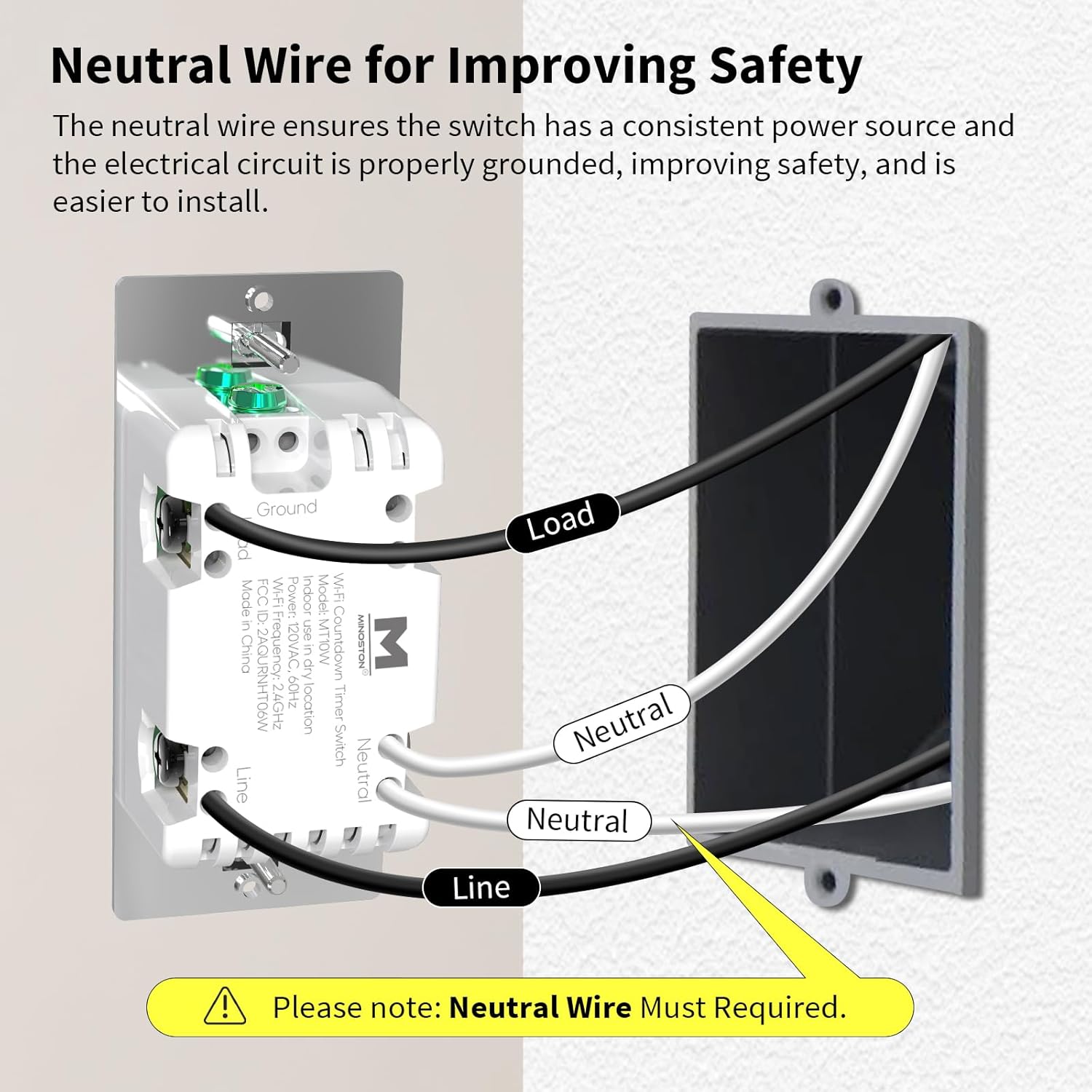
Image: Detailed wiring diagram for the Minoston MT10W WiFi Timer Switch, showing connections for Line, Load, Neutral, and Ground wires. A note emphasizes the requirement for a neutral wire.
ขั้นตอนการติดตั้ง
- ปิดไฟ: Before beginning, turn off the power to the switch location at the circuit breaker or fuse box.
- ถอดสวิตช์เก่าออก: ถอดแผ่นปิดผนังและสวิตช์เดิมออกจากกล่องไฟฟ้าอย่างระมัดระวัง
- ระบุสายไฟ: Identify the Line (hot), Load, Neutral, and Ground wires. A neutral wire is typically white. If you do not have a neutral wire, this switch is not compatible.
- เชื่อมต่อสายไฟ:
- Connect the Line wire from the wall box to the Line terminal on the MT10W switch.
- Connect the Load wire from the wall box to the Load terminal on the MT10W switch.
- Connect the Neutral wire from the wall box to the Neutral terminal on the MT10W switch.
- Connect the Ground wire from the wall box to the Ground terminal on the MT10W switch.
- สวิตช์ติดตั้ง: ค่อยๆ ดันสวิตช์แบบมีสายเข้าไปในกล่องไฟฟ้า แล้วยึดให้แน่นด้วยสกรูที่ให้มา
- ติดตั้งแผ่นปิดผนัง: Attach the new or existing wall plate.
- คืนพลังงาน: เปิดไฟที่เบรกเกอร์อีกครั้ง
Wi-Fi and App Setup
The Minoston MT10W can be controlled via the Smart Life or Minoston APP. Ensure your Wi-Fi network is 2.4GHz.
- ดาวน์โหลดแอพ: Download the "Smart Life" or "Minoston" app from the App Store (iOS) or Google Play Store (Android).
- ลงทะเบียน/เข้าสู่ระบบ: เปิดแอปและลงทะเบียนบัญชีใหม่หรือเข้าสู่ระบบหากคุณมีบัญชีอยู่แล้ว
- เพิ่มอุปกรณ์:
- Tap "+" or "Add Device" in the app.
- Select "Electrical" > "Switch (Wi-Fi)" or search for "MT10W".
- Follow the in-app instructions to put the switch into pairing mode. This usually involves holding the "30 Min" button for 5 seconds until the blue LED indicator flashes quickly.
- ป้อนชื่อเครือข่าย Wi-Fi 2.4GHz และรหัสผ่านของคุณ
- Wait for the device to connect. Once connected, you can rename the switch.

Image: Screenshot of the mobile application interface demonstrating remote control of the Minoston MT10W WiFi Timer Switch.
Voice Control Setup (Alexa/Google Assistant)
- Ensure your Minoston MT10W switch is successfully added to the Smart Life/Minoston app.
- เปิดแอป Amazon Alexa หรือ Google Home
- ไปที่ "ทักษะและเกม" (Alexa) หรือ "ทำงานร่วมกับ Google" (Google Home)
- ค้นหา "Smart Life" (or "Minoston" if available) and enable the skill.
- Link your Smart Life/Minoston account with your Alexa/Google account.
- Discover devices. You can now control your switch using voice commands like "Alexa, turn on the timer for 30 minutes" or "Hey Google, turn off the fan."

Image: Illustration of a user interacting with an Amazon Echo device to control the Minoston MT10W WiFi Timer Switch via voice commands.
คำแนะนำการใช้งาน
ปุ่มฟังก์ชั่น
The Minoston MT10W features an ON/OFF override button and six preset countdown buttons.

Image: Diagram illustrating the various buttons on the Minoston MT10W WiFi Timer Switch and their corresponding functions, including ON/OFF override, preset countdowns, and LED brightness adjustments.
- ON/OFF Override Button:
- Press to manually turn the connected device ON or OFF.
- Hold for 3 seconds to exit countdown mode. Press again to resume countdown mode.
- Preset Countdown Buttons (5 Min, 10 Min, 30 Min, 60 Min, 2 Hour, 4 Hour):
- Press any button to activate the corresponding countdown timer. The connected device will turn ON and automatically turn OFF after the selected duration.
- 5 Min Button (Hold for 3s): Turn off or resume the 6 LED indicators of the countdown.
- 10 Min Button (Hold for 3s): Dim the LED indicator (backlight) of the ON/OFF button.
- 2 Hour Button (Hold for 3s): Dim LED indicators of all 7 buttons to minimum brightness. All LED indicators flash on minimum brightness.
- 4 Hour Button (Hold for 3s): Brighten LED indicators of all 7 buttons to maximum brightness. All LED indicators flash on maximum brightness.
- 30 Min Button (Hold for 5s): Until blue LED indicator flashes quickly, Wi-Fi network configuration is displayed (for pairing mode).
ไฟแสดงสถานะ LED
The amber LED indicator light provides soft illumination, making it easy to locate the switch in the dark.

Image: Close-up of the Minoston MT10W WiFi Timer Switch showing the amber LED indicator light, designed for visibility in low-light conditions.
คุณสมบัติการประหยัดพลังงาน
Utilizing the countdown timer helps save electricity by ensuring devices like fans, ceiling lights, and other appliances automatically turn off after a set period, preventing unnecessary energy consumption.

Image: A Minoston MT10W WiFi Timer Switch installed in a bathroom setting, illustrating its use for energy saving by automatically turning off lights or exhaust fans.
การซ่อมบำรุง
- Clean the switch surface with a soft, damp ผ้า. อย่าใช้สารเคมีที่รุนแรงหรือน้ำยาทำความสะอาดที่มีฤทธิ์กัดกร่อน
- Ensure the switch is not exposed to excessive moisture or direct water spray.
- Regularly check for any loose wiring connections during routine electrical inspections (by a qualified electrician).
การแก้ไขปัญหา
| ปัญหา | สาเหตุที่เป็นไปได้ | สารละลาย |
|---|---|---|
| สวิตซ์ไม่เปิดเครื่อง | No power at the circuit breaker; incorrect wiring; neutral wire not connected. | Check circuit breaker. Verify wiring connections according to the diagram. Ensure neutral wire is connected. |
| ไม่สามารถเชื่อมต่อ Wi-Fi ได้ | Incorrect Wi-Fi password; not 2.4GHz network; switch not in pairing mode; too far from router. | Verify Wi-Fi password. Ensure you are connecting to a 2.4GHz network. Put switch into pairing mode (hold 30 Min button for 5s). Move router closer or use a Wi-Fi extender. |
| การควบคุมด้วยเสียงไม่ทำงาน | ทักษะไม่ได้เปิดใช้งาน บัญชีไม่ได้เชื่อมโยง ชื่ออุปกรณ์ไม่ถูกต้อง | Ensure "Smart Life" skill is enabled and accounts are linked in Alexa/Google Home app. Check device name in app and use that name for voice commands. |
| Countdown not working. | Switch is in override mode. | Hold the ON/OFF button for 3 seconds to exit override mode and resume countdown functionality. |
การรับประกันและการสนับสนุน
Minoston products come with a standard manufacturer's warranty. For specific warranty details, please refer to the warranty card included with your product or visit the official Minoston webเว็บไซต์.
For technical support, troubleshooting assistance, or to inquire about replacement parts, please contact Minoston Customer Service:
- Webเว็บไซต์: www.minoston.com
- อีเมล: support@minoston.com
Please have your model number (MT10W) and purchase date ready when contacting support.


