1. บทนำ
Welcome to the user manual for your new Avtex W195TS Smart TV. This television is specifically designed for mobile living, offering versatile power options (12V, 24V, and 240V) and a range of smart features, including Wi-Fi, Bluetooth, and an integrated Freesat satellite decoder. This manual provides essential information for setting up, operating, maintaining, and troubleshooting your device to ensure optimal performance and enjoyment.
2. ข้อมูลด้านความปลอดภัย
โปรดอ่านคำแนะนำด้านความปลอดภัยทั้งหมดอย่างละเอียดก่อนใช้งานโทรทัศน์ เก็บคู่มือนี้ไว้เพื่อใช้อ้างอิงในอนาคต
- แหล่งจ่ายไฟ: ตรวจสอบให้แน่ใจว่าถูกต้อง voltage is used (12V, 24V DC or 240V AC). Do not overload power outlets.
- การระบายอากาศ : อย่าปิดกั้นช่องระบายอากาศ ควรเว้นพื้นที่รอบทีวีให้เพียงพอเพื่อให้อากาศถ่ายเทได้สะดวก
- น้ำและความชื้น: อย่าให้ทีวีโดนฝนหรือความชื้น อย่าวางวัตถุที่บรรจุของเหลวไว้บนทีวี
- การทำความสะอาด: ถอดปลั๊กทีวีก่อนทำความสะอาด ใช้ผ้านุ่มและแห้ง ห้ามใช้น้ำยาทำความสะอาดชนิดน้ำหรือสเปรย์ทำความสะอาด
- การจัดวาง: Place the TV on a stable, flat surface or mount securely to a wall/bracket. Avoid direct sunlight or heat sources.
- การบริการ: อย่าพยายามให้บริการผลิตภัณฑ์นี้ด้วยตนเอง ส่งต่อการบริการทั้งหมดไปยังช่างบริการที่ผ่านการรับรอง
3. เนื้อหาบรรจุภัณฑ์
Before setup, please check that all items are present in the box:
- Avtex W195TS สมาร์ททีวี
- รีโมทคอนโทรลพร้อมแบตเตอรี่
- สายไฟ DC 12V/24V
- อะแดปเตอร์แปลงไฟ AC 240V
- Table Stand (if applicable)
- คู่มือการใช้งาน (เอกสารนี้)
4. สินค้าหมดview
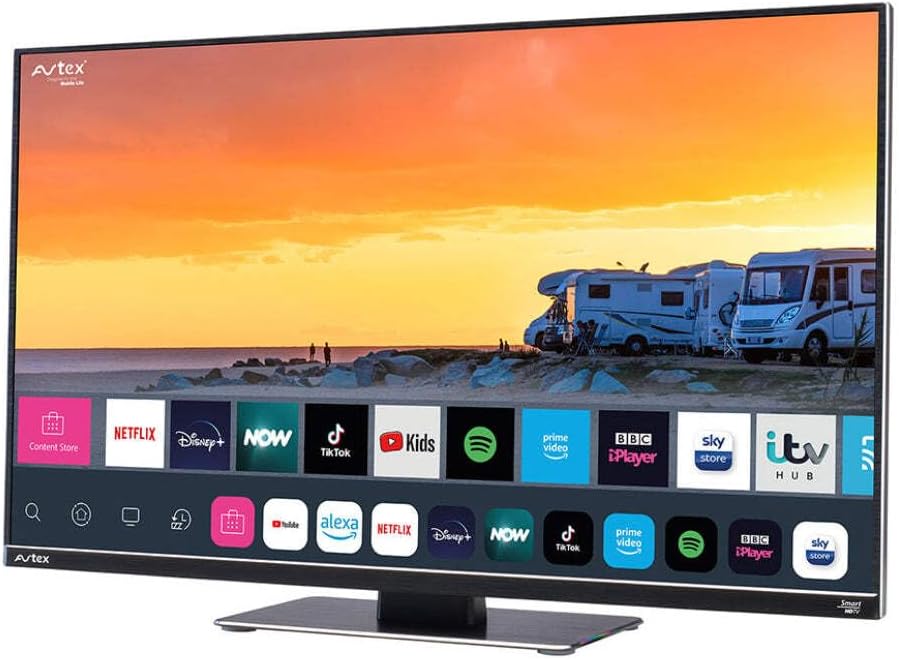
Figure 4.1: Avtex W195TS Smart TV Front View
This image shows the Avtex W195TS Smart TV from a slight angle, highlighting its slim design and the vibrant display. The screen shows a user interface with icons for popular streaming services like Netflix, Disney+, Now, TikTok, Kids, Spotify, Prime Video, BBC iPlayer, Sky Store, and ITV Hub. The background on the screen depicts a scenic view of motorhomes parked near a beach at sunset. The Avtex logo is visible on the top left and bottom left of the TV frame.
4.1. พอร์ตและการเชื่อมต่อ
- พอร์ต HDMI: For connecting external devices like Blu-ray players, game consoles, or set-top boxes.
- พอร์ต USB (2): For media playback from USB drives or connecting USB accessories.
- อินพุตเสาอากาศ: For connecting a terrestrial TV antenna.
- อินพุตดาวเทียม: For connecting a satellite dish for Freesat or other satellite services.
- อินพุตไฟ DC: For 12V/24V DC power connection.
- อินพุตไฟ AC: For 240V AC power connection via adapter.
- พอร์ตอีเธอร์เน็ต: สำหรับการเชื่อมต่อเครือข่ายแบบใช้สาย
- เอาต์พุตเสียง: สำหรับเชื่อมต่อระบบเสียงภายนอกหรือหูฟัง
5. การตั้งค่า
5.1. การติดตั้งขาตั้ง (ทางเลือก)
- วางทีวีคว่ำหน้าลงบนพื้นผิวที่นุ่มและสะอาดอย่างระมัดระวังเพื่อป้องกันไม่ให้หน้าจอเสียหาย
- จัดวางขาตั้งให้ตรงกับรูยึดที่ด้านล่างของทีวี
- ยึดขาตั้งโดยใช้สกรูที่ให้มา
5.2. การเชื่อมต่อไฟฟ้า
The Avtex W195TS supports multiple power inputs:
- 12V/24V กระแสตรง: Connect the supplied 12V/24V DC power cable to the DC input on the TV and to your vehicle's 12V or 24V power outlet.
- ไฟฟ้ากระแสสลับ 240V: Connect the supplied 240V AC power adapter to the AC input on the TV, then plug the adapter into a standard 240V AC wall socket.
บันทึก: Do not connect both DC and AC power simultaneously.
5.3. การเชื่อมต่อเสาอากาศ/จานรับสัญญาณดาวเทียม
- Terrestrial TV: Connect your aerial cable to the 'ANTENNA IN' port.
- Satellite TV (Freesat): Connect your satellite dish cable to the 'SATELLITE IN' port.
5.4. การเปิดเครื่องครั้งแรกและการตั้งค่าครั้งแรก
- Connect the TV to power and press the power button on the remote control or TV.
- The First-Time Setup Wizard will appear. Follow the on-screen prompts to select your language, country, and time zone.
- Perform an automatic channel scan for both terrestrial and satellite channels.
- เชื่อมต่อกับเครือข่าย Wi-Fi ของคุณโดยเลือกชื่อเครือข่ายและป้อนรหัสผ่าน
6. ปฏิบัติการ
6.1. ฟังก์ชั่นการควบคุมระยะไกล
Familiarize yourself with the remote control buttons for easy navigation and control of your TV's features.
- ปุ่มเปิด/ปิด: เปิด/ปิดทีวี
- ปุ่มต้นทาง: Selects input sources (HDMI, USB, TV, Satellite).
- ระดับเสียง +/-: ปรับระดับเสียง
- ช่อง +/-: เปลี่ยนช่องทีวี
- ปุ่มนำทาง (ขึ้น/ลง/ซ้าย/ขวา/ตกลง): สำหรับการนำทางและเลือกเมนู
- Smart Hub/Home Button: เข้าถึงอินเทอร์เฟซสมาร์ททีวี
- ปุ่มแอป: Dedicated buttons for popular streaming apps (if available).
6.2. คุณสมบัติของสมาร์ททีวี
Your Avtex W195TS is equipped with smart TV capabilities:
- แอปสโตร์: Download and install various applications for streaming, news, and entertainment.
- บริการสตรีมมิ่ง: Access pre-installed or downloaded apps like Netflix, Disney+, Prime Video, BBC iPlayer, etc. (subscription may be required).
- Web เบราว์เซอร์: ท่องอินเทอร์เน็ตโดยตรงบนทีวีของคุณ
- มิเรอร์หน้าจอ: Connect your smartphone or tablet to display content on the TV screen (compatibility may vary).
6.3. การเชื่อมต่อบลูทูธ
Pair Bluetooth devices such as headphones or external speakers for enhanced audio experience.
- เข้าไปที่เมนูการตั้งค่าของทีวี
- Select 'Bluetooth' or 'Connected Devices'.
- Enable Bluetooth and put your device into pairing mode.
- เลือกอุปกรณ์ของคุณจากรายการที่จะจับคู่
6.4. Media Playback via USB
Insert a USB drive into one of the USB ports to view ภาพถ่าย เล่นวิดีโอ หรือฟังเพลง
- The TV will usually prompt you to open the media player.
- นำทางผ่านของคุณ fileโดยใช้รีโมทคอนโทรล
7. การบำรุงรักษา
7.1. การทำความสะอาดทีวี
- หน้าจอ: เช็ดหน้าจอเบาๆ ด้วยผ้านุ่มที่ไม่เป็นขุย สำหรับรอยฝังแน่น ให้เช็ดเบาๆampเทน้ำหรือน้ำยาทำความสะอาดหน้าจอลงบนผ้า (อย่าฉีดพ่นลงบนหน้าจอโดยตรง)
- Casing: ใช้ผ้าแห้งนุ่มๆ เช็ดทำความสะอาดทีวีasinก. หลีกเลี่ยงน้ำยาทำความสะอาดหรือตัวทำละลายที่มีฤทธิ์กัดกร่อน
7.2. การอัปเดตซอฟต์แวร์
Periodically check for software updates to ensure your TV has the latest features and bug fixes. Updates can usually be found in the TV's settings menu under 'System' or 'Software Update'.
8 การแก้ไขปัญหา
If you encounter issues with your Avtex W195TS, refer to the following common problems and solutions:
| ปัญหา | สาเหตุที่เป็นไปได้ | สารละลาย |
|---|---|---|
| ไม่มีไฟฟ้า | ไม่ได้เสียบสายไฟ ไม่มีไฟจากปลั๊กไฟ | Check power cable connection; test outlet with another device; ensure correct voltagอี (12V/24V/240V) |
| ไม่มีภาพแต่มีเสียง | เลือกแหล่งสัญญาณเข้าไม่ถูกต้อง สายเคเบิลชำรุด | Press the 'Source' button on the remote to select the correct input; check HDMI/antenna cables. |
| ไม่มีเสียงแต่มีภาพ | เสียงถูกปิดหรือเบาเกินไป มีปัญหากับระบบเสียงภายนอก | เปิดเสียงหรือเพิ่มระดับเสียง ตรวจสอบการเชื่อมต่อกับอุปกรณ์เสียงภายนอก |
| ไม่สามารถเชื่อมต่อ Wi-Fi ได้ | รหัสผ่านไม่ถูกต้อง ปัญหาเราเตอร์ ทีวีอยู่ห่างจากเราเตอร์มากเกินไป | Re-enter Wi-Fi password; restart router; move TV closer to router or use an extender. |
| รีโมตคอนโทรลไม่ทำงาน | แบตเตอรี่หมด; สิ่งกีดขวาง; ปัญหาการจับคู่ | Replace batteries; remove obstructions; re-pair remote if it's a Bluetooth remote. |
9. ข้อมูลจำเพาะ
| คุณสมบัติ | ข้อมูลจำเพาะ |
|---|---|
| ยี่ห้อ | แอฟเท็กซ์ |
| หมายเลขรุ่น | AVTEX W195TS |
| ขนาดหน้าจอ | 19.5 นิ้ว |
| ปณิธาน | 1080p (ฟูลเอชดี) |
| อัตราส่วนภาพ | 16:9 น. |
| เทคโนโลยีการเชื่อมต่อ | บลูทูธ, HDMI, Wi-Fi |
| พอร์ต USB รวม | 2 |
| เล่มที่tage | 12 โวลต์, 24 โวลต์, 240 โวลต์ |
| น้ำหนักสินค้า | 2.5 กิโลกรัม |
| รุ่นปี | 2018 |
10. การรับประกันและการสนับสนุน
Your Avtex W195TS Smart TV comes with a manufacturer's warranty. Please refer to the warranty card included in your product packaging for specific terms and conditions, including warranty period and coverage details. Keep your proof of purchase for warranty claims.
For technical support, troubleshooting assistance beyond this manual, or warranty inquiries, please contact Avtex customer service through their official website or the contact information provided with your product. When contacting support, please have your model number (AVTEX W195TS) and serial number ready.


