1. บทนำ
This manual provides essential information for the safe and efficient operation of your ONN 43-Inch Class 4K UHD (2160P) LED Smart TV. This television offers a 4K Ultra High Definition display, High Dynamic Range (HDR) compatibility, and integrated smart TV functionalities powered by Roku. It supports popular streaming services and voice assistants like Alexa and Google Assistant. Please read this manual thoroughly before using your television and retain it for future reference.

Image 1: ONN 43-Inch 4K UHD Smart TV in a typical living room environment.
2. ข้อมูลด้านความปลอดภัย
Always follow basic safety precautions when using this product to reduce the risk of fire, electric shock, and injury. Keep this manual handy for reference.
- แหล่งพลังงาน: เชื่อมต่อทีวีกับแหล่งจ่ายไฟที่ระบุเท่านั้น
- การระบายอากาศ : ตรวจสอบให้แน่ใจว่ามีการระบายอากาศรอบทีวีอย่างเพียงพอ อย่าปิดกั้นช่องระบายอากาศ
- น้ำและความชื้น: อย่าให้ทีวีโดนฝนหรือความชื้น อย่าวางวัตถุที่บรรจุของเหลวไว้บนทีวี
- การทำความสะอาด: ถอดปลั๊กทีวีก่อนทำความสะอาด ใช้ผ้าแห้งนุ่มๆ เช็ดทำความสะอาด
- การติดตั้งบนผนัง: If wall mounting, ensure the mount is compatible with VESA 400x400 standards and installed by qualified personnel.
- เด็ก: ดูแลเด็ก ๆ ไม่ให้ปีนป่ายหรือเล่นทีวี
3. เนื้อหาบรรจุภัณฑ์
ตรวจสอบว่าสินค้าทั้งหมดอยู่ในบรรจุภัณฑ์ครบถ้วน หากมีสินค้าใดขาดหายหรือเสียหาย โปรดติดต่อผู้ค้าปลีก
- ONN 43-Inch Class 4K UHD LED Smart TV
- รีโมทคอนโทรล
- Wall Mount (Note: For renewed products, TV stands may not be included as a wall mount is provided for installation.)
- สายไฟ
- คู่มือเริ่มต้นใช้งานฉบับย่อ (ไม่รวมอยู่ในคู่มือนี้)

Image 2: The ONN 43-Inch 4K UHD Smart TV alongside its included wall mount.
4. การตั้งค่า
4.1 การติดตั้งแบบติดผนัง
Your ONN 43-Inch Smart TV is designed for wall mounting using a VESA 400x400 compatible bracket. Follow these general steps for installation:
- เตรียมกำแพง: Locate wall studs and ensure the mounting area can support the TV's weight (approximately 16.9 pounds) plus the mount.
- Attach Mount Brackets to TV: Secure the wall mount brackets to the VESA holes on the back of the TV using appropriate screws.
- ติดตั้งแผ่นผนัง: Mount the wall plate securely to the wall studs according to the wall mount manufacturer's instructions.
- ติดตั้งทีวี: Carefully lift the TV and attach it to the wall plate. Ensure it is securely locked in place.
Note: Always refer to the specific instructions provided with your wall mount for detailed installation steps. Professional installation is recommended.
4.2 การเชื่อมต่ออุปกรณ์ต่อพ่วง
ทีวีมีพอร์ตต่างๆ สำหรับเชื่อมต่ออุปกรณ์ภายนอก:
- ช่องต่อ HDMI: 3 HDMI ports (including 1 eARC) for high-definition audio/video devices like Blu-ray players, gaming consoles, or cable boxes.
- ยูเอสบี: 1 USB port for media playback from USB drives.
- LAN: พอร์ต Ethernet 1 พอร์ตสำหรับการเชื่อมต่ออินเทอร์เน็ตแบบใช้สาย
- ออปติคอล: 1 Optical digital audio output for connecting to soundbars or home theater systems.
- คอมโพสิต: 1 Composite video input for older devices.
- สายโคแอกเซียล/สายเคเบิล: 1 Coaxial input for antenna or cable TV connection.
- หูฟัง: 1 Headphone jack for private listening.
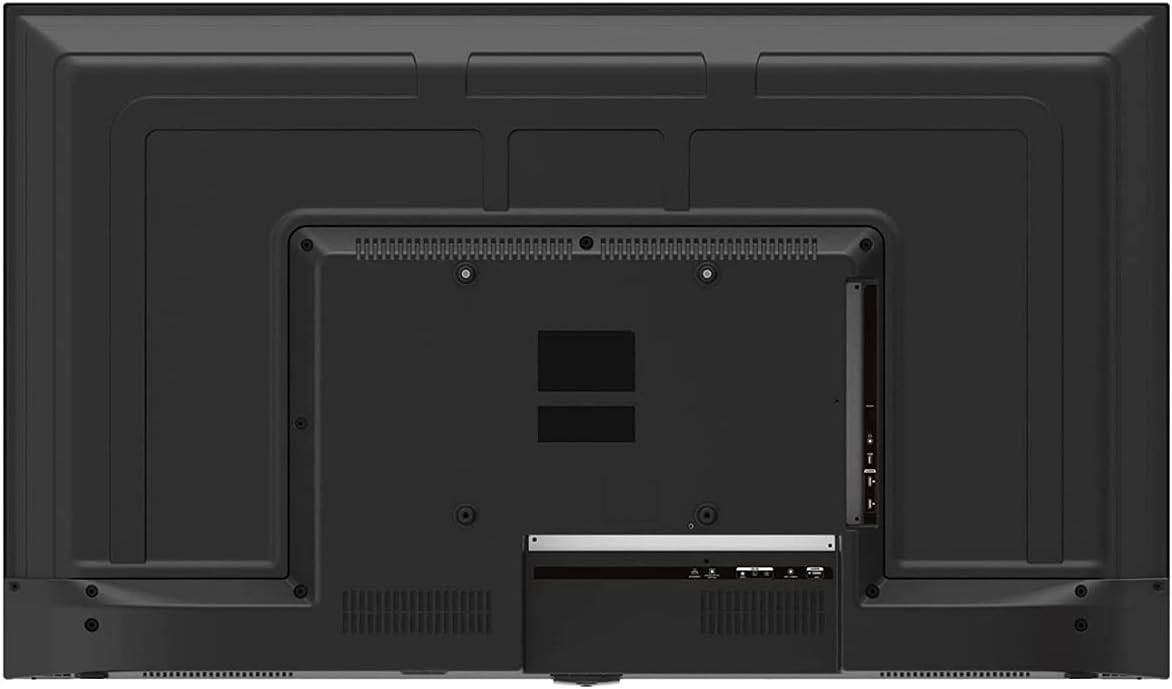
Image 3: Rear panel of the ONN 43-Inch Smart TV, highlighting the available connectivity ports.
4.3 การเปิดเครื่องครั้งแรกและการตั้งค่าเครือข่าย
- เปิดเครื่อง: Connect the power cord to the TV and a power outlet. Press the power button on the remote control.
- เลือกภาษา: ทำตามคำแนะนำบนหน้าจอเพื่อเลือกภาษาที่คุณต้องการ
- การเชื่อมต่อเครือข่าย: เลือกเครือข่าย Wi-Fi ของคุณจากรายการและป้อนรหัสผ่าน หรืออีกทางเลือกหนึ่งคือเชื่อมต่อสาย Ethernet เพื่อเชื่อมต่อแบบใช้สาย
- การตั้งค่าบัญชี Roku: Follow the instructions to create or sign in to your Roku account. This is necessary to access streaming channels and features.
5. การใช้งานทีวีของคุณ
5.1 การควบคุมระยะไกล
The included remote control provides easy access to all TV functions and streaming services. It features dedicated buttons for popular streaming apps like Netflix, Apple TV+, Paramount+, and HBO Max.
5.2 Smart TV Interface (Roku TV)
The Roku TV home screen provides a centralized hub for all your entertainment. You can easily navigate through streaming channels, live TV inputs, and device connections.

Image 4: The Roku TV home screen on the ONN 43-Inch Smart TV, showing available streaming applications.

ภาพที่ 5: มุมเอียง view of the ONN 43-Inch Smart TV, showcasing the user interface from a different perspective.
- บ้าน: Access the main Roku TV interface.
- ทีวีสด: Browse available live television channels.
- Streaming Store: Discover and add new streaming channels.
- Apps & Inputs: Select connected devices (e.g., HDMI 1, HDMI 2) or launch installed applications.
5.3 การบูรณาการผู้ช่วยเสียง
The TV is compatible with Alexa and Google Assistant. You can use a compatible voice assistant device (sold separately) or the Roku mobile app to control your TV with voice commands, such as turning it on/off, changing channels, or launching apps.
5.4 การตั้งค่าภาพ
To adjust picture quality, navigate to Settings > Picture Settings on the Roku TV menu. Options typically include Brightness, Contrast, Color, Tint, Sharpness, and various picture modes (e.g., Movie, Sports, Vivid, Standard).
5.5 การตั้งค่าเสียง
To adjust audio settings, navigate to Settings > Audio Settings. Options may include Volume Mode, Audio Delay, and various sound modes (e.g., Standard, Theater, Music).
6. การบำรุงรักษา
6.1 การทำความสะอาดทีวี
- ควรถอดปลั๊กทีวีทุกครั้งก่อนทำความสะอาด
- ใช้ผ้านุ่มที่ไม่เป็นขุยเช็ดหน้าจอและตู้เบาๆ
- สำหรับรอยฝังแน่น ให้เช็ดเบาๆampชุบผ้าด้วยน้ำหรือน้ำยาทำความสะอาดหน้าจอสูตรอ่อนโยนที่ไม่กัดกร่อน ห้ามฉีดน้ำยาลงบนหน้าจอโดยตรง
6.2 การอัปเดตซอฟต์แวร์
Your ONN Roku TV automatically receives software updates to improve performance and add new features. Ensure your TV is connected to the internet for these updates. You can manually check for updates via การตั้งค่า > ระบบ > อัปเดตระบบ.
7 การแก้ไขปัญหา
หากคุณประสบปัญหาเกี่ยวกับทีวี โปรดดูวิธีแก้ไขทั่วไปต่อไปนี้:
| ปัญหา | สารละลาย |
|---|---|
| ไม่มีไฟฟ้า | ตรวจสอบให้แน่ใจว่าสายไฟเสียบเข้ากับทีวีและเต้ารับไฟฟ้าที่ใช้งานได้แน่นดีแล้ว ลองใช้เต้ารับอื่น |
| ไม่มีภาพ/เสียง | Check all cable connections (HDMI, coaxial). Ensure the correct input source is selected on the TV. |
| รีโมทไม่ทำงาน | เปลี่ยนแบตเตอรี่ในรีโมทคอนโทรล ตรวจสอบให้แน่ใจว่าไม่มีสิ่งกีดขวางระหว่างรีโมทและเซ็นเซอร์อินฟราเรดของทีวี |
| ไม่สามารถเชื่อมต่อ Wi-Fi ได้ | Verify your Wi-Fi password. Restart your router and modem. Move the TV closer to the router if possible. |
| คุณภาพของภาพไม่ดี | Check the resolution settings of your connected device. Adjust picture settings on the TV. Ensure you are viewปรับแต่งเนื้อหา 4K เพื่อให้ได้ความละเอียดสูงสุด |
8. ข้อมูลจำเพาะ
| คุณสมบัติ | รายละเอียด |
|---|---|
| ขนาดหน้าจอ | 43 นิ้ว |
| เทคโนโลยีการแสดงผล | นำ |
| ปณิธาน | 4K อัลตร้าเอชดี (2160p) |
| ความเข้ากันได้ของ HDR | ใช่ |
| แพลตฟอร์มสมาร์ททีวี | ทีวีโรคุ |
| การสนับสนุนผู้ช่วยเสียง | Alexa ผู้ช่วยของ Google |
| การเชื่อมต่อ | 3 HDMI (1 eARC), 1 Composite, 1 USB, 1 LAN, 1 Optical, 1 Coaxial/Cable, 1 Headphone |
| อัตราส่วนภาพ | 16:9 น. |
| ขนาดสินค้า (ลึก x กว้าง x สูง) | 7" x 38" x 23" |
| น้ำหนักสินค้า | 16.9 ปอนด์ |
| สี | สีดำ |

ภาพที่ 6: ด้านข้างfile of the ONN 43-Inch Smart TV, illustrating its slim design.

ภาพที่ 7: ฉลากคู่มือพลังงานที่แสดงค่าใช้จ่ายและปริมาณการใช้พลังงานโดยประมาณต่อปีของโทรทัศน์
9. การรับประกันและการสนับสนุน
For warranty information and technical support, please refer to the documentation included with your product or visit the official ONN support website. As this is a renewed product, specific warranty terms may vary. Please consult the seller or product listing for details regarding the renewed product warranty.


