1. สินค้าหมดview
The MINLOVE 108S is a high-definition projector designed for both home theater and business presentations. It features native 1080p resolution, 5G and 2.4G WiFi connectivity for seamless screen mirroring, and Bluetooth 5.0 for audio output. With a brightness of 9800 lumens and a 10000:1 contrast ratio, it delivers clear and vibrant images up to 450 inches. This package includes a 100-inch projector screen for immediate use.
เนื้อหาแพ็คเกจ:
- MINLOVE 108S Projector x1
- สาย HDMI x1
- รีโมทคอนโทรล 1 อัน (ไม่รวมแบตเตอรี่)
- 3-in-1 AV Cable x1
- คู่มือการใช้งาน x1
- สายไฟ x1
- 100-inch Projector Screen x1
- ฝาครอบเลนส์ x1

Image 1.1: The MINLOVE 108S Projector, showcasing its compact design and the included 100-inch screen, along with icons representing various streaming services and connectivity options.
2. คู่มือการติดตั้ง
2.1 การจัดวาง
Position the projector on a stable, flat surface or mount it to the ceiling. Ensure there is adequate ventilation around the unit. The optimal projection distance will vary based on desired screen size, with a maximum display size of 450 inches.
2.2 การเชื่อมต่อสายไฟ
- เชื่อมต่อสายไฟเข้ากับช่องจ่ายไฟของโปรเจ็กเตอร์
- Plug the other end of the power cord into a standard electrical outlet (240 Volts).
2.3 การเปิดเครื่องครั้งแรก
กดปุ่มเปิด/ปิดบนโปรเจ็กเตอร์หรือรีโมทคอนโทรลเพื่อเปิดเครื่อง ไฟแสดงสถานะจะสว่างขึ้น
2.4 การปรับโฟกัสและคีย์สโตน
- จุดสนใจ: หมุนวงแหวนปรับโฟกัสบนเลนส์โปรเจ็กเตอร์จนกว่าภาพที่ฉายจะคมชัดและชัดเจน
- การแก้ไขคีย์สโตน: Use the manual keystone correction dial (typically ±15°) to adjust the image shape if it appears trapezoidal. This corrects for projection angles that are not perfectly perpendicular to the screen.
3. คู่มือการใช้งาน
3.1 ตัวเลือกการเชื่อมต่อ
3.1.1 WiFi Connection (5G/2.4G) for Screen Mirroring
The projector supports dual-band 2.4G and 5G WiFi for wireless screen mirroring from iOS, Android, and Windows devices. Ensure both the projector and your device are connected to the same local WiFi network.
- Navigate to the 'Screen Mirroring' or 'WiFi Display' option in the projector's menu.
- Select your device's operating system (iOS/Android/Windows).
- On your mobile device or computer, enable screen mirroring/casting and select the projector from the list of available devices.
บันทึก: Wired screen mirroring is also supported for iOS devices using a USB cable or an HDMI conversion cable.

Image 3.1: Visual representation of 5G and 2.4G WiFi connectivity, demonstrating wireless screen mirroring from laptops, tablets, and smartphones to the projector.
3.1.2 การเชื่อมต่อบลูทูธ 5.0
Connect the projector to external Bluetooth speakers, headphones, or other Bluetooth audio devices for an enhanced audio experience. Bluetooth connection is for audio output only.
- Go to the 'Bluetooth Settings' in the projector's menu.
- เปิดใช้งาน Bluetooth และค้นหาอุปกรณ์ที่มีอยู่
- Select your Bluetooth audio device from the list to pair.

Image 3.2: The MINLOVE projector highlighting its built-in HiFi stereo speakers and its ability to connect to external Bluetooth devices like headphones and speakers.
3.1.3 การเชื่อมต่อแบบมีสาย
The projector offers multiple wired input ports for various devices:
- HDMI (x2): Connect TV boxes, gaming consoles (PS5, Xbox), laptops, PCs, Blu-ray players.
- ยูเอสบี (x1): เล่นสื่อโดยตรงจากไดรฟ์ USB
- เอวี: Connect older devices using the included 3-in-1 AV cable.
- VGA: Connect to computers.
- ไมโคร SD: Play media from Micro SD cards.

Image 3.3: An illustration of the MINLOVE projector's universal connectivity, showing its compatibility with a wide range of devices through HDMI, USB, and other ports.
3.2 การเลือกแหล่งที่มาของอินพุต
Use the 'Source' button on the remote control or the projector's control panel to cycle through available input sources (HDMI1, HDMI2, USB, AV, Screen Mirroring).
3.3 การนำทางเมนู
Use the arrow keys and 'OK' button on the remote control to navigate the projector's on-screen menu. Adjust settings such as picture mode, sound mode, aspect ratio, and network settings.

Image 3.4: The projector's home interface, showing various applications and examples of its use in different settings, such as watching movies, exercising, and outdoor entertainment.
4. การบำรุงรักษา
4.1 การทำความสะอาดเลนส์
Gently clean the projector lens with a soft, lint-free cloth or a lens cleaning brush. Avoid using abrasive cleaners or excessive force, which can scratch the lens.
4.2 การทำความสะอาดตัวกรองฝุ่น
Regularly check and clean the dust filter (if accessible) to ensure proper airflow and prevent overheating. Refer to the specific location of the filter in the product diagram if available.
4.3 ลิตรamp ชีวิต
The LED light source in the MINLOVE 108S projector has an estimated lifespan of up to 60,000 hours, providing long-term performance without frequent lamp การทดแทน
4.4 พื้นที่จัดเก็บ
เมื่อไม่ใช้งาน ให้เก็บโปรเจคเตอร์ไว้ในที่แห้งและเย็น หลีกเลี่ยงแสงแดดโดยตรงและอุณหภูมิที่สูงหรือต่ำเกินไป ใช้ฝาปิดเลนส์เพื่อป้องกันเลนส์จากฝุ่นและรอยขีดข่วน
5 การแก้ไขปัญหา
- ไม่มีไฟฟ้า: Ensure the power cord is securely connected to both the projector and the electrical outlet. Check if the outlet is functional.
- ไม่มีรูป:
- ตรวจสอบว่าเลือกแหล่งอินพุตที่ถูกต้อง
- Check all connected cables (HDMI, AV, etc.) for secure connections.
- ปรับวงแหวนปรับโฟกัส
- คุณภาพของภาพต่ำ:
- Adjust the focus and keystone correction.
- ตรวจสอบให้แน่ใจว่าพื้นผิวที่จะฉายภาพเรียบและสะอาด
- Check the resolution settings on your source device.
- If a browning or multicolored spot appears, this may indicate overheating. Turn off the unit to cool down or ensure adequate ventilation.
- ไม่มีเสียง:
- เพิ่มระดับเสียงทั้งบนโปรเจ็กเตอร์และอุปกรณ์แหล่งที่มา
- If using Bluetooth, ensure the device is properly paired and selected as the audio output. Note that Bluetooth audio may experience slight latency.
- Check audio cable connections for wired setups.
- รีโมทคอนโทรลไม่ทำงาน: ใส่แบตเตอรี่กลับเข้าไปในรีโมทคอนโทรล ตรวจสอบให้แน่ใจว่าไม่มีสิ่งกีดขวางระหว่างรีโมทและตัวรับสัญญาณอินฟราเรดของโปรเจ็กเตอร์
6. ข้อมูลจำเพาะ
| คุณสมบัติ | ข้อมูลจำเพาะ |
|---|---|
| หมายเลขรุ่น | 108วินาที |
| ความละเอียดมาตรฐาน | Native 1920 x 1080 Pixels |
| ความสว่าง | 9800 ลูเมน |
| อัตราส่วนคอนทราสต์ | 10000:1 น. |
| ฟังก์ชั่นซูม | 100% - 75% |
| Keystone Correction | ±15° แบบแมนนวล |
| ขนาดหน้าจอสูงสุด | 450 นิ้ว |
| ไฟ LED ชีวิต | 60,000 ชั่วโมง |
| ฟังก์ชันไร้สาย | 5G/2.4G WiFi & Bluetooth 5.0 |
| อัตราส่วนภาพ | 4:3 / 16:9 / อัตโนมัติ |
| ความเข้ากันได้ | iOS, Android, PC, Xbox, PS4/PS5, TV Stick, HDMI, USB |
| ประเภทการเชื่อมต่อ | Wi-Fi, HDMI (x2), USB (x1), AV, VGA, Micro SD |
| ขนาดสินค้า | 29.97 x 19.99 x 10.01 ซม. |
| น้ำหนักสินค้า | 3.68 กิโลกรัม |
| เล่มที่tage | 240 โวลต์ |
| วัดtage | 50 วัตต์ |

Image 6.1: Visual comparison illustrating the superior brightness, sharpness, and wider color gamut of the MINLOVE projector compared to traditional models.
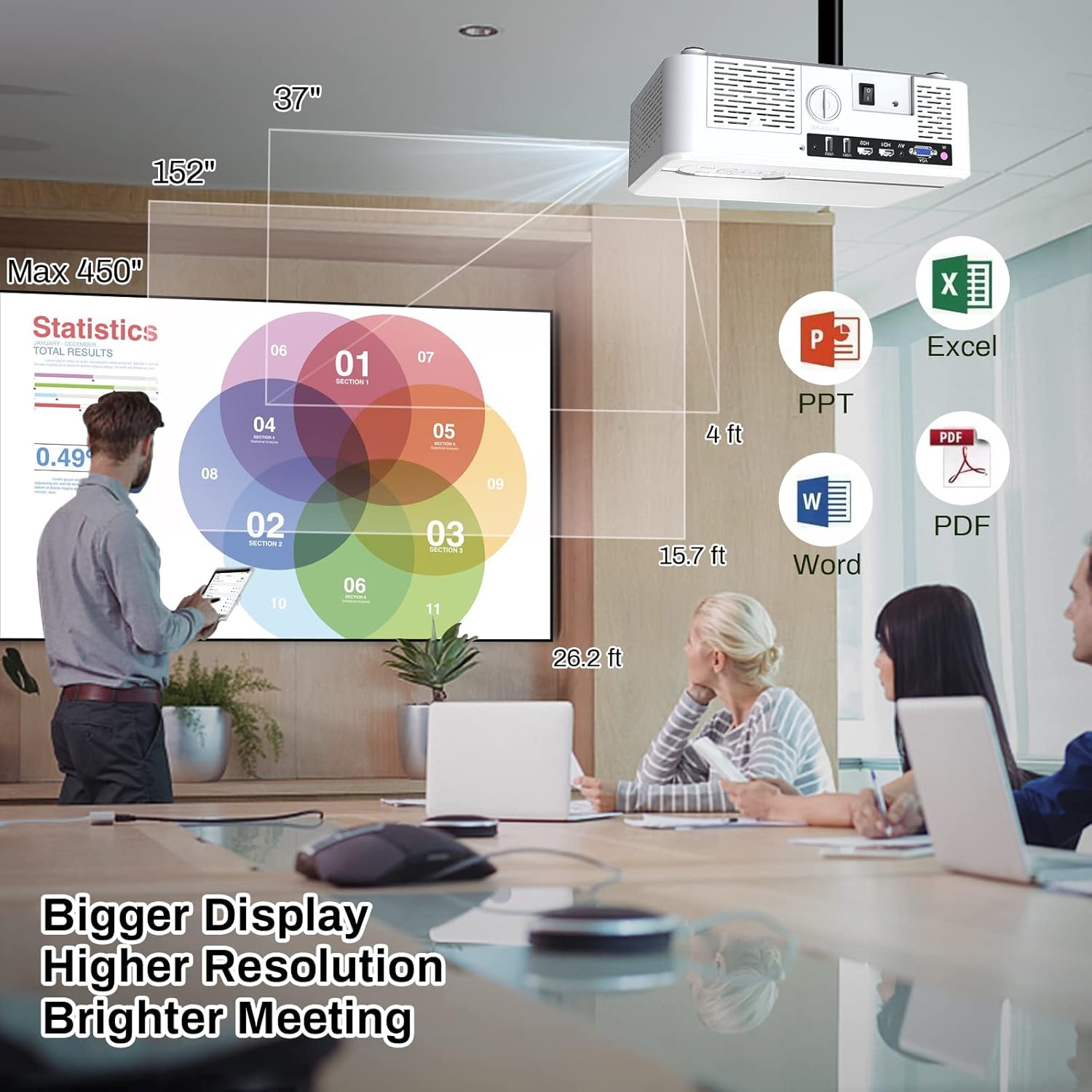
Image 6.2: The MINLOVE projector in a business environment, demonstrating its capability to project large, high-resolution displays for meetings and presentations.
7. การรับประกันและการสนับสนุน
The MINLOVE 108S projector comes with a 1-year warranty. For any questions, technical assistance, or after-sales service, please contact MINLOVE customer support. Our customer service team is available 24/7 to provide satisfactory solutions.


