สินค้าเกินview
The Geek Smart L-B400 Fingerprint Door Lock offers advanced keyless entry solutions for enhanced home security and convenience. This smart door knob combines multiple unlocking methods including fingerprint recognition, passcode, RFID card, emergency key, and mobile application control. Designed for easy, wire-free installation, it integrates modern technology with a sleek design.
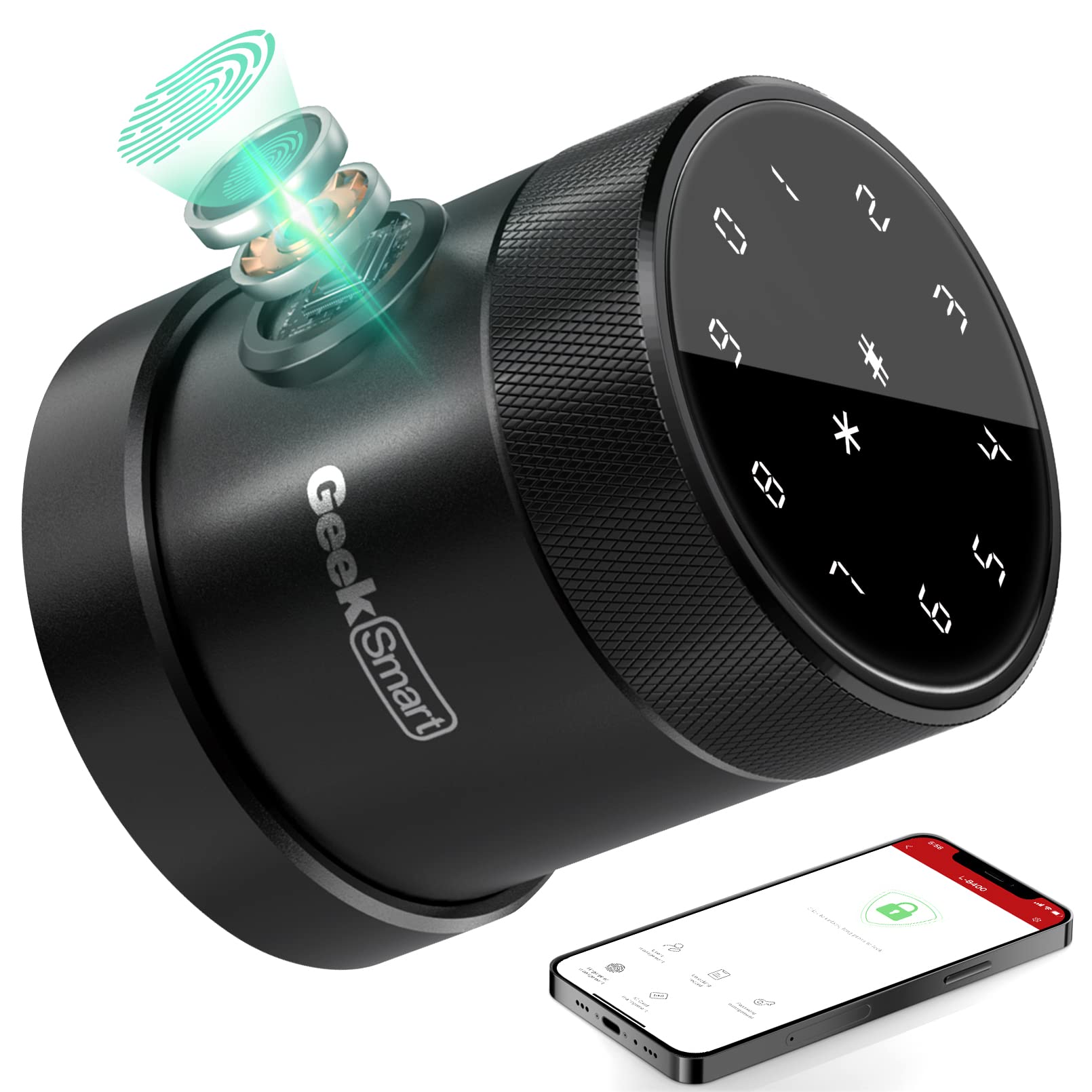
ภาพ: ด้านหน้า view of the Geek Smart L-B400 Fingerprint Door Lock, showcasing its modern black and silver design.
การติดตั้งและการตั้งค่า
The Geek Smart L-B400 is designed for quick and easy installation, typically within 15 minutes using only a screwdriver. Follow these steps to replace your existing lock with the smart lock.
1. เตรียมประตูของคุณให้พร้อม
Ensure your door meets the required dimensions for installation. The lock is suitable for door thicknesses between 35mm and 54mm (1 1/8" to 2 1/8").

Image: Diagram showing door measurements required for installing the Geek Smart L-B400 lock, including thickness, backset, and bore hole diameter.
2. ติดตั้งตัวล็อค
Insert the deadlatch into the door edge. Ensure the latch direction matches your door's opening direction. Secure it with screws.
3. Assemble and Install the Exterior Panel
Connect the spindle and wiring to the exterior lock panel. Carefully feed the wiring through the door bore hole and align the spindle with the latch mechanism. Secure the exterior panel.
Video: Official installation guide for the Geek Smart L-B400 door lock, demonstrating step-by-step assembly and mounting.
4. Install the Interior Panel
Connect the wiring from the exterior panel to the interior panel. Ensure the battery compartment is correctly oriented (button on top, socket at the bottom). Insert 4x AA batteries (not included) and secure the interior panel with screws.

Image: A person installing the Geek Smart L-B400 lock using a screwdriver, highlighting the ease of replacement for existing locks.
5. Initial Setup with Geek Smart App
Download the Geek Smart app from your mobile app store. Enable Bluetooth on your device. Open the app, tap "Add Device," select "Smart Lock," then choose "L-B400." Follow the on-screen prompts to register your lock and set up the administrator.
Video: Tutorial on how to connect the Geek Smart L-B400 to the mobile application, guiding users through the device pairing process.
คำแนะนำการใช้งาน
The Geek Smart L-B400 offers five convenient ways to unlock your door:
1. การปลดล็อคด้วยลายนิ้วมือ
Place your registered fingerprint on the sensor for instant access. The highly accurate sensor unlocks the door within 0.3 seconds and can store up to 120 unique fingerprints.

Image: Robotic hand demonstrating the fingerprint unlock feature on the Geek Smart L-B400, highlighting its speed and capacity.
2. Passcode Unlock
Enter your personalized passcode on the intuitive LED touchscreen keypad. The anti-peep code feature allows you to enter random digits before or after your actual code to prevent password disclosure.

Image: Close-up of the Geek Smart L-B400 keypad, illustrating the anti-peep code function with random digits surrounding the correct password.
3. RFID Card Unlock
Tap your registered RFID card on the lock's sensor for quick and secure entry.
4. การควบคุมแอปพลิเคชันบนมือถือ
Use the Geek Smart app to unlock your door remotely, manage users, generate one-time passcodes for visitors, and view access logs. For remote control beyond Bluetooth range, a Geek Smart WiFi Gateway (sold separately) is required.

Image: A smartphone displaying the Geek Smart app interface, showing options for auto-lock, unlock record, one-time passcode access, and voice control integration with Alexa and Google Assistant.
5. ปลดล็อคกุญแจฉุกเฉิน
In case of battery depletion or electronic malfunction, use the provided mechanical emergency key to unlock the door. A micro-USB port is also available for emergency power supply.

Image: Infographic illustrating the five-in-one unlock methods for the Geek Smart L-B400: Fingerprint, App Bluetooth, Password, Keys, and Smart IC Cards.
การซ่อมบำรุง
To ensure optimal performance and longevity of your Geek Smart L-B400 door lock, regular maintenance is recommended:
- การเปลี่ยนแบตเตอรี่: The lock uses 4x AA batteries. The app will provide low battery notifications. Replace batteries promptly to avoid being locked out.
- ไฟฉุกเฉิน: In case of complete battery depletion, use a micro-USB power bank to temporarily power the lock and gain entry.
- การทำความสะอาด: Gently wipe the touchscreen keypad and fingerprint sensor with a soft, dry cloth to remove dust and smudges. Avoid abrasive cleaners.
- อัพเดตเฟิร์มแวร์: Check the Geek Smart app regularly for any available firmware updates to ensure your lock has the latest features and security enhancements.
การแก้ไขปัญหา
If you encounter issues with your Geek Smart L-B400 lock, consider the following:
- ล็อคไม่ตอบสนอง: Check battery levels. If batteries are low or depleted, replace them or use emergency micro-USB power.
- ไม่รู้จักลายนิ้วมือ: โปรดตรวจสอบให้แน่ใจว่านิ้วของคุณสะอาดและแห้ง จากนั้นลองลงทะเบียนลายนิ้วมือของคุณอีกครั้งผ่านแอป
- ปัญหาการป้อนรหัสผ่าน: Verify the correct passcode is being entered. Ensure the keypad is clean and responsive.
- ปัญหาการเชื่อมต่อแอพ: Ensure Bluetooth is enabled on your phone and you are within range. If using remote unlock, verify your WiFi Gateway is properly connected and configured.
- Lock Binding/Sticking: Ensure the lock was installed correctly and is not overtightened, which can cause binding. Refer to the installation guide or contact customer support.
หากต้องการความช่วยเหลือเพิ่มเติม โปรดดูที่ส่วน "การรับประกันและการสนับสนุน"
ข้อมูลจำเพาะ
| คุณสมบัติ | รายละเอียด |
|---|---|
| ยี่ห้อ | ฉลาดเกินบรรยาย |
| แบบอย่าง | 400 |
| คุณสมบัติพิเศษ | Anti Lock, Fingerprint, Smart Lock, Wi-Fi |
| ประเภทล็อค | ระบบไบโอเมตริกซ์, แป้นพิมพ์ |
| วัสดุ | อลูมิเนียม |
| สี | สีดำ |
| โปรโตคอลการเชื่อมต่อ | Wi-Fi (with optional gateway) |
| แหล่งพลังงาน | แบตเตอรี่ AA 4 ก้อน (ไม่รวม) |
| น้ำหนักสินค้า | 2.97 ปอนด์ |
| ความหนาของประตู | 1 1/8" ~ 2 1/8" (35-54mm) |
การรับประกันและการสนับสนุน
The Geek Smart L-B400 Fingerprint Door Lock comes with a รับประกัน 1 ปี. For any problems or inquiries, please feel free to contact Geek Smart customer service.
อีเมล: หลังการขาย@geektechnology.com
You can also scan the QR code on the "Geek Smart Care+ For Free" card included in your package for more information.


