1. สินค้าหมดview
The Kuephom Portable CD Player (Model PM11-Black) is a versatile audio device designed for personal and multi-user listening. It features a built-in speaker, rechargeable battery, and anti-skip protection, making it suitable for various environments including home, car, and travel. The player supports multiple audio formats and offers adjustable playback speed for learning purposes.

Image 1.1: Kuephom Portable CD Player and accessories.
คุณสมบัติหลัก:
- แบตเตอรี่แบบชาร์จไฟได้: Integrated 1500mAh battery provides up to 8 hours of playback with earphones or 5 hours with the built-in speaker on a 4-hour charge.
- ลำโพงในตัว: Allows direct listening without external headphones or speakers.
- การป้องกันการข้าม: Ensures uninterrupted audio playback during movement or light shocks.
- Memory Playing: Resumes playback from the last played track when the device is turned on again.
- ความเข้ากันได้กว้าง: รองรับไฟล์ CD, CD-R, CD-RW, MP3 และ WMA
- ตัวเลือกการเชื่อมต่อที่หลากหลาย: Includes 3.5mm AUX input/output, USB port, and headphone jack.
- Adjustable Playback Speed: Useful for language learning or musical practice.
2. คู่มือการติดตั้ง
2.1 การชาร์จอุปกรณ์
Before initial use, fully charge the CD player. The device features a built-in rechargeable battery, eliminating the need for disposable AA batteries.
- Locate the charging port on the side of the CD player.
- Connect the provided USB charging cable to the player and a compatible USB power source (e.g., wall charger, power bank, car charger, computer USB port).
- ไฟแสดงสถานะการชาร์จจะสว่างขึ้น โดยทั่วไปการชาร์จจนเต็มจะใช้เวลาประมาณ 4 ชั่วโมง

Image 2.1: Charging options for the CD player.
2.2 การใส่แผ่นซีดี
The CD player supports standard CD, CD-R, CD-RW, MP3, and WMA disc formats.
- Locate the 'OPEN' switch on the side of the player.
- Slide the switch to the 'OPEN' position to release the lid.
- Gently place the CD onto the central spindle with the label side facing up. Ensure the CD is securely seated.
- ปิดฝาให้แน่นจนกระทั่งล็อคเข้าที่
Video 2.2: Demonstrates the basic functions and usage scenarios of the Kuephom Portable CD Player, including loading a CD and identifying ports.
2.3 การเชื่อมต่ออุปกรณ์ภายนอก
- หูฟัง: Plug the included earbuds or your preferred 3.5mm headphones into the headphone jack (blue port).
- การเชื่อมต่อ AUX: Use the provided 3.5mm audio cable to connect the player's AUX port (green port) to external speakers or a car's AUX input.
- การเล่น USB: Insert a USB flash drive into the USB port to play compatible audio file(ไฟล์ MP3, WMA)

Image 2.3: Connecting the CD player to a car's audio system.
3. คู่มือการใช้งาน
3.1 เปิด/ปิดเครื่อง
Locate the power switch on the side of the player. Slide it to the 'ON' position to power on the device. Slide it to 'OFF' to power off.
3.2 การควบคุมการเล่นขั้นพื้นฐาน
The control panel on the top of the player features intuitive buttons:
- Play/Pause (►▮): กดเพื่อเริ่มหรือหยุดการเล่นชั่วคราว
- Previous Track (◀◀): Press once to go to the beginning of the current track. Press twice to go to the previous track.
- Next Track (►►): กดเพื่อข้ามไปยังเพลงถัดไป
- เพิ่มระดับเสียง (+): เพิ่มระดับเสียง
- ลดเสียงลง (-): ลดระดับเสียง
3.3 ฟังก์ชันการเล่นขั้นสูง
- Repeat (REP): Cycles through repeat modes (e.g., repeat one, repeat all, random).
- โหมด (MODE) : Switches between different playback modes (e.g., CD, USB, AUX).
- A-B Repeat (A-B): Allows repeating a specific segment of audio.
- โปรแกรม (PROG): Enables programming a custom playback order for tracks.
- Speed Adjustment (SPEED +/-): Adjusts the playback speed, useful for language learning or transcribing audio.

Image 3.1: The adjustable playback speed feature is beneficial for learning.
3.4 Anti-Skip and Memory Functions
- การป้องกันการข้าม: This function is automatically activated when the player is turned on, providing a buffer against minor shocks and vibrations to ensure continuous playback.
- Memory Playing: The device remembers the last played track and position, resuming from that point when powered on again.
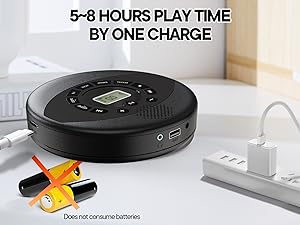
Image 3.2: Anti-shock protection for active use.
4. การบำรุงรักษา
4.1 Cleaning the CD Player
- Use a soft, dry cloth to clean the exterior of the player.
- For the lens, use a specialized CD lens cleaning kit. Do not touch the lens directly.
- หลีกเลี่ยงการใช้น้ำยาทำความสะอาดหรือตัวทำละลายที่มีฤทธิ์กัดกร่อน
4.2 การดูแลแบตเตอรี่
- เพื่อยืดอายุการใช้งานแบตเตอรี่ ควรหลีกเลี่ยงการปล่อยแบตเตอรี่จนหมดบ่อยครั้ง
- เก็บอุปกรณ์ไว้ในที่แห้งและเย็นเมื่อไม่ได้ใช้งานเป็นเวลานาน
- Charge the device at least once every three months if unused to prevent deep discharge.
4.3 การดูแลซีดี
- ควรจับแผ่นซีดีที่ขอบเพื่อป้องกันรอยนิ้วมือและรอยขีดข่วน
- ทำความสะอาดซีดีด้วยผ้านุ่มที่ไม่เป็นขุย เช็ดจากตรงกลางออกด้านนอก
- Store CDs in their cases to protect them from dust and damage.
5 การแก้ไขปัญหา
| ปัญหา | สาเหตุที่เป็นไปได้ | สารละลาย |
|---|---|---|
| เครื่องเล่นไม่เปิดใช้งาน | แบตเตอรี่หมดแล้ว สวิตช์เปิดปิดปิดอยู่ | Charge the battery. Ensure the power switch is in the 'ON' position. |
| ไม่มีเสียง. | Volume is too low. Headphones/AUX cable not connected properly. CD/USB not playing. | Increase volume. Check connections. Ensure CD/USB is playing and not paused. |
| CD skipping or not playing. | CD is dirty or scratched. CD is not properly seated. Incorrect CD format. | Clean the CD. Re-seat the CD. Ensure the CD format (CD, CD-R, CD-RW, MP3, WMA) is supported. |
| การเล่น USB ไม่ทำงาน | USB drive not properly inserted. Incompatible file รูปแบบ | Ensure USB drive is fully inserted. Check if files are MP3 or WMA format. |
6. ข้อมูลจำเพาะผลิตภัณฑ์
| คุณสมบัติ | รายละเอียด |
|---|---|
| หมายเลขรุ่น | PM11-Black |
| ขนาดสินค้า | 5.7 x 5.7 x 1.2 นิ้ว |
| น้ำหนักสินค้า | 1.01 ปอนด์ |
| ประเภทแบตเตอรี่ | แบตเตอรี่ลิเธียมโพลิเมอร์ 1 ก้อน (รวมอยู่ด้วย) |
| การเชื่อมต่อ | เสริม USB |
| คุณสมบัติพิเศษ | Anti-Skip Protection, Portable, Programmable Memory, Rechargeable |
| ส่วนประกอบที่รวมอยู่ | CD player X 1, Earbuds X 1, Audio cable X 1, Charging cable X 1, Pouch X 1 |
| รูปแบบที่รองรับ | ซีดี, ซีดี-อาร์, ซีดี-อาร์ดับบลิว, MP3, WMA |
7. การรับประกันและการสนับสนุน
For warranty information and customer support, please contact Kuephom directly. Details regarding product warranty periods and service procedures are typically provided with your purchase documentation or can be found on the official Kuephom webเว็บไซต์.
If you encounter any issues not covered in this manual, please reach out to Kuephom customer service for assistance.


