1. บทนำ
Thank you for choosing the HXSJ X50 Wireless Game Mouse. This manual provides detailed instructions for setting up, operating, and maintaining your new wireless mouse. Please read this manual thoroughly before use to ensure optimal performance and longevity of your device.
เนื้อหาแพ็คเกจ:
- HXSJ X50 Wireless Game Mouse
- ตัวรับสัญญาณ USB

Image 1.1: The HXSJ X50 Wireless Game Mouse and its USB receiver.
2. ข้อมูลด้านความปลอดภัย
- อย่าให้เมาส์โดนน้ำหรือความชื้นมากเกินไป
- หลีกเลี่ยงการทำตกหรือให้เมาส์ได้รับแรงกระแทกรุนแรง
- เก็บอุปกรณ์ให้ห่างจากอุณหภูมิที่สูงเกินไป
- อย่าพยายามถอดประกอบหรือซ่อมแซมเมาส์ด้วยตนเอง หากจำเป็น โปรดติดต่อเจ้าหน้าที่บริการที่มีคุณสมบัติเหมาะสม
- ทิ้งแบตเตอรี่ตามระเบียบข้อบังคับในท้องถิ่น
3. การตั้งค่า
3.1 การติดตั้งแบตเตอรี่
The HXSJ X50 Wireless Game Mouse requires batteries for operation. Please ensure you have the necessary batteries (typically 1x AA battery, not included) before proceeding.
- ค้นหาช่องใส่แบตเตอรี่ที่ด้านล่างของเมาส์
- เปิดฝาช่องใส่แบตเตอรี่
- Insert the battery, ensuring correct polarity (+/-).
- ปิดฝาช่องใส่แบตเตอรี่ให้แน่น
3.2 การเชื่อมต่อตัวรับสัญญาณ USB
- ค้นหาพอร์ต USB ที่มีอยู่ในคอมพิวเตอร์ของคุณ
- Insert the USB receiver into the USB port. Your computer should automatically detect and install the necessary drivers.
3.3 การเปิดเครื่อง
Slide the power switch, located on the underside of the mouse, to the 'ON' position. The mouse is now ready for use.
4. คู่มือการใช้งาน
4.1 ฟังก์ชันปุ่ม
The HXSJ X50 mouse features 6 buttons for enhanced functionality:
- ปุ่มคลิกซ้าย: Primary function, selection.
- ปุ่มคลิกขวา: Secondary function, context menus.
- ล้อเลื่อน: เลื่อนขึ้น/ลง คลิกตรงกลาง
- ปุ่มปรับ DPI: หมุนเวียนผ่านการตั้งค่า DPI
- Page Forward Button: นำทางไปข้างหน้าใน web เบราว์เซอร์หรือ file นักสำรวจ
- Page Backward Button: นำทางย้อนกลับใน web เบราว์เซอร์หรือ file นักสำรวจ

ภาพที่ 4.1: ด้านข้าง view showing the ergonomic design and side buttons.
4.2 การปรับ DPI
Press the DPI adjustment button (located behind the scroll wheel) to cycle through the available sensitivity settings: 1000DPI, 1200DPI, 1600DPI, and 2400DPI. Select the DPI that best suits your preference and task.
4.3 ประหยัดพลังงาน
The mouse features a power switch on its underside. To conserve battery life, slide the switch to the 'OFF' position when the mouse is not in use for extended periods.
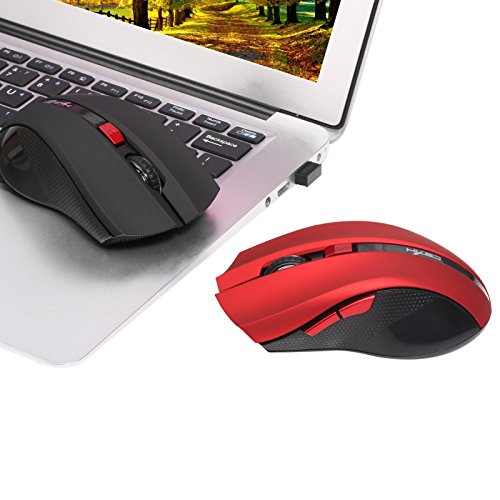
Image 4.2: The HXSJ X50 mouse in use with a laptop.
5. การบำรุงรักษา
5.1 การทำความสะอาด
To clean the mouse, gently wipe its surface with a soft, dry cloth. For stubborn dirt, slightly dampชุบผ้าด้วยน้ำ หลีกเลี่ยงการใช้สารเคมีรุนแรงหรือน้ำยาทำความสะอาดที่มีฤทธิ์กัดกร่อน
5.2 พื้นที่จัดเก็บ
When not in use, store the mouse and USB receiver in a dry, cool place, away from direct sunlight and extreme temperatures. If storing for an extended period, it is recommended to remove the battery.
6 การแก้ไขปัญหา
- เมาส์ไม่ตอบสนอง:
Ensure the mouse is powered on. Check if the USB receiver is securely plugged into a working USB port. Replace the battery if it is low or depleted. - การเคลื่อนไหวของเคอร์เซอร์ที่ไม่แน่นอน:
Clean the optical sensor on the underside of the mouse. Ensure the surface you are using the mouse on is clean and non-reflective. - ปัญหาการเชื่อมต่อ:
Try plugging the USB receiver into a different USB port. Move the mouse closer to the receiver to rule out interference. - Side buttons not working:
Ensure your operating system and applications support the forward/backward functions. Some software may require specific drivers or settings.
7. ข้อมูลจำเพาะ
| คุณสมบัติ | รายละเอียด |
|---|---|
| ยี่ห้อ | HXSJ |
| แบบอย่าง | เอ็กซ์50 |
| การเชื่อมต่อ | ไร้สาย (ตัวรับสัญญาณ USB) |
| ช่วงสาย | สูงถึง 10-15 เมตร |
| การตรวจจับการเคลื่อนไหว | ออฟติคอล |
| การตั้งค่า DPI | 1000, 1200, 1600, 2400 (ปรับได้) |
| จำนวนปุ่ม | 6 (ซ้าย, ขวา, ล้อเลื่อน, DPI, ไปข้างหน้า, ถอยหลัง) |
| แหล่งพลังงาน | แบตเตอรี่ (AA 1 ก้อน ไม่รวมอยู่ในชุด) |
| อายุการใช้งานแบตเตอรี่ (เฉลี่ย) | 6 เดือน |
| การวางแนวมือ | ถนัดทั้งสองมือ |
| วัสดุ | พลาสติก |
| น้ำหนักสินค้า | 80 กรัม |
| ระบบปฏิบัติการที่รองรับ | Windows 98/ME/2000/XP/Vista/7/8, Linux |
8. การรับประกันและการสนับสนุน
For warranty information or technical support, please refer to the documentation provided with your purchase or contact the retailer/manufacturer directly. Keep your proof of purchase for warranty claims.


