1. บทนำ
The Deity TC-1 is a compact and versatile wireless timecode box designed for professional audio and video synchronization. It integrates advanced features such as Bluetooth 5.0, a 2.4G radio ecosystem, and app control, offering precise timecode accuracy and flexible workflow integration. This manual provides detailed instructions for setting up, operating, maintaining, and troubleshooting your TC-1 unit.
2. ข้อมูลด้านความปลอดภัย
- อย่าให้เครื่องโดนน้ำหรือความชื้นมากเกินไป
- หลีกเลี่ยงอุณหภูมิที่สูงหรือต่ำเกินไป ใช้งานและจัดเก็บอุปกรณ์ภายในสภาพแวดล้อมที่แนะนำ
- ห้ามถอดประกอบหรือดัดแปลงอุปกรณ์ด้วยตนเอง การซ่อมแซมควรดำเนินการโดยบุคลากรที่ได้รับอนุญาตเท่านั้น
- เพื่อป้องกันความเสียหายหรือการเกิดไฟไหม้ โปรดใช้เฉพาะสายชาร์จและแหล่งจ่ายไฟที่ระบุไว้เท่านั้น
- เก็บอุปกรณ์ให้ห่างจากสนามแม่เหล็กแรงสูง
3. เนื้อหาบรรจุภัณฑ์
Verify that all items are present in your Deity TC-1 package:
- 1x Deity TC-1 Wireless Timecode Box
- 1x Locking to Unlocking TRS Audio Spring Cable
- 1x Removable Cold Shoe Holder
- สายชาร์จ Type-C 1 เส้น
- 1x USB-C to USB-A Firmware Upgrade Adapter
- 2x Female Buckle Velcro

Image: Deity TC-1 Wireless Timecode Box with all included accessories, including cables, cold shoe mount, and Velcro.
4. สินค้าหมดview
The Deity TC-1 features a compact design with an intuitive OLED display and on-board controls for easy operation.

ภาพ: ด้านหน้า view of the Deity TC-1, highlighting its 1-inch OLED display showing timecode, battery status, and connection indicators.

ภาพ: ด้านข้าง view of the Deity TC-1, showing the control wheel for menu navigation and the power/menu button.

ภาพ: ด้านล่าง view of the Deity TC-1, illustrating the attachment point for the removable cold shoe holder.
5. การตั้งค่า
5.1 การชาร์จอุปกรณ์
The TC-1 is powered by an internal Lithium Ion battery. To charge, connect the included USB-C charging cable to the USB-C port on the device and a compatible USB power source. A full charge takes approximately 2 hours and provides up to 28 hours of battery life.
5.2 ตัวเลือกการติดตั้ง
The TC-1 offers flexible mounting solutions:
- ที่ยึดรองเท้าเย็น: Attach the removable cold shoe holder to the bottom of the TC-1 and slide it onto a camera's cold shoe or hot shoe mount.
- เวลโคร: Use the included female buckle Velcro pieces to secure the TC-1 to various surfaces or equipment.

Image: Deity TC-1 unit shown with the removable cold shoe mount attached to its base.
5.3 การเปิดเครื่องครั้งแรก
To power on the TC-1, press and hold the power button located on the side of the unit. The OLED display will illuminate, showing the current timecode and device status. To power off, press and hold the power button again until the display turns off.
6. คู่มือการใช้งาน
6.1 การซิงโครไนซ์ไทม์โค้ด
The TC-1 offers multiple methods for timecode synchronization:
- Bluetooth 5.0: Connect the TC-1 to your smartphone via Bluetooth for wireless jamming and control using the Sidus Audio mobile app. The Bluetooth range is up to 250 feet.
- 2.4G Radio: Utilize the proprietary 8-channel 2.4G radio ecosystem to wirelessly sync multiple TC-1 units together. This method also offers a maximum range of 250 feet.
- Hardwire Jam: Use the 3.5mm timecode port to hardwire jam timecode from another device or to jam other devices from the TC-1.
- Internal Generation: The TC-1 can also internally generate timecode, functioning as a master clock for your setup.

Image: A smartphone screen showing the Sidus Audio app interface, used for controlling and syncing the Deity TC-1.
6.2 Supported Timecode Formats
The Deity TC-1 supports all standard SMPTE Timecode Formats, ensuring compatibility with a wide range of professional equipment.
6.3 Timecode Accuracy
The TC-1 boasts high timecode accuracy of 0.5ppm, resulting in a minimal drift of only 1 frame every 72 hours. This ensures reliable and consistent synchronization over extended periods.
6.4 การเชื่อมต่อกับอุปกรณ์
Use the locking 3.5mm timecode port to connect the TC-1 to cameras, audio recorders, and other timecode-enabled devices. The included Locking to Unlocking TRS Audio Spring Cable facilitates these connections.
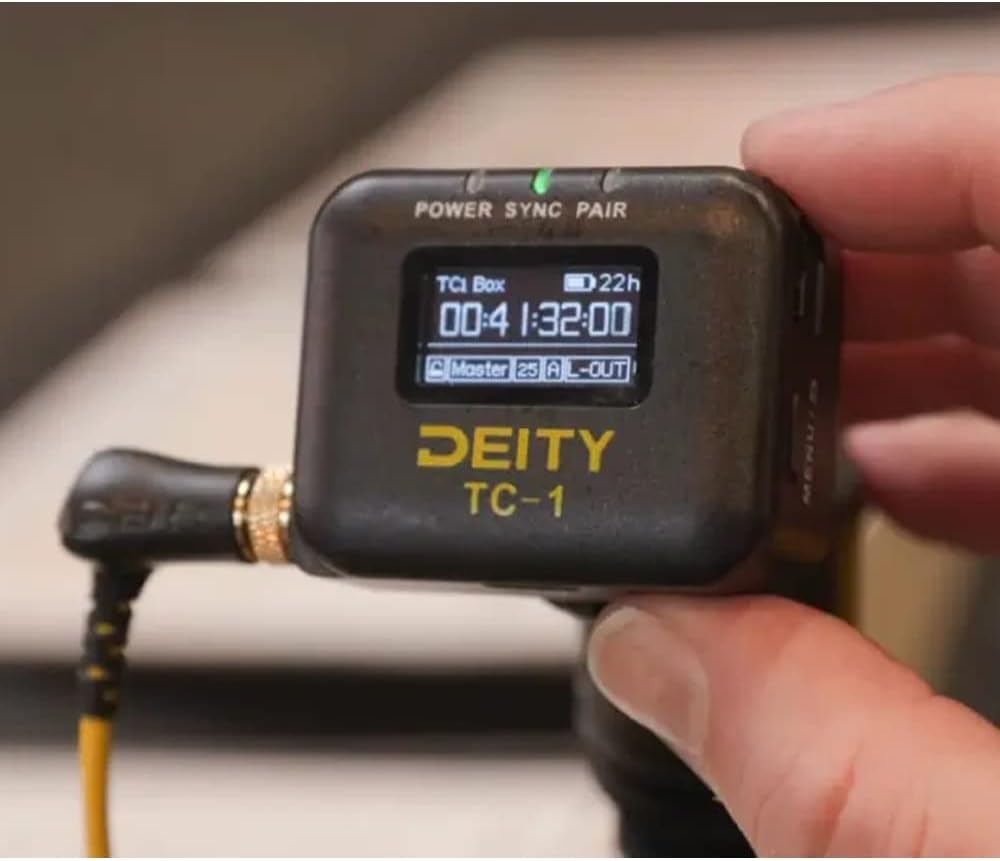
Image: The Deity TC-1 connected to a professional camera setup, demonstrating its integration into a production workflow.
7. การบำรุงรักษา
- การทำความสะอาด: ใช้ผ้าแห้งเนื้อนุ่มเช็ดทำความสะอาดภายนอกของอุปกรณ์ ห้ามใช้น้ำยาทำความสะอาดหรือสารละลายใดๆ
- พื้นที่จัดเก็บ: Store the TC-1 in a cool, dry place away from direct sunlight and extreme temperatures when not in use.
- การดูแลแบตเตอรี่ For optimal battery longevity, avoid fully discharging the battery frequently. If storing for extended periods, charge the battery to approximately 50% every few months.
8 การแก้ไขปัญหา
- อุปกรณ์ไม่เปิดเครื่อง: ตรวจสอบให้แน่ใจว่าแบตเตอรี่ชาร์จเต็มแล้ว เสียบสาย USB-C เข้ากับแหล่งจ่ายไฟแล้วลองอีกครั้ง
- Timecode not syncing: Check all cable connections. Ensure both the TC-1 and the receiving device are set to the correct timecode format and frame rate. Verify that Bluetooth or 2.4G radio connections are active and within range.
- จอแสดงผลไม่ทำงาน: If the device powers on but the display is blank, try restarting the unit. If the issue persists, contact Deity support.
- ปัญหาการเชื่อมต่อแอป: Ensure Bluetooth is enabled on your mobile device. Restart the Sidus Audio app and the TC-1.
9. ข้อมูลจำเพาะ
| คุณสมบัติ | ข้อมูลจำเพาะ |
|---|---|
| หมายเลขรุ่น | TC-1 |
| Timecode Port | Locking 3.5mm |
| เวอร์ชันบลูทูธ | 5.0 |
| ระยะการใช้งานบลูทูธสูงสุด | 250ฟุต |
| ความถี่วิทยุ | 2.4จี |
| ช่องวิทยุ | 8 |
| ความแม่นยำของรหัสเวลา | 0.5หน้าต่อนาที |
| Frame Drift | 1 Frame Every 72 Hours |
| แสดง | จอ OLED ขนาด 1 นิ้ว |
| พอร์ตชาร์จ | ยูเอสบี-ซี |
| เวลาในการชาร์จ | 2 ชั่วโมง (โดยประมาณ) |
| อายุการใช้งานแบตเตอรี่ | นานถึง 28 ชั่วโมง |
| น้ำหนักสินค้า | 9.2 ออนซ์ (0.26 กก.) |
| ขนาดแพ็คเกจ | 5.59 x 5.04 x 1.73 นิ้ว |
10. การรับประกันและการสนับสนุน
For detailed warranty information and technical support, please refer to the official Deity website or contact Deity customer service directly. Keep your purchase receipt as proof of purchase for any warranty claims.
Deity Contact Information: กรุณาเข้าเยี่ยมชม www.deitymic.com สำหรับข้อมูลแหล่งสนับสนุนล่าสุดและรายละเอียดการติดต่อ


