การแนะนำ
This manual provides detailed instructions for the setup, operation, maintenance, and features of your SteelSeries Apex 9 Mini keyboard. Please read this guide thoroughly to ensure optimal performance and longevity of your device.
มีอะไรอยู่ในกล่อง
- SteelSeries Apex 9 Mini Keyboard
- สาย USB
- ตัวดึงกุญแจ
การตั้งค่า
- เชื่อมต่อคีย์บอร์ด: Plug the provided USB cable into the USB-C port on the keyboard and the other end into an available USB-A port on your computer.
- การติดตั้งไดร์เวอร์: Your operating system (Windows 10 or later, macOS) should automatically detect and install the necessary drivers. For advanced customization, download and install the SteelSeries GG software from the official SteelSeries webเว็บไซต์.
- ปรับมุมแป้นพิมพ์: The keyboard features adjustable feet on the underside. Flip out the feet to achieve your preferred typing angle.
เพื่อให้การทำงานมีประสิทธิภาพสูงสุด โปรดตรวจสอบให้แน่ใจว่าระบบปฏิบัติการของคุณได้รับการอัปเดตแล้ว
คุณสมบัติหลัก
OptiPoint Optical Switches
The Apex 9 Mini utilizes custom OptiPoint optical switches, designed for rapid actuation and durability. These switches actuate 33% faster than leading optical keyboards, offering a lightning-fast 0.2ms response time with zero debounce.

ภาพ: รายละเอียด view of the custom OptiPoint optical switch mechanism.
2-Point Actuation
Customize your keystroke sensitivity with 2-point actuation. You can adjust the registration depth between a fast 1mm for gaming and a more deliberate 1.5mm for typing, adapting to various tasks and preferences.
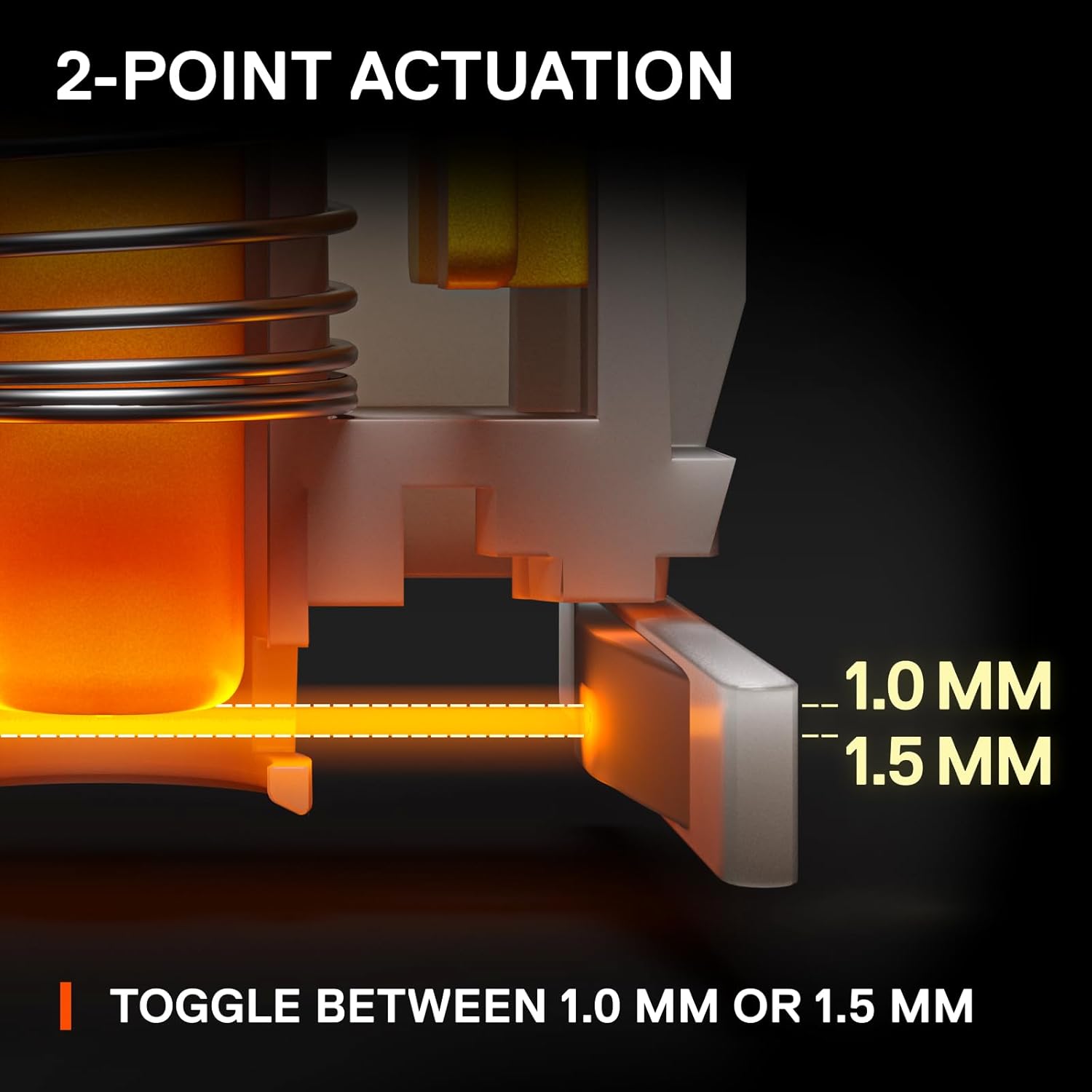
Image: Visual representation of adjustable 1.0mm and 1.5mm actuation points.
Swappable Switches
The OptiPoint switches are swappable, allowing for customization, upgrades, and easy repairs. You can replace switches with your preferred type of OptiPoint switch.

Image: Keyboard with keycaps removed, highlighting the swappable optical switches.
ฟอร์มแฟกเตอร์ 60% กะทัดรัด
The streamlined 60% compact design saves desk space, providing more room for mouse movement. Despite its size, it retains full-size keyboard capabilities through side-printed functions on keycaps.

Image: Comparison showing the compact 60% form factor saving desk space.
ปุ่มกดทำจาก PBT ที่ทนทาน
The keyboard features long-lasting and fade-proof double shot PBT keycaps. These provide a high-quality texture for enhanced keystroke feel and improved typing accuracy.

ภาพ: รายละเอียด view of a double shot PBT keycap construction.
คำแนะนำการใช้งาน
การปรับจุดการทำงาน
The actuation point of the OptiPoint switches can be adjusted via the SteelSeries GG software. This allows you to fine-tune the sensitivity of each key to your preference, switching between 1mm for quick responses and 1.5mm for more deliberate presses.
การปรับแต่ง RGB
The keyboard features per-key RGB illumination. Customize lighting effects, colors, and patterns using the SteelSeries GG software. You can choose from various presets, create custom animations, or set static colors to match your setup.
Media Controls and Function Keys
Due to the 60% form factor, many functions are accessed via secondary key presses. Refer to the side-printed legends on the keycaps for these functions. The SteelSeries GG software allows for remapping and creating custom macros for enhanced control.
การซ่อมบำรุง
ทำความสะอาดคีย์บอร์ด
- ถอดแป้นพิมพ์ออกจากคอมพิวเตอร์ของคุณก่อนทำความสะอาด
- ใช้ผ้านุ่มไม่เป็นขุยค่อยๆ งampล้างด้วยน้ำหรือน้ำยาทำความสะอาดอ่อนๆ เพื่อเช็ดทำความสะอาดปุ่มกดและตัวเครื่อง
- หากต้องการทำความสะอาดอย่างล้ำลึก ให้ใช้ลมอัดเพื่อกำจัดฝุ่นและเศษต่างๆ ออกจากระหว่างปุ่มต่างๆ
Keycap and Switch Removal
The included keycap puller can be found in a hidden compartment on the underside of the keyboard. Use it to carefully remove keycaps for cleaning or to access the swappable switches. When removing switches, use a switch puller (not included unless specified) to gently dislodge them.
Video: A closer look at the SteelSeries Apex 9 Mini, demonstrating its features and components.
การแก้ไขปัญหา
- แป้นพิมพ์ไม่ตอบสนอง: Ensure the USB cable is securely connected to both the keyboard and the computer. Try a different USB port or restart your computer.
- ปัญหาเรื่องแสงสว่าง: Check the SteelSeries GG software for lighting settings. Ensure no conflicting profiles are active. Update the keyboard firmware if available.
- Key Actuation Problems: Verify actuation point settings in the SteelSeries GG software. If a specific switch is faulty, it can be replaced due to the hot-swappable design.
- ซอฟต์แวร์ตรวจไม่พบแป้นพิมพ์: Reinstall the SteelSeries GG software. Ensure your operating system is fully updated.
For further assistance, visit the official SteelSeries support webเว็บไซต์.
ข้อมูลจำเพาะ
| คุณสมบัติ | รายละเอียด |
|---|---|
| ยี่ห้อ | สตีลซีรีส์ |
| หมายเลขรุ่น | 64837 |
| ความเข้ากันได้ของระบบปฏิบัติการ | Windows 10, PC |
| น้ำหนักสินค้า | 1.9 ปอนด์ |
| ขนาดสินค้า | 4.02 x 11.53 x 1.58 นิ้ว |
| สี | อาร์จีบี |
| แหล่งพลังงาน | สายไฟ |
| เทคโนโลยีการเชื่อมต่อ | มีสาย |
| คำอธิบายแป้นพิมพ์ | การเล่นเกม |
| การใช้ที่แนะนำ | การเล่นเกม |
| คุณสมบัติพิเศษ | การเล่นเกม |
| แป้นพิมพ์แบ็คไลท์ | อาร์จีบี |
| สไตล์ | Esports Mini |
การรับประกันและการสนับสนุน
For warranty information and detailed support resources, please visit the official SteelSeries webไซต์ เก็บหลักฐานการซื้อของคุณไว้เพื่อใช้ในกรณีเรียกร้องการรับประกัน
Online resources often include FAQs, driver downloads, and community forums for additional assistance.


