1. บทนำ
This manual provides detailed instructions for the operation and maintenance of your Skechers Ruhland Digital Watch, Model SR1137. Please read this manual thoroughly to ensure proper use and to maximize the lifespan of your watch.
2. สินค้าหมดview
The Skechers Ruhland digital watch features a durable black polyurethane case and strap, a negative digital display, and multiple functions including a stopwatch, calendar, daily alarm, hourly chime, and backlight. It is designed for everyday wear and is water-resistant.

รูปที่ 2.1 : ด้านหน้า view of the Skechers Ruhland Digital Watch, showing the digital display and function buttons.
The watch case measures 45 mm, and the strap width is 28 mm. The display is protected by mineral glass.
2.1 ส่วนประกอบของนาฬิกา
- ปุ่มไฟ: เปิดไฟแบ็คไลท์เพื่อให้มองเห็นได้ชัดเจนในสภาพแสงน้อย
- ปุ่มโหมด: Cycles through different modes (Time, Stopwatch, Alarm, Date).
- ปุ่มเริ่มต้น: Used to start/stop functions in stopwatch mode, or adjust settings.
- ปุ่มรีเซ็ต: Used to reset functions in stopwatch mode, or adjust settings.

รูปที่ 2.2: ด้านข้าง view of the Skechers Ruhland Digital Watch, highlighting the function buttons.
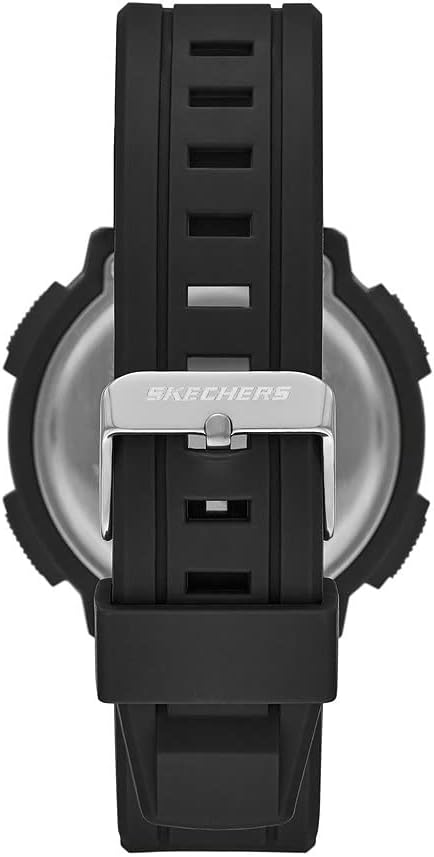
รูปที่ 2.3: ย้อนกลับ view of the Skechers Ruhland Digital Watch, showing the stainless steel case back and strap buckle.
3. การตั้งค่าและการกำหนดค่าเริ่มต้น
3.1 การตั้งเวลาและวันที่
- จากหน้าจอแสดงเวลาปกติ ให้กดปุ่ม โหมด กดปุ่มซ้ำๆ จนกว่าเข็มวินาทีจะเริ่มกะพริบ แสดงว่าคุณอยู่ในโหมดตั้งเวลาแล้ว
- กดปุ่ม รีเซ็ต button to cycle through the setting options: seconds, hour, minute, month, date, day of the week.
- ใช้ เริ่ม button to adjust the flashing value. Hold the เริ่ม button to change values more quickly.
- เมื่อการตั้งค่าทั้งหมดถูกต้องแล้ว ให้กดปุ่ม โหมด กดปุ่มเพื่อออกจากโหมดการตั้งค่าและกลับสู่การแสดงเวลาปกติ
3.2 การเปิดใช้งานไฟแบ็คไลท์
กดปุ่ม แสงสว่าง button (top left) to illuminate the display for a few seconds. This function is useful in dark environments.
4. คู่มือการใช้งาน
4.1 Stopwatch Function (1/100 Second)
- จากหน้าจอแสดงเวลาปกติ ให้กดปุ่ม โหมด button once to enter Stopwatch mode. The display will show "00:00:00".
- กดปุ่ม เริ่ม ปุ่มสำหรับเริ่มจับเวลา
- กดปุ่ม เริ่ม กดปุ่มอีกครั้งเพื่อหยุดการจับเวลา
- กดปุ่ม รีเซ็ต button to clear the stopwatch to "00:00:00".
- หากต้องการเริ่มจับเวลาต่อหลังจากหยุดชั่วคราว ให้กดปุ่ม เริ่ม ปุ่ม.
- กดปุ่ม โหมด กดปุ่มเพื่อกลับไปแสดงเวลาตามปกติ
4.2 ปลุกทุกวัน
- จากหน้าจอแสดงเวลาปกติ ให้กดปุ่ม โหมด button twice to enter Alarm mode. The alarm time will be displayed.
- กดปุ่ม รีเซ็ต กดปุ่มเพื่อเลือกการตั้งค่าชั่วโมงหรือนาที ค่าที่เลือกจะกะพริบ
- ใช้ เริ่ม ปุ่มสำหรับปรับการกระพริบของชั่วโมงหรือนาที
- กดปุ่ม โหมด ปุ่มสำหรับยืนยันเวลาปลุกและออกจากโหมดการตั้งค่า
- หากต้องการเปิด/ปิดนาฬิกาปลุก ให้กดปุ่ม เริ่ม button while in Alarm mode (without any value flashing). An alarm icon will appear/disappear to indicate its status.
- เมื่อเสียงเตือนดังขึ้น ให้กดปุ่มใดก็ได้เพื่อหยุดเสียงเตือน
4.3 โฮจิมินห์urly ตีระฆัง
การเปิดหรือปิดการทำงานของโฮurlเสียงระฆังดังขึ้น ให้กดปุ่ม โหมด button until you are in the normal time display. Then, press the รีเซ็ต ปุ่มและ เริ่ม button simultaneously. A chime icon will appear/disappear to indicate the hourly chime status. When active, the watch will beep every hour on the hour.
5. การบำรุงรักษาและการดูแล
5.1 การทำความสะอาดนาฬิกาของคุณ
เช็ดตัวเรือนนาฬิกาและสายนาฬิกาเป็นประจำด้วยผ้าเนื้อนุ่มและแห้งamp cloth. Avoid using harsh chemicals or abrasive cleaners, as these can damage the polyurethane material and finish.
5.2 ความต้านทานต่อน้ำ
This watch is water resistant to 50 meters (164 feet). This means it is suitable for short periods of recreational swimming in shallow water. It is not suitable for diving, snorkeling, or high-impact water sports. Do not operate buttons while the watch is submerged in water.
5.3 การเปลี่ยนแบตเตอรี่
The watch uses one product-specific battery (included). When the display becomes dim or functions become erratic, it may be time to replace the battery. Battery replacement should ideally be performed by a qualified watch technician to ensure proper sealing and maintain water resistance.
6 การแก้ไขปัญหา
- จอแสดงผลว่างเปล่าหรือมืดลง: The battery may be low or depleted. Consider professional battery replacement.
- ปุ่มไม่มีการตอบสนอง: Ensure the watch is not in a locked mode (if applicable, though this model typically does not have one). If issues persist, a reset may be required (consult a technician).
- เวลาไม่ถูกต้อง: Refer to Section 3.1 "Setting Time and Date" to re-adjust the time.
- มีน้ำอยู่ภายในนาฬิกา: Immediately cease use and take the watch to a qualified technician. Water damage is typically not covered under warranty.
7. ข้อมูลจำเพาะ
| คุณสมบัติ | รายละเอียด |
|---|---|
| หมายเลขรุ่น | เอสอาร์1137 |
| ความเคลื่อนไหว | ดิจิตอล |
| วัสดุตัวเรือน | โพลียูรีเทน |
| เส้นผ่านศูนย์กลางตัวเรือน | 45 มม. |
| วัสดุสายรัด | โพลียูรีเทน |
| ความกว้างสายคล้อง | 28 มม. |
| ประเภทจอภาพ | Negative Digital Display |
| ประเภทคริสตัล | กระจกมิเนอรัล |
| ความต้านทานต่อน้ำ | 50 เมตร (164 ฟุต) |
| ฟังก์ชั่น | 1/100 Second Stopwatch, Calendar, Daily Alarm, Hourly Chime, Backlight |
| แบตเตอรี่ | แบตเตอรี่เฉพาะผลิตภัณฑ์ 1 ก้อน (รวมอยู่ด้วย) |
| ผู้ผลิต | กลุ่มฟอสซิล |
8. การรับประกันและการสนับสนุน
Your Skechers Ruhland Digital Watch is manufactured by Fossil Group. For specific warranty information and customer support, please refer to the warranty card included with your purchase or visit the official Skechers or Fossil Group webไซต์นี้ โปรดเก็บหลักฐานการซื้อไว้เพื่อใช้ยืนยันการรับประกัน

Figure 8.1: The Skechers watch packaging, which may contain warranty information.


