การแนะนำ
Welcome to the user manual for your new CERAGEM M2 Arc Massage Chair. This chair is designed to provide optimal relaxation and a personalized massage experience within the comfort of your home. Featuring a premium SL frame, 6 automatic massage modes, thermal heating, a built-in Bluetooth speaker, and a convenient USB port, the M2 is crafted for both therapeutic benefits and modern convenience.

Image: The CERAGEM M2 Massage Chair in a stylish brown and beige finish, accompanied by its matching ottoman, showcasinด้วยดีไซน์ที่สวยงาม
ข้อมูลด้านความปลอดภัยที่สำคัญ
Please read all instructions carefully before using the CERAGEM M2 Massage Chair. Retain this manual for future reference. Improper use can lead to injury or damage to the product.
- Always ensure the chair is placed on a stable, level surface.
- Do not use the chair if the power cord is damaged or if the plug is loose.
- ควรกันเด็กและสัตว์เลี้ยงให้ออกห่างจากเก้าอี้ขณะทำการผ่าตัด
- Consult a physician before use if you have pre-existing medical conditions, are pregnant, or have a pacemaker.
- Do not attempt to disassemble or repair the chair yourself. Contact authorized service personnel.
- ถอดปลั๊กเก้าอี้ออกจากเต้าเสียบเมื่อไม่ใช้งานหรือก่อนทำความสะอาด
การติดตั้งและการประกอบ
The CERAGEM M2 Massage Chair requires minimal assembly. Follow these steps to set up your chair:
- การแกะกล่อง: Carefully remove all components from the packaging. Ensure all parts are present: main chair unit, ottoman, power cord, and remote control.
- การจัดวาง: Position the chair in a desired indoor location, ensuring sufficient space around it for reclining. The chair dimensions are 44.1"D x 25.6"W x 39.7"H.
- การเชื่อมต่อไฟฟ้า: Connect the power cord to the chair's power input port, then plug it into a standard electrical outlet.
- Ottoman Assembly (if separate): If the ottoman base is separate, attach it securely according to the included quick-start guide.
คำแนะนำการใช้งาน
Familiarize yourself with the chair's functions using the remote control.
เปิด/ปิดเครื่อง
กดปุ่ม พลัง button on the remote control to turn the chair on or off.
โหมดการนวดอัตโนมัติ
The M2 offers 6 automatic modes, each designed for specific relaxation needs. Select your desired mode using the corresponding buttons on the remote:
- Whole-body concentration mode
- Neck and shoulder concentration mode
- Hip and pelvis concentration mode
- Back and hip concentration mode
- Upper body concentration mode
- Deep massage mode
ฟังก์ชั่นปรับเอน
Adjust the chair's recline angle up to 120° for optimal comfort. Use the recline buttons on the remote control to find your perfect position.

Image: A woman comfortably reclined in the CERAGEM M2 Massage Chair, demonstrating the chair's ability to adjust to an optimal angle for relaxation.
Thermal Heating
Activate the thermal heating function to enhance your massage experience. The heat helps loosen tight muscles and promote blood circulation, particularly around the waist and hips. The temperature can be controlled up to 140°F (60°C).

ภาพ: ภาพระยะใกล้ view of the lumbar area of the CERAGEM M2 chair, highlighting the integrated warming function for enhanced relaxation.
Bluetooth Speaker & USB Port
Enhance your relaxation with integrated multimedia features:
- ลำโพงบลูทูธ: Pair your device with the chair's built-in Bluetooth speaker to enjoy music or guided meditations during your massage.
- พอร์ต USB: Use the convenient USB port to charge your mobile devices while you relax.

Image: A composite image illustrating the CERAGEM M2's convenience features: a Bluetooth speaker, a USB charging port, and the intuitive remote control.
การบำรุงรักษาและการดูแล
Proper maintenance ensures the longevity and optimal performance of your CERAGEM M2 Massage Chair.
- การทำความสะอาด:
- เช็ดพื้นผิวเก้าอี้ด้วยผ้านุ่มๆamp ผ้า.
- ห้ามใช้น้ำยาทำความสะอาดที่มีฤทธิ์กัดกร่อน ตัวทำละลาย หรือสารเคมีรุนแรง
- For leather parts, use a specialized leather cleaner if necessary, following the product instructions.
- พื้นที่จัดเก็บ: When not in use for extended periods, unplug the chair and store it in a cool, dry place away from direct sunlight and extreme temperatures.
- การตรวจสอบ: ตรวจสอบสายไฟและปลั๊กเป็นระยะๆ เพื่อดูว่ามีสัญญาณความเสียหายใดๆ หรือไม่
การแก้ไขปัญหา
If you encounter any issues with your CERAGEM M2 Massage Chair, refer to the following common problems and solutions:
| ปัญหา | สาเหตุที่เป็นไปได้ | สารละลาย |
|---|---|---|
| เก้าอี้ไม่สามารถเปิดเครื่องได้ | สายไฟไม่ได้เชื่อมต่ออย่างถูกต้อง ปัญหาเกี่ยวกับเต้ารับไฟฟ้า | Ensure power cord is securely plugged into both the chair and a working electrical outlet. Check circuit breaker. |
| ฟังก์ชั่นนวดไม่ทำงาน | Chair is not powered on; mode not selected. | Turn on the chair and select an automatic massage mode or manual setting. |
| ลำโพงบลูทูธเชื่อมต่อไม่ได้ | Bluetooth on device is off; chair not in pairing mode. | Ensure Bluetooth is enabled on your device. Refer to your device's manual for pairing instructions. Restart the chair. |
| Thermal heating not felt. | ฟังก์ชั่นทำความร้อนไม่ได้เปิดใช้งาน | Activate the thermal heating function via the remote control. Allow a few minutes for the heat to build up. |
หากปัญหายังคงมีอยู่หลังจากพยายามแก้ไขปัญหาเหล่านี้แล้ว โปรดติดต่อฝ่ายสนับสนุนลูกค้า
ข้อมูลจำเพาะ
Detailed specifications for the CERAGEM M2 Massage Chair:
| ยี่ห้อ | เซราเจม |
| หมายเลขรุ่น | M2 |
| ขนาดสินค้า | ลึก 44.1 นิ้ว x กว้าง 25.6 นิ้ว x สูง 39.7 นิ้ว |
| น้ำหนักสินค้า | 80 ปอนด์ |
| ส่วนประกอบที่รวมอยู่ | Premium SL Frame, Thermal Heating, Bluetooth Speaker, USB Port |
| วัสดุเติม | โฟม |
| จำนวนตำแหน่งการเอน | 2 (สูงสุด 120°) |
| การใช้ที่แนะนำ | ผ่อนคลาย |
| การใช้งานภายใน/ภายนอกอาคาร | ในร่ม |
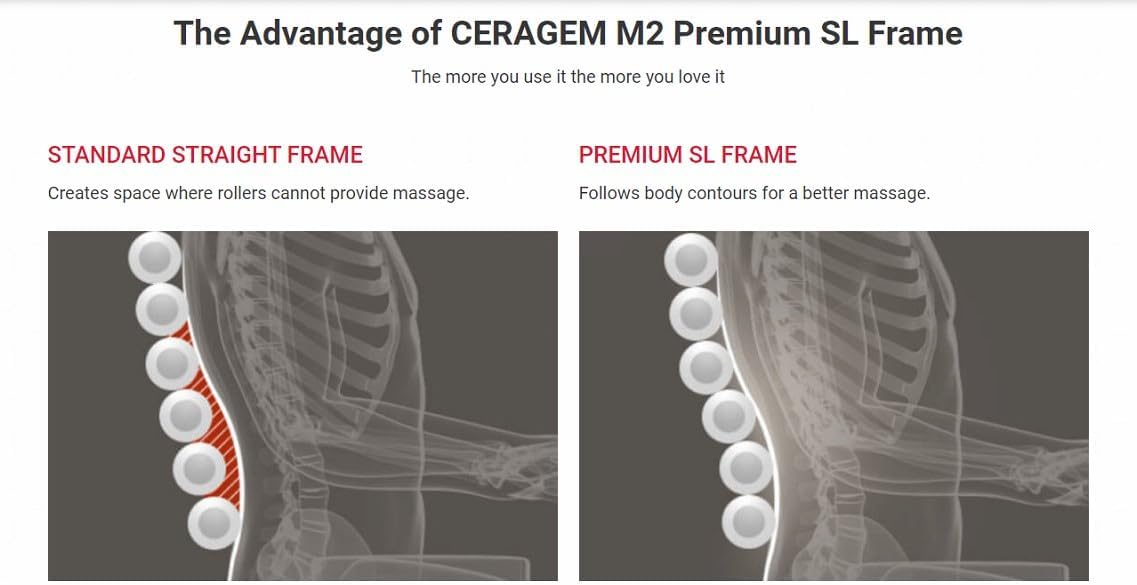
Image: A diagram illustrating the advantage of the CERAGEM M2's Premium SL Frame, showing how it follows body contours more effectively than a standard straight frame for a better massage.
การรับประกันและการสนับสนุน
CERAGEM stands behind the quality of its products. Your CERAGEM M2 Massage Chair is covered by a limited warranty against defects in materials and workmanship from the date of purchase. Please refer to the warranty card included with your product for specific terms and conditions.
For technical support, warranty claims, or service inquiries, please contact CERAGEM customer service:
- Webเว็บไซต์: Visit the official CERAGEM webไซต์สำหรับทรัพยากรสนับสนุนและข้อมูลการติดต่อ
- อีเมล: [Insert Customer Service Email Here, if available]
- โทรศัพท์: [Insert Customer Service Phone Number Here, if available]
When contacting support, please have your model number (M2) and proof of purchase readily available.


