การแนะนำ
This manual provides comprehensive instructions for the Black Shark Sixgill K2 RGB Mechanical Gaming Keyboard. It covers setup, operation, maintenance, and troubleshooting to ensure optimal performance and longevity of your device. Please read this manual thoroughly before using the keyboard.

Image: The Black Shark Sixgill K2 RGB Mechanical Gaming Keyboard, showcasing its full layout and vibrant RGB lighting.
เนื้อหาแพ็คเกจ
ตรวจสอบว่ามีสินค้าทั้งหมดที่ระบุไว้ด้านล่างอยู่ในแพ็คเกจของคุณ:
- 1 x Black Shark Sixgill K2 Mechanical Keyboard
- ตัวดึงคีย์แคป 1 ตัว
- 1 x คู่มือผู้ใช้ (เอกสารนี้)
คำแนะนำการตั้งค่า
Follow these steps to set up your Black Shark Sixgill K2 keyboard:
- แกะคีย์บอร์ดออก: ถอดคีย์บอร์ดและอุปกรณ์เสริมทั้งหมดออกจากบรรจุภัณฑ์อย่างระมัดระวัง
- เชื่อมต่อกับพีซี: Plug the USB connector of the keyboard cable into an available USB port on your desktop PC.
- การติดตั้งไดร์เวอร์: The keyboard is plug-and-play and typically does not require additional drivers. Your operating system (Windows 7 / 8 / 10 / XP) will automatically detect and install the necessary drivers.
- การติดตั้งซอฟต์แวร์เสริม: For advanced customization of lighting effects and macro programming, download the official Black Shark software from the manufacturer's webเว็บไซต์.

Image: The Black Shark Sixgill K2 keyboard in a typical desktop PC setup, demonstrating its wired connection.
คำแนะนำการใช้งาน
การควบคุมแสง RGB
The Sixgill K2 keyboard features extensive RGB lighting customization:
- เอฟเฟกต์แสงพื้นหลัง: Choose from 12 different backlight effects.
- Pre-set Gaming Modes: Utilize 5 pre-set gaming lighting modes, which can be re-customized.
- Sidelight Effects: Activate 3 distinct sidelight effects.
- ตัวเลือกสี: Select from 8 optional single colors.
- ความสว่างและความเร็ว: Adjust the backlight brightness across 7 levels and modify the movement speed of dynamic effects.
Specific key combinations (often involving the Fn key) are used to cycle through modes, colors, brightness, and speed. Refer to the keyboard's keycap legends for these combinations.

Image: Illustration of the various RGB lighting effects available on the Black Shark Sixgill K2 keyboard, including backlight and sidelight options.
ฟังก์ชันและคุณสมบัติหลัก
- รูปแบบ 104 คีย์: The keyboard features a full 104-key layout, including a numeric keypad.
- การป้องกันภาพซ้อนและ N-Key Rollover: All 104 keys are conflict-free, ensuring accurate registration of simultaneous key presses, crucial for gaming and fast typing.
- สวิตช์สีแดงเชิงเส้น: Equipped with Black Shark mechanical red switches, providing a linear, quiet click sound and responsive feedback. These switches are rated for up to 50 million keystrokes.
- Multimedia Key Combinations: Access 12 multimedia functions using the Fn key in combination with specific F-keys (e.g., Fn+F1 for media player, Fn+F2 for volume down).
- ฟังก์ชั่น Win-Lock: The Win-Lock function (often Fn+Win key) disables the Windows key to prevent accidental presses during gameplay.

Image: The Black Shark Sixgill K2 keyboard, emphasizing its full anti-ghosting capability for all 104 keys.

ภาพ: ภาพระยะใกล้ view of the linear red mechanical switches, demonstrating their design and placement beneath the keycaps.
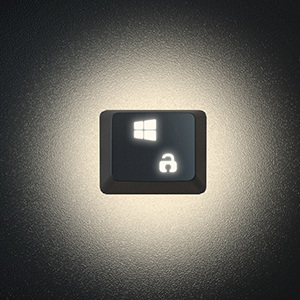
Image: A close-up of the Win-Lock key, indicating its function to disable the Windows key.
Programmable Keys and Macros
The Black Shark Sixgill K2 keyboard supports full programmability and macro creation:
- Key Reassignment: All keys can be reassigned to perform different functions.
- การสร้างมาโคร: Create complex macros for effortless execution of multiple commands with a single key press.
- การควบคุมซอฟต์แวร์: Utilize the dedicated Black Shark software for comprehensive lighting effect control and micro programming.

Image: The Black Shark software interface, illustrating options for lighting effect control and macro programming for the Sixgill K2 keyboard.
การออกแบบและการสร้างคุณภาพ
- Ergonomic Arc Layout: Designed with an ergonomic arc layout and suspended keys for comfortable typing.
- ขาตั้งพับได้: Integrated foldable stands allow adjustment of the typing angle.
- แผงโลหะที่ทนทาน: Features an aluminum alloy panel with a matte-finish texture, ensuring sturdiness and extended product lifespan.

ภาพ: ภาพระยะใกล้ view of the durable aluminum alloy panel, highlighting the premium build quality of the keyboard.

ภาพ: ด้านข้าง view of the keyboard demonstrating its ergonomic angle, adjustable via foldable stands.
การซ่อมบำรุง
การบำรุงรักษาอย่างเหมาะสมจะช่วยให้คีย์บอร์ดของคุณมีอายุการใช้งานยาวนานและมีประสิทธิภาพ:
- การทำความสะอาดปกติ: ใช้แปรงขนนุ่มหรือลมอัดเพื่อขจัดฝุ่นและเศษต่างๆ ออกจากระหว่างปุ่มต่างๆ
- การทำความสะอาดคีย์แคป: สำหรับการทำความสะอาดอย่างละเอียด ให้ใช้เครื่องมือถอดคีย์แคปที่ให้มาถอดคีย์แคปออกอย่างระมัดระวัง ทำความสะอาดด้วยน้ำสบู่เจือจางและผ้านุ่ม จากนั้นตรวจสอบให้แน่ใจว่าแห้งสนิทก่อนประกอบกลับเข้าไปใหม่
- การทำความสะอาดพื้นผิว: Wipe the keyboard's aluminum alloy panel with a damp, soft cloth. Avoid abrasive cleaners or solvents.
- การป้องกันการรั่วไหล: Avoid spilling liquids on the keyboard. In case of a spill, immediately disconnect the keyboard from your PC and allow it to dry completely before reconnecting.
การแก้ไขปัญหา
หากคุณพบปัญหาเกี่ยวกับคีย์บอร์ด Black Shark Sixgill K2 โปรดดูวิธีแก้ไขปัญหาทั่วไปต่อไปนี้:
- แป้นพิมพ์ไม่ตอบสนอง:
- Ensure the USB cable is securely connected to both the keyboard and the PC.
- Try plugging the keyboard into a different USB port on your PC.
- รีสตาร์ทเครื่องคอมพิวเตอร์ของคุณ
- Keys Not Registering or Sticky:
- Clean around and under the affected keycap using compressed air or a keycap puller to remove debris.
- If a specific key is consistently unresponsive, it may indicate a switch issue.
- ไฟ RGB ไม่ทำงาน/ไม่ถูกต้อง:
- ตรวจสอบให้แน่ใจว่าแป้นพิมพ์เชื่อมต่ออย่างถูกต้อง
- Cycle through lighting modes using the designated key combinations (e.g., Fn + specific keys).
- Check the Black Shark software for lighting settings and ensure they are correctly configured.
- ซอฟต์แวร์ตรวจไม่พบแป้นพิมพ์:
- Reinstall the Black Shark software.
- ตรวจสอบให้แน่ใจว่าระบบปฏิบัติการของคุณเป็นเวอร์ชันล่าสุด
- ปิดใช้งานโปรแกรมป้องกันไวรัสหรือไฟร์วอลล์ใดๆ ที่อาจก่อให้เกิดการรบกวนเป็นการชั่วคราว
ข้อมูลจำเพาะ
| หมายเลขรุ่น | K2 |
| ยี่ห้อ | ฉลามดำ |
| เทคโนโลยีการเชื่อมต่อ | สาย (USB) |
| ประเภทสวิตซ์ | สวิตช์สีแดงแบบกลไก |
| จำนวนคีย์ | 104 คีย์ |
| ป้องกันการโดนผีหลอก | โรลโอเวอร์ N-Key แบบเต็ม |
| การแบ็คไลท์ | RGB (12 effects, 5 gaming modes, 3 sidelight effects, 8 single colors) |
| อุปกรณ์ที่รองรับ | PC (Windows 7 / 8 / 10 / XP) |
| วัสดุ | Aluminum Alloy Panel, ABS Keycaps |
| น้ำหนักสินค้า | 2.44 ปอนด์ (ประมาณ 1.11 กก.) |
| ขนาด (กว้าง x ยาว x สูง) | 17.72 x 4.96 x 1.46 นิ้ว (ประมาณ 450 x 126 x 37 มม.) |
| ข้อแนะนำการใช้ | การเล่นเกม |

Image: Technical drawing showing the dimensions of the Black Shark Sixgill K2 keyboard.
การรับประกันและการสนับสนุน
For warranty information and technical support, please refer to the official Black Shark webหรือติดต่อฝ่ายบริการลูกค้าโดยตรง โดยทั่วไปแล้ว ผลิตภัณฑ์จะมาพร้อมกับการรับประกันจากผู้ผลิตที่ครอบคลุมข้อบกพร่องด้านวัสดุและฝีมือการผลิต
Additional resources, including an electronic version of this manual, may be available on the Black Shark support page.
หากต้องการความช่วยเหลือเพิ่มเติม คุณสามารถไปที่ ร้าน Black Shark บน Amazon หรือปรึกษาได้ที่ คู่มือการใช้งาน (PDF).


