การแนะนำ
This manual provides detailed instructions for the safe installation, operation, and maintenance of your bimar Wi-Fi Ceiling Fan, Model 1 (Ø 132). Please read this manual thoroughly before using the product and retain it for future reference.
วัตถุประสงค์การใช้: This high-performance ceiling fan is designed for ventilation in indoor domestic environments. Any other use is considered improper and potentially hazardous. The manufacturer cannot be held responsible for any damages resulting from improper use or repairs performed by unqualified personnel.
คำแนะนำด้านความปลอดภัยที่สำคัญ
เพื่อลดความเสี่ยงต่อการเกิดไฟไหม้ ไฟฟ้าช็อต หรือการบาดเจ็บของบุคคล โปรดปฏิบัติตามสิ่งต่อไปนี้:
- อ่านคำแนะนำทั้งหมดก่อนติดตั้งพัดลม
- การติดตั้งจะต้องดำเนินการโดยช่างไฟฟ้าที่มีคุณสมบัติตามมาตรฐานไฟฟ้าท้องถิ่นและระดับชาติทั้งหมด
- Ensure the installation site can support the fan's weight (approximately 6.2 kg).
- ควรตัดกระแสไฟที่เบรกเกอร์หลักทุกครั้งก่อนทำการติดตั้งหรือซ่อมบำรุง
- ห้ามใช้งานพัดลมหากสายไฟหรือปลั๊กชำรุด
- Keep hands, hair, and clothing away from moving blades.
- Do not insert any objects into the fan blades while it is operating.
- เครื่องใช้ไฟฟ้าตัวนี้ไม่ได้มีวัตถุประสงค์เพื่อให้บุคคล (รวมทั้งเด็ก) ที่มีความบกพร่องทางร่างกาย ทางประสาทสัมผัส หรือทางจิตใจ หรือขาดประสบการณ์และความรู้ ใช้งาน เว้นแต่จะมีการดูแลหรือคำแนะนำเกี่ยวกับการใช้เครื่องใช้ไฟฟ้าโดยบุคคลที่รับผิดชอบด้านความปลอดภัยของบุคคลดังกล่าว
- ควรมีผู้ดูแลเด็กเพื่อให้แน่ใจว่าไม่ได้เล่นกับเครื่องใช้ไฟฟ้าดังกล่าว
มีอะไรอยู่ในกล่อง
Your bimar Wi-Fi Ceiling Fan package includes the following components:
- bimar Wi-Fi Ceiling Fan unit (with 3 blades)
- รีโมทคอนโทรล
- Mounting hardware (screws, brackets, etc.)
- คู่มือการใช้งาน (เอกสารนี้)

Image: The bimar Wi-Fi Ceiling Fan, featuring three light-colored wooden blades and a brushed metal motor housing and downrod.
การติดตั้งและการตั้งค่า
1. การติดตั้งพัดลม
ขอแนะนำอย่างยิ่งให้ติดตั้งโดยช่างไฟฟ้าผู้ชำนาญการ Ensure the ceiling structure can safely support the fan's weight and that all wiring complies with local electrical codes.
- เตรียมสถานที่ติดตั้ง: Turn off power at the circuit breaker. Securely attach the mounting bracket to a ceiling joist or a fan-rated outlet box.
- Assemble the Downrod and Motor: Attach the downrod to the fan motor housing.
- แขวนพัดลม: ยกชุดพัดลมขึ้นอย่างระมัดระวัง แล้วแขวนไว้กับขายึด
- ต่อสายพัดลม: Connect the electrical wires (live, neutral, ground) from the ceiling to the fan's wiring, following the wiring diagram provided in the separate installation guide (if applicable).
- ติดใบมีด: Securely fasten the three blades to the motor housing.
- ยึดหลังคาให้แน่น: Raise the canopy to cover the wiring and mounting bracket, securing it in place.

ภาพ: ด้านข้าง view of the bimar ceiling fan, illustrating the angle of the light wood blades and the connection to the downrod.
2. การเชื่อมต่อ Wi-Fi และแอปพลิเคชัน
The bimar Wi-Fi Ceiling Fan is compatible with the Bimar Live Smart app for advanced control and scheduling.
- ดาวน์โหลดแอป: ค้นหา "Bimar Live Smart" in your smartphone's app store (iOS or Android) and install it.
- สร้างบัญชี: เปิดแอปและทำตามคำแนะนำบนหน้าจอเพื่อสร้างบัญชีผู้ใช้ใหม่หรือเข้าสู่ระบบหากคุณมีบัญชีผู้ใช้อยู่แล้ว
- เพิ่มอุปกรณ์: Power on the ceiling fan. In the Bimar Live Smart app, tap "Add Device" or the "+" icon. Select "Ceiling Fan" or the appropriate device type.
- เชื่อมต่อกับ Wi-Fi: Follow the app's instructions to put the fan into pairing mode (usually by pressing a button on the fan or remote for a few seconds). Connect the fan to your home 2.4GHz Wi-Fi network.
- ตั้งชื่ออุปกรณ์: Once connected, you can name your fan for easy identification within the app.

Image: A modern living room featuring the bimar ceiling fan installed, with a smartphone displaying the Bimar Live Smart app interface, indicating Wi-Fi and voice control capabilities.
คำแนะนำการใช้งาน
Your bimar Wi-Fi Ceiling Fan offers multiple control options for convenience.
1. การทำงานของรีโมทคอนโทรล
The included remote control allows direct access to all fan functions.
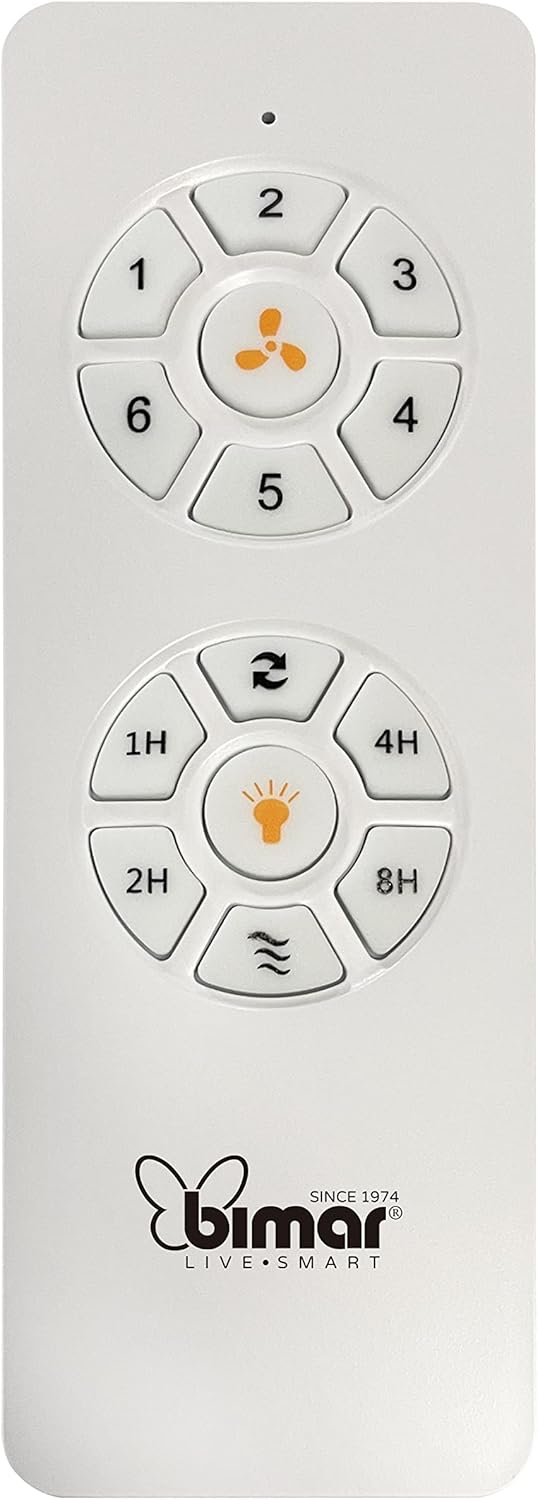
Image: The white remote control for the bimar ceiling fan, showing buttons for fan speed (1-6), fan on/off, timer (1H, 2H, 4H, 8H), mode selection, and reverse function.
- เปิด/ปิดเครื่อง: กดปุ่มไอคอนพัดลมเพื่อเปิดหรือปิดพัดลม
- การปรับความเร็ว: Use buttons 1-6 to select one of the six available fan speeds.
- ฟังก์ชั่นจับเวลา: Press 1H, 2H, 4H, or 8H to set the fan to automatically turn off after the selected duration.
- การเลือกโหมด: Use the mode button (often represented by waves or arrows) to cycle through Normal, Natural, Sleep, and Breeze modes.
- โหมดฤดูร้อน/ฤดูหนาว: The reverse button (often two arrows forming a circle) changes the blade rotation direction.
2. App Control (Bimar Live Smart)
Once connected to the Bimar Live Smart app, you can access enhanced features:
- การทำงานระยะไกล: Control all fan functions from anywhere with an internet connection.
- การกำหนดตารางเวลา: Program daily and weekly on/off times for automated operation.
- ตัวจับเวลา: Adjust the timer from 1 to 8 hours.
- Mode and Speed Selection: Easily switch between the 6 speeds and 4 operating modes.
3. การควบคุมด้วยเสียง
The bimar Wi-Fi Ceiling Fan is compatible with popular voice assistants like Amazon Alexa and Google Assistant. After connecting the fan to the Bimar Live Smart app, link your Bimar account to your voice assistant app (e.g., Alexa app or Google Home app).
Exampคำสั่งเสียง:
- "อเล็กซ่า เปิดพัดลมเพดาน"
- "Hey Google, set ceiling fan speed to 3."
- "Alexa, turn off the ceiling fan in 1 hour."
4. Operating Modes and Speeds
- 6 Ventilation Speeds: Adjust the airflow intensity to your preference.
- โหมดปกติ: การไหลของอากาศสม่ำเสมอตามความเร็วที่เลือกไว้
- โหมดธรรมชาติ: จำลองลมธรรมชาติโดยการปรับความเร็วพัดลม
- โหมดสลีป: ทำงานด้วยความเร็วต่ำและเงียบกว่า เพื่อการพักผ่อนที่ไม่ถูกรบกวน
- โหมดบรีซ: Provides a gentle, intermittent airflow.
5. Summer/Winter Function
The reversible blade function allows for year-round use:
- โหมดฤดูร้อน (หมุนทวนเข็มนาฬิกา): สร้างกระแสลมพัดลงด้านล่าง ทำให้เกิดลมเย็นสบาย
- โหมดฤดูหนาว (หมุนตามเข็มนาฬิกา): Creates an upward airflow, circulating warm air trapped near the ceiling, improving heating efficiency.

Image: A diagram illustrating the airflow patterns for summer (indirect ventilation, pushing air upwards) and winter (direct ventilation, pulling air downwards) modes of a ceiling fan.
การซ่อมบำรุง
การบำรุงรักษาตามปกติจะช่วยให้พัดลมเพดานของคุณมีประสิทธิภาพสูงสุดและมีอายุการใช้งานยาวนาน
- การทำความสะอาด: Before cleaning, ensure the fan is turned off and power is disconnected at the circuit breaker. Use a soft, damp ใช้ผ้าเช็ดทำความสะอาดใบพัดและตัวมอเตอร์ ห้ามใช้สารทำความสะอาดที่มีฤทธิ์กัดกร่อนหรือตัวทำละลาย
- การตรวจสอบใบมีด: Periodically check the blades for any signs of damage or warping. Ensure all blade screws are tight.
- การหล่อลื่นมอเตอร์: The fan's DC motor is designed for maintenance-free operation and does not require lubrication.
- ขันสกรูให้แน่น: เมื่อเวลาผ่านไป สกรูและข้อต่อบางตัวอาจหลวมได้ ตรวจสอบและขันสกรูและข้อต่อทั้งหมดให้แน่นทุกปี

ภาพ: ภาพระยะใกล้ view of the bimar ceiling fan's brushed metal motor housing and the attachment points for the light wood blades, highlighting areas for cleaning and inspection.
การแก้ไขปัญหา
| ปัญหา | สาเหตุที่เป็นไปได้ | สารละลาย |
|---|---|---|
| พัดลมไม่เริ่มทำงาน | ไม่มีแหล่งจ่ายไฟ; แบตเตอรี่รีโมทคอนโทรลเหลือน้อย; การเดินสายไฟไม่ถูกต้อง | Check circuit breaker and wall switch. Replace remote batteries. Verify wiring connections (consult electrician). |
| พัดลมสั่น | ใบพัดหรืออุปกรณ์ยึดหลวม; ใบพัดไม่สมดุล | Ensure all blade screws and mounting screws are tight. Use a balancing kit (not included) if necessary. |
| รีโมตคอนโทรลไม่ทำงาน | Low battery; Obstruction between remote and receiver; Remote not paired. | Replace remote batteries. Ensure clear line of sight. Refer to pairing instructions in the full manual. |
| ปัญหาการเชื่อมต่อ Wi-Fi | Incorrect Wi-Fi password; Router too far; 5GHz network selected. | Verify Wi-Fi password. Move router closer or use a Wi-Fi extender. Ensure you are connecting to a 2.4GHz network. Reset fan and re-attempt pairing. |
| พัดลมมีเสียงดัง | Loose screws; Blades hitting an obstruction; Motor issue. | Check and tighten all screws. Ensure nothing is obstructing the blades. If noise persists, contact customer support. |
ข้อมูลจำเพาะ
| คุณสมบัติ | รายละเอียด |
|---|---|
| ยี่ห้อ | บิมาร์ |
| หมายเลขรุ่น | 1 |
| ขนาดสินค้า | 132 x 132 x 27.5 ซม. (เส้นผ่านศูนย์กลาง x เส้นผ่านศูนย์กลาง x ความสูง) |
| น้ำหนัก | 6.2 กก. |
| จำนวนใบมีด | 3 |
| วัสดุ | ไม้ |
| สี | Black (Note: Blades are light wood finish as shown in images) |
| ประเภทมอเตอร์ | DC (Brushless, energy-saving) |
| การใช้พลังงาน | 35วัตต์ |
| วิธีการควบคุม | Remote Control, Bimar Live Smart App, Voice Control (Amazon Alexa, Google Assistant) |
| ความเร็วพัดลม | 6 |
| โหมดการทำงาน | Normal, Natural, Sleep, Breeze |
| ตัวจับเวลา | 1 ถึง 8 ชั่วโมง |
| คุณสมบัติเพิ่มเติม | Silent operation, Summer/Winter mode (reversible blades) |
| แหล่งพลังงาน | ไฟฟ้า |
| ประเภทการติดตั้ง | การติดตั้งบนเพดาน |

Image: The three light wood fan blades, detached and laid flat, showcasing their design and texture.


ภาพ: สอง views of the bimar ceiling fan, illustrating different downrod lengths: one with a 25 cm downrod and another with a 13 cm downrod, affecting the overall height of the fan.
การรับประกันและการสนับสนุน
For warranty information, technical support, or service inquiries, please refer to the warranty card included with your product or visit the official bimar webไซต์นี้ โปรดเก็บหลักฐานการซื้อไว้เพื่อใช้ยืนยันการรับประกัน
ผู้ผลิต: Bimar S.r.l.
ติดต่อ: กรุณาเข้าเยี่ยมชม the bimar store on Amazon or the official bimar webเว็บไซต์สำหรับรายละเอียดการติดต่อ


