1. บทนำ
This user manual provides detailed instructions for the LiNKFOR UHF Handheld Rechargeable Microphone System. This all-metal dual cordless microphone system is designed for various applications including karaoke, conferences, parties, and public speaking, offering clear sound and reliable wireless performance.

Figure 1: LiNKFOR UHF Handheld Rechargeable Microphone System
2. เนื้อหาบรรจุภัณฑ์
โปรดตรวจสอบแพ็คเกจอย่างละเอียดเพื่อให้แน่ใจว่ามีสินค้าทั้งหมดอยู่และอยู่ในสภาพดี:
- 1 x ตัวรับสัญญาณ
- 2 x ไมโครโฟนไร้สาย
- สายสัญญาณเสียงขนาด 1 มม. 6.35 เส้น
- สาย RCA 2 เส้น
- อะแดปเตอร์ 1 x 6.35 มม. ถึง 3.5 มม.
- 1 x 2-in-1 Charging Cable
- อะแดปเตอร์ไฟฟ้า 1 ตัว
- 1 x คู่มือผู้ใช้
- 2 x Microphone Sponges
- 2 x Microphones Anti-Rolling Rings
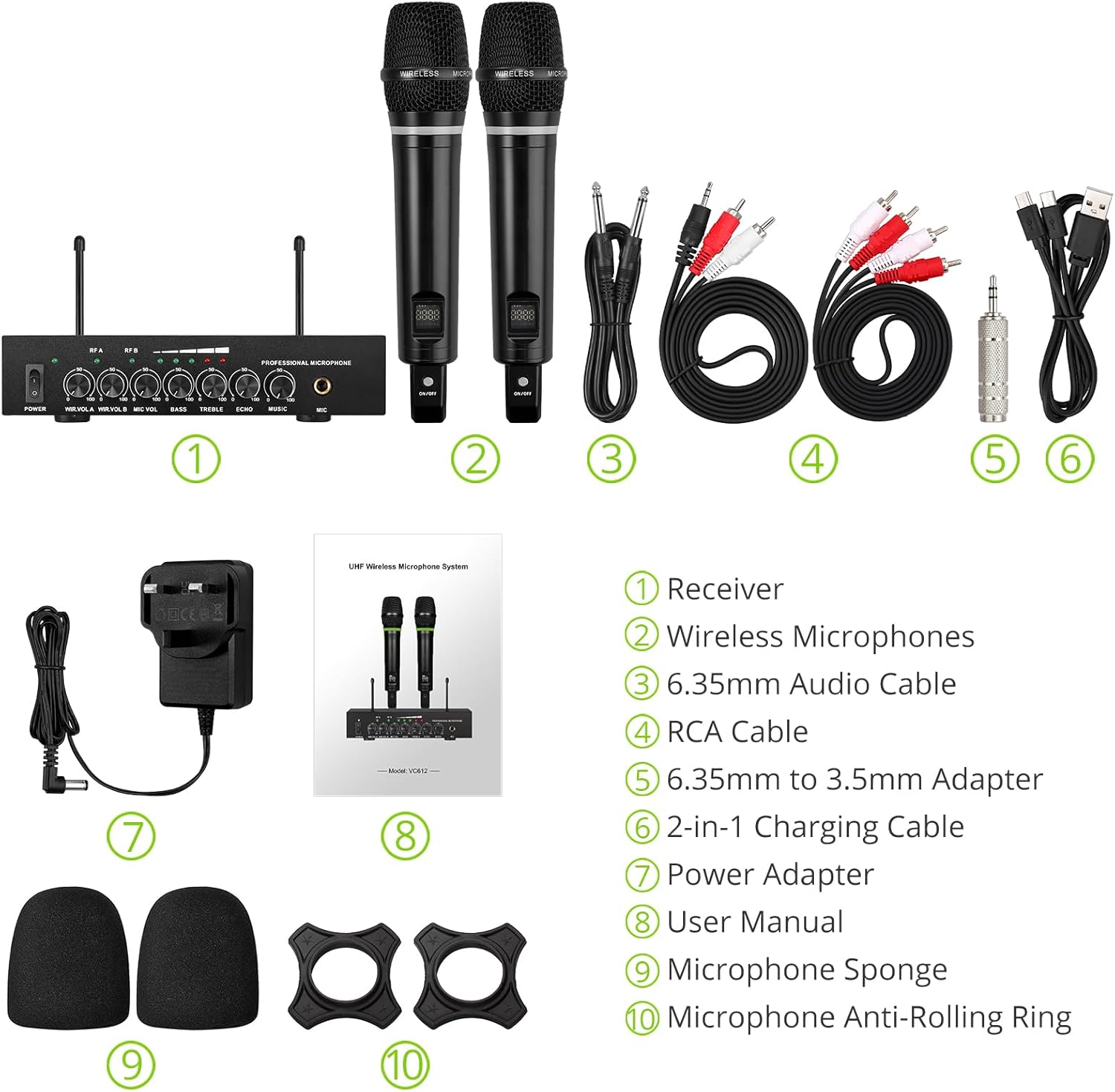
รูปที่ 2: สิ่งของทั้งหมดในบรรจุภัณฑ์
3. คำแนะนำในการตั้งค่า
3.1 การเชื่อมต่อเครื่องรับ
- การเชื่อมต่อไฟฟ้า: Connect the included power adapter to the DC 12V INPUT port on the receiver and plug it into a power outlet.
- เอาต์พุตเสียง:
- For RCA connection: Use the provided RCA cables to connect the "OUTPUT" ports (L/R) on the receiver to the audio input (e.g., AUX, PC) of your sound system (soundbar, amplifier, mixer, or speakers).
- For 6.35mm connection: Use the 6.35mm audio cable to connect the "6.35mm MIC Output" on the receiver to a 6.35mm microphone input on your sound system.
- External Audio Input (Optional):
- For RCA input: Use RCA cables to connect external audio sources (e.g., DVD player, TV) to the "INPUT" ports (L/R) on the receiver.
- For Bluetooth input: Enable Bluetooth on your mobile device (smartphone, tablet) and search for "X168" to pair and connect.

Figure 3: Receiver Connections (RCA Input/Output, 6.35mm MIC Output)

รูปที่ 4: การตั้งค่าการเชื่อมต่อบลูทูธ
3.2 Preparing the Microphones
- การชาร์จ: The microphones are rechargeable. Use the provided 2-in-1 charging cable to charge both microphones simultaneously. The LED light ring on the microphone will turn red when charging and green when fully charged or in use. A full charge takes approximately 3-4 hours and provides up to 10 hours of play time.
- เปิด/ปิดเครื่อง: Locate the ON/OFF switch on each microphone and slide it to the "ON" position to power on. The display screen on the microphone will light up.
- Anti-Rolling Rings & Sponges: Attach the anti-rolling rings to the base of the microphones and place the microphone sponges over the mesh heads for protection and improved sound quality.

Figure 5: Charging the Microphones
4. คู่มือการใช้งาน
- ระบบเปิดทำงาน: Ensure the receiver is powered on (POWER switch on the front panel). The indicator lights for RF A and RF B should illuminate when the corresponding microphone is turned on and connected.
- การปรับระดับเสียง: Use the "WIR.VOL A" and "WIR.VOL B" knobs on the receiver to adjust the individual volume levels of Microphone A and Microphone B.
- การควบคุมเสียง: The receiver features independent controls for BASS, TREBLE, and ECHO to customize the sound output. Adjust these knobs to achieve your desired audio effect.
- ระดับเสียงดนตรี: The "MUSIC" knob controls the volume of the external audio input (e.g., Bluetooth, RCA input).
- ระยะสัญญาณไร้สาย: The UHF wireless range for the microphones is approximately 165 feet (50 meters). The Bluetooth range for audio input is approximately 32 feet (10 meters).

Figure 6: Wireless Range Overview

Figure 7: Sound Control Features
4.1 วิดีโอผลิตภัณฑ์อย่างเป็นทางการ
Video 1: LiNKFOR Rechargeable UHF Wireless Microphone System Overview. This video demonstrates the setup, features, and usage of the microphone system, including connections and sound adjustments.
5. การบำรุงรักษา
- Keep the receiver and microphones clean by wiping them with a soft, dry cloth.
- หลีกเลี่ยงการสัมผัสอุปกรณ์ในอุณหภูมิที่สูง ความชื้นสูง หรือแสงแดดโดยตรง
- Store the system in a dry, cool place when not in use.
- Ensure microphones are fully charged before extended use to maximize battery life.
6 การแก้ไขปัญหา
| ปัญหา | สาเหตุที่เป็นไปได้ | สารละลาย |
|---|---|---|
| ไม่มีเสียงออก |
|
|
| ไมโครโฟนไม่ชาร์จไฟ |
|
|
| ปัญหาการเชื่อมต่อบลูทูธ |
|
|

Figure 8: Compatibility and Common Questions
7. ข้อมูลจำเพาะ
| คุณสมบัติ | รายละเอียด |
|---|---|
| ยี่ห้อ | ลิงค์ฟอร์ |
| ชื่อรุ่น | เอส-105 |
| หมายเลขรุ่นสินค้า | ULKVC613us-US |
| เทคโนโลยีการเชื่อมต่อ | UHF Wireless, Bluetooth 5.0 |
| ปัจจัยรูปแบบไมโครโฟน | แบบถือด้วยมือ |
| วัสดุ | โลหะ |
| แหล่งพลังงาน | ใช้แบตเตอรี่ (ลิเธียมไอออนแบบชาร์จไฟได้) |
| เวลาเล่น | ใช้งานได้นานสูงสุด 10 ชั่วโมง (หลังจากชาร์จ 3-4 ชั่วโมง) |
| UHF Wireless Range | ประมาณ 165 ฟุต (50 ม.) |
| ช่วงบลูทูธ | ประมาณ 32 ฟุต (10 ม.) |
| อัตราส่วนสัญญาณต่อเสียงรบกวน | 95 เดซิเบล |
| อิมพีแดนซ์ | 600 โอห์ม |
| การตอบสนองความถี่ | 1 KHz (Min/Max) |
| จำนวนช่องสัญญาณ | 2 |
| ขนาดรายการ (ยาว x กว้าง x สูง) | 16.54 x 12.99 x 3.31 นิ้ว |
| น้ำหนักสินค้า | 4.84 ปอนด์ (2.2 กิโลกรัม) |
| อุปกรณ์ที่รองรับ | Amplifier, Audio Mixer, Karaoke Machine, TV, Laptop, Smartphones (not Bluetooth Speakers) |

รูปที่ 9: ขนาดผลิตภัณฑ์
8. การรับประกันและการสนับสนุน
For warranty information or technical support, please refer to the contact details provided in your product packaging or visit the official LiNKFOR webไซต์นี้ โปรดเก็บใบเสร็จรับเงินที่ซื้อไว้เพื่อใช้เรียกร้องการรับประกัน
LiNKFOR is committed to providing innovative products and reliable connectivity solutions. For further assistance, please contact customer service.


