การแนะนำ
Welcome to the VTech Toot-Toot Drivers Fix & Fuel Garage. This interactive playset is designed to provide an engaging experience for young children. This manual contains important information regarding the assembly, operation, and care of your product. Please read it thoroughly before use and retain it for future reference.
ข้อมูลด้านความปลอดภัย
CAUTION: Adult assembly required. This package contains small screws. For your child’s safety, do not let your child play with the toy until it is fully assembled.
- Ensure all components are securely fastened before allowing a child to play.
- ตรวจสอบของเล่นอย่างสม่ำเสมอเพื่อดูว่ามีรอยชำรุดหรือชิ้นส่วนหลวมหรือไม่ หากพบรอยชำรุดให้หยุดใช้ทันที
- เก็บวัสดุบรรจุภัณฑ์ให้ห่างจากมือเด็ก
มีอะไรอยู่ในกล่อง
- ส่วนประกอบของชุดของเล่นโรงรถนักขับ Toot-Toot
- One Toot-Toot Drivers Stock Car
- คู่มือเริ่มต้นใช้งานฉบับย่อ (เอกสารนี้ทำหน้าที่เป็นคู่มือที่ครอบคลุม)
บันทึก: Additional SmartPoint vehicles are sold separately.
การติดตั้งและการประกอบ
Follow these steps to assemble your VTech Toot-Toot Drivers Fix & Fuel Garage. Adult assembly is required.
- Unpack all components and verify against the parts list (refer to the Quick Start Guide for a detailed list if available).
- Connect the base sections of the garage securely.
- แนบ ramps and elevated track pieces, ensuring they click into place.
- Install the interactive elements such as the tuning station, fuel pumps, and car wash.
- Secure any signs or decorative elements.
- Insert batteries into the Toot-Toot Drivers Stock Car as per its individual instructions (typically 2x AAA batteries, not included).
- Ensure all connections are firm and stable before play.

Image: The VTech Toot-Toot Drivers Fix & Fuel Garage fully assembled, showcasing its multi-level structure, ramps, and various play areas. A green stock car is positioned at the entrance.
คำแนะนำการใช้งาน
The Toot-Toot Drivers Fix & Fuel Garage offers multiple interactive play zones.
SmartPoint Technology
- The playset includes 6 SmartPoint locations.
- When a Toot-Toot Drivers vehicle (including the included Stock Car) drives over a SmartPoint location, it triggers unique phrases, sounds, and melodies.
- Experiment with different vehicles on various SmartPoint locations to discover all interactions.
พื้นที่เล่น
- สถานีจูน: Drive your stock car onto the tuning station for service. The interactive repair lift allows for engaging pretend play with mechanic sounds and phrases.
- Fuel Station: Fuel up your vehicles with either classic fuel or super-charged electricity.
- ล้างรถ: Ensure your vehicles are sparkling clean by driving them through the car wash.
- Convenience Store: Park and shop for supplies at the integrated convenience store.
- Ramps and Gates: Utilize the various ramps for racing and the lift-able gates and swinging signs for dynamic play.
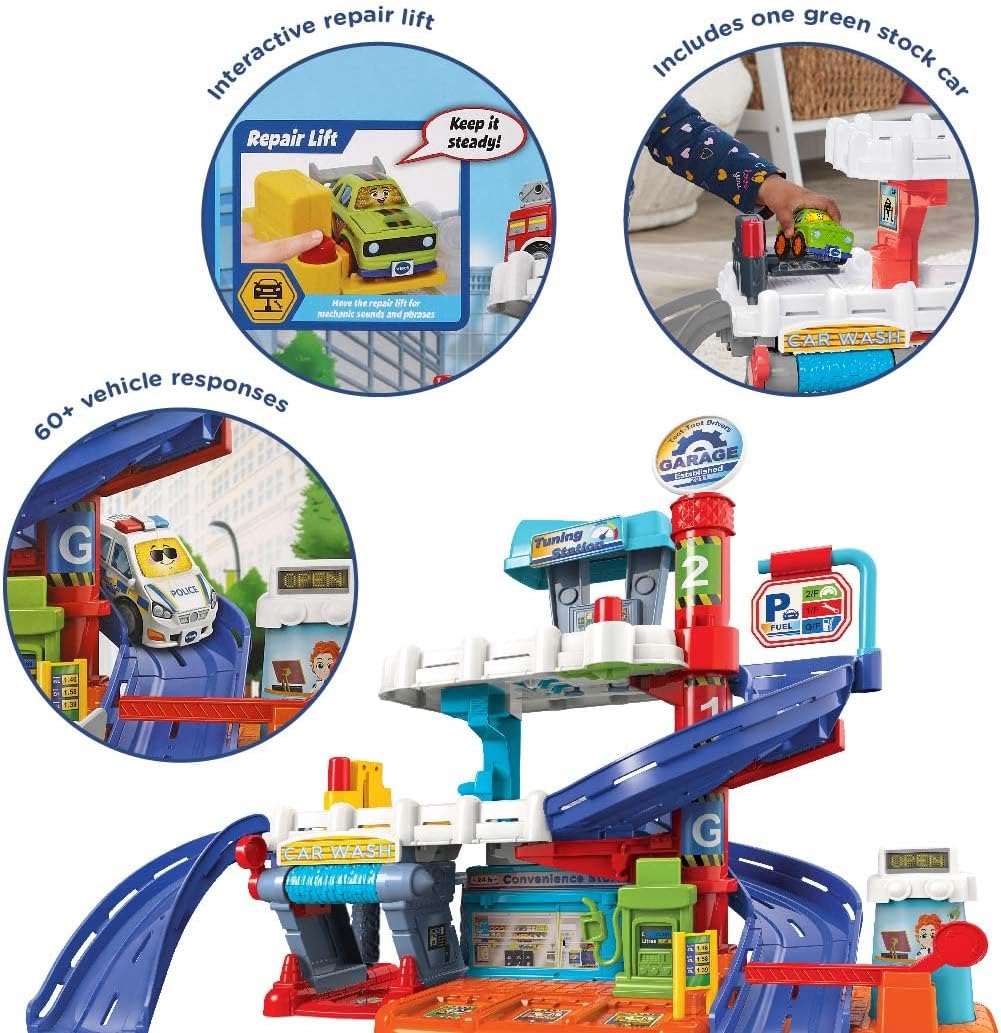
ภาพ: รายละเอียด view of the interactive repair lift feature, where a green stock car can be raised for pretend maintenance, triggering sounds and phrases. Another car is shown on a ramp, highlighting the multi-level play.
Toot-Toot Drivers Stock Car
- The included Stock Car features 3 songs and 6 melodies.
- Press the light-up button on the car to activate sounds and phrases.
- Push the car along to hear additional sounds and watch the headlights flash.
การซ่อมบำรุง
- การทำความสะอาด: Wipe the playset and vehicles with a slightly damp cloth. Do not immerse in water. Avoid using harsh cleaning agents or abrasives.
- การเปลี่ยนแบตเตอรี่: When the sounds or lights on the Stock Car become faint or stop working, replace the batteries. Refer to the battery compartment for correct polarity and battery type (typically AAA).
- พื้นที่จัดเก็บ: Store the playset in a cool, dry place away from direct sunlight when not in use.
การแก้ไขปัญหา
- No Sound/Lights from Vehicle:
- Check if batteries are correctly installed.
- เปลี่ยนแบตเตอรี่ใหม่
- Ensure the vehicle's ON/OFF switch is in the 'ON' position.
- SmartPoint Not Triggering:
- Ensure the vehicle is a VTech Toot-Toot Drivers SmartPoint vehicle.
- Confirm the vehicle's batteries are working.
- Drive the vehicle slowly and directly over the SmartPoint sensor.
- ชิ้นส่วนไม่พอดี:
- Refer to the assembly diagrams in the Quick Start Guide.
- Ensure you are using the correct parts for each step.
- Apply gentle, even pressure during assembly. Do not force parts.
ข้อมูลจำเพาะ
| คุณสมบัติ | รายละเอียด |
|---|---|
| ยี่ห้อ | VTech |
| หมายเลขรุ่น | 556603 |
| ขนาดสินค้า | 11.14 x 29.13 x 20.55 นิ้ว (28.29 x 74 x 52.2 ซม.) |
| น้ำหนักสินค้า | 5.83 ปอนด์ (2.64 กก.) |
| อายุที่แนะนำ | 12 เดือน - 5 ปี |
| ผู้ผลิต | วีเทค อิเล็กทรอนิกส์ |
| วันที่วางจำหน่าย | วันที่ 1 สิงหาคม 2022 |
การรับประกันและการสนับสนุน
สำหรับข้อมูลเกี่ยวกับเงื่อนไขการรับประกันสินค้า โปรดดูบัตรรับประกันที่แนบมากับสินค้าที่ซื้อ หรือเยี่ยมชมเว็บไซต์อย่างเป็นทางการของ VTech webเว็บไซต์.
For customer support, technical assistance, or to purchase additional accessories, please contact VTech Customer Service. Contact details can typically be found on the VTech official webไซต์หรือบนบรรจุภัณฑ์ผลิตภัณฑ์


