1. บทนำ
This manual provides essential information for operating your DOOGEE S98 rugged smartphone. Please read it carefully to ensure proper use and to maximize the device's features and longevity.

รูปที่ 1.1: ด้านหน้าและด้านหลัง view of the DOOGEE S98 Rugged Smartphone. The front features a display, while the rear showcases the camera module with a circular secondary display and rugged design elements.
2. อุปกรณ์โอเวอร์view
The DOOGEE S98 is a rugged smartphone designed for durability and performance. Key features include:
- โปรเซสเซอร์: MediaTek Helio G96 Octa-core chipset.
- หน่วยความจำและการจัดเก็บ: 8GB RAM + 256GB ROM (expandable up to 512GB).
- ระบบปฏิบัติการ: Android 12.
- แสดง: 6.3-inch FHD+ with Corning Gorilla Glass.
- กล้องถ่ายรูป: 64MP main camera, 20MP night vision camera (with 4 infrared lights), 8MP wide-angle camera.
- แบตเตอรี่: 6000mAh with 33W fast charging and 15W wireless charging.
- ความทนทาน: IP68/IP69K and MIL-STD-810G certified for water, dust, and shock resistance.
- การเชื่อมต่อ: Dual 4G SIM, NFC, OTG, GPS, Glonass, Beidou, Galileo.
- คุณสมบัติพิเศษ: Circular rear display for quick access to time, notifications, music control, and alarms.
3. การตั้งค่า
3.1. การใส่ซิมการ์ดและการ์ด SD
- ค้นหาถาดใส่การ์ด SIM ที่ด้านข้างของอุปกรณ์
- ใช้เครื่องมือถอดซิมที่ให้มาเพื่อเปิดถาด
- ใส่ซิมการ์ดนาโนและ/หรือการ์ด microSD ลงในช่องที่กำหนดอย่างระมัดระวัง ตรวจสอบให้แน่ใจว่าด้านขั้วสีทองหันลงด้านล่าง
- ค่อยๆ ดันถาดกลับเข้าไปในเครื่องจนแนบสนิท
3.2. ตัวช่วยเปิดเครื่องและการตั้งค่าเบื้องต้น
- Press and hold the Power button (located on the side) until the DOOGEE logo appears.
- ปฏิบัติตามคำแนะนำบนหน้าจอเพื่อทำการตั้งค่าเบื้องต้นให้เสร็จสมบูรณ์ รวมถึงการเลือกภาษา การเชื่อมต่อ Wi-Fi การเข้าสู่ระบบบัญชี Google และการตั้งค่าความปลอดภัย
4. คู่มือการใช้งาน
4.1. การนำทางพื้นฐาน
- ปุ่มเปิด/ปิด: กดเพื่อปลุก/พักหน้าจอ กดค้างไว้เพื่อปิดเครื่องหรือรีสตาร์ท
- ปุ่มปรับระดับเสียง: ปรับระดับเสียงสื่อ ระดับเสียงการโทร และระดับเสียงการแจ้งเตือน
- ปุ่มกำหนดเอง: A programmable button for quick access to specific functions or apps. Configure this in Settings.
- เซ็นเซอร์ลายนิ้วมือ: Integrated for secure unlocking. Register your fingerprints in Settings > Security.
4.2. Smart Rear Display
The circular rear display provides quick information and controls without needing to activate the main screen.
- เวลา: แสดงเวลาปัจจุบัน
- เตือน: Snooze or cancel active alarms.
- การควบคุมเพลง: เล่น หยุดชั่วคราว ข้ามเพลง
- สายเรียกเข้า: View caller ID and manage calls.
- การแจ้งเตือน: Receive alerts for messages and other app notifications.

รูปที่ 4.1: Illustration of the smart rear display showing its various functions like time, alarm, music control, incoming call, and notifications.
4.3. การทำงานของกล้อง
The DOOGEE S98 features a versatile camera system:
- กล้องหลัก 64MP: เพื่อภาพถ่ายความละเอียดสูงในสภาพแสงต่างๆ
- กล้องมองกลางคืน 20 ล้านพิกเซล: Equipped with 4 infrared lights, allowing clear photography up to 20 meters in complete darkness. Activate this mode in the camera app.
- 8MP Wide-Angle Camera: บันทึกภาพมุมกว้างขึ้น
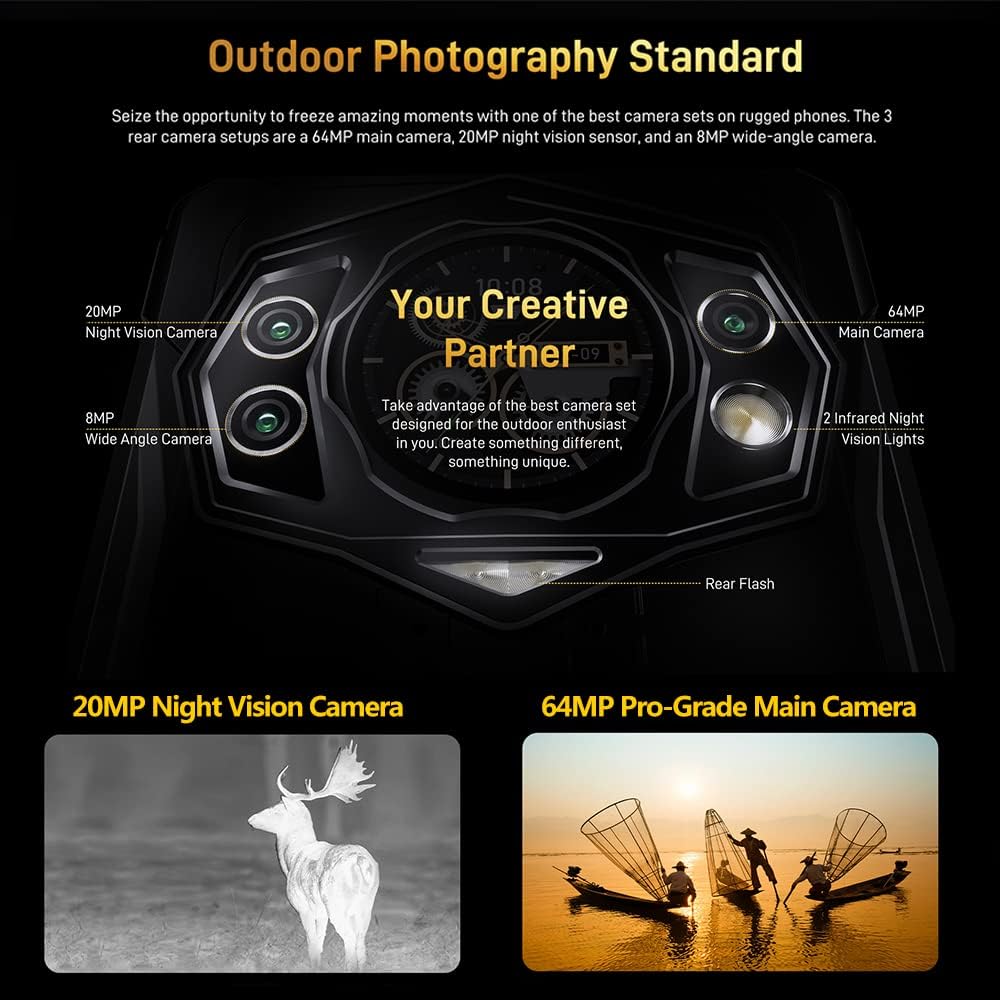
รูปที่ 4.2: รายละเอียด view of the DOOGEE S98 camera module, highlighting the 64MP main camera, 20MP night vision camera, 8MP wide-angle camera, and infrared lights.

รูปที่ 4.3: Examples of photos taken with the DOOGEE S98 camera, demonstrating both standard and night vision capabilities.
4.4. การเชื่อมต่อ
- ซิมคู่ 4G: Supports two 4G SIM cards simultaneously for flexible network usage.
- NFC: สำหรับการชำระเงินแบบไร้สัมผัสและการจับคู่ที่รวดเร็วกับอุปกรณ์อื่นๆ ที่เปิดใช้งาน NFC
- ออโตจีที: เชื่อมต่ออุปกรณ์ต่อพ่วง USB เช่น แฟลชไดรฟ์หรือคีย์บอร์ด
- จีพีเอส: Integrated with GPS, Glonass, Beidou, and Galileo for accurate positioning.
5. แบตเตอรี่และการชาร์จ
The DOOGEE S98 is equipped with a 6000mAh battery for extended usage.
- การชาร์จแบบมีสาย: Supports 33W fast charging. A 33W charger can replenish 55% of the battery in approximately 1 hour.
- การชาร์จแบบไร้สาย: Supports 15W wireless charging. Place the device on a compatible wireless charging pad.

รูปที่ 5.1: Visual representation of the 6000mAh battery capacity and the 33W turbo charging feature of the DOOGEE S98.
6. ความทนทานและการปกป้อง
The DOOGEE S98 is built to withstand harsh environments, certified with IP68, IP69K, and MIL-STD-810G standards.
- กันน้ำ: Can withstand immersion in water up to 1.5 meters for 30 minutes. Features an underwater mode for photography.
- กันฝุ่น: ป้องกันฝุ่นเข้าได้อย่างเต็มประสิทธิภาพ
- กันกระแทก: Designed to endure drops from a height of 1.5 meters.
- ความทนทานต่ออุณหภูมิ: Operates in extreme temperatures between 70°C (158°F) and -55°C (-67°F).

รูปที่ 6.1: Image demonstrating the DOOGEE S98's waterproof, dustproof, and shockproof capabilities, showing the phone submerged in water and covered in sand.
7. ข้อมูลจำเพาะ
| คุณสมบัติ | รายละเอียด |
|---|---|
| ชื่อรุ่น | DOOGEE S98 |
| ระบบปฏิบัติการ | แอนดรอยด์ 12.0 |
| โปรเซสเซอร์ | MediaTek Helio G96 Octa-core |
| แรม | 8GB |
| การจัดเก็บข้อมูลภายใน | 256GB |
| พื้นที่เก็บข้อมูลแบบขยายได้ | สูงสุด 512GB (microSD) |
| ขนาดหน้าจอ | 6.3 นิ้ว |
| ปณิธาน | 1080 x 2340 (FHD+) |
| กล้องหลัก | 64 MP |
| กล้องมองกลางคืน | 20 MP (with 4 IR lights) |
| กล้องหน้า | 16 MP (Common for this model, inferred) |
| ความจุของแบตเตอรี่ | 6000 มิลลิแอมป์ |
| สายการชาร์จ | ชาร์จเร็ว 33W |
| การชาร์จแบบไร้สาย | 15วัตต์ |
| ระดับความทนทาน | IP68, IP69K, มาตรฐาน MIL-STD-810G |
| การเชื่อมต่อ | 4G LTE, Wi-Fi, Bluetooth, NFC, USB, OTG |
| การนำทาง | GPS, Glonass, Beidou, Galileo |
| ขนาด | 8.19 x 7.6 x 1.85 นิ้ว (บรรจุภัณฑ์) |
| น้ำหนัก | 11.3 ออนซ์ (320 กรัม) |
| แจ็คเสียง | 3.5 มม. |
8. การบำรุงรักษาและการดูแล
- การทำความสะอาด: ใช้แบบนุ่มๆamp ควรใช้ผ้าเช็ดทำความสะอาดอุปกรณ์ หลีกเลี่ยงสารเคมีรุนแรง
- การสัมผัสน้ำ: While waterproof, ensure all ports are securely closed before exposing the device to water. After water exposure, dry the device thoroughly, especially the charging port, before charging.
- อุณหภูมิ: Avoid prolonged exposure to extreme heat or cold to prevent battery degradation and component damage.
- การอัปเดตซอฟต์แวร์: ตรวจสอบและติดตั้งการอัปเดตระบบเป็นประจำเพื่อให้มั่นใจถึงประสิทธิภาพและความปลอดภัยที่เหมาะสมที่สุด
9 การแก้ไขปัญหา
| ปัญหา | วิธีแก้ปัญหาที่เป็นไปได้ |
|---|---|
| อุปกรณ์ไม่ได้เปิด | ตรวจสอบให้แน่ใจว่าแบตเตอรี่ชาร์จเต็มแล้ว เสียบอุปกรณ์ชาร์จไว้อย่างน้อย 10 นาที แล้วลองเปิดเครื่องอีกครั้ง |
| หน้าจอไม่ตอบสนอง | Perform a forced restart by holding the Power button for 10-15 seconds. If the issue persists, contact support. |
| ปัญหาการเชื่อมต่อเครือข่าย | Check SIM card insertion. Toggle Airplane Mode on/off. Restart the device. Verify network settings. |
| แบตเตอรี่หมดเร็ว | Close unused apps. Reduce screen brightness. Disable unnecessary features like GPS or Bluetooth when not in use. Check for background app activity. |
| Night Vision Camera not working | Ensure you are in a sufficiently dark environment. Check camera app settings for night vision mode activation. |
10. การรับประกันและการสนับสนุน
The DOOGEE S98 comes with a 12-month US warranty. For any questions or issues regarding your device, please contact DOOGEE customer support. Ensure you confirm SIM compatibility with your carrier before purchase, as the device is not compatible with AT&T, Cricket, Verizon, Sprint, Boost Mobile, or other CDMA networks.
For further assistance, please refer to the official DOOGEE webเว็บไซต์หรือติดต่อช่องทางบริการลูกค้าของเรา


