1. บทนำ
This manual provides detailed instructions for the installation, operation, and maintenance of your DAHUA IMOU Indoor WiFi Camera, model IPC-T22AP. Please read this manual thoroughly before using the product to ensure correct usage and optimal performance. Retain this manual for future reference.
2. สินค้าหมดview
The DAHUA IMOU IPC-T22AP is an indoor WiFi camera designed for home surveillance. It features 2MP resolution, infrared night vision, and motion-activated alerts. The camera supports both WiFi and Ethernet connectivity, with Power over Ethernet (PoE) capability for simplified installation when used with compatible equipment. It is designed to quickly identify human targets within its field of view.

Figure 2.1: DAHUA IMOU IPC-T22AP Indoor WiFi Camera shown with an included 128GB memory card.
3. เนื้อหาบรรจุภัณฑ์
เมื่อเปิดบรรจุภัณฑ์ โปรดตรวจสอบให้แน่ใจว่าสินค้าครบถ้วนและอยู่ในสภาพดี หากมีสินค้าใดขาดหายหรือเสียหาย โปรดติดต่อผู้ค้าปลีก
- DAHUA IMOU IPC-T22AP Indoor WiFi Camera
- อะแดปเตอร์แปลงไฟ
- สกรูยึดและปลั๊กผนัง
- คู่มือเริ่มต้นใช้งานฉบับย่อ (ไม่รวมอยู่ในคู่มือนี้)
- 128GB Memory Card (if purchased as a bundle)
4. การตั้งค่า
4.1 การติดตั้งทางกายภาพ
Select a suitable indoor location for the camera, ensuring it has a clear view of the area you wish to monitor. The camera can be mounted on a ceiling or wall. Use the provided mounting screws and wall plugs to secure the camera in place.
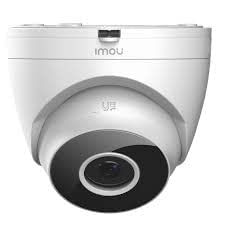
รูปที่ 4.1 : ด้านหน้า view of the IPC-T22AP camera, showing the lens and infrared sensors.
4.2 การเชื่อมต่อสายไฟ
Connect the included power adapter to the camera's power input port and then plug the adapter into a standard electrical outlet. Alternatively, if using a Power over Ethernet (PoE) compatible network switch or injector, connect an Ethernet cable from the PoE source directly to the camera's Ethernet port. This will provide both power and data connectivity.
4.3 การเชื่อมต่อเครือข่าย
The camera supports both WiFi and wired Ethernet connections.
- การเชื่อมต่อ WiFi: Ensure your smartphone is connected to the 2.4GHz WiFi network you intend to use for the camera. Follow the instructions in the IMOU Life app to add the device and connect it to your WiFi network.
- การเชื่อมต่ออีเทอร์เน็ต: Connect an Ethernet cable from your router or network switch to the camera's Ethernet port. The camera will automatically establish a wired network connection.
4.4 การติดตั้งและการจับคู่แอป
- Download the "IMOU Life" app from your mobile device's app store (available for Android and iOS).
- Register for an IMOU account or log in if you already have one.
- แตะไอคอน "+" ในแอปเพื่อเพิ่มอุปกรณ์ใหม่
- สแกนคิวอาร์โค้ดที่อยู่บนตัวกล้องหรือบรรจุภัณฑ์
- Follow the on-screen prompts to complete the pairing process, including connecting the camera to your WiFi network if applicable.
5. คู่มือการใช้งาน
5.1 สด View
Open the IMOU Life app and select your IPC-T22AP camera from the device list to access the live video feed. You can view ฟูแบบเรียลไทม์tage, take snapshots, and record video directly from the live view อินเทอร์เฟซ
5.2 การบันทึกและการเล่น
The camera supports local recording to a microSD card (up to 128GB, if included). Recordings can be accessed and played back through the IMOU Life app. Navigate to the camera's settings in the app to configure recording schedules and motion-triggered recording.
5.3 การตรวจจับการเคลื่อนไหวและการแจ้งเตือน
The IPC-T22AP camera is equipped with advanced motion detection capabilities, including human target detection. When motion is detected, the camera can send instant alerts to your mobile phone via the IMOU Life app. Adjust sensitivity and detection zones in the app settings to minimize false alarms.
5.4 การมองเห็นตอนกลางคืน
The camera features infrared night vision, providing clear surveillance footage even in complete darkness. The night vision mode activates automatically in low-light conditions. Ensure no obstructions are blocking the camera's view, especially the infrared LEDs.
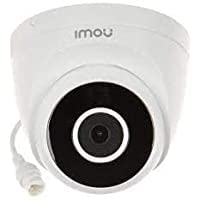
รูปที่ 5.1: ระยะใกล้ view of the IPC-T22AP camera lens, highlighting the infrared emitters for night vision.
6. การบำรุงรักษา
6.1 การทำความสะอาด
Regularly clean the camera lens with a soft, dry cloth to ensure clear image quality. Avoid using harsh chemicals or abrasive materials that could scratch the lens or housing.
การอัปเดตเฟิร์มแวร์ 6.2 รายการ
Periodically check for firmware updates through the IMOU Life app. Keeping your camera's firmware updated ensures optimal performance, security, and access to new features.
6.3 การจัดการการจัดเก็บข้อมูล
If using a microSD card for local storage, the camera will typically overwrite the oldest recordings when the card is full. You can manage storage settings, including formatting the SD card, through the IMOU Life app.
7 การแก้ไขปัญหา
- กล้องไม่เปิด: Ensure the power adapter is securely connected to both the camera and a working power outlet. If using PoE, verify the Ethernet cable is connected to a PoE-enabled port.
- ไม่สามารถเชื่อมต่อ WiFi ได้:
- Ensure the camera is within range of your 2.4GHz WiFi router.
- ตรวจสอบว่ารหัสผ่าน WiFi ที่ป้อนในแอปถูกต้องหรือไม่
- รีสตาร์ทเราเตอร์และกล้องของคุณ
- ไม่มีภาพวิดีโอ:
- Check network connectivity (WiFi or Ethernet).
- ตรวจสอบให้แน่ใจว่ากล้องเปิดอยู่
- Restart the camera and the IMOU Life app.
- ไม่ได้รับการแจ้งเตือนการเคลื่อนไหว:
- ตรวจสอบว่าการตรวจจับการเคลื่อนไหวได้เปิดใช้งานอยู่ในการตั้งค่าแอปแล้ว
- ตรวจสอบกำหนดการแจ้งเตือนและการตั้งค่าความไวในการตรวจจับ
- Ensure your phone's notification settings allow alerts from the IMOU Life app.
- คุณภาพของภาพไม่ดี:
- ทำความสะอาดเลนส์กล้อง
- Ensure adequate lighting in the monitored area, especially for color images.
- ตรวจสอบแบนด์วิดท์เครือข่ายหากคุณภาพการสตรีมต่ำ
8. ข้อมูลจำเพาะ
| แบบอย่าง | IPC-T22AP |
| ยี่ห้อ | ดาฮัว |
| ปณิธาน | 2 ล้านพิกเซล (2MP) |
| เทคโนโลยีการเชื่อมต่อ | Wireless (WiFi), Wired (Ethernet) |
| โปรโตคอลการเชื่อมต่อ | อีเธอร์เน็ต |
| คุณสมบัติพิเศษ | Local Recording, Night Vision, Motion Detection, Human Target Detection |
| การใช้งานภายใน/ภายนอกอาคาร | ในร่ม |
| แหล่งพลังงาน | AC Adapter, Power over Ethernet (PoE) |
| อุปกรณ์ที่รองรับ | Laptop, Android/iOS Mobile Devices (via IMOU Life App) |
| ประเภทตัวควบคุม | แอนดรอยด์, ไอโอเอส |
| ขนาดสินค้า | 11 x 11 x 8 ซม. |
| น้ำหนักสินค้า | 450 กรัม |
| ประเทศต้นกำเนิด | จีน |
9. ข้อมูลการรับประกัน
For specific warranty terms and conditions, please refer to the warranty card included with your product or visit the official DAHUA/IMOU webไซต์ โดยทั่วไปการรับประกันจะครอบคลุมถึงข้อบกพร่องในการผลิตเป็นระยะเวลาหนึ่งนับจากวันที่ซื้อ
10. การสนับสนุน
If you encounter any issues or have questions not covered in this manual, please contact DAHUA/IMOU customer support. You can usually find contact information on the official product website or in the IMOU Life app's help section.
แหล่งข้อมูลออนไลน์:


