การแนะนำ
This manual provides comprehensive instructions for the assembly, operation, maintenance, and troubleshooting of your FLEXISPOT EC5 Standing Desk. Please read this manual thoroughly before use to ensure proper setup and safe operation.

Figure 1: FLEXISPOT EC5 Standing Desk with a black tabletop and black frame, set up in an office environment.
The FLEXISPOT EC5 is an electric height-adjustable desk designed to promote a healthier work environment by allowing seamless transitions between sitting and standing positions. It features a robust dual-motor system, a smart control panel with memory presets, and a durable construction.
คุณสมบัติหลัก:
- Three-tier frame for height adjustment from 60.5cm to 125cm.
- Supports heavy loads up to 125kg (or 160kg with upgraded design).
- Smooth and quiet lifting speed of 38mm/second.
- Programmable digital memory with 3 preset options for customized heights.
- Collision protection system for enhanced safety.
- Durable MDF tabletop with scratch-resistant laminate.
การติดตั้งและการประกอบ
The FLEXISPOT EC5 Standing Desk is designed for straightforward assembly. All necessary tools are included, and detailed instructions are provided to guide you through the process, typically taking 20-25 minutes.
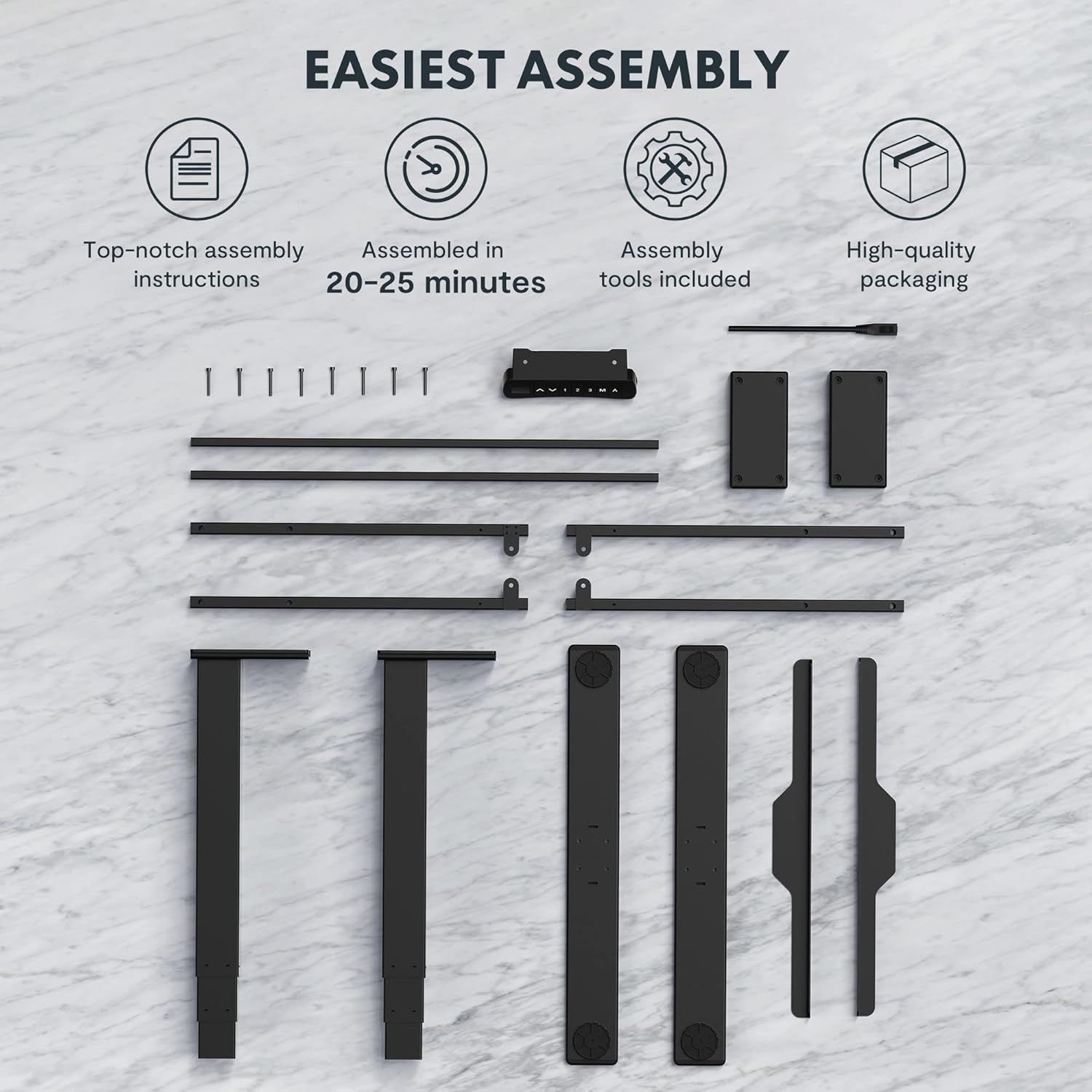
Figure 2: All components and tools required for assembling the FLEXISPOT EC5 Standing Desk.
เนื้อหาแพ็คเกจ:
- Desk Frame (legs, crossbars)
- Tabletop (if included in package)
- Control Panel with Cable
- อะแดปเตอร์แปลงไฟและสายเคเบิล
- Assembly Hardware (screws, bolts)
- เครื่องมือประกอบ (เช่น ประแจอัลเลน)
- คู่มือการใช้งาน
ขั้นตอนการประกอบ (ภาพรวม)view):
- แกะส่วนประกอบทั้งหมดออกและตรวจสอบกับรายการชิ้นส่วน
- Assemble the desk legs to the crossbars, ensuring all connections are secure.
- Attach the assembled frame to the tabletop using the provided screws.
- Mount the control panel to the underside of the tabletop in an accessible location.
- Connect all cables (motor cables to control box, control panel cable to control box, power cable to control box).
- Ensure all cables are neatly managed and secured to prevent snagging.
- Place the desk in its desired location, ensuring it is on a level surface.
For detailed, step-by-step assembly instructions, please refer to the separate assembly guide included in your product packaging.
คำแนะนำการใช้งาน
The FLEXISPOT EC5 Standing Desk features an intuitive control panel for easy height adjustment and memory functions.

Figure 3: The EC5 control panel, featuring height display, up/down buttons, and memory presets.
การใช้งานพื้นฐาน:
- ปรับความสูง: ใช้ ▲ และ ▼ arrows on the control panel to raise or lower the desk to your desired height. The current height will be displayed on the digital screen.
- ช่วงความสูง: The desk can be adjusted from a minimum height of 60.5 cm (23.8 inches) to a maximum height of 125 cm (49.2 inches).
การตั้งค่าหน่วยความจำ:
The EC5 desk allows you to save up to three preferred height settings for quick adjustments.
- การบันทึกที่ตั้งไว้ล่วงหน้า:
- ปรับโต๊ะให้อยู่ในระดับความสูงที่คุณต้องการ
- กดปุ่ม "เอ็ม" button. The display will show "S-".
- Within 3 seconds, press the desired number button ("1", "2", หรือ "3") to save the current height to that preset. The display will show "S-1", "S-2", or "S-3" to confirm.
- การเรียกคืนค่าที่ตั้งไว้ล่วงหน้า:
- Simply press the corresponding number button ("1", "2", หรือ "3"). The desk will automatically move to the saved height.
คุณสมบัติป้องกันการชน:
The desk is equipped with an anti-collision system. If the desk encounters an obstacle while moving up or down, it will automatically stop and reverse slightly to prevent damage. Ensure the area around the desk is clear during operation.
การซ่อมบำรุง
Regular maintenance ensures the longevity and optimal performance of your FLEXISPOT EC5 Standing Desk.
- การทำความสะอาด: เช็ดพื้นโต๊ะและกรอบโต๊ะด้วยผ้าเนื้อนุ่มและแห้งamp ผ้า หลีกเลี่ยงน้ำยาทำความสะอาดที่มีฤทธิ์กัดกร่อนหรือสารเคมีรุนแรงที่อาจทำลายพื้นผิวได้
- การจัดการสายเคเบิล: Periodically check that all cables are securely connected and neatly organized to prevent tangling or damage.
- ตัวล็อค: Occasionally check all screws and bolts to ensure they are tight. Retighten if necessary, but do not overtighten.
- ความจุน้ำหนัก: Do not exceed the maximum weight capacity of 125kg (or 160kg for upgraded models) to prevent damage to the motors and frame.
- สิ่งแวดล้อม: Use the desk in a dry indoor environment. Avoid exposure to extreme temperatures or high humidity.
การแก้ไขปัญหา
If you encounter issues with your FLEXISPOT EC5 Standing Desk, refer to the following common problems and solutions:
| ปัญหา | สาเหตุที่เป็นไปได้ | สารละลาย |
|---|---|---|
| โต๊ะไม่ขยับ | สายไฟหลุด, สายมอเตอร์หลวม, โหลดเกิน | Check all cable connections. Ensure power is supplied. Reduce weight on desk if overloaded. |
| โต๊ะขยับไม่สม่ำเสมอหรือมีเสียงผิดปกติ | Uneven load, loose fasteners, obstruction. | Distribute weight evenly. Check and tighten all fasteners. Clear any obstructions. |
| จอแสดงผลดิจิตอลแสดงรหัสข้อผิดพลาด | System malfunction, sensor issue. | Refer to the full troubleshooting guide in your product manual for specific error codes. Try unplugging the desk for 10 seconds and plugging it back in to reset. |
| Anti-collision feature is too sensitive or not working. | Sensor calibration needed, obstruction. | Ensure no constant obstructions. Consult the full manual for anti-collision sensitivity adjustment or reset procedures. |
หากปัญหายังคงอยู่หลังจากลองวิธีแก้ปัญหาเหล่านี้แล้ว โปรดติดต่อฝ่ายบริการลูกค้าของ FLEXISPOT
ข้อมูลจำเพาะผลิตภัณฑ์
Detailed technical specifications for the FLEXISPOT EC5 Standing Desk:
| คุณสมบัติ | ข้อมูลจำเพาะ |
|---|---|
| ยี่ห้อ | เฟล็กซิสพอท |
| หมายเลขรุ่น | EC5B-EU3+PR1206-Black |
| ยูพีซี | 810072812643 |
| ช่วงการปรับความสูง | 60.5 cm - 125 cm (23.8" - 49.2") |
| ความเร็วในการยก | 38 มม./วินาที |
| ความจุน้ำหนักสูงสุด | 125 กิโลกรัม (275 ปอนด์) - Upgraded models may support up to 160 kg |
| จำนวนมอเตอร์ | 2 |
| กรอบ Stages | 3 |
| แผงควบคุม | Digital display with 3 memory presets |
| Tabletop Dimensions (H x W x D) | 2.5 x 140 x 70 ซม. (0.98 นิ้ว ลึก x 55.12 นิ้ว กว้าง x 27.56 นิ้ว สูง) |
| วัสดุของโต๊ะ | MDF with high pressure scratch resistant laminate |
| วัสดุฐาน | Engineered Wood (for tabletop), Metal (for frame) |
| สี | สีดำ |
| จำเป็นต้องประกอบ | ใช่ |
| ประเภทการรับประกัน | จำกัด |

Figure 4: The EC5 desk frame is designed for stability and can support significant weight, with some models supporting up to 160KG.
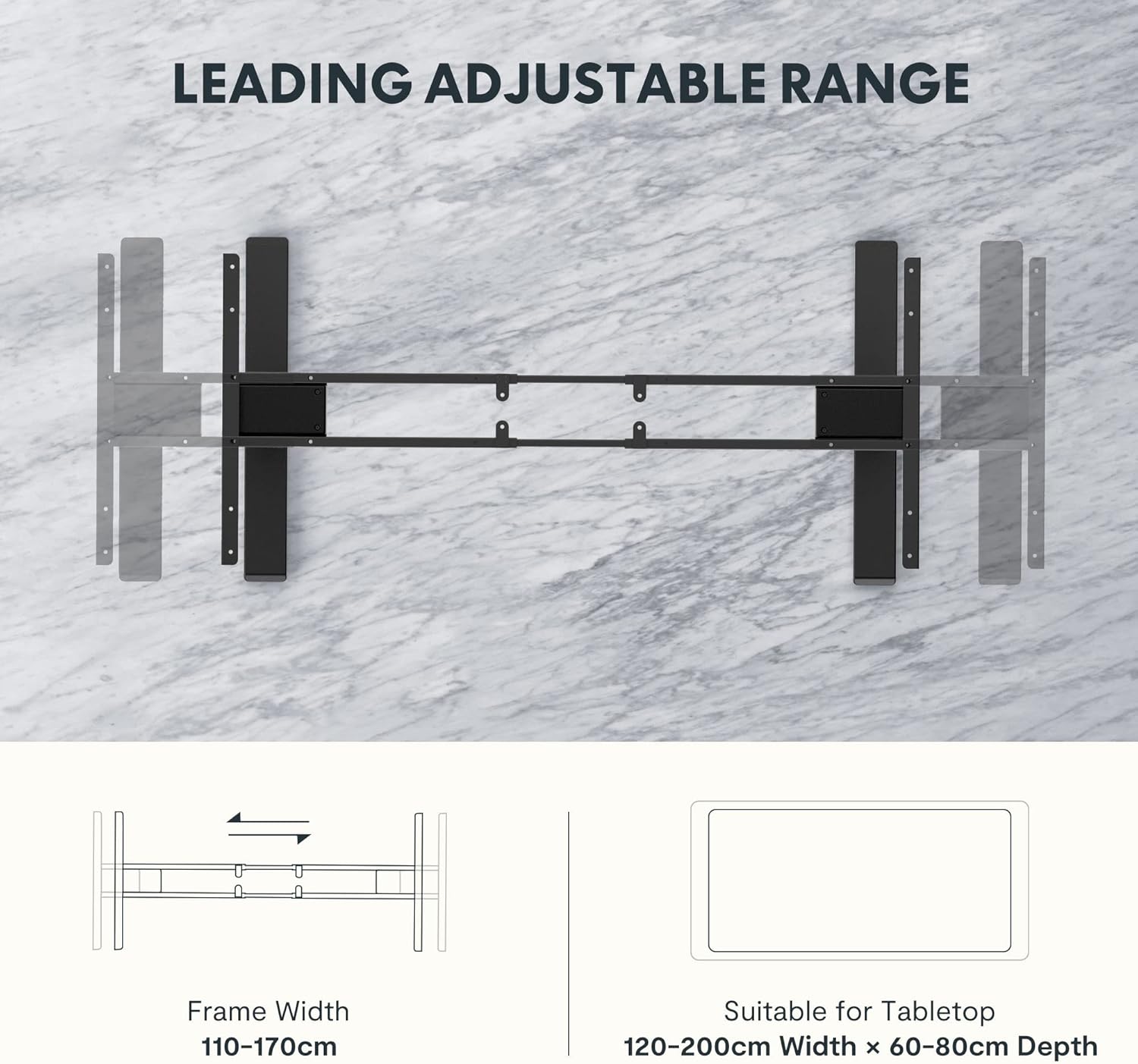
Figure 5: The adjustable frame accommodates various tabletop sizes, offering flexibility for different workspace needs.
การรับประกันและการสนับสนุน
ข้อมูลการรับประกัน:
The FLEXISPOT EC5 Standing Desk comes with a การรับประกันแบบจำกัด. Please refer to the warranty card included with your product for specific terms, conditions, and duration of coverage. This warranty typically covers manufacturing defects in materials and workmanship under normal use.
การสนับสนุนลูกค้า:
For technical assistance, warranty claims, or any questions regarding your FLEXISPOT EC5 Standing Desk, please contact FLEXISPOT customer support. You can typically find contact information on the FLEXISPOT official webไซต์หรือบนบรรจุภัณฑ์ผลิตภัณฑ์ของคุณ
When contacting support, please have your model number (EC5B-EU3+PR1206-Black) and proof of purchase readily available.


