1. สินค้าหมดview
The Loolinn Z3 Drone is designed for beginners, offering stable flight and ease of use. It features optical flow positioning technology for intelligent hovering and includes a 720p camera for capturing aerial photos and videos. With three included batteries, users can enjoy extended flight times.

Image 1.1: The Loolinn Z3 Drone, its remote control, and three rechargeable batteries.
2. เนื้อหาบรรจุภัณฑ์
โปรดตรวจสอบว่าสินค้าทั้งหมดที่ระบุไว้ด้านล่างนี้มีอยู่ในแพ็คเกจของคุณ:
- 1 x Loolinn Z3 Drone
- 1 x รีโมทคอนโทรล
- 1 x คู่มือผู้ใช้
- 1 x ที่วางสมาร์ทโฟน
- แบตเตอรี่โดรน 3 ก้อน
- สายชาร์จ USB 2 เส้น
- 4 x Rotor Blade Protectors
- ใบพัดสำรอง 4 ใบ
- ไขควง 1 อัน

Image 2.1: Contents of the Loolinn Z3 Drone package, including the drone, remote, batteries, and accessories.
3. คำแนะนำด้านความปลอดภัย
Before operating the Loolinn Z3 Drone, please read and adhere to the following safety guidelines to ensure a safe and enjoyable experience:
- Always fly in open areas, away from people, animals, buildings, and obstacles.
- หลีกเลี่ยงการบินในช่วงที่มีลมแรงหรือสภาพอากาศเลวร้าย
- รักษาระยะการมองเห็นกับโดรนตลอดเวลา
- Ensure the drone batteries and remote control batteries are fully charged before each flight.
- เก็บนิ้วและเสื้อผ้าที่หลวมให้ห่างจากใบพัดที่กำลังหมุน
- Do not operate the drone near airports or restricted airspace.
- This product is suitable for ages 14 and up. Adult supervision is recommended for younger users.
4. การตั้งค่า
4.1 การชาร์จแบตเตอรี่และการติดตั้ง
The drone comes with three 1500mAh Lithium Ion batteries. Each battery provides approximately 20 minutes of flight time. Use the provided USB charging cables to charge the drone batteries. A full charge typically takes about 35 minutes per battery.
- Connect the USB charging cable to a power source (e.g., computer USB port, USB wall adapter).
- Connect the battery to the charging cable. The indicator light on the cable will show charging status.
- เมื่อชาร์จแบตเตอรี่จนเต็มแล้ว ให้ถอดแบตเตอรี่ออก
- Insert a charged battery into the drone's battery compartment.
The remote control requires 4 AA batteries (not included). Open the battery compartment on the back of the remote and insert the batteries, observing correct polarity.

Image 4.1: The three 1500mAh Lithium Ion batteries included with the Loolinn Z3 Drone.
4.2 การติดตั้งใบพัดและอุปกรณ์ป้องกัน
Attach the propeller guards to the drone's arms by snapping them into place. Ensure they are securely fastened. If replacing propellers, match the propellers marked 'A' with motor 'A' and 'B' with motor 'B'.
4.3 Smartphone Holder Attachment
Attach the smartphone holder to the top of the remote control. This allows you to mount your smartphone to view the drone's camera feed.
4.4 การจับคู่โดรนและรีโมต
- วางโดรนไว้บนพื้นผิวเรียบ
- เปิดโดรนโดยกดปุ่มเปิด/ปิด ไฟแสดงสถานะของโดรนจะกะพริบ
- เปิดรีโมทคอนโทรล
- ดันจอยสติ๊กด้านซ้าย (คันเร่ง) ขึ้นจนสุด แล้วดันลงจนสุด ไฟของโดรนจะหยุดกระพริบและติดสว่างคงที่ แสดงว่าการจับคู่สำเร็จแล้ว
4.5 การสอบเทียบไจโรสโคป
หลังจากจับคู่แล้ว ให้ปรับเทียบไจโรสโคปเพื่อให้การบินมีเสถียรภาพ:
- Ensure the drone is on a flat, level surface.
- Push both joysticks on the remote control down and to the right simultaneously.
- ไฟของโดรนจะกะพริบถี่ๆ แล้วจึงติดสว่างคงที่ แสดงว่าการปรับเทียบสำเร็จ
5. คู่มือการใช้งาน
5.1 การควบคุมการบินขั้นพื้นฐาน
- ขึ้น/ลงด้วยปุ่มเดียว: Press the one-key take-off/landing button (usually marked with an arrow) to automatically take off or land.
- คันเร่ง (จอยสติ๊กซ้าย): ดันขึ้นเพื่อขึ้น ดึงลงเพื่อลง
- การควบคุมทิศทาง (จอยสติ๊กด้านขวา): Push forward to fly forward, pull back to fly backward, push left to fly left, push right to fly right.
- การหมุนตัว (จอยสติ๊กซ้าย ซ้าย/ขวา): Push left to rotate left, push right to rotate right.
5.2 การวางตำแหน่งการไหลของแสง
The Loolinn Z3 Drone is equipped with an optical flow positioning sensor on its underside. This technology helps the drone maintain its position and hover stably, especially in indoor environments or areas with minimal wind. This feature contributes to easier control and clearer image capture.

Image 5.1: The Loolinn Z3 Drone utilizing its optical flow positioning technology for stable flight.
5.3 การทำงานของกล้อง
The drone features a 720p camera for capturing photos and videos. To access the camera feed and control, download the dedicated Loolinn drone app on your smartphone and connect via Wi-Fi.
- Download the Loolinn drone app from your smartphone's app store.
- เปิดโดรน.
- Connect your smartphone to the drone's Wi-Fi network (usually named 'Loolinn_XXXX').
- เปิดแอปไปที่ view ฟีดกล้องสด
- Use the app interface to take photos or start/stop video recording.

Image 5.2: A smartphone displaying the 720p live video feed from the drone's camera.
5.4 Special Features: 3D Flip
The Loolinn Z3 Drone can perform 3D flips. To execute a flip:
- บินโดรนให้สูงอย่างน้อย 2 เมตร (6.5 ฟุต)
- Press the 3D flip button on the remote control (refer to your remote diagram for exact location).
- Immediately push the right joystick in the desired direction (forward, backward, left, or right) to perform the flip.

Image 5.3: The Loolinn Z3 Drone executing a 3D flip, demonstrating its acrobatic capabilities.
5.5 Flight Environment Considerations
The Loolinn Z3 Drone is lightweight (approximately 4.65 ounces) and can be sensitive to wind. For optimal performance and control, fly in calm conditions. The maximum control range is approximately 262 feet (80 meters).
6. การบำรุงรักษา
6.1 การดูแลแบตเตอรี่
- Always use the provided charging cables.
- ห้ามชาร์จแบตเตอรี่มากเกินไปหรือปล่อยประจุมากเกินไป
- เก็บแบตเตอรี่ไว้ในที่เย็นและแห้ง ห่างจากแสงแดดโดยตรงและอุณหภูมิที่สูงหรือต่ำเกินไป
- If not used for an extended period, charge batteries to about 50% capacity.
6.2 การเปลี่ยนใบพัด
In case of propeller damage, use the included extra propellers and screwdriver for replacement. Ensure the correct 'A' and 'B' propellers are installed on their respective motors.
6.3 การทำความสะอาด
Use a soft, dry cloth to clean the drone and remote control. Avoid using water or chemical cleaners, which can damage electronic components.
7 การแก้ไขปัญหา
- โดรนไม่เปิดเครื่อง: ตรวจสอบให้แน่ใจว่าแบตเตอรี่ชาร์จเต็มและใส่เข้าไปอย่างถูกต้อง
- ความยากลำบากในการจับคู่: Make sure the drone and remote are turned on and within range. Repeat the pairing steps (Section 4.4).
- เที่ยวบินไม่เสถียร: Perform gyroscope calibration (Section 4.5). Avoid flying in windy conditions. Check for damaged propellers.
- คุณภาพกล้องไม่ดี: The camera records at 720p resolution. Ensure good lighting conditions for best results.
- ระยะเวลาบินสั้น: ตรวจสอบให้แน่ใจว่าแบตเตอรี่ชาร์จเต็มแล้ว ระยะเวลาบินอาจลดลงได้หากบินอย่างรุนแรงหรือมีลมแรง
- Propeller damage: Replace damaged propellers immediately using the spare parts provided.
- ขาดการเชื่อมต่อ: If the drone loses connection with the remote, it will typically descend and land automatically. Ensure you are within the maximum range of 262 feet.
8. ข้อมูลจำเพาะ
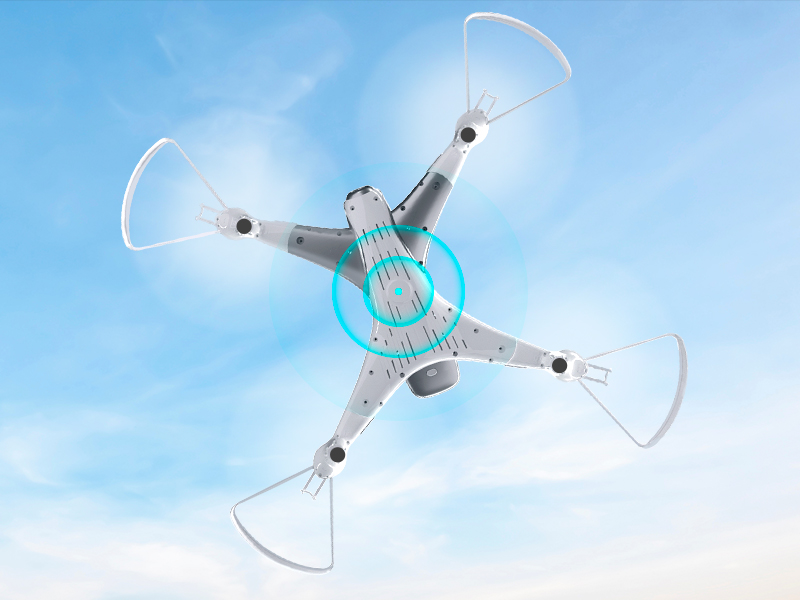
Image 8.1: The Loolinn Z3 Drone's weight measured on an electronic scale.
| คุณสมบัติ | ข้อมูลจำเพาะ |
|---|---|
| ยี่ห้อ | ลูลินน์ |
| ชื่อรุ่น | โดรน Z3 |
| คุณสมบัติพิเศษ | 3 Batteries, 3D Flip, 60 Minutes Long Flight Time (total), Optical Flow Positioning Technology, Stable Flight |
| ช่วงอายุ (คำอธิบาย) | Kids, Teenagers |
| สี | สีขาว |
| ความละเอียดในการจับภาพวิดีโอ | 720p |
| เทคโนโลยีการเชื่อมต่อ | ไวไฟ |
| ระดับทักษะ | ผู้เริ่มต้น |
| น้ำหนักสินค้า | 4.65 ออนซ์ (ประมาณ 131.7 กรัม) |
| ความจุของแบตเตอรี่ | 1500 มิลลิวินาทีamp ชั่วโมง (ต่อแบตเตอรี่) |
| รูปแบบการจับภาพวิดีโอ | เอ็มพี 4 |
| เทคโนโลยีการควบคุมระยะไกล | ไวไฟ |
| ระยะสูงสุด | 262 ฟุต (ประมาณ 80 เมตร) |
| วัสดุ | โลหะ, พลาสติก |
| ส่วนประกอบของเซลล์แบตเตอรี่ | ลิเธียมไอออน |
| รูปแบบภาพที่รองรับ | เจพีเจ |
| ขนาดสินค้า | ยาว 12.6 นิ้ว x กว้าง 12.6 นิ้ว x สูง 1.97 นิ้ว |
| ยูพีซี | 768492333128 |
9. การรับประกันและการสนับสนุน
Loolinn is committed to providing quality products and customer satisfaction. For any inquiries or support needs, please refer to the following:
- นโยบายการคืนสินค้า: สามารถขอคืนเงินเต็มจำนวนได้ภายใน 30 วันนับจากวันที่ซื้อ
- บริการลูกค้า: Loolinn offers responsive customer service, typically providing replies within 12 hours.
- ชิ้นส่วนทดแทน: For replacement parts such as propellers, please contact Loolinn customer support or visit their official webเว็บไซต์.
หากต้องการความช่วยเหลือเพิ่มเติม โปรดไปที่ Loolinn Store on Amazon.


