1. บทนำ
This manual provides comprehensive instructions for the setup, operation, and maintenance of your Cherry MW 9100 Wireless Rechargeable Mouse. The MW 9100 is a compact, versatile mouse offering dual connectivity options (Bluetooth or 2.4 GHz USB receiver) and a convenient rechargeable battery.
คุณสมบัติที่สำคัญ ได้แก่:
- Compact design with charging functionality.
- Flexible operation: use while charging via USB-C cable.
- Dual connectivity: Bluetooth or 2.4 GHz USB receiver.
- Magnetic storage for the USB receiver, ideal for travel.
- Adjustable DPI settings for varied usage.
2. เนื้อหาบรรจุภัณฑ์
ตรวจสอบว่ามีรายการทั้งหมดอยู่ในแพ็คเกจ:
- Cherry MW 9100 Wireless Rechargeable Mouse
- สายชาร์จ USB-C
- ตัวรับสัญญาณ USB 2.4 GHz
- กระเป๋าใส่อุปกรณ์ป้องกัน
- คู่มือการใช้งาน (เอกสารนี้)
3. การตั้งค่า
3.1 การชาร์จเมาส์
The Cherry MW 9100 mouse features a built-in rechargeable battery. Before initial use, or when the battery is low, connect the included USB-C cable to the mouse and to a USB power source (e.g., computer USB port, USB wall adapter). The mouse can be used normally while charging.

ภาพที่ 3.1: สูงสุด view of the Cherry MW 9100 mouse, showing the charging indicator light.
3.2 การเชื่อมต่อเมาส์
The MW 9100 offers two connection methods: 2.4 GHz wireless via USB receiver or Bluetooth.
3.2.1 การเชื่อมต่อไร้สาย 2.4 GHz
- Locate the USB receiver. It is magnetically stored in a compartment on the underside of the mouse.
- เสียบตัวรับสัญญาณ USB เข้ากับพอร์ต USB ที่พร้อมใช้งานบนคอมพิวเตอร์ของคุณ
- On the underside of the mouse, slide the switch to the "RF" position.
- เมาส์ควรเชื่อมต่อกับคอมพิวเตอร์ของคุณโดยอัตโนมัติ
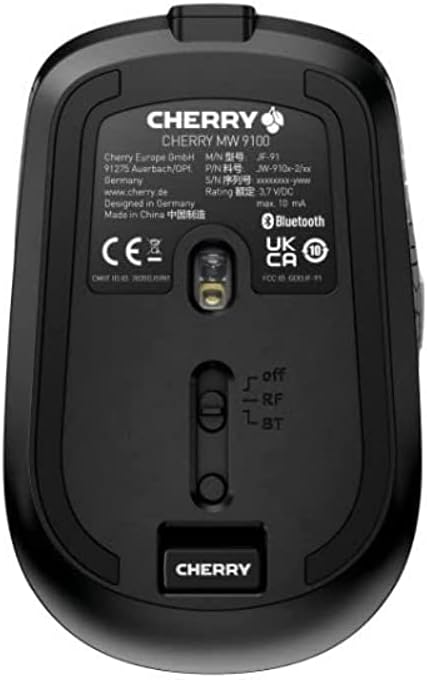
ภาพที่ 3.2: Underside of the Cherry MW 9100 mouse, highlighting the USB receiver storage and the connection mode switch.
3.2.2 การเชื่อมต่อบลูทูธ
- On the underside of the mouse, slide the switch to the "BT" (Bluetooth) position.
- Press and hold the small pairing button located near the connection switch on the underside of the mouse until the LED indicator on the mouse starts blinking, indicating pairing mode.
- บนคอมพิวเตอร์หรืออุปกรณ์ของคุณ เปิดการตั้งค่าบลูทูธและค้นหาอุปกรณ์ใหม่
- Select "Cherry MW 9100" from the list of available devices to complete the pairing process.
4. คู่มือการใช้งาน
4.1 ฟังก์ชั่นพื้นฐาน
The Cherry MW 9100 mouse features standard left and right click buttons, a scroll wheel (which also functions as a middle click button), and two side buttons for navigation (typically forward/back).
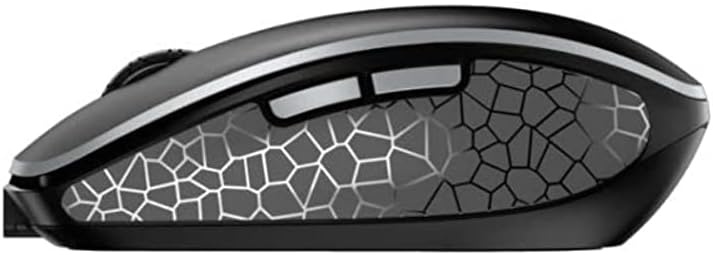
ภาพที่ 4.1: ด้านข้าง view of the Cherry MW 9100 mouse, illustrating the ergonomic design and side buttons.
4.2 การปรับ DPI
The mouse includes a DPI (Dots Per Inch) button, usually located near the scroll wheel, allowing you to adjust the cursor sensitivity. Press this button to cycle through different DPI settings to match your preference or task requirements.

ภาพที่ 4.2: A hand demonstrating the comfortable grip on the Cherry MW 9100 mouse during use.
5. การบำรุงรักษา
To ensure optimal performance and longevity of your Cherry MW 9100 mouse:
- การทำความสะอาด: ใช้ผ้านุ่มและแห้งเช็ดทำความสะอาดพื้นผิวของเมาส์ สำหรับคราบสกปรกฝังแน่น ให้เช็ดเบาๆamp cloth can be used, but ensure no moisture enters the device. Avoid harsh chemicals or abrasive materials.
- พื้นที่จัดเก็บ: When not in use, especially during travel, store the mouse in the provided protective pouch to prevent scratches and damage.
- การดูแลแบตเตอรี่ Avoid fully discharging the battery frequently. Recharge the mouse when the low battery indicator appears.
6 การแก้ไขปัญหา
| ปัญหา | สาเหตุที่เป็นไปได้ | สารละลาย |
|---|---|---|
| เมาส์ไม่ตอบสนอง | Low battery, incorrect connection mode, USB receiver not connected, Bluetooth not paired. |
|
| Intermittent connection (Bluetooth) | Interference, device driver issues, distance from device. |
|
| การเคลื่อนที่ของเคอร์เซอร์ผิดปกติหรือช้า | Dirty optical sensor, low battery, incorrect DPI setting. |
|
7. ข้อมูลจำเพาะ
| คุณสมบัติ | รายละเอียด |
|---|---|
| ยี่ห้อ | เชอร์รี่ |
| หมายเลขรุ่น | JW-9100US-2 |
| เทคโนโลยีการเชื่อมต่อ | บลูทูธ, ไร้สาย USB 2.4 GHz |
| การตรวจจับการเคลื่อนไหว | ออฟติคอล |
| คุณสมบัติพิเศษ | น้ำหนักเบา พกพาสะดวก ชาร์จไฟได้ |
| ขนาดสินค้า | 4 x 3 x 2 นิ้ว |
| น้ำหนักสินค้า | 6.4 ออนซ์ |
| สี | สีดำ |
8. การรับประกันและการสนับสนุน
สำหรับข้อมูลการรับประกันและการสนับสนุนทางเทคนิค โปรดดูที่เว็บไซต์อย่างเป็นทางการของ Cherry webเข้าชมเว็บไซต์หรือติดต่อฝ่ายบริการลูกค้าของ Cherry โดยตรง เก็บหลักฐานการซื้อไว้เพื่อใช้ในการเคลมประกัน
ผู้ผลิต: เชอร์รี่
Webเว็บไซต์: www.cherry.de