DAREU EK807G

DAREU EK807G Wireless TKL Mechanical Keyboard User Manual

Model: EK807G | Brand: DAREU

1. บทนำ

This manual provides comprehensive instructions for the DAREU EK807G Wireless TKL Mechanical Keyboard. Designed for office use, this keyboard features an aluminum alloy panel, function keys, and stable 2.4G wireless connectivity, compatible with PC, Mac, and Windows systems. Please read this manual thoroughly to ensure proper use and longevity of your device.

มีอะไรอยู่ในกล่อง

  • DAREU EK807G Wireless TKL Mechanical Keyboard
  • ตัวรับสัญญาณ USB (2.4G)
  • ตัวดึงกุญแจ
  • คู่มือการใช้งาน
DAREU EK807G Wireless TKL Mechanical Keyboard on a desk setup

Image 1.1: The DAREU EK807G Wireless TKL Mechanical Keyboard in a typical office setup.

2. การตั้งค่า

2.1 Inserting Batteries and USB Receiver

The DAREU EK807G keyboard requires two AAA batteries (not included) for operation. The 2.4G USB receiver is conveniently stored within the keyboard's battery compartment.

  1. หาฝาปิดช่องใส่แบตเตอรี่ที่อยู่ด้านล่างของแป้นพิมพ์
  2. Remove the cover to access the battery slots and the stored USB receiver.
  3. Carefully remove the 2.4G USB receiver from its storage slot.
  4. ใส่แบตเตอรี่ AAA สองก้อนลงในช่องใส่แบตเตอรี่ โดยตรวจสอบให้แน่ใจว่าขั้วถูกต้อง (+/-)
  5. เปลี่ยนฝาครอบช่องใส่แบตเตอรี่
Underside of DAREU EK807G keyboard showing battery compartment and USB receiver

Image 2.1: The battery compartment and USB receiver storage on the keyboard's underside.

2.2 การเชื่อมต่อกับอุปกรณ์ของคุณ

The keyboard uses a 2.4G wireless connection for stable and reliable performance.

  1. Plug the 2.4G USB receiver into an available USB port on your computer, laptop, or tablet.
  2. Locate the ON/OFF switch on the upper side of the keyboard.
  3. เลื่อนสวิตช์ไปที่ตำแหน่ง "เปิด"
  4. Your device should automatically detect and connect to the keyboard. No additional drivers are typically required.
DAREU EK807G keyboard overview with 2.4G wireless icon

Image 2.2: The keyboard features 2.4G wireless connectivity.

3. คู่มือการใช้งาน

3.1 การพิมพ์ขั้นพื้นฐานและหลักสรีรศาสตร์

The DAREU EK807G features a classic TKL (Tenkeyless) 87-key layout, providing a comfortable typing experience. The keyboard is designed with an ergonomic 5° optimum slope when the folding holder is used, preventing wrist strain during long typing sessions. Anti-slide pads ensure stability.

This model is equipped with DAREU Red Switches, known for their linear and quiet operation, making them suitable for office and study environments where minimal noise is preferred.
Close-up of DAREU Red Switches on the keyboard

Image 3.1: The DAREU EK807G features quiet Red Switches for comfortable typing.

3.2 Function (Fn) Key Shortcuts

The keyboard includes 12 hotkeys accessible via the Fn key, allowing for quick access to various functions.

  • Fn+F1: คอมพิวเตอร์ของฉัน
  • Fn+F2: หน้าแรก
  • Fn+F3: อีเมล
  • Fn+F4: เครื่องคิดเลข
  • Fn+F5: หยุด (สื่อ)
  • Fn+F6: Last Song (Media)
  • Fn+F7: เล่น/หยุดชั่วคราว (สื่อ)
  • Fn+F8: Next Song (Media)
  • Fn+F9: ลดระดับเสียง
  • Fn+F10: เพิ่มระดับเสียง
  • Fn+F11: ปิดเสียง
  • Fn+F12: Switch Left Win & Left Alt keys
Diagram showing Fn key combinations for shortcuts

Image 3.2: Shortcut keys activated by pressing the Fn key in combination with F1-F12.

3.3 Anti-Ghosting Technology

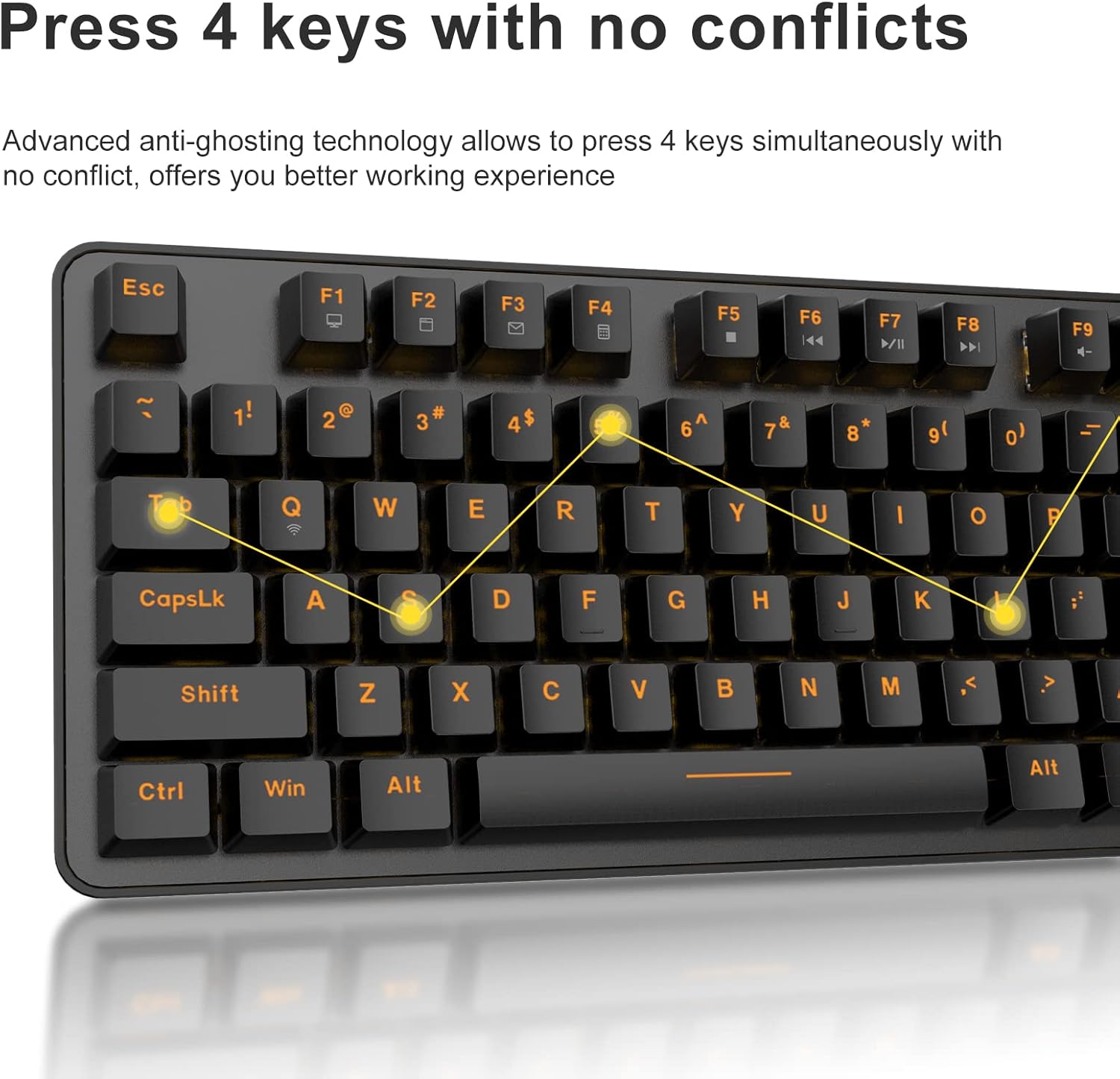
The DAREU EK807G features advanced anti-ghosting technology, allowing up to 6 keys to be pressed simultaneously without conflict. This ensures all your commands are registered accurately, improving efficiency.

Diagram illustrating anti-ghosting technology on the keyboard

Image 3.3: Anti-ghosting technology ensures multiple key presses are registered accurately.

3.4 Automatic Power Saving

To conserve battery life, the keyboard enters an automatic sleeping mode after 6 seconds of inactivity. To wake the keyboard, simply press any key. With this feature, the keyboard can last approximately 90 days of continuous use, and up to half a year between battery changes.

Image depicting long battery life and automatic sleep mode

Image 3.4: The keyboard features automatic power saving for extended battery life.

4. การบำรุงรักษา

4.1 การทำความสะอาดแป้นพิมพ์

การทำความสะอาดเป็นประจำจะช่วยรักษาประสิทธิภาพและรูปลักษณ์ของแป้นพิมพ์

  • การทำความสะอาดทั่วไป: ใช้ผ้าแห้งนุ่มเช็ดทำความสะอาดพื้นผิวแป้นพิมพ์ สำหรับคราบสกปรกที่ติดแน่น ให้ใช้ผ้าชุบน้ำหมาดๆ เช็ดเบาๆamp สามารถใช้ผ้าชุบน้ำสบู่ชนิดอ่อนๆ เช็ดได้ โดยให้แน่ใจว่าไม่มีของเหลวเข้าไปในแป้นพิมพ์
  • การทำความสะอาดคีย์แคป: The DAREU EK807G features removable double-shot keycaps, which are resistant to fading and easy to clean. Use the included keycap puller to carefully remove keycaps. Clean them with a soft brush or a damp ผ้า. ตรวจสอบให้แน่ใจว่าปุ่มกดแห้งสนิทก่อนประกอบกลับเข้าไปใหม่
  • Aluminum Alloy Panel: The aluminum alloy panel is designed to be sweat-resistant and anti-rust. Wipe it with a soft cloth to keep it clean.

5 การแก้ไขปัญหา

5.1 ปัญหาการเชื่อมต่อ

  • แป้นพิมพ์ไม่ตอบสนอง:
    • Ensure the keyboard's ON/OFF switch is in the "ON" position.
    • ตรวจสอบว่าใส่แบตเตอรี่ AAA ถูกต้องและมีประจุเพียงพอหรือไม่ เปลี่ยนแบตเตอรี่หากจำเป็น
    • ตรวจสอบให้แน่ใจว่าตัวรับสัญญาณ USB 2.4G เสียบเข้ากับพอร์ต USB ที่ใช้งานได้บนอุปกรณ์ของคุณอย่างแน่นหนา ลองใช้พอร์ต USB อื่นดู
    • รีสตาร์ทเครื่องคอมพิวเตอร์หรืออุปกรณ์ของคุณ
  • การเชื่อมต่อไม่ต่อเนื่อง:
    • Ensure the keyboard is within the operating distance of 33 feet (10m) from the USB receiver.
    • Avoid placing the keyboard near strong electromagnetic interference sources (e.g., Wi-Fi routers, other wireless devices).

5.2 Key Functionality Issues

  • คีย์ไม่ลงทะเบียนหรือเกิดการโกสต์:
    • While the keyboard has anti-ghosting for up to 6 keys, excessive simultaneous presses beyond this limit may not register.
    • Ensure keycaps are properly seated. If a key feels stuck, gently remove the keycap with the puller and reattach it.
    • Clean any debris under the keycaps (refer to Maintenance section).
  • Fn key shortcuts not working:
    • ตรวจสอบให้แน่ใจว่าคุณกดปุ่ม Fn พร้อมกันกับปุ่ม F ที่ต้องการ
    • If Fn + F12 (Switch L-Win & L-Alt) was accidentally activated, press it again to revert the key functions.

6. ข้อมูลจำเพาะ

ยี่ห้อดาเรอู
หมายเลขรุ่นEK807G
คำอธิบายแป้นพิมพ์Mechanical (Red Switch)
เทคโนโลยีการเชื่อมต่อ2.4G ไร้สาย
ระยะการทำงานสูงถึง 33 ฟุต (10 ม.)
อุปกรณ์ที่รองรับLaptop, PC, Tablet (Mac, Windows, Chromebook)
แหล่งพลังงานแบตเตอรี่ AAA 2 ก้อน (ไม่รวม)
วัสดุแผงอลูมิเนียมอัลลอยด์
ขนาดสินค้า14.17"ยาว x 5.31"กว้าง x 1.57"สูง (36.0 x 13.5 x 4.0 ซม.)
น้ำหนักสินค้า1.65 ปอนด์ (0.75 กก.)
คุณสมบัติพิเศษErgonomic design, Hotkeys, Multimedia Keys, Anti-ghosting, Removable Double-shot Keycaps

7. การรับประกันและการสนับสนุน

7.1 บริการรับประกัน

DAREU provides a 180-day warranty service for the EK807G Wireless TKL Mechanical Keyboard from the date of purchase. This warranty covers manufacturing defects and issues arising from normal use.

7.2 การสนับสนุนลูกค้า

If you encounter any problems during the use of your DAREU keyboard, please contact DAREU customer support. Our team is available to assist you with troubleshooting, product inquiries, and warranty claims.

Please refer to the contact information provided on the product packaging or the official DAREU webเว็บไซต์นี้เป็นแหล่งรวมช่องทางการสนับสนุนที่ทันสมัยที่สุด

เอกสารที่เกี่ยวข้อง - EK807G

พรีview คู่มือผู้ใช้คีย์บอร์ด Dareu EK807G
คู่มือผู้ใช้สำหรับคีย์บอร์ด Dareu EK807G พร้อมรายละเอียดผลิตภัณฑ์ viewคำแนะนำในการตั้งค่า ปุ่มลัด ข้อมูลจำเพาะ และข้อมูลการปฏิบัติตาม FCC
พรีview คู่มือผู้ใช้และคำแนะนำคีย์บอร์ดเชิงกล Dareu Z82
คู่มือผู้ใช้ที่ครอบคลุมสำหรับคีย์บอร์ดเชิงกล Dareu Z82 พร้อมรายละเอียดการตั้งค่า ตัวเลือกการเชื่อมต่อ (2.4G, บลูทูธ, แบบมีสาย), การติดตั้งไดรเวอร์ และคุณสมบัติหลักเพื่อประสิทธิภาพที่เหมาะสมที่สุด
พรีview คู่มือการใช้งานคีย์บอร์ด DAREU EK75 - คุณสมบัติและข้อมูลจำเพาะ
คู่มือการใช้งานคีย์บอร์ด DAREU EK75 ครอบคลุมรายละเอียดต่างๆ เช่น อุปกรณ์ในกล่อง ข้อมูลจำเพาะทางกายภาพและทางไฟฟ้า และข้อมูลผลิตภัณฑ์ viewและคำอธิบายโดยละเอียดเกี่ยวกับการใช้งานปุ่มฟังก์ชันแบบผสมผสานและการตั้งค่าแสงไฟพื้นหลังแบบกำหนดเอง
พรีview DAREU A87 Series Mechanical Keyboard User Manual
User manual for the DAREU A87 Series mechanical keyboard, covering basic information, product review, lighting modes, setup, installation, and driver usage.
พรีview คู่มือผู้ใช้คีย์บอร์ดเชิงกลแบบสามโหมด DAREU A87
คู่มือฉบับสมบูรณ์สำหรับคีย์บอร์ดเชิงกล DAREU A87 Triple Mode ครอบคลุมการตั้งค่า วิธีการเชื่อมต่อ คุณสมบัติ และการเปลี่ยนสวิตช์ รวมถึงข้อมูลการรับประกัน
พรีview คู่มือผู้ใช้เกมแพดไร้สายบลูทูธ Dareu H101X
ค้นพบคู่มือผู้ใช้ Dareu H101X Bluetooth Wireless Gamepad ที่ให้คำแนะนำที่ครอบคลุมเกี่ยวกับการเชื่อมต่อ คุณสมบัติ และการตั้งค่าบนอุปกรณ์ PC, Switch, iOS, Mac และ Android เรียนรู้เกี่ยวกับไจโรสโคป 6 แกน ฟังก์ชันเทอร์โบ และโหมด Xinput/Dinput เพื่อประสบการณ์การเล่นเกมที่ดีที่สุด