การแนะนำ
Thank you for choosing the MOTPK Pink Gaming Desk. This manual provides detailed instructions for the assembly, operation, and maintenance of your new gaming desk. Designed with a spacious 63-inch carbon fiber surface, a monitor shelf, and convenient accessories like a cup holder and headphone hook, this desk is built to enhance your gaming or workstation experience. Its sturdy R-shaped steel frame ensures stability and durability.
โปรดอ่านคู่มือนี้อย่างละเอียดก่อนประกอบและใช้งาน เพื่อให้มั่นใจได้ว่าการติดตั้งถูกต้องและเพื่อยืดอายุการใช้งานของผลิตภัณฑ์ให้ยาวนานที่สุด เก็บคู่มือนี้ไว้เพื่อใช้อ้างอิงในอนาคต
ข้อมูลด้านความปลอดภัย
- ควรประกอบโต๊ะบนพื้นผิวที่นุ่มและสะอาดเสมอ เพื่อป้องกันรอยขีดข่วน
- Ensure all screws and fasteners are securely tightened before use. Periodically check and re-tighten if necessary.
- Do not overload the desk. The maximum load-bearing capacity is 330 lbs (150 kg).
- เก็บชิ้นส่วนขนาดเล็กและวัสดุบรรจุภัณฑ์ให้ห่างจากเด็กและสัตว์เลี้ยงเพื่อป้องกันอันตรายจากการสำลัก
- Avoid placing hot items directly on the carbon fiber surface without protection, despite its heatproof properties.
- ห้ามยืนหรือนั่งบนโต๊ะทำงาน
- Use the desk on a level surface to prevent tipping. The adjustable legs can help compensate for uneven floors.
เนื้อหาแพ็คเกจ
ก่อนเริ่มการประกอบ โปรดตรวจสอบให้แน่ใจว่าชิ้นส่วนทั้งหมดที่ระบุไว้ด้านล่างนี้อยู่ในสภาพสมบูรณ์และไม่มีความเสียหาย หากมีชิ้นส่วนใดสูญหายหรือเสียหาย โปรดติดต่อฝ่ายสนับสนุนลูกค้า
- Desktop Panel (Carbon Fiber)
- R-shaped Steel Frame Components (Legs, Crossbars)
- ชั้นวางจอภาพ
- ที่วางแก้ว
- ที่แขวนหูฟัง
- อุปกรณ์ประกอบ (สกรู, น็อต, ประแจหกเหลี่ยม)
- เท้าปรับระดับได้
- Stickers (Decorative/Cable Management)
- คู่มือการใช้งาน (เอกสารนี้)
การติดตั้งและการประกอบ
Estimated Assembly Time: Approximately 30 minutes.
Tools Required: Included Allen Wrench.
การประกอบทีละขั้นตอน
- แกะกล่องและระบุชิ้นส่วน: Carefully remove all components from the packaging. Lay them out on a soft, clean surface to prevent damage. Refer to the parts list to ensure all components are present.

Figure 1: Desk Dimensions and Components Overview. This image illustrates the overall dimensions of the desk (63" W x 23.6" D x 29.9" H) and the monitor shelf (23.6" W x 7.9" D), providing a visual guide for component identification.
- Assemble the R-shaped Steel Frame: Connect the R-shaped leg components using the provided crossbars and screws. Ensure all connections are aligned before fully tightening. Do not overtighten initially; leave slightly loose for adjustments.

Figure 2: Sturdy Construction. This image demonstrates the robust Y-shaped steel frame, emphasizing its stability and ability to bear up to 330 lbs.
- Attach the Desktop Panel: Carefully place the carbon fiber desktop panel onto the assembled steel frame. Align the pre-drilled holes on the desktop with the holes on the frame. Secure the desktop to the frame using the appropriate screws. Now, fully tighten all screws on the frame and desktop.
- Install the Monitor Shelf: Attach the monitor shelf to the designated mounting points on the desktop. Ensure it is securely fastened.
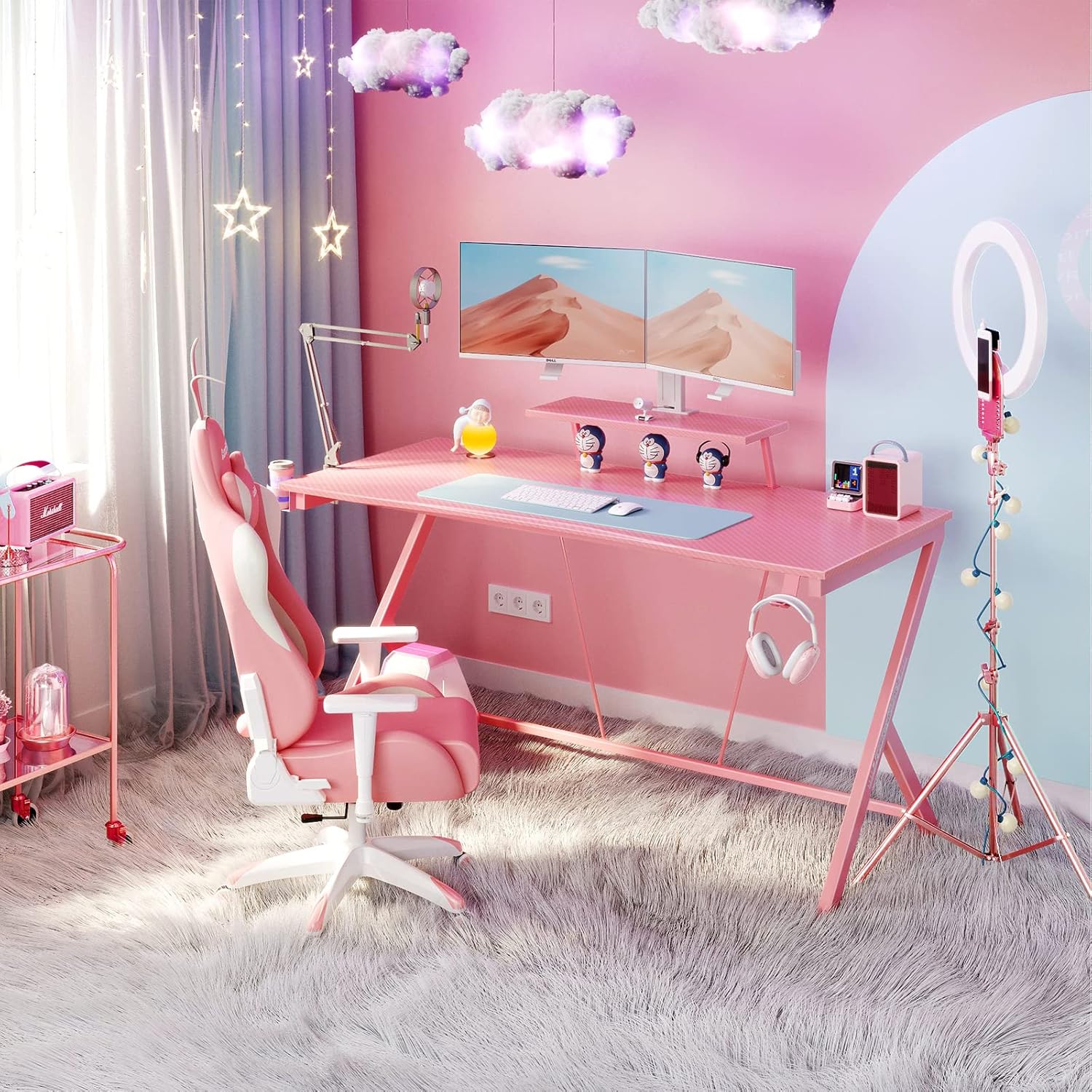
Figure 3: Monitor Shelf in Use. This image provides a detailed view of the monitor shelf, demonstrating how a monitor can be positioned for optimal viewing, alongside a keyboard and mouse on the main desk surface.
- Attach Accessories (Cup Holder & Headphone Hook): Secure the cup holder and headphone hook to the desired locations on the desk frame or desktop edge using the provided hardware.
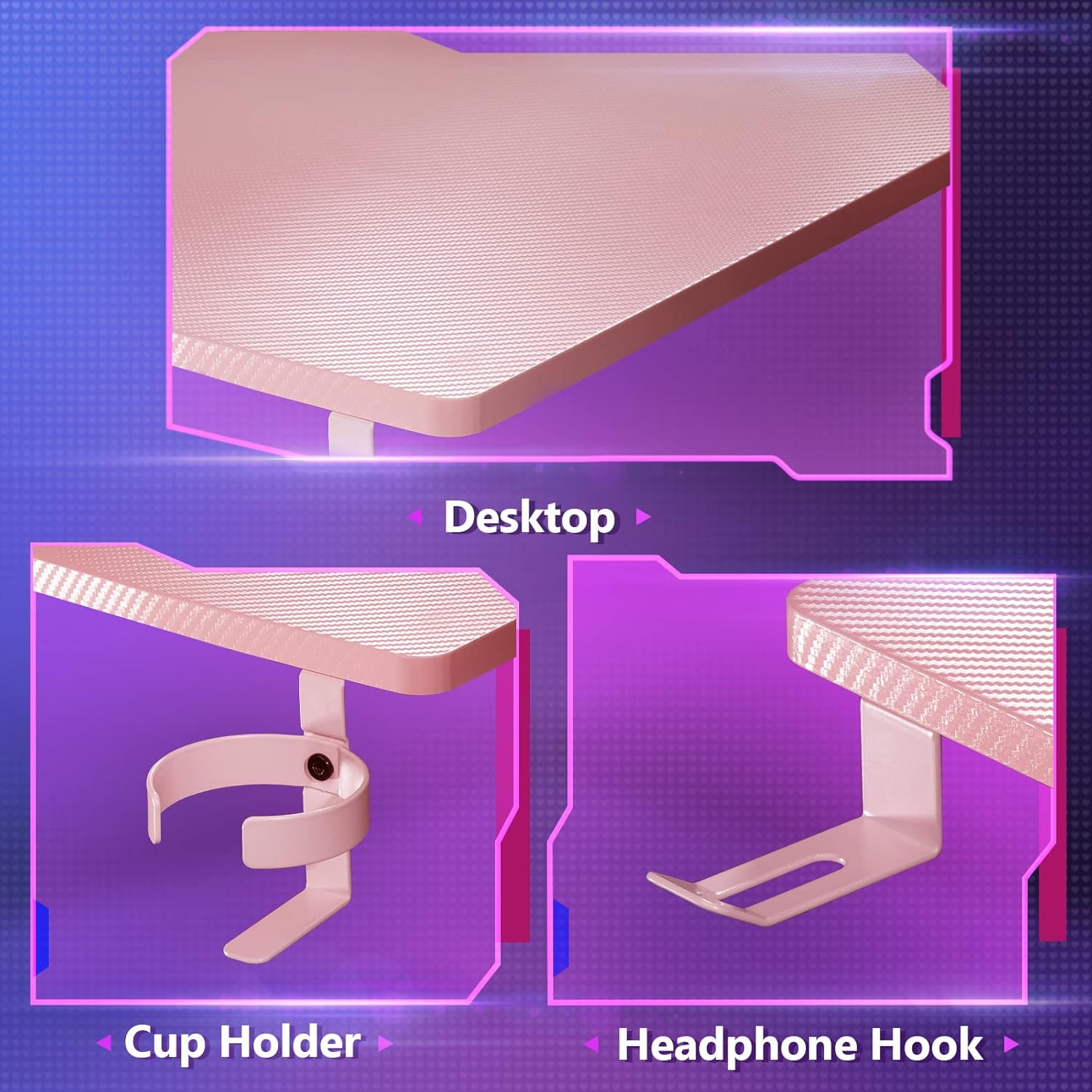
Figure 4: Desktop Texture and Accessories. This image highlights the carbon fiber texture of the desktop and provides close-up views of the integrated cup holder and headphone hook, showcasing their design and placement.
- ปรับระดับขา: Once the desk is assembled and in its desired location, adjust the leveling feet at the bottom of the legs to ensure the desk is stable and level on uneven surfaces.
การดำเนินงานและการใช้งาน
The MOTPK Pink Gaming Desk is designed for optimal functionality and comfort. Here are guidelines for its use:
- เดสก์ท็อปกว้างขวาง: The 63" W x 23.6" D surface provides ample space for multiple monitors, keyboards, mice, and other gaming peripherals. Arrange your setup to maximize comfort and efficiency.

Figure 5: Typical Desk Setup. This image displays the desk fully equipped with a monitor, keyboard, mouse, and other accessories, illustrating its large capacity and functional design.
- ชั้นวางจอมอนิเตอร์: Utilize the elevated monitor shelf to position your screen(s) at an ergonomic height, reducing neck and eye strain. This also frees up valuable space on the main desktop.
- ที่วางแก้วน้ำ: Use the integrated cup holder to keep your beverages secure and prevent spills on your equipment.
- ที่เกี่ยวหูฟัง: Hang your gaming headset on the dedicated hook to keep it organized and easily accessible, preventing clutter on the desk surface.
- การจัดการสายเคเบิล: While not explicitly stated, the design often allows for basic cable routing. Consider using the included stickers or external cable ties to manage wires for a cleaner setup.
การซ่อมบำรุง
Proper care and maintenance will ensure the longevity and appearance of your MOTPK Gaming Desk.
- การทำความสะอาด: Wipe the carbon fiber desktop and steel frame with a soft, damp cloth. For stubborn stains, a mild soap solution can be used, followed by drying with a clean cloth. Avoid abrasive cleaners or harsh chemicals, as they may damage the finish. The carbon fiber surface is waterproof and heatproof, making cleaning easy.
- การตรวจสอบปกติ: Periodically inspect all screws and fasteners to ensure they remain tight. Re-tighten any loose connections to maintain stability.
- หลีกเลี่ยงแสงแดดโดยตรง: While durable, prolonged exposure to direct sunlight may affect the color or material over time.
- การกระจายน้ำหนัก: กระจายน้ำหนักให้ทั่วโต๊ะทำงานอย่างสม่ำเสมอ เพื่อป้องกันไม่ให้เกิดแรงกดมากเกินไปที่จุดใดจุดหนึ่ง
การแก้ไขปัญหา
If you encounter any issues with your MOTPK Gaming Desk, refer to the following common problems and solutions:
| ปัญหา | สาเหตุที่เป็นไปได้ | สารละลาย |
|---|---|---|
| โต๊ะโยกเยก/ไม่มั่นคง | พื้นไม่เรียบ; สกรูหลวม; การประกอบไม่ถูกต้อง | Adjust the leveling feet at the bottom of the legs. Check and tighten all assembly screws. Ensure the desk is on a flat surface. |
| ชิ้นส่วนไม่เรียงกันในระหว่างการประกอบ | การวางตำแหน่งชิ้นส่วนไม่ถูกต้อง สกรูขันแน่นเกินไปก่อนเวลาอันควร | Review the assembly instructions and diagrams carefully. Loosen all screws slightly, adjust alignment, then re-tighten. Ensure parts are not forced. |
| Scratches or marks on the desktop. | Sharp objects; abrasive cleaning materials. | Use soft cloths for cleaning. Avoid dragging sharp objects across the surface. While durable, the carbon fiber finish can still be scratched by excessive force. |
| Accessories (cup holder/headphone hook) are loose. | สกรูยึดหลวม | Tighten the screws securing the accessories to the desk. |
If the problem persists or if you encounter an issue not listed here, please contact MOTPK customer support for assistance.
ข้อมูลจำเพาะ
| ยี่ห้อ | MOTPK |
| หมายเลขรุ่น | B0101122 |
| ชื่อรุ่น | Pink Gaming Desk 60" with Monitor Shelf (Note: Product title states 63", model name states 60". Using 63" as per title for consistency in manual title, but noting 60" from spec.) |
| ขนาดสินค้า | 59.94 x 160.02 x 73.91 cm (23.6" D x 63" W x 29.1" H) |
| น้ำหนักสินค้า | 19.46 กก. (42.9 ปอนด์) |
| ประเภทวัสดุ | Metal (Alloy Steel Frame), Carbon-Coated Desktop (Carbon Fibre) |
| สี | สีชมพู |
| ความจุในการรับน้ำหนัก | 330 ปอนด์ (150 กก.) |
| คุณสมบัติพิเศษ | Adjustable (Leveling Feet), Waterproof, Heatproof Desktop |
| รวมฮาร์ดแวร์สำหรับติดตั้ง | Cup Holder, Headphone Hook, Monitor Stand, Stickers |
การรับประกันและการสนับสนุน
MOTPK is committed to providing high-quality products and excellent customer service. While specific warranty details are not provided in this manual, please retain your proof of purchase for any warranty claims.
For technical support, missing parts, or any questions regarding your MOTPK Pink Gaming Desk, please contact our customer service team. Our service team is always available to help and will respond within 24 hours.
Contact Information: Please refer to the contact details provided on the product packaging or the retailer's website where you purchased the desk.


