1. บทนำ
ขอบคุณสำหรับการซื้อasing the Muse MT-106 BT Stereo Turntable. This manual provides essential information for the safe and efficient operation of your new device. Please read it thoroughly before use and retain it for future reference.
The Muse MT-106 BT is a versatile 3-speed (33/45/78 RPM) stereo turntable featuring a Bluetooth receiver, a USB port for playback and encoding, and two integrated speakers. It is designed to play vinyl records and can also stream music from any Bluetooth-compatible device such as a tablet, smartphone, or laptop.
2. คำแนะนำด้านความปลอดภัย
- แหล่งพลังงาน: ตรวจสอบแหล่งจ่ายไฟ voltage matches the rating indicated on the unit.
- น้ำและความชื้น: Do not expose the unit to rain, moisture, or dripping water. Do not place objects filled with liquids, such as vases, on the unit.
- การระบายอากาศ : ตรวจสอบให้แน่ใจว่ามีการระบายอากาศที่เพียงพอ อย่าปิดกั้นช่องระบายอากาศ
- ความร้อน: ควรวางเครื่องให้ห่างจากแหล่งความร้อน เช่น เครื่องทำความร้อน ช่องระบายความร้อน เตา หรือเครื่องใช้ไฟฟ้าอื่นๆ ที่ให้ความร้อน
- การทำความสะอาด: ถอดปลั๊กเครื่องออกจากเต้ารับไฟฟ้าก่อนทำความสะอาด ใช้ผ้านุ่มและแห้ง ห้ามใช้น้ำยาทำความสะอาดชนิดน้ำหรือสเปรย์ทำความสะอาด
- การบริการ: อย่าพยายามให้บริการผลิตภัณฑ์นี้ด้วยตนเอง ส่งต่อการบริการทั้งหมดไปยังช่างบริการที่ผ่านการรับรอง
- การจัดวาง: วางเครื่องบนพื้นผิวที่มั่นคงและเรียบ เพื่อป้องกันความเสียหายจากการตกหล่น
3. เนื้อหาบรรจุภัณฑ์
กรุณาตรวจสอบว่ารายการต่อไปนี้รวมอยู่ในแพ็คเกจของคุณ:
- Muse MT-106 BT Stereo Turntable
- คู่มือการใช้งาน
- อะแดปเตอร์แปลงไฟ
- อะแดปเตอร์ 45 RPM
4. สินค้าหมดview
Familiarize yourself with the components and controls of your Muse MT-106 BT Turntable.

รูปที่ 4.1: โดยรวม view of the Muse MT-106 BT Stereo Turntable. This image displays the turntable from an angled perspective, with its transparent dust cover lifted. The wooden base and integrated speakers are visible, along with the black platter, tonearm, and control knobs on the right side.
4.1 ส่วนประกอบด้านหน้าและด้านบน
- ฝาปิดป้องกันฝุ่น: Protects the platter and tonearm from dust.
- แผ่นเสียง: แท่นหมุนสำหรับวางแผ่นเสียง
- แกนหมุน: Holds the record in place on the platter.
- อะแดปเตอร์ 45 รอบต่อนาที: Used for playing 7-inch records with large center holes.
- โทนอาร์ม: ยึดปากกาและติดตามร่องแผ่นเสียง
- สไตลัส (เข็ม): The part that reads the record grooves.
- คันคิว: Lifts and lowers the tonearm.
- ตัวเลือกความเร็ว: สลับเพื่อเลือก 33, 45 หรือ 78 รอบต่อนาที
- ลำโพงในตัว: ลำโพงในตัวสำหรับเอาต์พุตเสียง

รูปที่ 4.2: แผงควบคุม ภาพนี้แสดงรายละเอียดต่างๆ view of the control panel located on the right side of the turntable. It shows three rotary knobs for volume and function selection, along with several buttons for playback control and mode switching.
4.2 แผงควบคุม
- ปุ่มเปิดปิด/ปรับระดับเสียง: เปิด/ปิดเครื่องและปรับระดับเสียง
- ปุ่มเลือกฟังก์ชั่น: Switches between Phono, Bluetooth, USB, and Aux-in modes.
- ปุ่มควบคุมการเล่น: Play/Pause, Skip Forward, Skip Backward (for USB mode).
- สวิตช์หยุดอัตโนมัติ: Enables or disables the automatic stop function for vinyl playback.
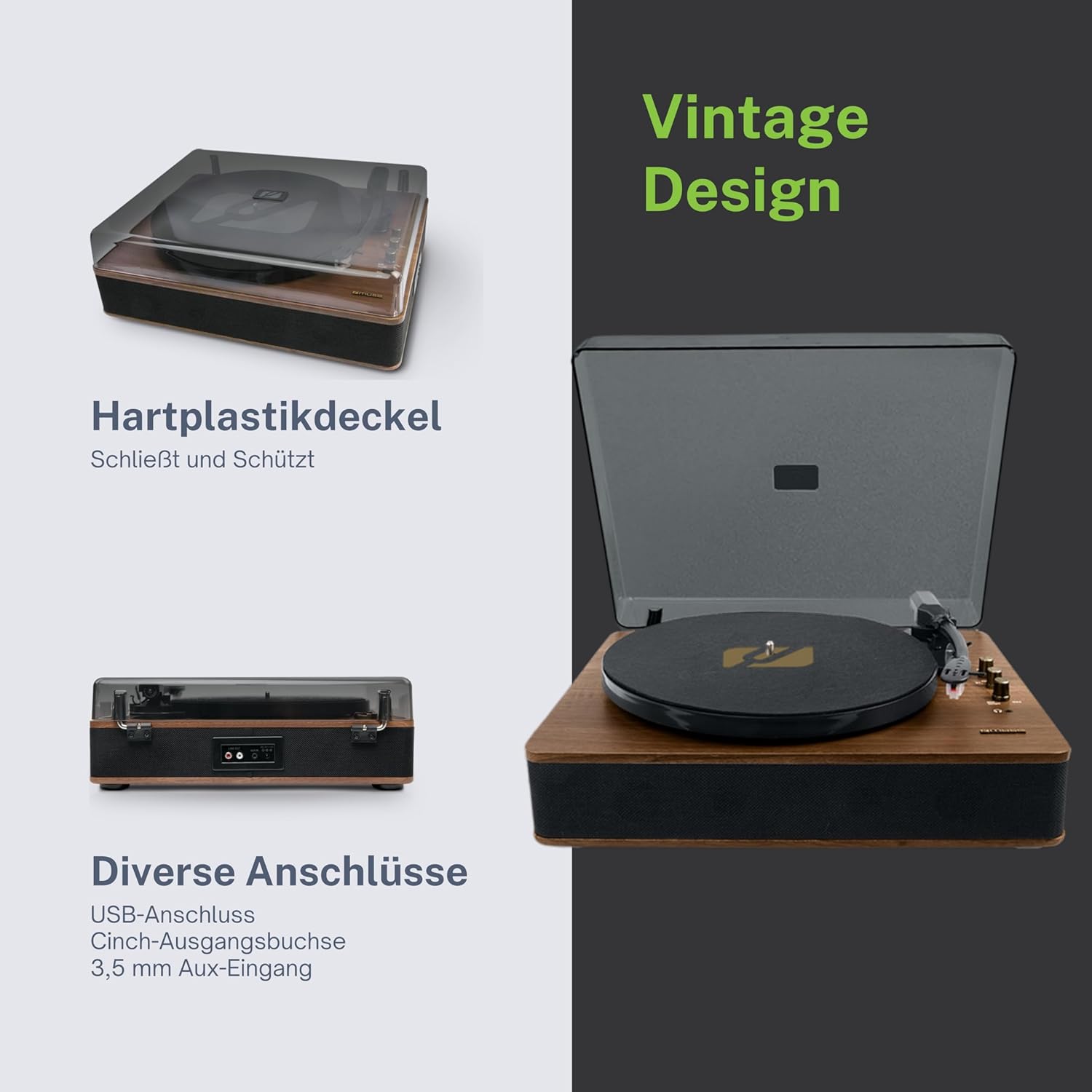
Figure 4.3: Rear Connections. The rear panel of the turntable is shown, featuring various connection ports including RCA audio outputs, a USB port, and an auxiliary input jack, allowing connection to external audio systems or devices.
4.3 Rear and Side Connections
- ช่องเสียบเอาต์พุต RCA (ซ้าย/ขวา): เชื่อมต่อกับอุปกรณ์ภายนอก ampเครื่องขยายเสียงหรือลำโพงที่มีกำลังขยาย
- พอร์ต USB: สำหรับเล่นไฟล์ MP3 files from a USB drive or encoding vinyl to USB.
- แจ็ค AUX IN (3.5 มม.): เชื่อมต่ออุปกรณ์เสียงภายนอก
- แจ็ค DC IN: เชื่อมต่ออะแดปเตอร์ไฟฟ้า
- แจ็คหูฟัง (3.5 มม.): สำหรับการฟังส่วนตัว

รูปที่ 4.4: ฟังก์ชันหลักเหนือview. An illustrative graphic highlighting the key functions and connectivity options of the turntable. Icons represent features such as USB encoding, MP3 playback via USB, RCA output, auto-stop, integrated speakers, headphone jack, auxiliary input, and AC power input.
5. การตั้งค่า
5.1 การแกะกล่อง
- นำเครื่องออกจากบรรจุภัณฑ์อย่างระมัดระวัง
- นำวัสดุบรรจุภัณฑ์และฟิล์มป้องกันออกทั้งหมด
- Keep the packaging for future transport or storage.
5.2 การจัดวาง
- Place the turntable on a flat, stable, and level surface.
- Avoid placing it near strong magnetic fields, direct sunlight, or heat sources.
- ตรวจสอบให้แน่ใจว่ามีพื้นที่รอบๆ เครื่องเพียงพอเพื่อการระบายอากาศที่เหมาะสม
5.3 การเชื่อมต่อสายไฟ
- Connect the supplied power adapter to the DC IN jack on the rear of the turntable.
- เสียบอะแดปเตอร์ไฟฟ้าเข้ากับเต้ารับไฟฟ้าที่เหมาะสม
5.4 การติดตั้งฝาครอบกันฝุ่น
- Carefully attach the dust cover to the hinges on the back of the turntable.
- The dust cover protects the unit when not in use. Remove it or lift it fully when playing records.
6. คู่มือการใช้งาน
6.1 การเล่นแผ่นเสียงไวนิล
- ยกฝาครอบกันฝุ่นขึ้น
- Rotate the Power/Volume knob clockwise to turn on the unit.
- Set the Function Selector knob to 'Phono'.
- Place a record on the platter. If playing a 45 RPM single, place the 45 RPM adapter on the spindle first.
- Select the correct speed (33, 45, or 78 RPM) using the Speed Selector switch.
- ถอดตัวป้องกันสไตลัสออกจากสไตลัส
- Lift the tonearm using the cue lever.
- เลื่อนแขนจับหัวอ่านไปที่จุดเริ่มต้นที่ต้องการของแผ่นเสียง
- Gently lower the tonearm onto the record using the cue lever. The music will begin to play.
- ปรับระดับเสียงโดยใช้ปุ่มเปิด/ปิดเครื่อง/ระดับเสียง
- At the end of the record, if the Auto Stop switch is ON, the platter will stop rotating. If OFF, the platter will continue to rotate. Manually lift the tonearm and return it to its rest.
6.2 โหมดบลูทู ธ
- Rotate the Power/Volume knob clockwise to turn on the unit.
- Set the Function Selector knob to 'BT' (Bluetooth). The Bluetooth indicator will flash, indicating pairing mode.
- เปิดใช้งานบลูทูธบนอุปกรณ์ภายนอกของคุณ (สมาร์ทโฟน แท็บเล็ต ฯลฯ) แล้วค้นหาอุปกรณ์ที่ใช้งานได้
- Select 'MUSE MT-106 BT' from the list of devices. Once connected, the Bluetooth indicator will stop flashing and remain solid.
- You can now play music from your external device through the turntable's speakers. Adjust volume using both the turntable's knob and your external device.
6.3 การเล่นและการเข้ารหัสผ่าน USB
6.3.1 การเล่น USB
- Rotate the Power/Volume knob clockwise to turn on the unit.
- Set the Function Selector knob to 'USB'.
- Insert a USB flash drive into the USB port. The unit will automatically detect and begin playing MP3 files.
- Use the Playback Control Buttons (Play/Pause, Skip Forward, Skip Backward) to navigate tracks.
6.3.2 การเข้ารหัส USB (การบันทึกแผ่นเสียงลง USB)
The MT-106 BT allows you to convert your vinyl records into digital MP3 files on a USB drive.
- ตรวจสอบให้แน่ใจว่าได้เสียบแฟลชไดรฟ์ USB เข้ากับพอร์ต USB แล้ว
- Set the Function Selector knob to 'Phono'.
- Start playing your vinyl record as described in section 6.1.
- Press the 'Record' button (refer to Figure 4.2 for button location, typically indicated by a circle or 'REC' label). The recording indicator will illuminate.
- To stop recording, press the 'Record' button again. The recording indicator will turn off.
- The recorded audio will be saved as an MP3 file บนไดรฟ์ USB ของคุณ
6.4 Auxiliary Input (AUX IN)
- Rotate the Power/Volume knob clockwise to turn on the unit.
- Set the Function Selector knob to 'AUX'.
- Connect an external audio device (e.g., MP3 player, CD player) to the AUX IN jack (3.5mm) on the rear of the turntable using an audio cable (not supplied).
- Play audio from your external device. The sound will be output through the turntable's speakers.
6.5 เอาต์พุตอาร์ซีเอ
To connect your turntable to an external ampเครื่องขยายเสียงหรือลำโพงแบบมีกำลังขับ:
- Ensure the turntable and the external audio system are turned off.
- Connect an RCA audio cable (not supplied) from the RCA Output Jacks (L/R) on the rear of the turntable to the corresponding audio input jacks on your ampเครื่องขยายเสียงหรือลำโพงที่มีกำลังขยาย
- Turn on both the turntable and your external audio system.
- Select the appropriate input on your external audio system.
7. การบำรุงรักษา
7.1 การทำความสะอาดสไตลัส
- Use a soft brush, specifically designed for stylus cleaning, to gently brush the stylus from back to front.
- อย่าออกแรงมากเกินไปหรือปัดไปมา เพราะอาจทำให้หัวปากกาเสียหายได้
- เปลี่ยนสไตลัสทุกๆ ประมาณ 300-500 ชั่วโมงของการเล่น หรือหากคุณสังเกตเห็นว่าคุณภาพเสียงลดลง
7.2 การทำความสะอาดหน่วย
- Wipe the exterior of the turntable with a soft, dry, lint-free cloth.
- ห้ามใช้สารทำความสะอาดที่มีฤทธิ์กัดกร่อน ขี้ผึ้ง หรือตัวทำละลาย เพราะอาจทำให้พื้นผิวเสียหายได้
- สำหรับการทำความสะอาดฝาครอบกันฝุ่น ให้ใช้ผ้าเนื้อนุ่มและน้ำยาทำความสะอาดที่ไม่กัดกร่อนหากจำเป็น
8 การแก้ไขปัญหา
If you experience issues with your turntable, please consult the following table before contacting support.
| ปัญหา | สาเหตุที่เป็นไปได้ | สารละลาย |
|---|---|---|
| ไม่มีไฟฟ้า | ไม่ได้เชื่อมต่ออะแดปเตอร์ไฟหรือเต้ารับไฟฟ้าชำรุด | ตรวจสอบให้แน่ใจว่าอะแดปเตอร์ไฟฟ้าเชื่อมต่ออย่างแน่นหนาและเต้ารับใช้งานได้ |
| ไม่มีเสียง | Volume too low; incorrect function mode; external speakers not connected/powered. | Increase volume; select correct function (Phono, BT, USB, AUX); check external speaker connections and power. |
| Poor sound quality (vinyl) | Dirty or worn stylus; dirty record; incorrect speed selected. | Clean or replace stylus; clean record; select correct RPM. |
| บลูทูธไม่เชื่อมต่อ | เครื่องเล่นแผ่นเสียงไม่ได้อยู่ในโหมดจับคู่ อุปกรณ์อยู่ไกลเกินไป หรือเชื่อมต่อกับอุปกรณ์อื่นอยู่แล้ว | Ensure turntable is in BT mode and flashing; move device closer; disconnect from other devices. |
| การเล่น USB ไม่ทำงาน | USB drive not inserted correctly; unsupported file ฟอร์แมต; ไดรฟ์ USB ผิดพลาด | Reinsert USB drive; ensure files are MP3 format; try a different USB drive. |
9. ข้อมูลจำเพาะ
| ยี่ห้อ | มิวส์ |
| ชื่อรุ่น | MT-106 บีที |
| สี | ไม้ |
| วัสดุ | ไม้ |
| น้ำหนักสินค้า | 4.3 กิโลกรัม |
| ความเร็วในการหมุน | 33, 45, 78 รอบต่อนาที |
| การเชื่อมต่อ | Bluetooth, USB, RCA Output, 3.5mm AUX Input, 3.5mm Headphone Jack |
| คุณสมบัติพิเศษ | Integrated Speaker, Dust Protection, Adjustable Speed, USB Encoding |
| อุปกรณ์ที่รองรับ | สมาร์ทโฟน, แท็บเล็ต |
| แหล่งพลังงาน | AC Adapter (1 AAAA battery required for unspecified function, likely remote or internal clock) |
| ประเทศต้นกำเนิด | จีน |
10. การรับประกันและการสนับสนุน
This product is covered by a manufacturer's warranty. Please refer to the warranty card included with your purchase or visit the official MUSE webเว็บไซต์สำหรับข้อกำหนดและเงื่อนไขการรับประกันโดยละเอียด
For technical support, troubleshooting assistance, or inquiries regarding spare parts, please contact MUSE customer service through their official channels. Information regarding spare parts availability is currently not available.


