1. บทนำ
ขอบคุณสำหรับการซื้อasing the DOOMAY Digital Alarm Clock. This compact and versatile alarm clock is designed for convenience and readability, featuring an adjustable LCD display, snooze function, weekend mode, and temperature display. This manual will guide you through the setup, operation, and maintenance of your new alarm clock to ensure optimal performance.
2. ข้อมูลด้านความปลอดภัย
- เก็บอุปกรณ์ให้ห่างจากน้ำและสภาพแวดล้อมที่มีความชื้นสูง
- ควรหลีกเลี่ยงการวางนาฬิกาไว้ในที่ที่มีแสงแดดส่องโดยตรงหรือในอุณหภูมิที่สูงหรือต่ำเกินไป
- อย่าพยายามถอดประกอบหรือซ่อมแซมอุปกรณ์ด้วยตนเอง โปรดติดต่อช่างผู้ชำนาญเพื่อขอรับบริการ
- Use only the specified battery type (2 x AAA batteries).
- ถอดแบตเตอรี่ออกหากจะไม่ได้ใช้งานอุปกรณ์เป็นเวลานานเพื่อป้องกันการรั่วไหล
- เก็บแบตเตอรี่ให้พ้นจากมือเด็ก
3. เนื้อหาบรรจุภัณฑ์
- DOOMAY Digital Alarm Clock (1 unit)
- AAA Batteries (2 units)
- คู่มือการใช้งาน (เอกสารนี้)
4. สินค้าหมดview
Familiarize yourself with the components and controls of your DOOMAY Digital Alarm Clock.
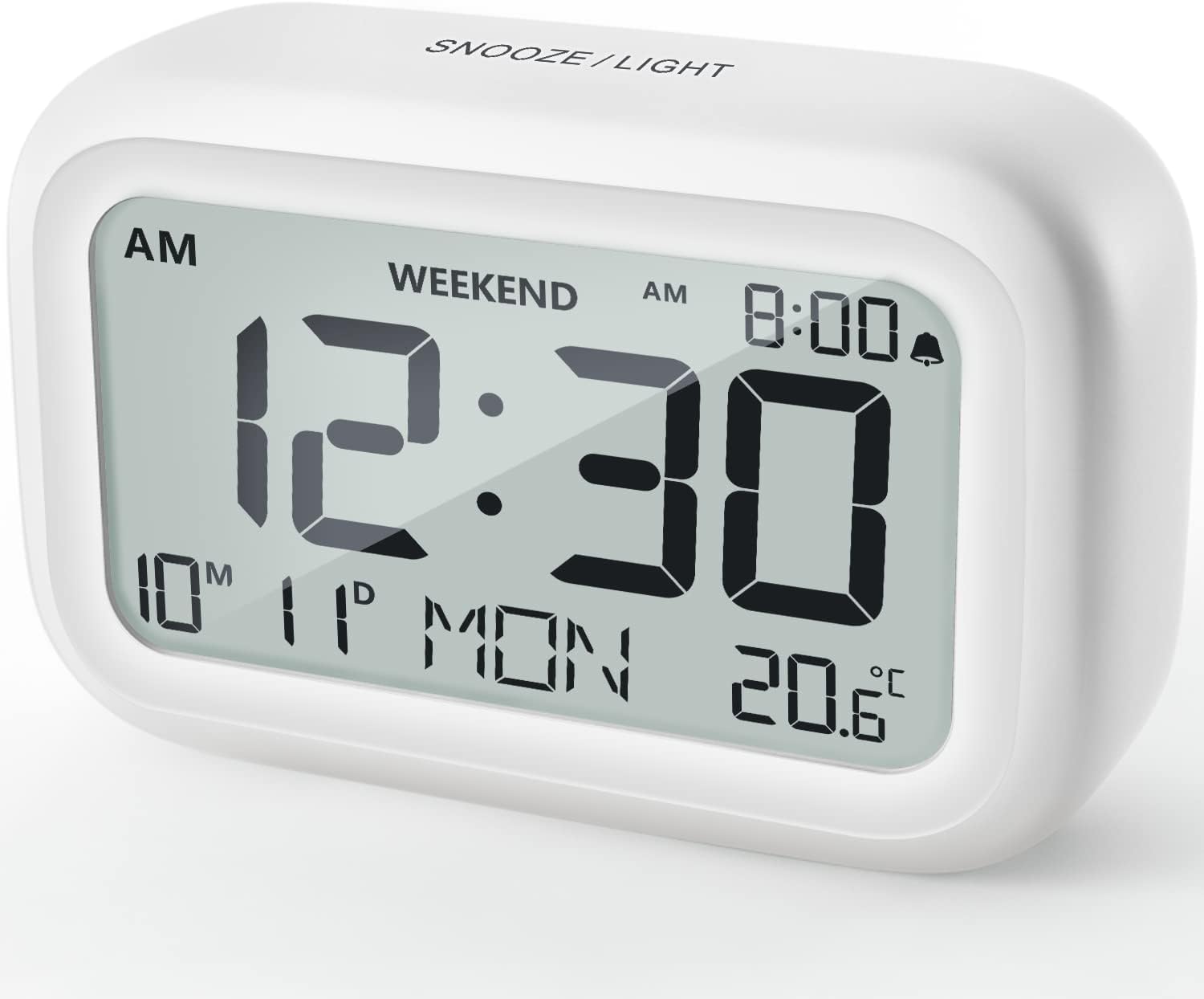
รูปที่ 4.1 : ด้านหน้า View ของนาฬิกาปลุก
This image displays the front of the DOOMAY Digital Alarm Clock, highlighting its large, clear LCD screen. The screen shows the current time (12:30), AM indicator, day of the week (MON), date (10th month, 11th day), and indoor temperature (20.6°C). The top of the clock has a "SNOOZE/LIGHT" button.

รูปที่ 4.2: คุณสมบัติหลักเหนือview
This diagram illustrates the main functionalities of the alarm clock: 12/24H time display, calendar, alarm setting, adjustable volume, snooze function, backlight, weekend mode, and temperature display. The clock itself is shown on a wooden table, displaying 7:00 AM, Friday, and 28.8 degrees.

Figure 4.3: Back Panel Controls
This image shows the rear of the alarm clock, detailing the various control buttons and the battery compartment. Buttons are clearly labeled for: 12/24H time format, Alarm setting, Weekend mode, Date setting, Minus (-) for decreasing values, Plus (+) for increasing values, and °C/°F for temperature unit selection. The battery compartment is visible, designed for two AAA batteries.
การควบคุมและการแสดงผล:
- จอแสดงผล LCD: Shows time, date, day of week, AM/PM indicator, alarm status, and temperature.
- SNOOZE/LIGHT Button (Top): Activates snooze function during alarm; illuminates backlight for 5 seconds.
- 12/24H Button (Back): Toggles between 12-hour and 24-hour time formats.
- ALARM Button (Back): เข้าสู่โหมดการตั้งค่าสัญญาณเตือน
- WEEKEND Button (Back): Activates/deactivates weekend mode.
- DATE Button (Back): Enters date setting mode.
- MINUS (-) Button (Back): Decreases values during setting; adjusts alarm volume.
- PLUS (+) Button (Back): Increases values during setting; adjusts alarm volume.
- °C/°F Button (Back): สลับระหว่างหน่วยอุณหภูมิเซลเซียสและฟาเรนไฮต์
5. การตั้งค่า
5.1 การติดตั้งแบตเตอรี่
- เปิดฝาช่องใส่แบตเตอรี่ที่อยู่ด้านหลังของนาฬิกา
- ใส่แบตเตอรี่ AAA สอง (2) ก้อน โดยตรวจสอบให้แน่ใจว่าขั้วถูกต้อง (+ และ -)
- ปิดฝาช่องใส่แบตเตอรี่ให้แน่น
- The display will light up, and the clock will be ready for initial setup. A low battery symbol will appear when batteries need replacement. If the display shows "8888" flashing, it's also an indication to change batteries.
5.2 การตั้งเวลาและวันที่เริ่มต้น
- ตั้งเวลา:
- กดปุ่ม 12/24 ชม. button to switch between 12-hour (with AM/PM) and 24-hour formats.
- กดปุ่มค้างไว้ 12/24 ชม. กดปุ่มค้างไว้ 3 วินาทีเพื่อเข้าสู่โหมดตั้งเวลา ตัวเลขชั่วโมงจะกะพริบ
- ใช้ + or - ปุ่มเพื่อปรับชั่วโมง
- กดปุ่ม 12/24 ชม. กดปุ่มอีกครั้งเพื่อยืนยันชั่วโมง แล้วจึงเปลี่ยนไปตั้งค่านาที ตัวเลขนาทีจะกะพริบ
- ใช้ + or - ปุ่มปรับนาที
- กดปุ่ม 12/24 ชม. button one more time to exit time setting.
- กำหนดวันที่:
- กดปุ่มค้างไว้ วันที่ button for 3 seconds to enter date setting mode. The year digits will flash.
- ใช้ + or - ปุ่มเพื่อปรับปี
- กดปุ่ม วันที่ button again to confirm the year and move to month setting.
- Adjust the month using + or -.
- กด วันที่ again to move to day setting.
- Adjust the day using + or -.
- กด วันที่ one more time to exit date setting. The day of the week will automatically adjust.
6. คู่มือการใช้งาน
6.1 การตั้งปลุก
- กดปุ่มค้างไว้ เตือน button for 3 seconds. The alarm hour digits will flash.
- ใช้ + or - ปุ่มสำหรับตั้งเวลาปลุกที่ต้องการ
- กดปุ่ม เตือน กดปุ่มอีกครั้งเพื่อยืนยันชั่วโมง แล้วจึงเปลี่ยนไปตั้งค่านาที ตัวเลขนาทีของนาฬิกาปลุกจะกะพริบ
- ใช้ + or - ปุ่มสำหรับตั้งเวลาปลุกตามต้องการ
- กดปุ่ม เตือน button one more time to exit alarm setting. The alarm icon (bell symbol) will appear on the display, indicating the alarm is active.
- To turn the alarm ON/OFF, simply press the เตือน button once. The bell icon will appear/disappear.
6.2 ฟังก์ชั่นเลื่อนซ้ำ
When the alarm sounds, gently tap the large สนูซ / ไลท์ button on the top of the clock. The alarm will pause for 9 minutes and then sound again. This can be repeated multiple times.

Figure 6.1: Activating Snooze
This image demonstrates how to activate the snooze function by touching the top of the alarm clock. The text highlights that this action provides an additional 9 minutes of sleep after the alarm sounds.
To completely turn off the alarm after it sounds (without snoozing), press any button on the back of the clock.
6.3 Weekend Mode
The weekend mode allows the alarm to sound only from Monday to Friday, preventing it from ringing on Saturday and Sunday.

Figure 6.2: Weekend Mode Activated
This image shows the alarm clock display with the "WEEKEND" indicator prominently displayed, signifying that the weekend mode is active. The accompanying text clarifies that in this mode, the alarm will only sound from Monday to Friday, ensuring undisturbed weekends.
- To activate Weekend Mode, press the สุดสัปดาห์ button once. The "WEEKEND" indicator will appear on the display.
- To deactivate Weekend Mode, press the สุดสัปดาห์ button again. The "WEEKEND" indicator will disappear.
6.4 Adjustable Alarm Volume
The alarm clock offers two volume levels: Low (70 dB) and High (85 dB).

Figure 6.3: Alarm Volume Levels
This image visually represents the two available alarm volume settings: L01 (85 dB) for a louder alarm and L02 (70 dB) for a softer alarm. The alarm clock is shown in a bedroom setting, emphasizing its use as a bedside device.
- While in normal time display mode, press the + or - buttons to cycle between the two alarm volume levels. The current volume level will be briefly displayed.
6.5 ฟังก์ชันไฟแบ็คไลท์
To illuminate the display in low light conditions, simply tap the สนูซ / ไลท์ button on the top of the clock. The backlight will activate for approximately 5 seconds, providing clear visibility of the time and other information.
Figure 6.4: Backlight in Action
This image provides a side-by-side comparison of the alarm clock's display. On the left, the clock is shown in a well-lit environment. On the right, the same clock is shown in a dark setting with its 5-second backlight activated, demonstrating how the display becomes clearly visible at night.
6.6 การแสดงอุณหภูมิ
The clock displays the indoor temperature. You can switch between Celsius (°C) and Fahrenheit (°F) units.
- To change the temperature unit, press the ° C / ° F ปุ่มที่ด้านหลังของนาฬิกา
7. การบำรุงรักษา
7.1 การทำความสะอาด
เช็ดนาฬิกาด้วยผ้าแห้งเนื้อนุ่ม ห้ามใช้สารทำความสะอาดที่มีฤทธิ์กัดกร่อนหรือตัวทำละลาย เพราะอาจทำให้พื้นผิวเสียหายได้
7.2 การเปลี่ยนแบตเตอรี่
When the low battery indicator appears on the display, or if the display shows "8888" flashing, it is time to replace the batteries. Follow the steps in Section 5.1 Battery Installation to replace the two AAA batteries.
8 การแก้ไขปัญหา
| ปัญหา | สาเหตุที่เป็นไปได้ | สารละลาย |
|---|---|---|
| จอแสดงผลว่างเปล่าหรือมืดลง | แบตเตอรี่หมดหรือติดตั้งไม่ถูกต้อง | เปลี่ยนแบตเตอรี่ด้วยแบตเตอรี่ AAA ใหม่ โดยตรวจสอบให้แน่ใจว่าใส่ขั้วถูกต้อง |
| สัญญาณเตือนภัยไม่ดัง | Alarm is not activated, or Weekend Mode is ON. | Ensure the alarm icon is displayed. Check if Weekend Mode is active and deactivate if necessary. |
| ฟังก์ชันเลื่อนปลุกไม่ทำงาน | Not tapping the SNOOZE/LIGHT button correctly. | Ensure a firm, brief tap on the top SNOOZE/LIGHT button when the alarm is sounding. |
| เวลา/วันที่ไม่ถูกต้อง | ตั้งค่าไม่ถูกต้อง หรืออาจถอดแบตเตอรี่ออก | Refer to Section 5.2 Initial Time and Date Setting to re-set. |
9. ข้อมูลจำเพาะ
| คุณสมบัติ | รายละเอียด |
|---|---|
| หมายเลขรุ่น | 5293สหราชอาณาจักร |
| ยี่ห้อ | หายนะ |
| ขนาด (กว้าง x ยาว x สูง) | 10.9 x 3.81 x 6.9 ซม. (4.29 x 1.5 x 2.72 นิ้ว) |
| น้ำหนัก | 127.01 กรัม (0.28 ปอนด์) |
| วัสดุ | อะคริโลไนไตรล์ บิวทาไดอีน สไตรีน (ABS) |
| แหล่งพลังงาน | แบตเตอรี่ AAA 2 ก้อน (รวมอยู่ด้วย) |
| ประเภทจอภาพ | จอ LCD ระบบดิจิตอล |
| ระดับเสียงเตือนภัย | Low (70 dB), High (85 dB) |
| เลื่อนระยะเวลา | 9 นาที |
| ระยะเวลาแบ็คไลท์ | 5 วินาที |
| หน่วยอุณหภูมิ | เซลเซียส (°C) / ฟาเรนไฮต์ (°F) |
10. การรับประกันและการสนับสนุน
DOOMAY products are designed for reliability and performance. For any questions, technical support, or warranty claims, please contact your retailer or visit the official DOOMAY website for assistance. Please retain your proof of purchase for warranty purposes.
For further information, you may visit the brand's Amazon store page: DOOMAY Store on Amazon


