1. บทนำ
This manual provides comprehensive instructions for the installation, operation, and maintenance of your ESX VN940-4G Autoradio Navigation Naviceiver. Please read this manual thoroughly before using the device to ensure proper and safe operation.
The ESX VN940-4G is a state-of-the-art car radio system featuring a 9-inch touchscreen display, integrated navigation, and Bluetooth connectivity, designed to enhance your in-car entertainment and navigation experience.
2. ข้อมูลด้านความปลอดภัย
ปฏิบัติตามข้อควรระวังด้านความปลอดภัยต่อไปนี้เสมอเพื่อป้องกันการบาดเจ็บหรือความเสียหายต่ออุปกรณ์:
- อย่าใช้งานอุปกรณ์ในลักษณะที่รบกวนสมาธิในการขับขี่ ให้ความสำคัญกับความปลอดภัยบนท้องถนนเสมอ
- Ensure all wiring is correctly connected to prevent short circuits or electrical hazards. Consult a professional for installation if unsure.
- ห้ามให้เครื่องสัมผัสกับอุณหภูมิที่สูงหรือต่ำเกินไป แสงแดดโดยตรงเป็นเวลานาน หรือความชื้นที่มากเกินไป
- Avoid disassembling or modifying the unit. This can void the warranty and cause damage.
- ปรับระดับเสียงให้อยู่ในระดับที่ทำให้คุณได้ยินเสียงการจราจรภายนอก
3. เนื้อหาบรรจุภัณฑ์
กรุณาตรวจสอบว่าสินค้าทั้งหมดมีอยู่ในแพ็คเกจ:
- ESX VN940-4G Naviceiver Unit
- ตัวยึด
- สายรัดสายไฟ
- เสาอากาศ GPS
- สายต่อ USB
- คู่มือการใช้งาน (เอกสารนี้)
4. การตั้งค่าและการติดตั้ง
Proper installation is crucial for the performance and longevity of your ESX VN940-4G. It is recommended to have the unit installed by a qualified professional.
4.1 การติดตั้งเครื่อง
Use the provided mounting bracket to secure the Naviceiver in your vehicle's dashboard. Ensure the unit is firmly seated and does not obstruct any vehicle controls or airbags.
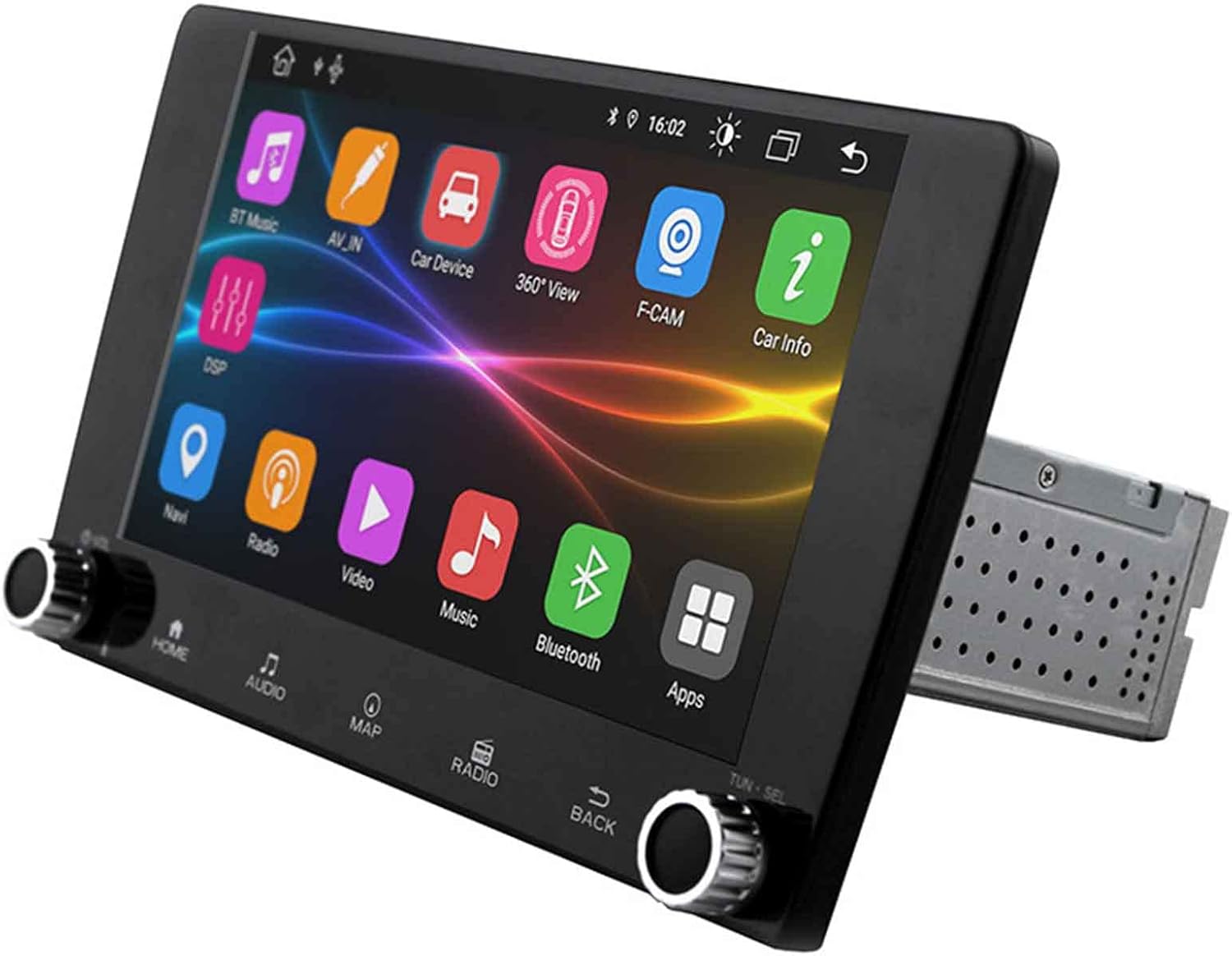
Image: The ESX VN940-4G Naviceiver unit, displaying its side profile and the integrated mounting cage, ready for dashboard installation.
4.2 การเชื่อมต่อสายไฟ
Connect the power harness, speaker wires, GPS antenna, and any other auxiliary inputs/outputs according to your vehicle's wiring diagram and the unit's connection ports. Pay close attention to positive and negative terminals.
- พาวเวอร์ (สีเหลือง): แรงดันไฟคงที่ 12V (แบตเตอรี่)
- ระบบจุดระเบิด (สีแดง): Switched 12V (ACC)
- พื้น(สีดำ): Vehicle Chassis Ground
- สายลำโพง: Connect to corresponding vehicle speaker wires (e.g., Front Left +, Front Left -).
- เสาอากาศ GPS: Connect to the dedicated GPS antenna port and mount the antenna in a location with a clear view ของท้องฟ้า
4.3 การเปิดเครื่องครั้งแรกและการกำหนดค่า
After installation, turn on your vehicle's ignition. The unit should power on. Follow the on-screen prompts for initial setup, which may include:
- การเลือกภาษา
- การตั้งเวลาและวันที่
- Radio Region Selection
5. คู่มือการใช้งาน
This section details the primary functions and operations of your ESX VN940-4G.
5.1 การควบคุมขั้นพื้นฐาน
- ปุ่มเปิด/ปิด: กดค้างไว้เพื่อเปิด/ปิดเครื่อง กดสั้นๆ เพื่อปิด/เปิดเสียง
- ปุ่มปรับระดับเสียง: หมุนตามเข็มนาฬิกาเพื่อเพิ่มระดับเสียง หมุนทวนเข็มนาฬิกาเพื่อลดระดับเสียง
- ปุ่มโฮม: กลับสู่หน้าจอเมนูหลัก
- ปุ่มย้อนกลับ: กลับไปที่หน้าจอหรือเมนูก่อนหน้า
5.2 การใช้งานวิทยุ
From the main menu, select the 'Radio' icon. You can manually tune frequencies, scan for stations, or save your favorite stations as presets.
- สแกน: Automatically searches for and stops at strong signals.
- ค่าที่ตั้งล่วงหน้า: Touch and hold a numbered button to save the current station.
5.3 การเชื่อมต่อบลูทูธ
หน่วยนี้รองรับบลูทูธสำหรับการโทรแบบแฮนด์ฟรีและการสตรีมเสียง
- ไปที่เมนู 'บลูทูธ'
- เปิดใช้งาน Bluetooth บนอุปกรณ์มือถือของคุณและค้นหาอุปกรณ์ที่มีอยู่
- Select 'ESX VN940-4G' from the list on your phone.
- ยืนยันรหัสการจับคู่หากได้รับแจ้ง
เมื่อจับคู่แล้ว คุณสามารถโทรออก/รับสายและสตรีมเพลงแบบไร้สายได้
5.4 ระบบนำทาง
Access the navigation application by selecting the 'Map' or 'Navi' icon from the main menu. The system provides turn-by-turn directions and real-time traffic information (if supported by the map software).

Image: The ESX VN940-4G Naviceiver's touchscreen displaying a detailed navigation map, including current route, speed, and remaining distance to destination.
- การป้อนปลายทาง: Use the on-screen keyboard to enter addresses or points of interest.
- คำแนะนำเส้นทาง: Follow the voice prompts and visual cues on the screen.
- แผนที่ View: สลับระหว่าง 2D และ 3D views, and adjust zoom levels.
5.5 การเล่นสื่อ
The unit supports media playback from various sources, such as USB drives. Connect your USB device to the designated USB port. The unit will automatically detect compatible audio or video files.
6. การบำรุงรักษา
Regular maintenance ensures the longevity and optimal performance of your Naviceiver.
- การทำความสะอาดหน้าจอ: ใช้ผ้าเนื้อนุ่มที่ไม่เป็นขุยเช็ดหน้าจอสัมผัสเบาๆ สำหรับคราบสกปรกที่เช็ดออกยาก ให้ใช้ผ้าชนิดอื่นเช็ดampen the cloth slightly with water or a screen-cleaning solution. Do not use abrasive cleaners.
- การอัปเดตซอฟต์แวร์: ตรวจสอบผู้ผลิตเป็นระยะ webตรวจสอบเว็บไซต์สำหรับดาวน์โหลดการอัปเดตซอฟต์แวร์ การอัปเดตอาจช่วยปรับปรุงประสิทธิภาพ เพิ่มคุณสมบัติใหม่ หรือแก้ไขข้อบกพร่อง โปรดปฏิบัติตามคำแนะนำที่ให้มาพร้อมกับแพ็กเกจการอัปเดตอย่างระมัดระวัง
7 การแก้ไขปัญหา
If you encounter issues with your ESX VN940-4G, refer to the following common problems and solutions:
| ปัญหา | สาเหตุที่เป็นไปได้ | สารละลาย |
|---|---|---|
| เครื่องไม่เปิด | สายไฟไม่ถูกต้อง ฟิวส์ขาด ปัญหาแบตเตอรี่รถยนต์ | ตรวจสอบการเชื่อมต่อไฟฟ้าและกราวด์ ตรวจสอบฟิวส์รถยนต์ ตรวจสอบว่าแบตเตอรี่มีประจุไฟอยู่ |
| ไม่มีเสียงออกจากลำโพง | Speaker wires disconnected, volume too low, unit muted. | ตรวจสอบการเชื่อมต่อลำโพง เพิ่มระดับเสียง ตรวจสอบว่าปิดเสียงเครื่องแล้วหรือไม่ |
| การเชื่อมต่อบลูทูธล้มเหลว | Bluetooth not enabled on phone/unit, device out of range, interference. | Ensure Bluetooth is active on both devices. Move phone closer. Restart both devices. |
| สัญญาณ GPS สูญหายหรือไม่แม่นยำ | GPS antenna obstructed, faulty antenna, poor satellite reception. | Relocate GPS antenna to a clear area. Check antenna connection. Wait for clear sky. |
หากปัญหายังคงมีอยู่หลังจากพยายามแก้ไขปัญหาเหล่านี้แล้ว โปรดติดต่อฝ่ายสนับสนุนลูกค้า
8. ข้อมูลจำเพาะ
| คุณสมบัติ | รายละเอียด |
|---|---|
| ชื่อรุ่น | ESX VN940-4G |
| ยี่ห้อ | อีเอสเอ็กซ์ |
| ขนาดจอแสดงผล | 9 นิ้ว (22.8 ซม.) |
| ความละเอียดการแสดงผล | 800 x 480 พิกเซล |
| เทคโนโลยีการเชื่อมต่อ | บลูทูธ |
| ประเภทการติดตั้ง | Dashboard-Mounting |
| โหมดเอาต์พุตเสียง | สเตอริโอ |
| ประเภทบริการยานพาหนะ | รถ |
| ส่วนประกอบที่รวมอยู่ | ตัวยึด |
| วันที่พร้อมใช้งานครั้งแรก | 10 มีนาคม 2022 |
9. การรับประกันและการสนับสนุน
สำหรับข้อมูลการรับประกัน โปรดดูเอกสารที่ให้ไว้ตอนซื้อสินค้า หรือติดต่อผู้ค้าปลีก เงื่อนไขการรับประกันอาจแตกต่างกันไปตามภูมิภาคและผู้ขาย
For technical support, troubleshooting assistance beyond this manual, or inquiries about spare parts, please contact the seller or the official ESX customer service. Contact details are typically available on the seller's website or the ESX official webเว็บไซต์.


