1. บทนำ
The PALOVUE iSound Wireless Earbuds are designed to provide a superior audio experience with advanced features for daily use. Equipped with Qualcomm CSR and Bluetooth 5.0 technology, these earbuds offer a stable and crystal-clear connection, supporting aptX HD sound quality. The CVC 8.0 Noise Cancelling technology with 4 built-in microphones ensures clear calls by effectively reducing ambient noise. Their ergonomic design and multiple ear-tip sizes provide a comfortable and secure fit for extended wear.
The iSound earbuds feature convenient one-step reconnection and intuitive one-touch operation. With up to 24 hours of playtime using the compact charging case, they are ideal for on-the-go listening. Further customization and control are available through the PALOVUE iSound APP.

Image: PALOVUE iSound Wireless Earbuds resting in their open charging case, showcasinด้วยการออกแบบสีดำอันโฉบเฉี่ยว
2. อะไรอยู่ในกล่อง
Upon opening your PALOVUE iSound package, you will find the following components:
- เคสชาร์จแบบไร้สาย
- PALOVUE iSound Earbuds (Left and Right)
- Ear Tips (multiple sizes for a customizable fit)
- สายชาร์จ (USB-C)
- สายคล้องคอ
- กล่องบรรจุภัณฑ์
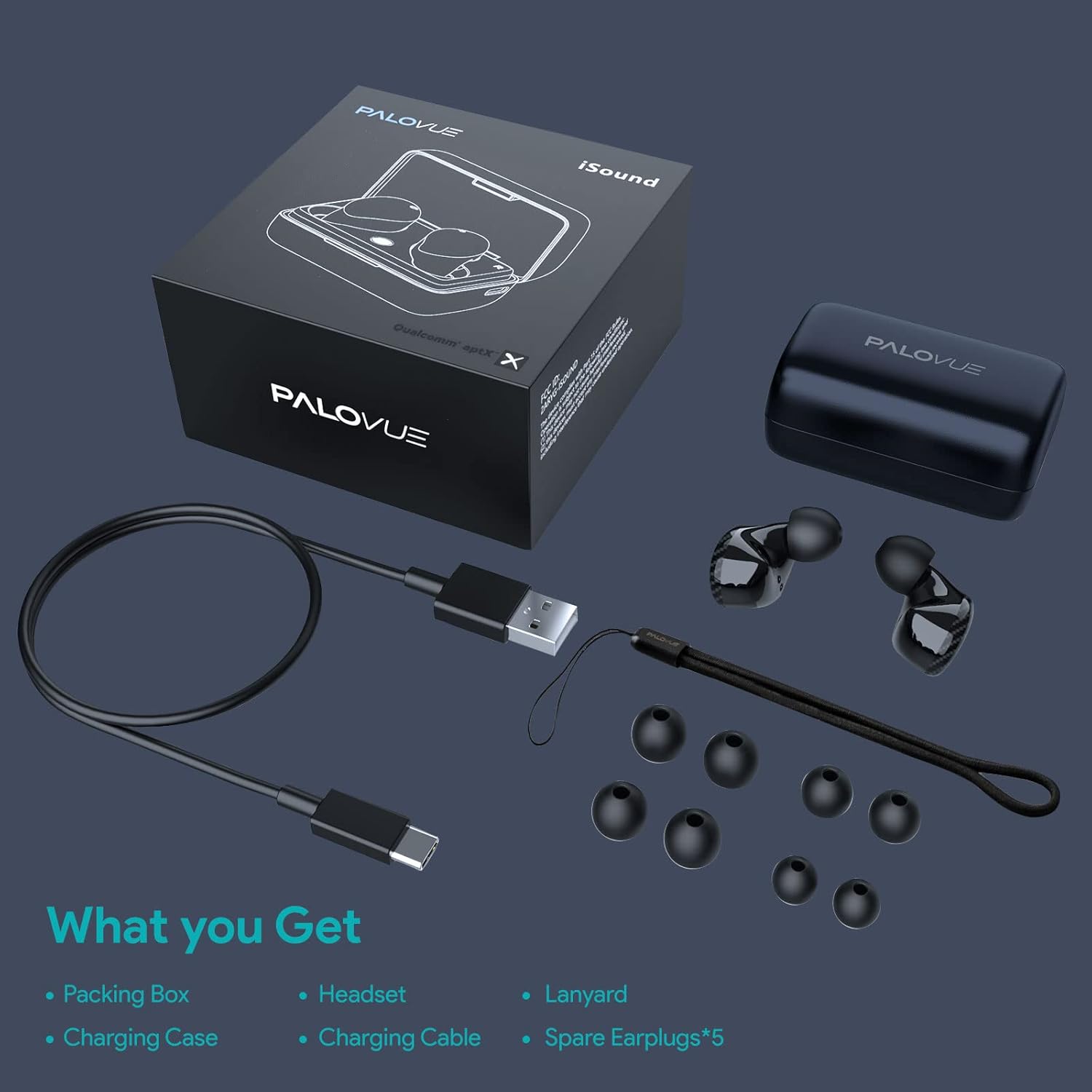
Image: A flat lay showing all items included in the PALOVUE iSound package: the packing box, charging case, earbuds, charging cable, lanyard, and five pairs of spare ear tips.
3. คู่มือการติดตั้ง
3.1 การชาร์จเริ่มต้น
Before first use, ensure both the earbuds and the charging case are fully charged. Place the earbuds into the charging case. Connect the provided USB-C cable to the charging case and a power source. The indicator lights on the case will show charging status. A full charge typically takes approximately 2 hours for the case.
3.2 การจับคู่กับอุปกรณ์ของคุณ
The PALOVUE iSound earbuds feature one-step reconnection for convenience.
- เปิดกล่องชาร์จ หูฟังจะเปิดอัตโนมัติและเข้าสู่โหมดจับคู่
- บนสมาร์ทโฟนหรืออุปกรณ์ที่รองรับ Bluetooth ของคุณ ให้ไปที่การตั้งค่า Bluetooth
- ค้นหา "PALOVUE iSound" in the list of available devices and select it to connect.
- เมื่อเชื่อมต่อแล้ว คุณจะได้ยินเสียงยืนยัน และหูฟังจะพร้อมใช้งาน
- For subsequent uses, simply open the charging case, and the earbuds will automatically connect to the last paired device.
Video: A detailed guide demonstrating the connection and operation of the PALOVUE iSound earbuds, including initial pairing steps and touch control functions.
4. การใช้งานหูฟังของคุณ
4.1 ระบบควบคุมแบบสัมผัส
The PALOVUE iSound earbuds feature intuitive touch controls on each earbud. The specific functions can be customized via the PALOVUE iSound APP.
| การกระทำ | เอียร์บัดข้างซ้าย | เอียร์บัดด้านขวา |
|---|---|---|
| แตะเพียงครั้งเดียว | ลดระดับเสียง | เพิ่มระดับเสียง |
| แตะสองครั้ง | เล่น/หยุดเพลง, รับ/วางสาย | เล่น/หยุดเพลง, รับ/วางสาย |
| กดแบบยาว | Previous Song, Reject Call | Next Song, Reject Call |
Video: A short demonstration of the touch controls for the PALOVUE iSound earbuds, showing how to adjust volume, skip tracks, and manage calls.
4.2 Using the PALOVUE iSound APP
Enhance your experience by downloading the PALOVUE iSound APP. The app allows you to:
- Customize touch control functions (e.g., volume, track control, call management).
- Adjust equalizer (EQ) settings for personalized sound profiles (Male Vocals, Electronic, Jazz, Rock, Classical, Female Vocals, Original, Customize).
- Check battery levels of each earbud.
- Access device information and firmware updates.

Image: A woman wearing PALOVUE iSound earbuds, illustrating their comfortable fit and suitability for daily use.

ภาพ: ระเบิด view diagram of the PALOVUE iSound earbud, detailing its internal structure and emphasizing Qualcomm AptX and Deep Bass sound capabilities.
5. การบำรุงรักษา
To ensure the longevity and optimal performance of your PALOVUE iSound Wireless Earbuds, follow these maintenance guidelines:
- การทำความสะอาด: ทำความสะอาดหูฟังและกล่องชาร์จเป็นประจำด้วยผ้าแห้งนุ่มๆ ที่ไม่มีขน ห้ามใช้สารทำความสะอาดที่มีฤทธิ์กัดกร่อนหรือตัวทำละลาย ค่อยๆ ขจัดขี้หูหรือสิ่งสกปรกออกจากจุกหูฟังและตะแกรงลำโพงโดยใช้แปรงขนนุ่มขนาดเล็กหรือสำลีพันก้าน
- พื้นที่จัดเก็บ: เมื่อไม่ใช้งาน ควรเก็บหูฟังไว้ในกล่องชาร์จเพื่อป้องกันฝุ่นละออง สิ่งสกปรก และความเสียหายทางกายภาพ
- การดูแลแบตเตอรี่ Avoid fully depleting the battery frequently. For long-term storage, charge the earbuds and case to about 50% to preserve battery health.
- ความต้านทานน้ำ: The earbuds are rated IPX4 for water resistance, meaning they are protected against splashing water from any direction. They are designed for sports and can withstand sweat and light rain, but they are not suitable for swimming or submersion in water. Ensure the earbuds are dry before placing them back in the charging case.
Video: A short promotional video highlighting the compact size and powerful features of the iSound True Wireless Earbuds, including their IPX4 water resistance.
6 การแก้ไขปัญหา
If you encounter issues with your PALOVUE iSound Wireless Earbuds, try the following solutions:
6.1 ปัญหาการจับคู่
- หูฟังไม่เชื่อมต่อ: Ensure Bluetooth is enabled on your device. Place earbuds back in the case, close it, wait a few seconds, then open it again to re-initiate pairing mode.
- มีหูฟังเพียงข้างเดียวที่ใช้งานได้: Try placing both earbuds back in the charging case, closing the lid, and then reopening it. Ensure both earbuds have sufficient charge.
- หูฟังไม่ปรากฏในรายการบลูทูธ: Turn off Bluetooth on your device, then turn it back on. Restart your device if necessary.
6.2 ปัญหาคุณภาพเสียง
- ปริมาณต่ำ: Increase the volume on both your earbuds (via touch control) and your connected device.
- เสียงเพี้ยน: Ensure the earbuds are within Bluetooth range of your device. Check for obstructions between the earbuds and your device.
- คุณภาพการโทรไม่ดี: Ensure the microphones are not obstructed. CVC 8.0 Noise Cancelling technology helps, but extreme noise environments can still affect clarity.
6.3 Battery and Charging Issues
- หูฟังไม่ชาร์จ: Ensure the charging contacts on the earbuds and inside the case are clean and dry. Try a different charging cable or power adapter.
- เคสไม่ชาร์จ: ตรวจสอบว่าสายชาร์จและแหล่งจ่ายไฟทำงานถูกต้อง
6.4 How to Reset Your Earbuds
หากคุณประสบปัญหาอย่างต่อเนื่อง การรีเซ็ตเป็นค่าเริ่มต้นจากโรงงานอาจช่วยแก้ไขปัญหาได้:
- ใส่หูฟังเอียร์บัดทั้งสองข้างลงในกล่องชาร์จ
- Press and hold the reset button on the charging case (usually located inside or near the charging port) until the indicator lights on the earbuds flash red and green alternately.
- Release the button and wait until only the green light flashes, indicating the reset is complete.
- Remove the earbuds from the case and attempt to re-pair them with your device.
Refer to the "PALOVUE iSound Connection operation guide" video in the Setup section for a visual demonstration of the reset process.
7. ข้อมูลจำเพาะ
| คุณสมบัติ | รายละเอียด |
|---|---|
| ยี่ห้อ | พาโลวิว |
| ชื่อรุ่น | ไอซาวน์ |
| เทคโนโลยีการเชื่อมต่อ | ไร้สาย (บลูทูธ 5.0) |
| เทคโนโลยีการสื่อสารไร้สาย | บลูทูธ |
| ชิปเซ็ต | Qualcomm CSR QCC3020 |
| การควบคุมเสียงรบกวน | CVC 8.0 Noise Cancellation (for calls) |
| ไมโครโฟน | 4 ไมค์ |
| ประเภทการควบคุม | การควบคุมแบบสัมผัส |
| การวางตำแหน่งหู | ในหู |
| ฟอร์มแฟกเตอร์ | ในหู |
| อายุการใช้งานแบตเตอรี่ (หูฟัง) | สูงสุด 6 ชั่วโมง (โดยประมาณ) |
| เวลาเล่นทั้งหมด (รวมเคส) | นานถึง 24 ชั่วโมง |
| ระยะเวลาในการชาร์จ (เคส) | 2 ชั่วโมง |
| ช่วงบลูทูธ | สูงสุด 10 เมตร (32.8 ฟุต) |
| ระดับความต้านทานต่อน้ำ | IPX4 (ป้องกันน้ำกระเซ็น) |
| วัสดุ | Silicone (Ear Tips) |
| น้ำหนักสินค้า | 1.76 ออนซ์ |
| อุปกรณ์ที่รองรับ | Smartphones, Tablets, Laptops, Desktops, Smart TVs, Car Audio Systems |
8. การรับประกันและการสนับสนุน
PALOVUE products typically come with a manufacturer's warranty. Please refer to the warranty card included in your product packaging for specific terms and conditions, including warranty period and coverage details. For technical support, troubleshooting assistance, or warranty claims, please contact PALOVUE customer service through their official webไซต์หรือข้อมูลการติดต่อที่ระบุไว้ในเอกสารผลิตภัณฑ์ของคุณ
You can also visit the official PALOVUE store on Amazon for more information and support: PALOVUE Amazon Store.


