1. บทนำ
The Bloody M70 TWS True Wireless Gaming Earbuds are designed to provide a high-quality audio experience for gaming and music. Featuring Bluetooth 5.0 connectivity, dual ENC noise-canceling microphones, deep bass, and low latency, these earbuds are built for immersive sound. The IPX4 water-resistant rating ensures durability against splashes.

Image: Bloody M70 TWS True Wireless Gaming Earbuds in their open charging case, highlighting the design and red LED indicators.
2. เนื้อหาบรรจุภัณฑ์
Verify that all items are present in your Bloody M70 TWS Earbuds package:
- Bloody M70 TWS Earbuds (Left and Right)
- เคสชาร์จไฟ
- สายชาร์จ USB
- จุกหูฟังซิลิโคน (ขนาดเล็ก กลาง ใหญ่)
- คู่มือการใช้งาน

Image: An illustration showing the Bloody M70 TWS Earbuds, charging case, various ear tip sizes, and charging cable as included in the package.
3. การเริ่มต้น
3.1 การชาร์จหูฟังและเคส
Before first use, fully charge the earbuds and charging case. The charging case features a slide-lid design for easy access.
- ใส่หูฟังลงในกล่องชาร์จ ตรวจสอบให้แน่ใจว่าใส่เข้าที่อย่างถูกต้อง
- เชื่อมต่อสายชาร์จ USB เข้ากับพอร์ตชาร์จบนเคสและแหล่งจ่ายไฟ
- The charging time for the earbuds is approximately 1.5 hours. The case provides extended playtime up to 24 hours.

Image: The Bloody M70 TWS charging case demonstrating its slide-lid mechanism for opening.

Image: A visual representation of the Bloody M70 TWS Earbuds' battery performance, showing 6 hours of music playback, 24 hours with the charging case, and 1.5 hours for earbud charging.
3.2 การจับคู่บลูทูธ
The Bloody M70 TWS Earbuds utilize Bluetooth 5.0 for a stable and fast connection.
- Open the charging case and remove the earbuds. They will automatically enter pairing mode.
- บนอุปกรณ์ของคุณ (สมาร์ทโฟน แท็บเล็ต คอมพิวเตอร์) เปิดใช้งาน Bluetooth
- ค้นหา available devices and select "Bloody M70" from the list.
- เมื่อเชื่อมต่อแล้ว คุณจะได้ยินเสียงยืนยัน และหูฟังจะพร้อมใช้งาน
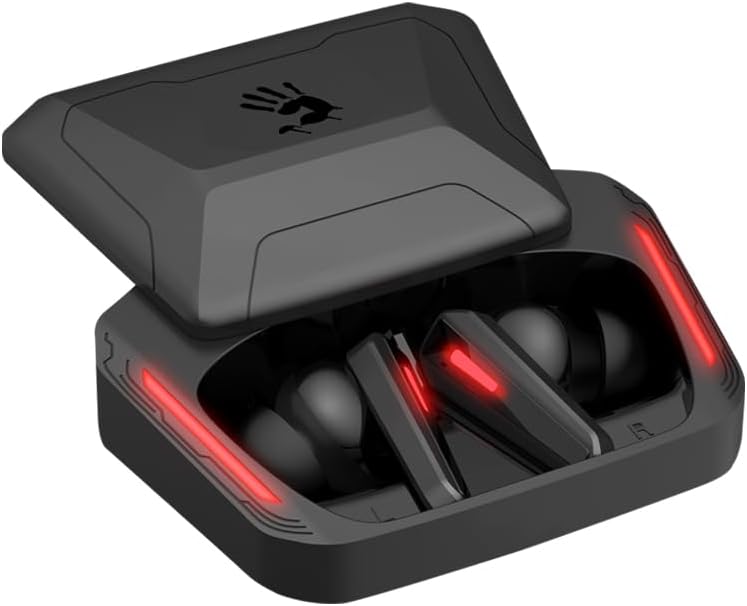
Image: A visual guide to Bluetooth pairing, showing a smartphone's Bluetooth menu with the 'Bloody M70' selected for connection.
4. การดำเนินการ
4.1 ระบบควบคุมแบบสัมผัส
The Bloody M70 earbuds feature intuitive touch controls for managing audio and calls.
- ปริมาณ -: Long tap the left earbud for 2 seconds.
- ปริมาณ +: Long tap the right earbud for 2 seconds.
- Play / Call: แตะเพียงครั้งเดียวที่หูฟังข้างใดข้างหนึ่ง
- แทร็กก่อนหน้า: แตะที่หูฟังด้านซ้ายสองครั้ง
- เพลงถัดไป: แตะที่หูฟังด้านขวาสองครั้ง
- ผู้ช่วยเสียง: แตะสามครั้งที่หูฟังข้างซ้าย
- สวิตช์โหมดเกม/เสียง: แตะสามครั้งที่เอียร์บัดด้านขวา

Image: A comprehensive diagram detailing the touch gestures and their corresponding functions on both the left and right Bloody M70 earbuds.
4.2 Dual-Mode Options (Game/Audio)
Switch between Game Mode for low-latency audio and Audio Mode for general listening by triple tapping the right earbud.

Image: A visual comparison of the Bloody M70 TWS Earbuds operating in Game Mode (highlighting low latency for gaming) and Audio Mode (for general music enjoyment).
4.3 ความต้านทานน้ำ (IPX4)
The earbuds are rated IPX4 water-resistant, protecting them from splashes and sweat. This makes them suitable for workouts and outdoor activities, but they are not designed for submersion.

Image: An earbud being splashed with water, visually representing the IPX4 water-resistant feature of the Bloody M70 TWS Earbuds.
5. ความสบายและการสวมใส่
Achieving a proper fit is crucial for both sound quality and comfort. The Bloody M70 TWS Earbuds come with three sizes of silicone ear tips (Small, Medium, Large).
- Experiment with different ear tip sizes to find the best seal for your ears. A good seal enhances bass response and noise isolation.
- Gently insert the earbuds into your ear canal and twist slightly until they feel secure and comfortable.

Image: An illustration demonstrating the proper fit of an earbud in the ear, alongside the three available ear tip sizes (Small, Medium, Large) for optimal comfort and sound.
6. การดูแลรักษา
To ensure the longevity and optimal performance of your Bloody M70 TWS Earbuds, follow these care guidelines:
- การทำความสะอาด: ทำความสะอาดหูฟังและกล่องชาร์จเป็นประจำด้วยผ้านุ่ม แห้ง และไม่เป็นขุย ห้ามใช้สารเคมีรุนแรงหรือวัสดุที่มีฤทธิ์กัดกร่อน
- เคล็ดลับหู: ถอดจุกหูฟังซิลิโคนออกแล้วล้างด้วยสบู่และน้ำอ่อนๆ จากนั้นเช็ดให้แห้งสนิทก่อนใส่กลับเข้าไปใหม่
- หน้าสัมผัสการชาร์จ: Ensure the charging contacts on both the earbuds and inside the case are clean and free of debris to maintain proper charging.
- พื้นที่จัดเก็บ: เมื่อไม่ได้ใช้งาน ให้เก็บหูฟังไว้ในกล่องชาร์จเพื่อป้องกันฝุ่นและความเสียหาย
- หลีกเลี่ยงเงื่อนไขที่รุนแรง: Do not expose the earbuds to extreme temperatures, humidity, or direct sunlight for extended periods.
7 การแก้ไขปัญหา
If you encounter issues with your Bloody M70 TWS Earbuds, refer to the following common solutions:
- หูฟังไม่จับคู่:
- ตรวจสอบให้แน่ใจว่าได้ชาร์จหูฟังเอียร์บัดทั้งสองข้างแล้ว
- ปิดบลูทูธบนอุปกรณ์ของคุณ จากนั้นเปิดใหม่อีกครั้ง
- Forget "Bloody M70" from your device's Bluetooth list and attempt to pair again.
- Place earbuds back in the case, close the lid, wait a few seconds, then reopen to reset.
- ไม่มีเสียงจากหูฟังข้างหนึ่ง:
- ตรวจสอบให้แน่ใจว่าได้ชาร์จหูฟังเอียร์บัดทั้งสองข้างแล้ว
- Try placing both earbuds back in the charging case, closing the lid, and then taking them out again.
- ทำความสะอาดหน้าสัมผัสการชาร์จทั้งบนหูฟังและเคส
- ระดับเสียงต่ำหรือคุณภาพเสียงไม่ดี:
- ปรับระดับเสียงทั้งบนอุปกรณ์และหูฟังของคุณ
- ตรวจสอบให้แน่ใจว่าจุกหูฟังแนบสนิทกับช่องหูของคุณ ลองใส่ขนาดต่างๆ
- ทำความสะอาดขี้หูหรือสิ่งสกปรกที่ติดอยู่ในตาข่ายของหูฟังออกให้หมด
- กล่องชาร์จไม่ชาร์จ:
- ตรวจสอบให้แน่ใจว่าสายชาร์จเชื่อมต่อกับเคสและแหล่งจ่ายไฟอย่างแน่นหนา
- ลองใช้สาย USB หรืออะแดปเตอร์จ่ายไฟอื่น
- ทำความสะอาดพอร์ตชาร์จบนเคส
8. ข้อมูลจำเพาะ
| คุณสมบัติ | ข้อมูลจำเพาะ |
|---|---|
| ชื่อรุ่น | M70 |
| เทคโนโลยีการเชื่อมต่อ | ไร้สาย (บลูทูธ 5.0) |
| ช่วงบลูทูธ | 10 เมตร |
| การควบคุมเสียงรบกวน | Active Noise Cancellation (ENC for Mics) |
| อายุการใช้งานแบตเตอรี่ (หูฟัง) | 6 ชั่วโมง |
| เวลาเล่นทั้งหมด (รวมเคส) | นานถึง 24 ชั่วโมง |
| เวลาในการชาร์จ | 1.5 ชั่วโมง |
| ระดับความต้านทานต่อน้ำ | IPX4 (กันน้ำ) |
| ประเภทการควบคุม | การควบคุมแบบสัมผัส |
| ประเภทไดร์เวอร์เสียง | Dynamic Driver (Hybrid Diaphragm Technology) |
| อุปกรณ์ที่รองรับ | Gaming Consoles, Desktops, Laptops, Mobile Devices |
| น้ำหนักสินค้า | 0.24 กิโลกรัม (8.4 ออนซ์) |
| วัสดุ | โลหะ พลาสติก ซิลิโคน |
9. การรับประกันและการสนับสนุน
Bloody offers a รับประกัน 24 เดือน for the M70 TWS True Wireless Gaming Earbuds. This warranty covers manufacturing defects and ensures product reliability.
For technical support, warranty claims, or any questions regarding your Bloody M70 earbuds, please refer to the contact information provided on the official Bloody website or your purchase documentation. When contacting support, please have your product model (M70) and proof of purchase readily available.


