1. บทนำ
This manual provides detailed instructions for the LFF DAB Plus Digital FM Radio. It covers setup, operation, maintenance, and troubleshooting to ensure optimal performance and user experience. Please read this manual thoroughly before using the device.

ด้านหน้า view of the LFF DAB Plus Digital FM Radio, showing the speaker grille, color display, and extended antenna.
2. เนื้อหาบรรจุภัณฑ์
กรุณาตรวจสอบแพ็คเกจสำหรับรายการต่อไปนี้:
- 1 x LFF DAB Plus Digital FM Radio
- 1 x อะแดปเตอร์ไฟ AC
- คู่มือเริ่มต้นอย่างรวดเร็ว 1 ชุด
3. สินค้าหมดview
ทำความคุ้นเคยกับส่วนประกอบและปุ่มควบคุมของวิทยุให้ดี
3.1 คุณสมบัติหลัก

This diagram illustrates the radio's key functions: DAB+ radio, 60 station presets, FM radio, sleep timer, headphone jack, Bluetooth connectivity, full-color screen, and dual alarm capability.
3.2 การควบคุมและพอร์ต

ด้านบนและด้านข้าง view of the radio, showing control buttons and knobs on the top panel, and the 3.5mm headphone jack located on the side.
Refer to the diagram above for the location of the following:
- ปุ่มเปิด/ปิด: เปิด/ปิดวิทยุ
- ปุ่มโหมด: Switches between DAB+, FM, and Bluetooth modes.
- Tune/Select Knob: Rotates to tune stations or navigate menus, press to select.
- ปุ่มปรับระดับเสียง: ปรับระดับเสียง
- ปุ่มที่ตั้งไว้ล่วงหน้า: For saving and recalling favorite stations.
- Alarm/Sleep Timer Button: Accesses alarm and sleep timer settings.
- การแสดงสี: แสดงข้อมูลสถานี เวลา และตัวเลือกเมนู
- แจ็คหูฟัง (3.5 มม.): สำหรับการฟังส่วนตัว
- พอร์ต DC IN: สำหรับเชื่อมต่ออะแดปเตอร์ไฟฟ้ากระแสสลับ
- เสาอากาศยืดไสลด์: เพื่อการรับสัญญาณวิทยุที่ดีขึ้น
4. การตั้งค่า
4.1 การเปิดเครื่อง
The radio can be powered by the included AC adapter or by batteries.
- ไฟฟ้ากระแสสลับ: Connect the AC power adapter to the DC IN port on the back of the radio and plug it into a wall outlet.
- พลังงานแบตเตอรี่: Open the battery compartment on the back of the radio and insert 4 x 1.5V AA (LR6) batteries, ensuring correct polarity.
กลับ view of the radio, detailing the battery compartment for 4x AA batteries, the AC adapter input (5V/1000mA), and the 360° rotatable antenna. Product dimensions are also indicated.
4.2 การปรับเสาอากาศ
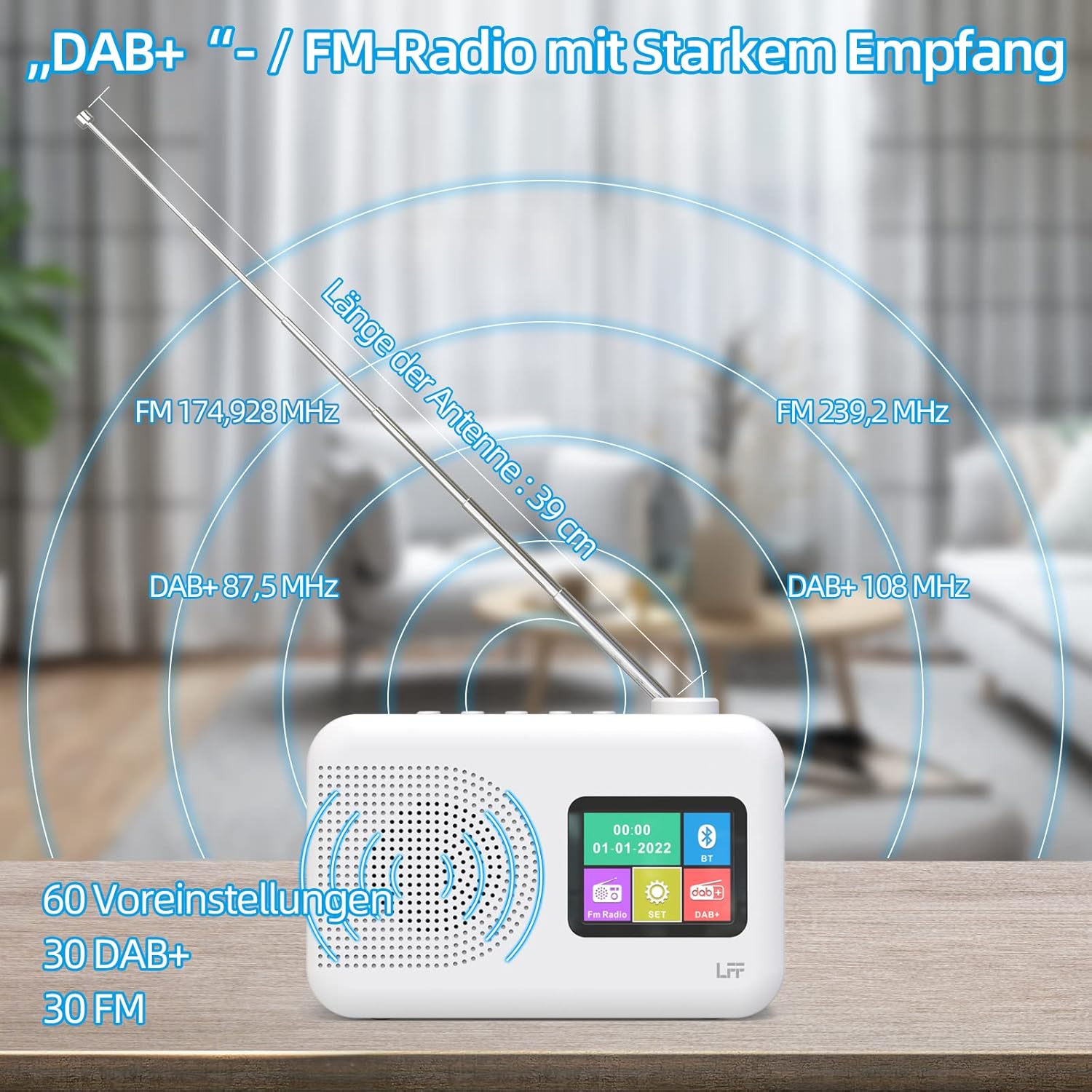
Extend the telescopic antenna fully (approximately 39 cm) and adjust its angle for optimal reception, especially for DAB+ and FM stations.

This diagram illustrates the radio's strong DAB+ and FM reception capabilities with the fully extended 39cm antenna, showing frequency ranges and the capacity for 60 total presets (30 DAB+, 30 FM).
4.3 การสแกนเบื้องต้น (DAB+)
- เปิดวิทยุ
- Ensure the mode is set to DAB+. If not, press the โหมด ปุ่มเพื่อเปลี่ยน
- The radio will automatically perform a full scan for available DAB+ stations. This may take a few minutes.
- Once the scan is complete, the radio will display a list of found stations.
5. คู่มือการใช้งาน
5.1 DAB+ Radio Mode
- กดปุ่ม โหมด ปุ่มเพื่อเลือกโหมด DAB+
- หมุน ปรับแต่ง/เลือก knob to browse through the available stations.
- กดปุ่ม ปรับแต่ง/เลือก ปุ่มหมุนเพื่อเลือกสถานีวิทยุ
- การบันทึกค่าที่ตั้งล่วงหน้า: To save a station, press and hold a พรีเซ็ต button until the display confirms. To recall, briefly press the corresponding พรีเซ็ต button. Up to 30 DAB+ stations can be saved.
โหมดวิทยุ FM 5.2
- กดปุ่ม โหมด ปุ่มเพื่อเลือกโหมด FM
- หมุน ปรับแต่ง/เลือก ปุ่มหมุนสำหรับปรับความถี่ด้วยตนเอง
- กดปุ่มค้างไว้ ปรับแต่ง/เลือก knob for a few seconds to auto-scan for the next available station.
- การบันทึกค่าที่ตั้งล่วงหน้า: Similar to DAB+ mode, press and hold a พรีเซ็ต button to save, and briefly press to recall. Up to 30 FM stations can be saved.
5.3 โหมดบลูทู ธ

This diagram illustrates the three primary playback options for the radio: through its internal speaker, via Bluetooth connection to an external device, or using headphones connected to the headphone jack.
- กดปุ่ม โหมด button to select Bluetooth mode. The display will show "Bluetooth Pairing" or similar.
- บนอุปกรณ์ภายนอกของคุณ (เช่น สมาร์ทโฟน) เปิดใช้งานบลูทูธและค้นหาอุปกรณ์ที่ใช้งานได้
- Select "LFF Radio" (or similar name) from the list to pair.
- เมื่อจับคู่เสร็จแล้ว คุณสามารถเล่นเสียงจากอุปกรณ์ของคุณผ่านลำโพงของวิทยุได้
- บันทึก: This radio acts as a Bluetooth receiver. It does not support connecting to Bluetooth headphones or other Bluetooth speakers.
5.4 ตัวตั้งเวลาปิดเครื่อง
ตัวตั้งเวลาปิดเครื่องอัตโนมัติจะช่วยให้วิทยุปิดตัวเองหลังจากช่วงเวลาที่กำหนดไว้

This image depicts the sleep timer function, offering selectable durations of 15, 30, 45, 60, 90, and 120 minutes before the radio automatically powers off.
- กดปุ่ม Alarm/Sleep Timer button repeatedly to cycle through sleep timer options (15 min, 30 min, 45 min, 60 min, 90 min, 120 min, OFF).
- Select your desired duration. The radio will turn off automatically after this time.
5.5 นาฬิกาปลุก
The radio features a dual alarm function.
- กดปุ่มค้างไว้ Alarm/Sleep Timer ปุ่มสำหรับเข้าสู่การตั้งค่านาฬิกาปลุก
- ใช้ ปรับแต่ง/เลือก knob to set the alarm time, alarm source (DAB+, FM, or buzzer), and volume.
- กดปุ่ม ปรับแต่ง/เลือก ปุ่มหมุนเพื่อยืนยันการตั้งค่าแต่ละครั้ง
- Repeat the process for the second alarm if needed.
5.6 การใช้หูฟัง
Plug 3.5mm headphones into the headphone jack on the side of the radio for private listening. The internal speaker will automatically mute.
6. การบำรุงรักษา
6.1 การทำความสะอาด
- Wipe the radio's surface with a soft, dry cloth.
- ห้ามใช้สารทำความสะอาดที่มีฤทธิ์กัดกร่อน ขี้ผึ้ง หรือตัวทำละลาย เพราะอาจทำให้พื้นผิวเสียหายได้
6.2 การเปลี่ยนแบตเตอรี่
When using battery power, replace all four AA batteries when the low battery indicator appears on the display or when performance degrades.
- Ensure the radio is turned off and disconnected from AC power.
- เปิดฝาช่องใส่แบตเตอรี่ที่ด้านหลัง
- ถอดแบตเตอรี่เก่าและทิ้งอย่างเหมาะสม
- Insert new 4 x 1.5V AA (LR6) batteries, observing correct polarity (+/-).
- ปิดฝาช่องใส่แบตเตอรี่ให้แน่น
6.3 Screen Protection Film
The radio's display comes with a transparent protective film. For optimal clarity, gently peel off this film before first use.
7 การแก้ไขปัญหา
หากคุณพบปัญหา โปรดดูปัญหาทั่วไปและวิธีแก้ไขต่อไปนี้:
| ปัญหา | สาเหตุที่เป็นไปได้ | สารละลาย |
|---|---|---|
| ไม่มีไฟฟ้า | อะแดปเตอร์ไฟไม่ได้เชื่อมต่อ แบตเตอรี่หมด หรือใส่แบตเตอรี่ไม่ถูกต้อง | ตรวจสอบการเชื่อมต่ออะแดปเตอร์ AC เปลี่ยนแบตเตอรี่หรือตรวจสอบให้แน่ใจว่าขั้วถูกต้อง |
| การรับสัญญาณวิทยุไม่ดี | เสาอากาศไม่ได้ยืดออก พื้นที่สัญญาณอ่อน มีสัญญาณรบกวน | Fully extend and adjust the telescopic antenna. Move the radio to a different location. Avoid sources of interference. |
| บลูทูธไม่เชื่อมต่อ | Radio not in Bluetooth mode, device too far, already paired with another device. | Ensure radio is in Bluetooth mode. Keep devices within range. Disconnect from other devices. |
| ไม่มีเสียง | Volume too low, headphones connected, mute activated. | เพิ่มระดับเสียง ถอดหูฟังออก ตรวจสอบว่าเปิดใช้งานโหมดปิดเสียงอยู่หรือไม่ |
8. ข้อมูลจำเพาะ
- ยี่ห้อ: แอลเอฟ
- แบบอย่าง: DAB Plus Digital FM Radio
- สี: สีขาว
- เทคโนโลยีการเชื่อมต่อ: บลูทูธ
- ขนาด (ยาว x กว้าง x สูง): 16.1 ซม. x 5.9 ซม. x 10.9 ซม.
- เทคโนโลยีการปรับแต่ง: แดบ
- แหล่งพลังงาน: AC Adapter (5V/1000mA) or 4 x 1.5V AA (LR6) Batteries
- คลื่นวิทยุที่รองรับ: ตบเบา ๆ +, เอฟเอ็ม
- ช่วงความถี่ตบเบาๆ: 174.928 - 239.2 เมกะเฮิรตซ์
- ช่วงความถี่ FM: 87.5 - 108 เมกะเฮิรตซ์
- ค่าที่ตั้งล่วงหน้า: 30 บอด+, 30 เอฟเอ็ม
- ความยาวของเสาอากาศ: 39 cm (extendable)
- คุณสมบัติพิเศษ: DAB Plus Radio, Sleep Timer, Dual Alarm, Headphone Jack, Color Display
- ส่วนประกอบที่รวมอยู่: DAB Digital Radio, AC Power Adapter, Quick Start Guide
9. การรับประกันและการสนับสนุน
For any quality-related issues or technical support, please contact the seller directly. We are committed to resolving any problems you may encounter with your LFF DAB Plus Digital FM Radio.


