1. คำแนะนำด้านความปลอดภัยที่สำคัญ
อ่านคำแนะนำทั้งหมดอย่างละเอียดก่อนใช้งานเครื่องใช้ไฟฟ้า เก็บคู่มือนี้ไว้เพื่อใช้อ้างอิงในอนาคต
ความปลอดภัยทั่วไป
- ห้ามพยายามใช้งานเตาอบโดยที่ประตูเปิดอยู่ เนื่องจากอาจทำให้ได้รับพลังงานไมโครเวฟที่เป็นอันตรายได้
- ห้ามวางวัตถุใดๆ ไว้ระหว่างด้านหน้าเตาอบและประตู และอย่าปล่อยให้มีดินหรือคราบน้ำยาทำความสะอาดสะสมอยู่บนพื้นผิวที่ปิดผนึก
- ห้ามใช้งานเตาอบหากเตาอบชำรุดเสียหาย สิ่งสำคัญอย่างยิ่งคือประตูเตาอบต้องปิดสนิท และไม่มีความเสียหายใดๆ ต่อ: (1) ประตู (งอ) (2) บานพับและสลัก (หักหรือหลวม) (3) ซีลประตูและพื้นผิวซีล
- ไม่ควรปรับแต่งหรือซ่อมแซมเตาอบโดยบุคคลใด ยกเว้นบุคลากรบริการที่มีคุณสมบัติเหมาะสมเท่านั้น
- เครื่องใช้ไฟฟ้าชิ้นนี้มีไว้สำหรับใช้ในครัวเรือนเท่านั้น
- ห้ามใช้สารเคมีหรือไอระเหยที่มีฤทธิ์กัดกร่อนในเครื่องนี้
- ห้ามเก็บอุปกรณ์นี้ไว้กลางแจ้ง ห้ามใช้ผลิตภัณฑ์นี้ใกล้แหล่งน้ำ
- ห้ามจุ่มสายไฟหรือเสียบปลั๊กลงในน้ำ
- วางสายไฟให้ห่างจากพื้นผิวที่ร้อน
- อย่าให้สายไฟห้อยออกจากขอบโต๊ะหรือเคาน์เตอร์
- เพื่อลดความเสี่ยงของการเกิดไฟไหม้ในช่องเตาอบ:
- อย่าปรุงอาหารให้สุกเกินไป
- ถอดลวดบิดออกจากถุงกระดาษหรือถุงพลาสติกก่อนนำถุงเข้าเตาอบ
- หากวัสดุภายในเตาอบควรติดไฟ ให้ปิดประตูเตาอบไว้ ปิดเตาอบ และถอดสายไฟออก หรือปิดไฟที่ฟิวส์หรือแผงเบรกเกอร์
ความปลอดภัยทางไฟฟ้า
- ตรวจสอบให้แน่ใจว่าแหล่งจ่ายไฟตรงกับปริมาตรtagตามที่ระบุไว้ในฉลากแสดงคุณสมบัติของเครื่องใช้ไฟฟ้า
- ควรเสียบปลั๊กเครื่องเข้ากับเต้าเสียบที่มีสายดินเสมอ
- Do not use extension cords unless absolutely necessary and ensure they are rated for the appliance's power consumption.
- ถอดปลั๊กไฟออกจากเต้าเสียบเมื่อไม่ใช้งานและก่อนทำความสะอาด
2. สินค้าหมดview
Familiarize yourself with the components and control panel of your SHARP YC-PS204AE-S microwave oven.
ส่วนประกอบ
- ช่องเตาอบ: พื้นที่ภายในที่ใช้สำหรับปรุงอาหาร
- เครื่องเล่นแผ่นเสียง: ถาดแก้วที่หมุนได้เพื่อช่วยให้การปรุงอาหารสม่ำเสมอ
- วงแหวนแท่นหมุน: รองรับแท่นหมุน
- ประตู: มีระบบล็อคเพื่อความปลอดภัยติดตั้งอยู่ด้วย
- แผงควบคุม: Contains the display, buttons, and dial for operation.
- ไฟ LED ภายใน: ส่องสว่างภายในช่องเตาอบระหว่างการทำงาน
แผงควบคุมและจอแสดงผล
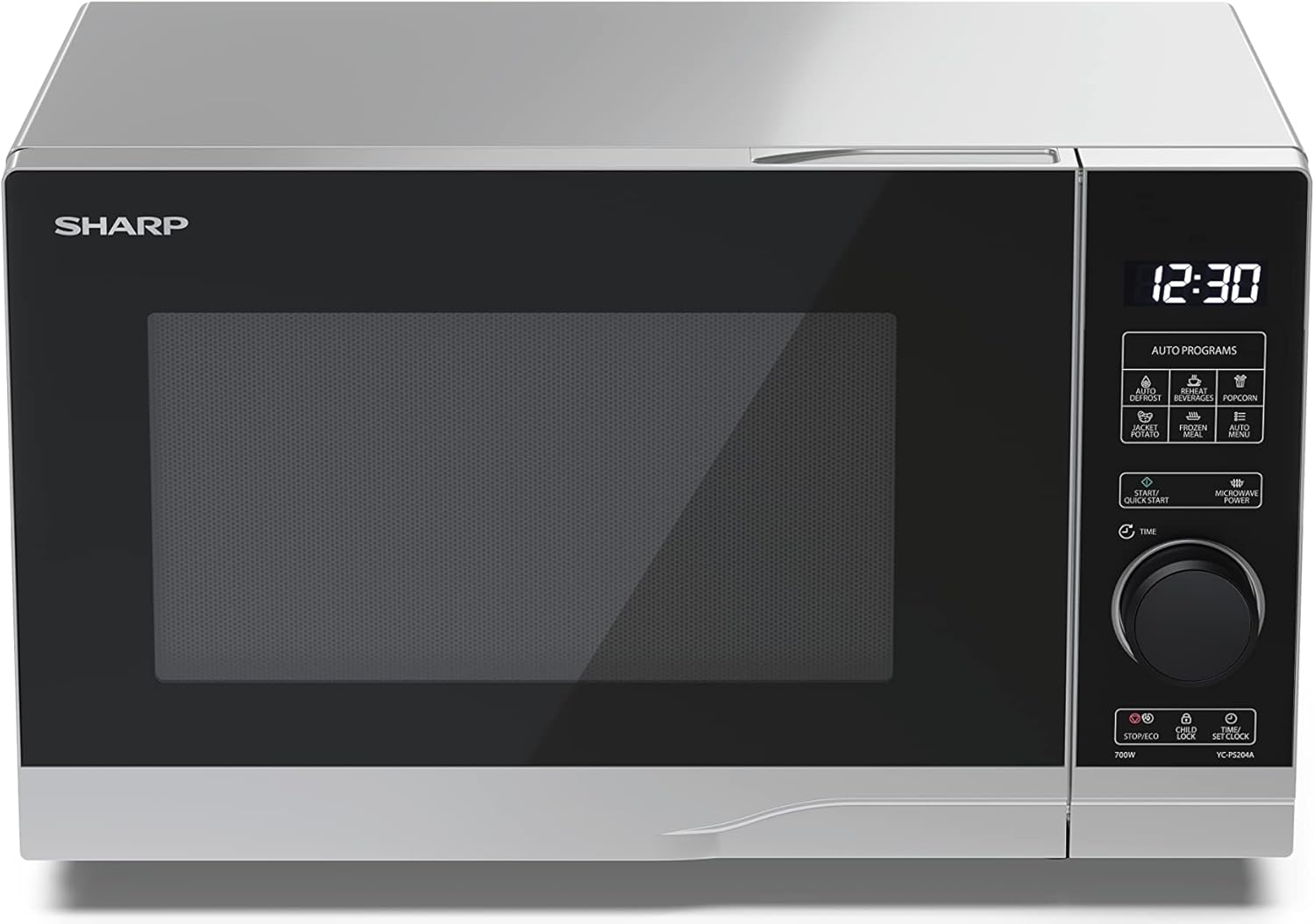
ภาพ: ด้านหน้า view of the Sharp YC-PS204AE-S microwave oven, highlighting the semi-digital control panel on the right side. The display shows "88:88" and various auto program icons are visible above the main dial.
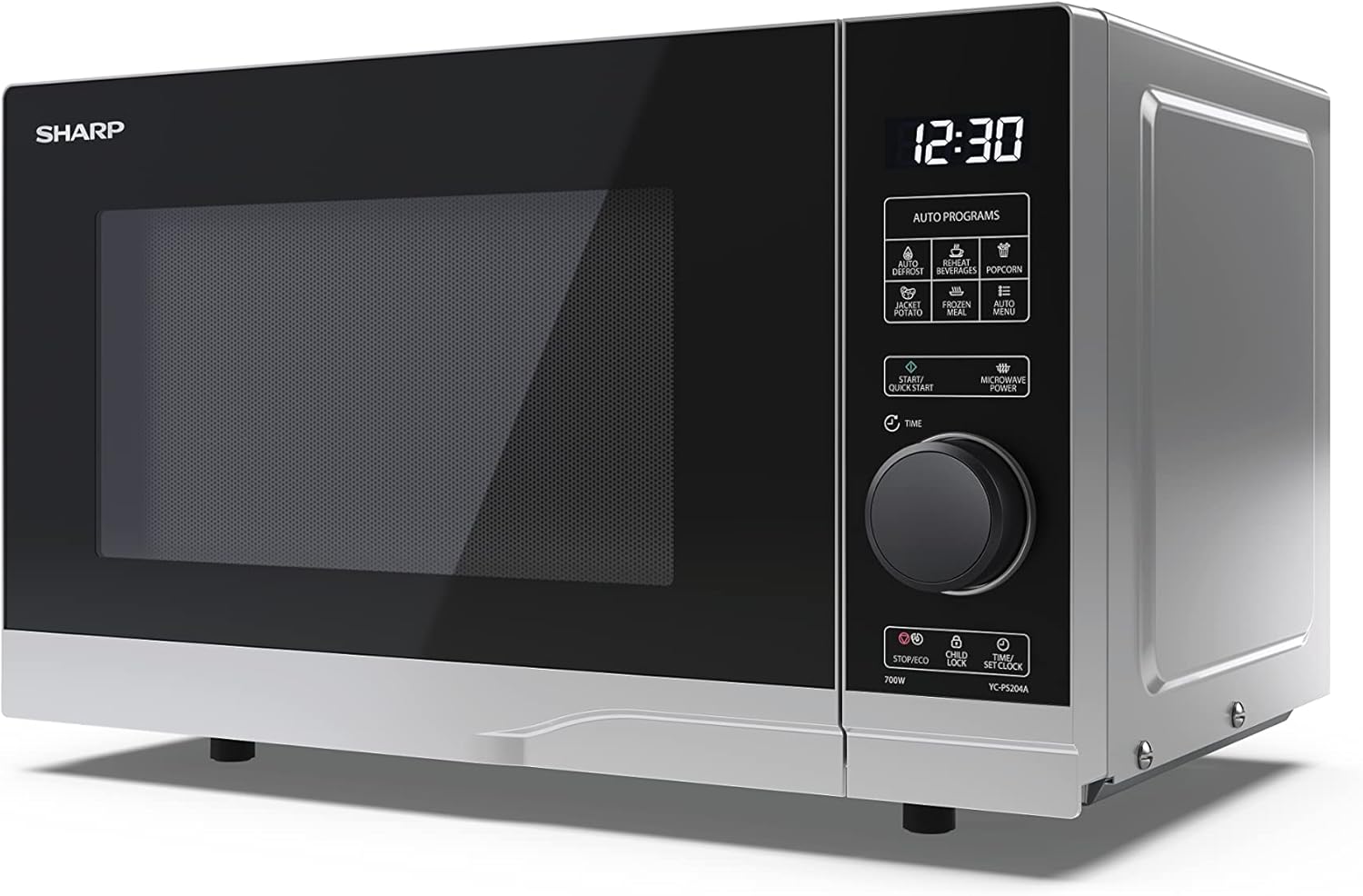
ภาพ: ด้านหน้าทำมุม view of the Sharp YC-PS204AE-S microwave, showing the sleek silver and black design. The control panel is clearly visible with its digital display and rotary knob.
The control panel features a digital display, a rotary dial for setting time and power, and several touch buttons for various functions and automatic programs.
- แสดง: Shows time, cooking settings, and program indicators.
- แป้นหมุน: Used to set cooking time, weight, and adjust clock.
- โปรแกรมอัตโนมัติ: Icons for Defrost, Reheat, Popcorn, Jacket Potato, Frozen Meal, Beverages, and Auto Menu.
- Start/Quick Start Button: Initiates cooking or starts quick cooking.
- Microwave Power Button: Selects power levels.
- ปุ่มหยุด/Eco: Stops cooking or activates ECO mode.
- ปุ่มล็อคป้องกันเด็ก: Activates/deactivates child lock.
- Time/Set Clock Button: Sets the clock or adjusts time.
3. การตั้งค่า
การแกะกล่อง
- นำเตาไมโครเวฟและวัสดุบรรจุภัณฑ์ทั้งหมดออกจากกล่องอย่างระมัดระวัง
- ตรวจสอบเตาอบว่ามีความเสียหายใดๆ หรือไม่ เช่น รอยบุบ หรือประตูไม่ตรงแนว อย่าใช้งานเตาอบหากพบว่าเสียหาย
- ลอกฟิล์มป้องกันใดๆ ออกจากพื้นผิวตู้
- Ensure all accessories are present: glass turntable, turntable ring, and instruction manual.

ภาพ: The interior of the Sharp YC-PS204AE-S microwave oven with the door open, showing the glass turntable and the stainless steel interior. This view is useful for understanding how to place food and clean the cavity.
การจัดวาง
- วางเตาอบบนพื้นผิวเรียบและมั่นคงที่สามารถรองรับน้ำหนักของเตาอบและอาหารที่หนักที่สุดที่จะอบในเตาอบนั้นได้
- Ensure adequate ventilation: leave a minimum of 20 cm (8 inches) of space above the oven, 10 cm (4 inches) at the rear, and 5 cm (2 inches) on each side.
- ห้ามปิดกั้นช่องระบายอากาศใดๆ
- Do not place the oven near heat sources such as radiators or stoves.
- เก็บเตาอบให้ห่างจากวิทยุและโทรทัศน์เพื่อหลีกเลี่ยงการรบกวน

ภาพ: A diagram showing the dimensions of the Sharp YC-PS204AE-S microwave oven, with measurements for height (273 mm), width (455 mm), and depth (334 mm). This helps users ensure proper placement and ventilation space.
การตั้งค่าเริ่มต้น
- Plug the power cord into a standard grounded electrical outlet (230V, 50Hz).
- The display will show "0:00" or "12:00".
- การตั้งนาฬิกา:
- Press the "Time/Set Clock" button once. The hour digits will flash.
- Turn the rotary dial to set the hour (0-23 for 24-hour format).
- Press "Time/Set Clock" again. The minute digits will flash.
- Turn the rotary dial to set the minutes (0-59).
- Press "Time/Set Clock" a third time to confirm. The clock is now set.
4. คู่มือการใช้งาน
การทำอาหารด้วยไมโครเวฟขั้นพื้นฐาน
- วางอาหารไว้ในภาชนะที่ใช้กับไมโครเวฟได้บนจานหมุน
- ปิดประตูเตาอบให้แน่น
- Press the "Microwave Power" button repeatedly to select the desired power level (e.g., P100 for 100% power, P80 for 80%, etc. There are 10 levels).
- Turn the rotary dial to set the cooking time (up to 95 minutes).
- Press the "Start/Quick Start" button to begin cooking.
ฟังก์ชั่นเริ่มต้นอย่างรวดเร็ว
- Press the "Start/Quick Start" button repeatedly to cook at 100% power for 30-second intervals. Each press adds 30 seconds.
- The maximum quick start time is 10 minutes.
ฟังก์ชั่นละลายน้ำแข็ง
This function allows you to defrost food by weight.
- วางอาหารแช่แข็งบนจานหมุน
- Press the "Defrost" button (usually indicated by a snowflake icon). The display will show "dEF1" or "dEF2" depending on the defrost mode.
- Turn the rotary dial to select the weight of the food (e.g., 100g to 2000g).
- Press "Start/Quick Start" to begin defrosting.
Automatic Programs (Auto Menu)
The microwave has 8 pre-set automatic programs for common food items.
- Press the "Auto Menu" button (often labeled with "Auto Programs" or specific icons).
- Turn the rotary dial to select the desired program (e.g., Popcorn, Potato, Pizza, Beverage, etc.). The display will show the program number (e.g., A-1, A-2).
- Press "Auto Menu" again to confirm the program.
- Turn the rotary dial to select the weight or quantity (if applicable for the program).
- Press "Start/Quick Start" to begin.
ฟังก์ชั่นล็อคเด็ก
To prevent unintended operation, especially by children.
- เพื่อเปิดใช้งาน: Press and hold the "Child Lock" button (often combined with "Stop/Eco") for 3 seconds. A lock icon will appear on the display.
- วิธีปิดใช้งาน: Press and hold the "Child Lock" button for 3 seconds again. The lock icon will disappear.
โหมด ECO
To save energy, the display can be turned off when the oven is not in use.
- เพื่อเปิดใช้งาน: In standby mode, press the "Stop/Eco" button once. The display will turn off.
- วิธีปิดใช้งาน: Press any button or open the door to reactivate the display.
5. การบำรุงรักษาและการทำความสะอาด
การทำความสะอาดและบำรุงรักษาเป็นประจำจะช่วยให้เตาไมโครเวฟของคุณมีอายุการใช้งานยาวนานและมีประสิทธิภาพเหมาะสมที่สุด
ทำความสะอาดภายในเตาอบ
- ถอดปลั๊กเตาอบก่อนทำความสะอาดเสมอ
- เช็ดทำความสะอาดช่องภายในหลังการใช้งานทุกครั้งด้วยน้ำยาทำความสะอาดamp ผ้าและผงซักฟอกอ่อนๆ
- For stubborn stains, place a bowl of water with lemon juice inside and heat for 2-3 minutes. The steam will loosen the residue.
- ห้ามใช้สารทำความสะอาดที่มีฤทธิ์กัดกร่อนหรือแปรงโลหะ เพราะอาจทำให้พื้นผิวด้านในเสียหายได้
Cleaning the Turntable and Ring
- จานหมุนกระจกและวงแหวนจานหมุนสามารถถอดออกเพื่อทำความสะอาดได้
- ล้างด้วยน้ำอุ่นผสมสบู่ หรือในเครื่องล้างจานก็ได้
- ตรวจสอบให้แน่ใจว่าแห้งสนิทก่อนนำกลับเข้าเตาอบ
การทำความสะอาดภายนอก
- เช็ดพื้นผิวภายนอกด้วยผ้านุ่ม damp ผ้า.
- หลีกเลี่ยงไม่ให้น้ำเข้าไปในช่องระบายอากาศ
- Clean the door and door seals regularly to ensure proper closure and prevent microwave leakage.
6 การแก้ไขปัญหา
หากคุณพบปัญหาเกี่ยวกับเตาไมโครเวฟ โปรดดูปัญหาและวิธีแก้ไขที่พบบ่อยต่อไปนี้
| ปัญหา | สาเหตุที่เป็นไปได้ | สารละลาย |
|---|---|---|
| เตาอบไม่เริ่มทำงาน | สายไฟไม่ได้เสียบปลั๊ก ฟิวส์ขาดหรือเบรกเกอร์สะดุด ประตูไม่ได้ปิดอย่างถูกต้อง | เสียบปลั๊กเข้าเต้าเสียบ; เปลี่ยนฟิวส์หรือรีเซ็ตเบรกเกอร์; ปิดประตูให้แน่นหนา |
| อาหารไม่สุกทั่วถึง | อาหารไม่ได้ถูกคนหรือพลิกกลับ จานหมุนไม่ได้หมุน | Stir or turn food halfway through cooking; Ensure turntable and ring are correctly placed and clean. |
| เกิดประกายไฟภายในเตาอบ | Metal or foil in the oven; Dish not microwave-safe; Food residue. | Remove any metal; Use microwave-safe dishes; Clean oven cavity thoroughly. |
| จอแสดงผลแสดงรหัสข้อผิดพลาด | ความผิดปกติภายใน | ถอดปลั๊กเตาอบสักครู่ แล้วเสียบปลั๊กกลับเข้าไปใหม่ หากยังคงมีปัญหาอยู่ โปรดติดต่อฝ่ายบริการลูกค้า |
| ไฟเตาอบไม่ทำงาน | หลอดไฟต้องเปลี่ยน | ติดต่อเจ้าหน้าที่บริการที่มีคุณสมบัติเหมาะสมเพื่อเปลี่ยนหลอดไฟ |
If the problem persists after trying these solutions, please contact SHARP customer support.
7. ข้อมูลจำเพาะ
Technical specifications for the SHARP YC-PS204AE-S Microwave Oven.
| คุณสมบัติ | รายละเอียด |
|---|---|
| หมายเลขรุ่น | YC-PS204AE-S |
| ความจุ | 20 ลิตร |
| กำลังขับไมโครเวฟ | 700 วัตต์ |
| ระดับพลังงาน | 10 |
| ประเภทการควบคุม | Semi-digital |
| ขนาดผลิตภัณฑ์ (กว้าง x สูง x ลึก) | 45.5 ซม. x 27.4 ซม. x 33.4 ซม. |
| น้ำหนัก | 10.5 กิโลกรัม |
| สี | เงิน |
| วัสดุภายใน | สแตนเลส |
| เส้นผ่านศูนย์กลางของจานหมุน | 245 มม. |
| คุณสมบัติพิเศษ | Child Lock, ECO Function, Defrost System, LED Interior Lighting, 8 Auto Programs |
| แหล่งจ่ายไฟ | 230 โวลต์ |
| ส่วนประกอบที่รวมอยู่ | 1x Microwave SHARP YC-PS204AE-S, Glass Turntable, Multilingual Operating Instructions, Warranty Card |
8. การรับประกันและการสนับสนุน
SHARP provides a warranty for this product. Please refer to the warranty card included in the packaging for specific terms and conditions.
การสนับสนุนลูกค้า
For technical assistance, troubleshooting beyond this manual, or warranty claims, please contact SHARP customer service.
- Visit the official SHARP website for support contact information in your region.
- Have your model number (YC-PS204AE-S) and purchase date ready when contacting support.


