การแนะนำ
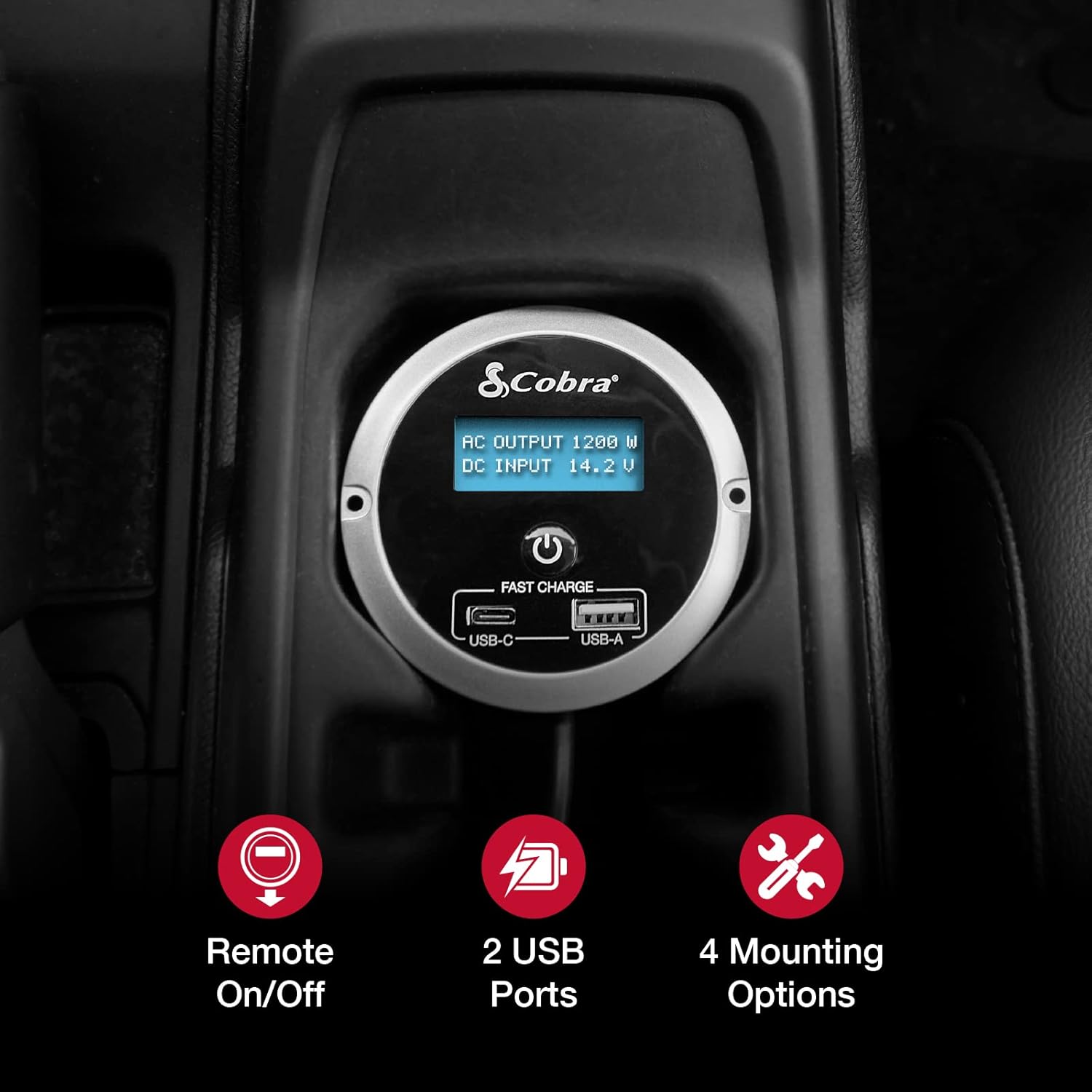
The Cobra CPIALCDG1 Remote Controller is designed to enhance the functionality and convenience of your compatible Cobra Power Inverter. This unit allows for remote power control (On/Off) and provides two USB ports for charging devices. It features a 7-color LED screen for monitoring inverter status and offers multiple mounting options for flexible installation within your vehicle.
เนื้อหาแพ็คเกจ
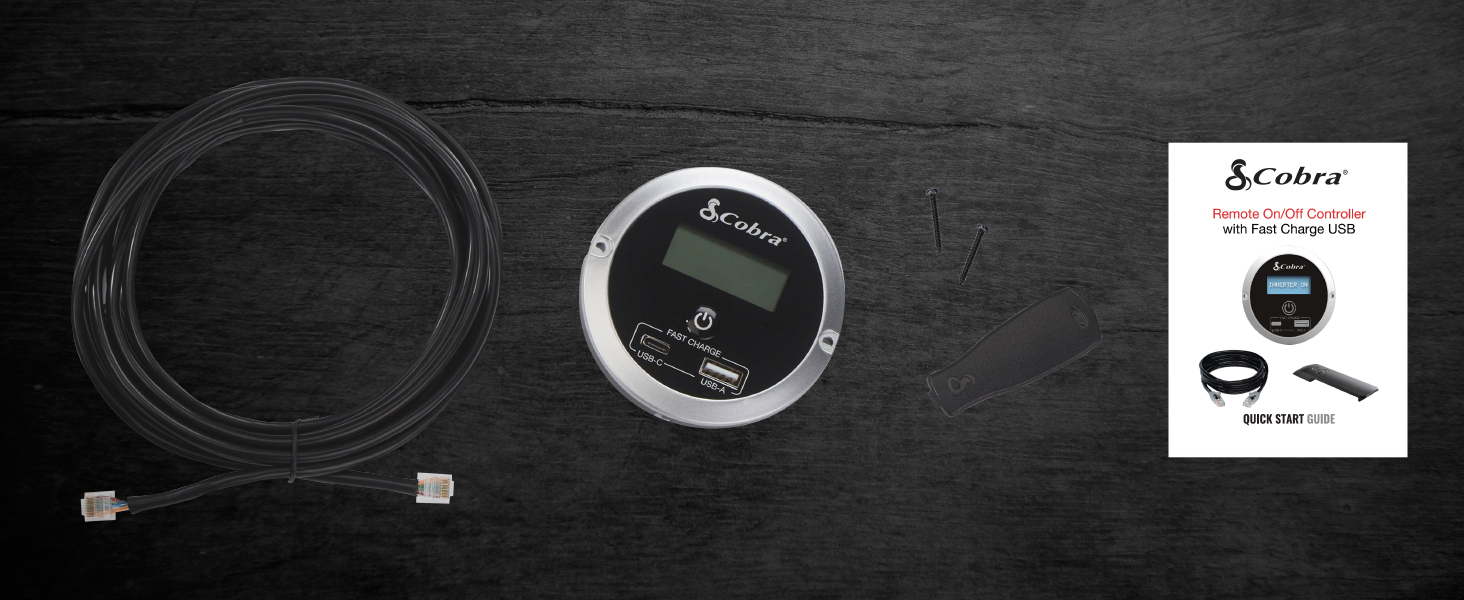
ตรวจสอบว่ามีรายการทั้งหมดอยู่ในแพ็คเกจ:
- งูเห่า CPIALCDG1 รีโมทคอนโทรล
- สายเชื่อมต่อ
- สกรูยึด
- Mounting Bracket (for clip mount)
- คู่มือเริ่มต้นอย่างรวดเร็ว

การติดตั้งและการตั้งค่า
The CPIALCDG1 Remote Controller offers four primary mounting options to suit various vehicle interiors and user preferences:
- การติดตั้งแบบฟลัช: For a permanent, integrated installation into a dashboard or console.
- การติดตั้งแบบรูกุญแจ: Allows for mounting on a wall or flat surface using screws.
- Cup Holder Mounting: Provides convenient placement in a vehicle's cup holder.
- คลิปยึด: For easy attachment to a seat back pocket or other suitable location.
การเชื่อมต่อรีโมทคอนโทรล
- Identify the "REMOTE" port on your compatible Cobra Power Inverter.
- Connect one end of the provided connection cable to the remote port on the inverter.
- Connect the other end of the cable to the corresponding port on the back of the CPIALCDG1 Remote Controller.
- Ensure all connections are secure before operating the inverter or controller.

คำแนะนำการใช้งาน
เปิด/ปิดเครื่อง
Once connected to a compatible Cobra Power Inverter, the remote controller allows you to turn the inverter On or Off from a convenient location within your vehicle. Press the power button on the remote controller to toggle the inverter's power state.
จอแสดงผล LED
The 7-color LED screen provides real-time information regarding your power inverter's operation:
- ปริมาณแบตเตอรี่tage: แสดงแรงดันไฟฟ้ากระแสตรงขาเข้าปัจจุบันtagดึงพลังงานจากแบตเตอรี่รถยนต์ของคุณ
- การบริโภคปัจจุบัน: Shows the AC output wattage ถูกดึงดูดโดยอุปกรณ์ที่เชื่อมต่อกัน
พอร์ตชาร์จ USB
The remote controller is equipped with Fast Charge USB ports (USB-C and USB-A) for charging smartphones and other USB-powered devices.

ความเข้ากันได้
This remote controller is compatible with the following Cobra Power Inverter models:
- ซีพีไอ1500W
- ซีพีไอ2500W
- CPI400PSW
- ซีพีไอ500W
การซ่อมบำรุง
To ensure optimal performance and longevity of your Cobra CPIALCDG1 Remote Controller:
- รักษาตัวเครื่องให้สะอาด ปราศจากฝุ่นและเศษขยะ ใช้ผ้านุ่มและแห้งเช็ดทำความสะอาด
- ตรวจสอบการเชื่อมต่อสายเคเบิลทั้งหมดเป็นประจำเพื่อให้แน่ใจว่าแน่นหนาและไม่มีความเสียหาย
- Avoid exposing the controller to extreme temperatures, direct sunlight for prolonged periods, or moisture.
การแก้ไขปัญหา
If you experience issues with your remote controller, consider the following:
- ไม่มีจอแสดงผล/ไม่มีพลังงาน: Ensure the remote cable is securely connected to both the controller and the power inverter. Verify that the power inverter itself is receiving power and is turned on.
- พอร์ต USB ไม่ชาร์จ: Check that the inverter is powered on. Ensure the device being charged is compatible with USB charging and that the USB cable is functional.
- Inverter Not Responding to Remote: Confirm the remote cable is fully inserted into both units. Refer to your specific Cobra Power Inverter manual for remote control setup details.
Cobra Power Inverters feature ปากกาtagon Protection™, which includes safeguards against:
- ความร้อนปิดตัวลง
- ขั้วย้อนกลับ
- เกินVoltage
- ปริมาณต่ำtage & Alarm
These protections are designed to prevent damage to the inverter and connected devices. If an alarm sounds or the inverter shuts down, consult your inverter's manual for specific error codes and resolutions.
ข้อมูลจำเพาะ
| คุณสมบัติ | รายละเอียด |
|---|---|
| หมายเลขรุ่น | ซีพีแอลซีดีจี1 |
| ขนาดสินค้า (กว้าง x ยาว x สูง) | 3.35 x 3.35 x 1.46 นิ้ว |
| น้ำหนักสินค้า | 13.1 ออนซ์ |
| สี | สีดำ |
| พอร์ต USB | USB-C (Fast Charge), USB-A (Fast Charge) |
| แสดง | 7-Color LED Screen (Battery Voltage, Current Consumption) |
| ตัวเลือกการติดตั้ง | Flush, Keyhole, Cup Holder, Clip |
| ผู้ผลิต | บริษัท โคบร้า อิเล็คทรอนิกส์ |
| วันที่พร้อมใช้งานครั้งแรก | 18 กุมภาพันธ์ 2022 |
ข้อมูลการรับประกัน
Cobra Electronics products are typically covered by a limited warranty. For specific warranty terms, conditions, and registration information for your CPIALCDG1 Remote Controller, please refer to the warranty card included with your product or visit the official Cobra Electronics webไซต์นี้ โปรดเก็บหลักฐานการซื้อไว้เพื่อใช้ยืนยันการรับประกัน
การสนับสนุนลูกค้า
For technical assistance, troubleshooting beyond this manual, or general inquiries, please contact Cobra Electronics customer support. Contact information can typically be found on the official Cobra Electronics webไซต์หรือในเอกสารประกอบที่มาพร้อมกับผลิตภัณฑ์ของคุณ
Webเว็บไซต์: www.cobra.com


