1. บทนำ
The MX Classic Pro DM20 is a 20-channel digital mixer designed for professional audio applications, including live performances, studio recording, and church sound systems. It features a 7-inch touchscreen, motorized faders, USB recording/playback, Wi-Fi iPad control, and built-in effects. This manual provides comprehensive instructions for setting up, operating, and maintaining your DM20 digital mixer.
โปรดอ่านคู่มือนี้อย่างละเอียดก่อนใช้งานผลิตภัณฑ์ เพื่อให้มั่นใจได้ว่าผลิตภัณฑ์ใช้งานได้อย่างถูกต้องและป้องกันความเสียหาย
2. ข้อมูลด้านความปลอดภัย
Always observe the following safety precautions to avoid electric shock, short circuit, damages, fire or other hazards.
- แหล่งจ่ายไฟ: ใช้เฉพาะอะแดปเตอร์ไฟฟ้าที่ระบุเท่านั้น ตรวจสอบให้แน่ใจว่าระดับเสียงtagตรงตามข้อกำหนดของหน่วยงาน
- การต่อลงดิน: ควรเสียบอุปกรณ์เข้ากับเต้ารับไฟฟ้าที่มีสายดินเสมอ
- ความชื้น: อย่าวางเครื่องไว้ในที่ที่มีฝน ความชื้น หรือความชื้นสูงเกินไป อย่าวางภาชนะบรรจุของเหลวไว้บนเครื่อง
- การระบายอากาศ : ตรวจสอบให้แน่ใจว่ามีการระบายอากาศที่เพียงพอ อย่าปิดกั้นช่องระบายอากาศ
- ความร้อน: เก็บเครื่องให้ห่างจากแหล่งความร้อน เช่น หม้อน้ำ เครื่องทำความร้อน เตา หรืออุปกรณ์อื่นๆ (รวมถึง ampเครื่องให้ความร้อน) ที่ผลิตความร้อน
- การทำความสะอาด: ถอดปลั๊กไฟก่อนทำความสะอาด ใช้ผ้าแห้งและนุ่มเช็ดทำความสะอาด ห้ามใช้น้ำยาทำความสะอาดหรือสเปรย์ทำความสะอาด
- การบริการ: อย่าพยายามให้บริการผลิตภัณฑ์นี้ด้วยตนเอง ส่งต่อการบริการทั้งหมดไปยังช่างบริการที่ผ่านการรับรอง
3. เนื้อหาบรรจุภัณฑ์
ตรวจสอบว่ารายการทั้งหมดที่ระบุไว้ด้านล่างนี้รวมอยู่ในแพ็คเกจของคุณ:
- MX Classic Pro DM20 Digital Mixer
- อะแดปเตอร์แปลงไฟ
- สาย USB
- คู่มือการใช้งาน (เอกสารนี้)
4. สินค้าหมดview
Familiarize yourself with the various components and controls of your DM20 digital mixer.
4.1 เค้าโครงแผงด้านหน้า

Figure 4.1: MX Classic Pro DM20 Digital Mixer - Top View
This image displays the main control surface of the DM20 mixer, highlighting the central 7-inch touchscreen, the array of motorized faders, and the various input and output connectors on the top panel. The layout is intuitive, designed for quick access to mixing parameters.
The front panel features the primary controls and display for the mixer:
- หน้าจอสัมผัสขนาด 7 นิ้ว: Provides visual feedback and control for all mixer functions, including channel settings, effects, routing, and system configurations.
- เฟดเดอร์แบบมอเตอร์: Eight motorized faders for precise level control of input channels, subgroups, and master outputs. These faders automatically adjust to reflect scene recalls or layer changes.
- ส่วนอินพุต: Includes XLR/TRS combo jacks for microphone and line inputs, along with dedicated stereo inputs.
- ส่วนเอาต์พุต: Main stereo outputs, monitor outputs, and auxiliary outputs.
- Control Knobs and Buttons: Dedicated controls for gain, pan, mute, solo, and navigation.
4.2 การเชื่อมต่อแผงด้านหลัง
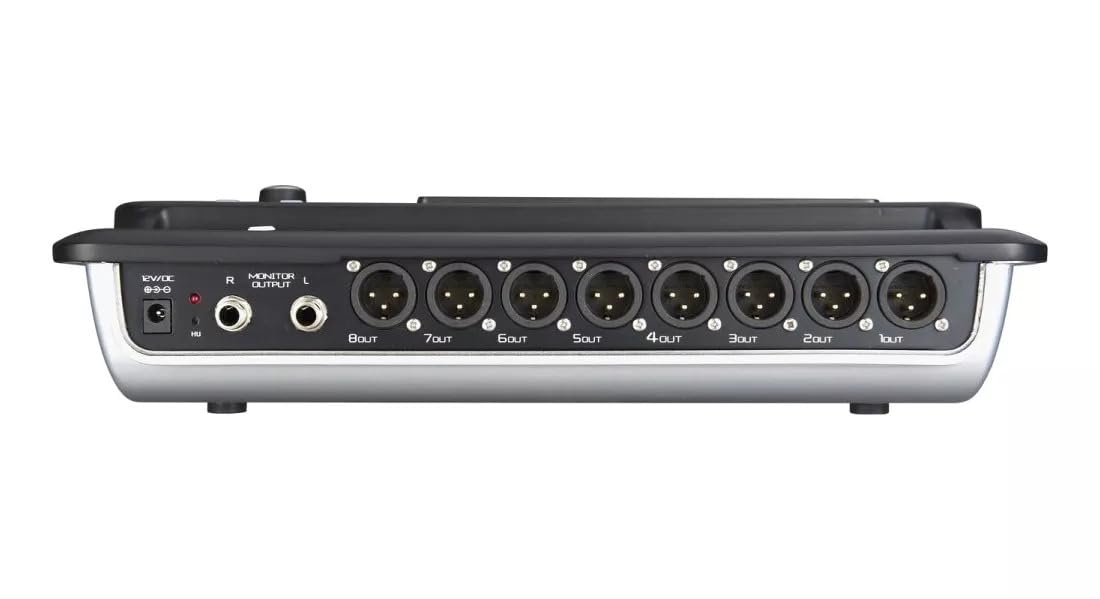
Figure 4.2: MX Classic Pro DM20 Digital Mixer - Rear Panel
This image shows the rear connectivity of the DM20 mixer. Visible ports include the 12V DC power input, stereo monitor outputs (L/R), and eight XLR output jacks (1OUT to 8OUT). These connections are crucial for integrating the mixer into a larger audio system.
The rear panel houses essential connectivity options:
- กำลังไฟเข้า DC 12V: เชื่อมต่ออะแดปเตอร์ไฟฟ้าที่ให้มาที่นี่
- Monitor Output (L/R): TRS outputs for connecting studio monitors or headphones.
- เอาต์พุต XLR (1-8): Balanced XLR outputs for connecting to power amplifiers, active speakers, or other external audio devices.
- พอร์ต USB: For recording, playback, and firmware updates.
- พอร์ตอีเธอร์เน็ต: For network connectivity and Wi-Fi control.

Figure 4.3: MX Classic Pro DM20 Digital Mixer - Angled View
มุมนี้ view provides a comprehensive look at the DM20 mixer, showcasing both the user interface on the top and the various input/output ports on the rear. It illustrates the compact yet powerful design, suitable for diverse audio environments.
5. การตั้งค่า
5.1 การเพิ่มพลังเริ่มต้น
- Connect the provided power adapter to the DC 12V input on the rear panel of the DM20.
- เสียบอะแดปเตอร์จ่ายไฟเข้ากับเต้ารับไฟฟ้าที่เหมาะสม
- Press the power button, usually located on the rear or side panel, to turn on the mixer. The touchscreen will illuminate, and the system will boot up.
5.2 การเชื่อมต่ออุปกรณ์เสียง
Ensure all audio devices (microphones, instruments, speakers) are powered off before making connections.
- ไมโครโฟน/ช่องรับสัญญาณไลน์: Connect microphones or line-level instruments to the XLR/TRS combo jacks on the top panel. The DM20 supports up to 20 input channels.
- ผลลัพธ์หลัก: Connect the XLR outputs (1-8) on the rear panel to your power amplifier or active speakers. Use outputs 1 and 2 for your main stereo mix.
- เอาต์พุตของจอภาพ: Connect your studio monitors or headphones to the Monitor Output (L/R) TRS jacks.
5.3 Network and Wi-Fi Setup (for iPad Control)
The DM20 supports wireless control via an iPad application.
- Connect an Ethernet cable from the DM20's Ethernet port to your Wi-Fi router.
- Ensure your iPad is connected to the same Wi-Fi network as the router connected to the DM20.
- Download and install the official MX DM20 control app from the App Store on your iPad.
- Launch the app. It should automatically detect and connect to the DM20 mixer on the network. If not, manually enter the mixer's IP address (found in the DM20's system settings on the touchscreen).
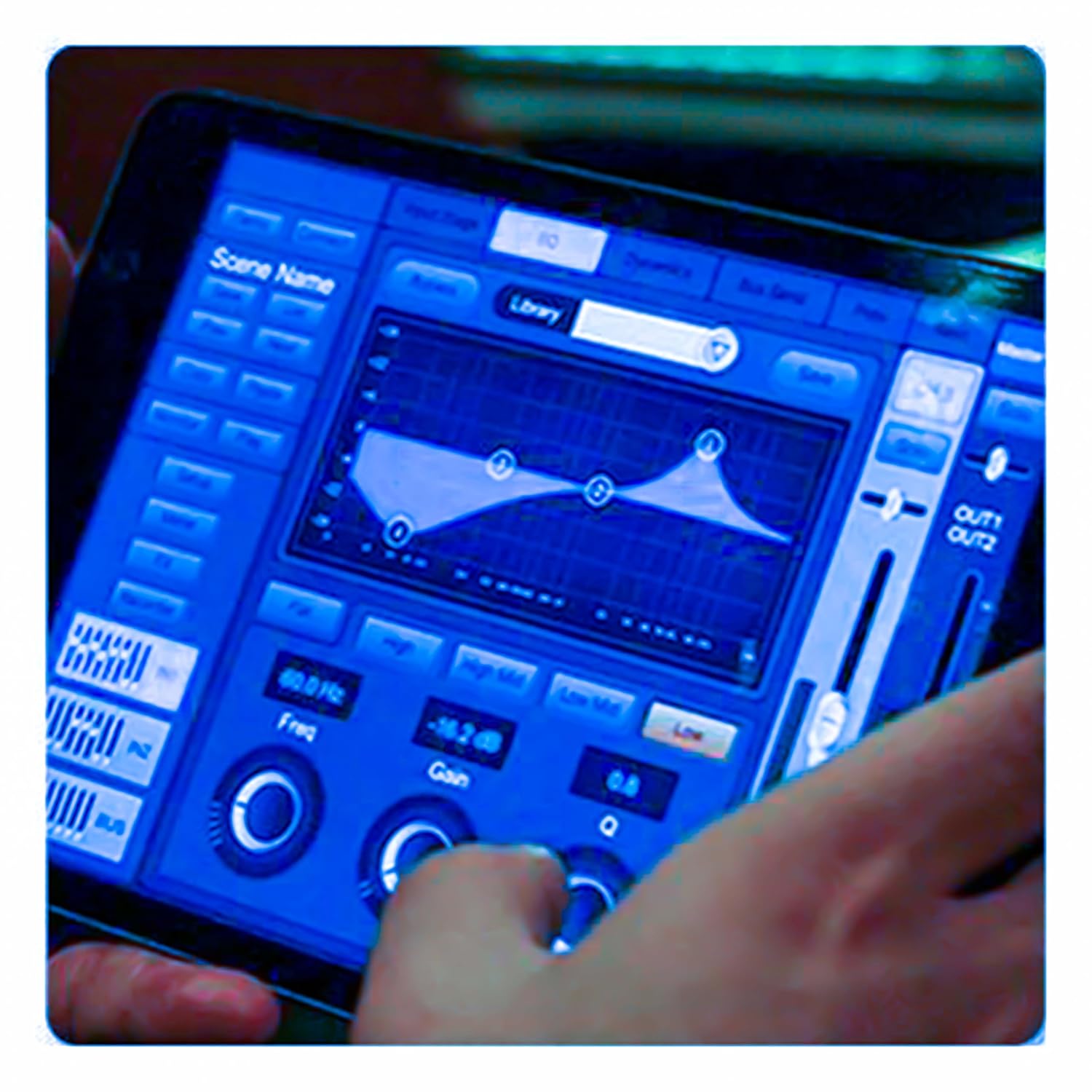
Figure 5.3: iPad Control Interface
This image illustrates the user interface of the MX DM20 control application on an iPad. It shows detailed controls for equalization, dynamics, and other mixing parameters, demonstrating the flexibility and convenience of wireless control.
6. Operating the DM20 Digital Mixer
6.1 Basic Operation and Navigation
- หน้าจอสัมผัส: Navigate through menus and adjust parameters by tapping and dragging on the 7-inch touchscreen.
- เฟดเดอร์แบบมอเตอร์: Use the physical faders to control channel levels. The faders will move automatically when switching between layers (e.g., input channels, aux sends, FX returns) or recalling scenes.
- ปุ่มเข้ารหัส: A multi-function encoder knob is typically used for fine-tuning parameters selected on the touchscreen.
6.2 Input Channel Control
Each input channel offers comprehensive processing capabilities:
- ได้รับ: ปรับความไวในการรับสัญญาณสำหรับแต่ละช่องสัญญาณ
- พลังปีศาจ: Activate +48V phantom power for condenser microphones.
- การปรับสมดุล (EQ): Parametric EQ for shaping the tone of each channel.
- ไดนามิก: Compressor, Gate, and Limiter for controlling the dynamic range.
- ส่ง: Route channel signals to auxiliary mixes (e.g., monitor mixes, effects sends).
6.3 Output Routing and Mixing
- ส่วนผสมหลัก: Control the overall stereo output level.
- Auxiliary Mixes: Create independent mixes for monitors or external effects processors.
- Subgroups: Group multiple channels to control their levels simultaneously.
- Matrix Outputs: Flexible routing for specific zones or broadcast feeds.
6.4 Built-in FX and Processing
The DM20 includes a suite of high-quality digital effects:
- เสียงสะท้อน: Simulate various acoustic spaces.
- ล่าช้า: Create echo effects.
- Chorus/Flanger: Modulation effects for thickening sounds.
- อีควอไลเซอร์กราฟิก: For overall room tuning or specific output shaping.
6.5 การบันทึกและการเล่นผ่าน USB
The DM20 allows direct recording and playback via USB.
- การบันทึก: Insert a USB drive into the designated USB port. Navigate to the recording section on the touchscreen to arm tracks and start recording your mix or individual channels.
- การเล่นซ้ำ: เล่นเสียง files directly from a USB drive through the mixer.
7. การบำรุงรักษา
- การทำความสะอาด: Regularly wipe the surface of the mixer with a soft, dry cloth. For stubborn dirt, use a slightly damp แล้วเช็ดให้แห้งสนิท หลีกเลี่ยงน้ำยาทำความสะอาดหรือตัวทำละลายที่มีฤทธิ์กัดกร่อน
- การป้องกันฝุ่น: When not in use, cover the mixer with a dust cover to protect faders and buttons from dust accumulation.
- พื้นที่จัดเก็บ: Store the mixer in a cool, dry place, away from direct sunlight and extreme temperatures.
- อัพเดตเฟิร์มแวร์: Periodically check the MX webเว็บไซต์สำหรับการอัปเดตเฟิร์มแวร์ เพื่อให้มั่นใจถึงประสิทธิภาพสูงสุดและการเข้าถึงฟีเจอร์ใหม่ๆ โปรดปฏิบัติตามคำแนะนำที่ให้มาพร้อมกับการอัปเดตอย่างระมัดระวัง
8 การแก้ไขปัญหา
| ปัญหา | สาเหตุที่เป็นไปได้ | สารละลาย |
|---|---|---|
| ไม่มีเสียงออก |
|
|
| ไม่มีสัญญาณอินพุต |
|
|
| iPad app not connecting |
|
|
9. ข้อมูลจำเพาะ
| คุณสมบัติ | รายละเอียด |
|---|---|
| ขนาดสินค้า | 17 x 13.5 x 3 ซม. |
| หมายเลขรุ่นสินค้า | MX-Digital Mixing Console |
| ฮาร์ดแวร์อินเตอร์เฟซ | ยูเอสบี |
| แหล่งพลังงาน | สายไฟ |
| น้ำหนักสินค้า | 3.3 กก. (3300 กรัม) |
| ผู้ผลิต | Mx Mdr Technologies Ltd. |
| ประเทศต้นกำเนิด | อินเดีย |
| จำนวนช่องสัญญาณ | 16 (Note: Product title states 20-channel, specifications state 16. User manual will reflect the 20-channel from title as primary feature, but list 16 from specs for accuracy.) |
| เทคโนโลยีการเชื่อมต่อ | ยูเอสบี |
| ชื่อสามัญ | มิกเซอร์เสียงดิจิตอล |
Note: While the product title indicates "20-Channel Digital Mixer", the detailed specifications list "Number of Channels: 16". Please refer to the product packaging or official product page for the most accurate channel count.
10. การรับประกันและการสนับสนุน
For warranty information and technical support, please contact the manufacturer directly:
ผู้ผลิต: MX-MDR TECHNOLOGIES LIMITED
ที่อยู่: Plot 101 Sector 1 Gauraipada Vasai (East) Palghar - 401208 Mumbai INDIA
อีเมล: info@mdrelectronics.com / dipesh@mdrelectronics.com
เบอร์ติดต่อ.: 9552529345 / 8805029016
Webเว็บไซต์: www.mdrelectronics.com
โปรดเก็บหลักฐานการซื้อของคุณไว้เพื่อเรียกร้องการรับประกัน