1. บทนำและเรื่องอื่นๆview
The Edision EDI-RCU 4 Learn is a versatile 2-in-1 universal remote control designed for seamless operation of your Edision receiver and television. It is pre-programmed for common TV brands like Samsung and LG, and offers a learning function to customize up to four buttons for any TV.

ภาพนี้แสดงด้านหน้า view of the Edision EDI-RCU 4 Learn universal remote control, highlighting its compact design and button layout.
คุณสมบัติหลัก:
- 2-in-1 functionality for Edision receivers and televisions.
- Pre-programmed for major TV brands (Samsung, LG).
- Four programmable TV buttons for custom control.
- Original replacement remote for compatible Edision models.

This image highlights the 2-in-1 functionality of the Edision EDI-RCU 4 Learn remote, indicating its use for both Set-Top Box (STB) and TV control. It also shows a close-up of the TV control buttons.
2. การตั้งค่า
2.1 การติดตั้งแบตเตอรี่
The Edision EDI-RCU 4 Learn remote control requires two AAA batteries (not included). Follow these steps to install them:
- ค้นหาฝาปิดช่องใส่แบตเตอรี่ที่ด้านหลังของรีโมทคอนโทรล
- เลื่อนฝาครอบลงหรือกดที่สลักเพื่อเปิด
- ใส่แบตเตอรี่ AAA สองก้อน โดยตรวจสอบให้แน่ใจว่าขั้วบวก (+) และขั้วลบ (-) ตรงกับเครื่องหมายภายในช่องใส่แบตเตอรี่อย่างถูกต้อง
- เลื่อนฝาครอบแบตเตอรี่กลับเข้าที่จนกระทั่งคลิกเข้าที่
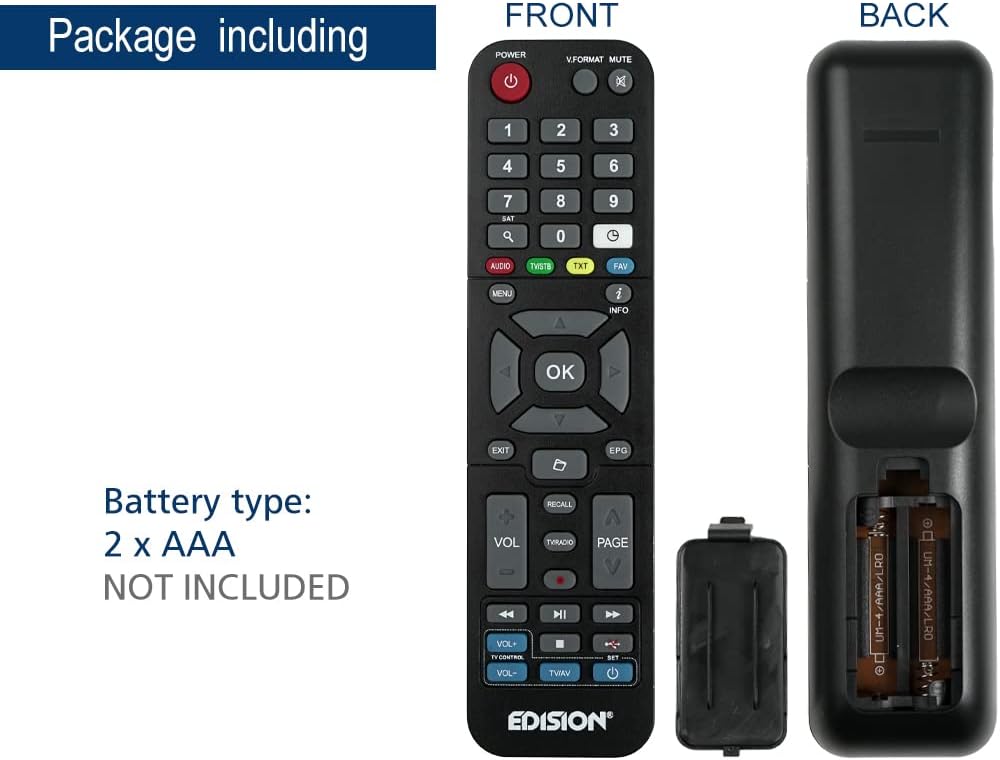
This image illustrates the battery compartment of the Edision EDI-RCU 4 Learn remote control, showing where to insert two AAA batteries. Batteries are not included.
2.2 Initial Setup and Pre-programmed Functions
The remote is pre-programmed for immediate use with compatible Edision receivers. Additionally, the four main TV control buttons (VOL+, VOL-, TV/AV, Power) are pre-programmed for Samsung and LG televisions. For other TV brands or custom functions, use the learning feature described in the Operating Instructions section.
3. คู่มือการใช้งาน
3.1 ฟังก์ชั่นพื้นฐาน
The remote control features standard buttons for navigating your Edision receiver and controlling basic TV functions:
- ปุ่มเปิดปิด (สีแดง): Turns the Edision receiver on or off.
- แผงปุ่มกดตัวเลข (0-9): สำหรับการป้อนข้อมูลโดยตรงผ่านช่องสัญญาณ
- ปุ่มนำทาง (ขึ้น, ลง, ซ้าย, ขวา, ตกลง): สำหรับการนำทางและเลือกเมนู
- ฉบับ+ / ฉบับ-: Adjusts volume (pre-programmed for TV).
- CH+ / CH-: เปลี่ยนช่อง
- ใบ้: Mutes TV sound.
- เมนู: เข้าสู่เมนูหลักของเครื่องรับสัญญาณ
- EXIT: ออกจากเมนูหรือหน้าจอปัจจุบัน
- ข้อมูล: แสดงข้อมูลโปรแกรม
- ทีวี/เอวี: Switches TV input source (pre-programmed for TV).
- TV Power Button (Blue): Turns the TV on or off (pre-programmed for TV).
3.2 Learning Function for TV Control
The EDI-RCU 4 Learn allows you to program its four dedicated TV control buttons (VOL+, VOL-, TV/AV, TV Power) using your original TV remote control. This enables universal control over your TV's essential functions.
- เข้าสู่โหมดการเรียนรู้: Press and hold the blue 'SET' button on the EDI-RCU 4 Learn remote until the red LED light stays lit.
- Select Button to Learn: Press the specific TV control button on the EDI-RCU 4 Learn remote that you wish to program (e.g., VOL+). The red LED will blink slowly.
- ส่งสัญญาณ: Point your original TV remote control directly at the EDI-RCU 4 Learn remote (infrared sensors should face each other, typically 1-3 cm apart). Press and hold the corresponding button on your original TV remote (e.g., TV's VOL+ button). The red LED on the EDI-RCU 4 Learn will blink rapidly, then light up steadily to indicate successful learning.
- ออกจากโหมดการเรียนรู้: Once all desired buttons are programmed, press the blue 'SET' button again to exit learning mode. The red LED will turn off.

Image illustrating holding the SET button to enter learning mode.

Image showing selection of a button on the EDI-RCU 4 Learn remote for learning.

Image depicting the process of transmitting the signal from the original TV remote to the EDI-RCU 4 Learn.

Image showing pressing the SET button to exit learning mode.
Tips for Learning:
- Ensure both remotes have fresh batteries.
- Perform the learning process in a well-lit area, away from direct sunlight or strong artificial light sources that might interfere with infrared signals.
- If a button fails to learn, repeat the process for that specific button.
4. การบำรุงรักษา
4.1 การเปลี่ยนแบตเตอรี่
Replace the AAA batteries when the remote's performance degrades or if the LED indicator does not light up during button presses. Refer to section 2.1 for battery installation instructions.
4.2 การทำความสะอาด
ในการทำความสะอาดรีโมทคอนโทรล ให้ใช้ผ้าแห้งนุ่มๆ เช็ด สำหรับคราบสกปรกที่ติดแน่น ให้ใช้ผ้าชุบน้ำหมาดๆ เช็ดเบาๆampชุบผ้าด้วยน้ำหรือน้ำยาทำความสะอาดอ่อนๆ ที่ไม่กัดกร่อน ห้ามใช้สารเคมีรุนแรงหรือจุ่มรีโมตลงในน้ำ
5 การแก้ไขปัญหา
- รีโมตไม่ตอบสนอง:
- ตรวจสอบว่าใส่แบตเตอรี่ถูกต้องและมีประจุเพียงพอหรือไม่ เปลี่ยนแบตเตอรี่หากจำเป็น
- Ensure there are no obstructions between the remote and the receiver/TV.
- Verify that the remote is pointed directly at the device's infrared sensor.
- Learning function not working:
- Ensure the original remote has working batteries and is transmitting a strong signal.
- Make sure the distance between the two remotes is correct (1-3 cm) and they are aligned properly.
- Avoid strong light sources during the learning process.
- Repeat the learning steps carefully.
- Some buttons work, others don't:
- For TV control buttons, re-program the non-working buttons using the learning function.
- For receiver control buttons, ensure the remote is compatible with your specific Edision receiver model.
6. ข้อมูลจำเพาะ

This image displays the Edision EDI-RCU 4 Learn remote control, indicating its dimensions: approximately 17.5 cm in length and 4.5 cm in width. It also lists key features such as original replacement, 2-in-1 functionality, learn function, and 4 programmable TV buttons.
| คุณสมบัติ | รายละเอียด |
|---|---|
| ชื่อรุ่น | EDI-RCU 4 เรียนรู้ |
| หมายเลขรุ่น | 07-00-0064 |
| ยี่ห้อ | เอดิชั่น |
| สี | สีดำ |
| เทคโนโลยีการเชื่อมต่อ | อินฟราเรด |
| คุณสมบัติพิเศษ | Universal, Programmable |
| อุปกรณ์ที่รองรับ | EDISION Set Top Box, Various TVs (via learning function) |
| ประเภทแบตเตอรี่ | 2 x AAA (ไม่รวม) |
| ระยะสูงสุด | 2 เมตร |
| Number of Programmable Buttons | 4 (for TV control) |
7. การรับประกันและการสนับสนุน
Warranty information for the Edision EDI-RCU 4 Learn remote control is typically provided with your purchase or can be found on the official Edision webไซต์ โปรดเก็บหลักฐานการซื้อไว้เพื่อใช้ในการเรียกร้องการรับประกัน
For technical support, troubleshooting assistance, or further inquiries, please visit the official Edision support website or contact their customer service department. Contact details are usually available on the manufacturer's packaging or webเว็บไซต์.


